

Radio Mexico - online radio
- 5.81K
- 4.8
- Installs
- 5.00M
- Price
- Free

Screenshots

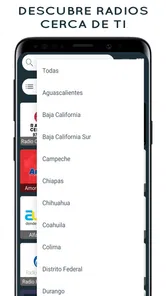
Analysis by Reviewed
When one phone or tablet serves several people at home, a radio app can become a small point of coordination: one person wants familiar music while another wants news or a different sound. I find Radio Mexico - online radio most useful in that shared setting when everyone is happy to take turns choosing stations, rather than expecting separate profiles or carefully managed listening histories. It is a straightforward way to bring Mexican radio into an ordinary kitchen, living room, or commute.
Making a shared device work smoothly
A useful household routine is to separate choosing a station from listening to it. One person can browse before breakfast or during a quiet moment, then start a station when others are ready to listen. This avoids turning a shared speaker into a queue of competing searches, and it gives less familiar users time to explore without interrupting a conversation or meal.
It also helps to treat radio as room audio rather than personal background sound. A station that works while someone cooks may not suit a child doing homework or another person taking a call. I’d agree on a simple signal for changing stations and keep the volume easy to adjust. Those small habits matter more on a shared device than elaborate setup: they make it clear who is choosing without pretending the app provides household scheduling or individual listening controls.
Where a station-based app fits
Compared with a music service built around playlists, Radio Mexico puts the station—not an individual track—at the center of the experience. That is a real advantage when I want sound without repeatedly deciding what comes next, or when I want to hear a broadcaster’s mix of music and other programming. A playlist app is the better tool when I need a particular song, a fixed sequence, or tightly controlled background music for a gathering.
Compared with opening a station’s own app, a directory can be more convenient when I want to browse beyond one broadcaster. The trade-off is that a broad catalog may take more searching than a single-purpose app if I already know exactly which station I want. My practical approach would be to use discovery for the first few sessions, then return to saved choices once I know which stations suit the household.
A routine that avoids unnecessary browsing
For example, imagine a weekday morning when one person is making coffee and another is packing a bag. I’d pick a station before the kitchen gets busy, save it if it becomes a regular choice, and leave the phone where the person nearest the speaker can reach it. If someone wants a different sound, they can search after the rush rather than interrupting the current stream. This is a modest workflow, but it makes a large catalog feel more manageable.
For a first-time listener, I’d explore by mood and familiarity instead of trying to inspect the whole selection in one sitting. Start with a station that feels recognizable, then try a different style when there is time to listen for a few minutes. That makes discovery less random and helps a household build a short list based on actual shared use, rather than saving stations after seeing their names alone.
More From Our News Desk

 Gmail
GmailGmail in a Busy Inbox: Who Benefits Most?
From first account to crowded workday, Gmail earns its place through dependable search and flexible sorting—but its best fit depends on how much inbox maintenance you can tolerate.

 Prime Video
Switching to Prime Video: What Changes in Your Viewing Routine
Prime Video can make a compelling second home for streaming, but switching means learning a different catalog, rental layer, and route from browsing to playback.

 Universal TV Remote Control
Universal TV Remote Control Works Best as a Reliable Backup
A phone remote earns its place through quick setup and reliable habits. Here is how to get more from Universal TV Remote Control—and where its limits show.

 Weather - By Xiaomi
Weather by Xiaomi Review: Clear at a Glance, Less Clear Up Close
Xiaomi’s weather app makes everyday forecasts quick to scan, but its calm surface can leave useful details and recovery paths harder to find than they should be.

 X
XX Under Pressure: Can It Recover When Posting Goes Wrong?
A resilience-focused review of X, examining setup, mistaken posts, interruptions, weak connections, and the gaps that matter when recovery needs to be dependable.

 Clash of Clans
Clash of Clans Is Won Between the Battles
Its raids are quick; its community is a long-term project of coordination, teaching, rivalry, and shared responsibility—with all the friction that entails.
Latest News



Who may prefer another option
This app is a good fit for people who like Mexican radio, want live programming, and are comfortable letting a station decide what plays next. It can also suit someone learning about music from Mexico through varied broadcasts, as long as they are happy to explore rather than curate every detail. A listener who wants offline access, precise track selection, or a private profile for each family member should look to a service designed around those needs instead.
It is also not the strongest choice when a group needs a guaranteed sequence for a class, workout, or event. Live radio can change tone unexpectedly, and searching for another station is not the same as controlling a playlist. I’d use it for a relaxed meal, casual company, or a quiet household task; for a carefully timed activity, I’d prepare audio elsewhere.
A practical fit for shared listening
Picture a family getting breakfast ready: someone puts on a station, and the music can fill the room without anyone having to build a playlist first. With a broad selection of Mexican stations, the app suits people who enjoy discovering what is on rather than choosing every track themselves. It can also work well for a Spanish-speaking household that wants radio from Mexico as part of its everyday routine, whether listeners are already familiar with the music or simply curious.
That shared-device convenience has a boundary. I would treat the app as a common listening tool, not as a household account system. If several people use the same device, favorites and listening choices may be less personal than they would be with individual accounts in a music service. A simple household habit helps: agree on a few shared favorites, and let each person search when it is their turn. If private recommendations or separate profiles matter, a service built around individual accounts is likely a better match.
The World of Mexican Radio at Your Fingertips
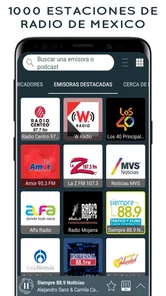
What I like most about Radio Mexico - online radio is the possibility of moving between very different sounds without assembling a playlist first. Its selection spans familiar Mexican styles as well as stations that can lead me somewhere less expected. The appeal is not that every choice will match my mood; it is that browsing can turn into a small listening discovery. The catalog is organized for finding stations, which matters when I want to get from opening the app to hearing something without a long setup.
Easy Peasy Navigation
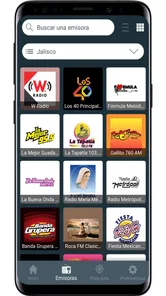
In my experience, the interface is approachable, and moving between station options feels simple. Search is especially useful when I have a station name in mind; it saves me from scrolling through a wide selection just to reach one known choice. When I do not have a specific destination, browsing gives me a way to sample alternatives. That distinction—search when I know, browse when I’m curious—is the easiest way I’ve found to keep the app from feeling like an endless directory.
For a smoother shared routine, I’d search for a station before handing the device to someone else, then keep a few go-to choices bookmarked if the app’s favorites suit the household. That avoids repeating the same search during a busy morning and gives newcomers an easy starting point. It is also worth deciding who gets to change stations when the phone is connected to a speaker; radio is communal by nature, but a little coordination prevents one person’s quick browse from interrupting everyone else.
Stay Connected, No Matter Where You Are
Streaming radio depends on an internet connection, so I’d think about where and how I plan to listen. At home, Wi-Fi is a natural option; away from it, mobile data may be involved. If data use matters to you, keep that trade-off in mind before making a long live stream part of a daily commute. I would also avoid assuming that a station will keep playing through every change in reception: a live broadcast is not a downloaded recording, and a weak connection can disrupt the experience.
Live radio is different from an on-demand music library: you tune into a station’s current programming instead of choosing a particular song or assembling a playlist. That spontaneity is part of the appeal, especially while cooking, working around the house, or driving as a passenger. The trade-off is that the exact music or conversation may not match your mood every time. If you need precise track control, offline listening, or a predictable playlist for a focused activity, I’d choose a music-streaming app instead.
Personalize Your Listening Experience
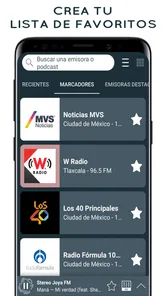
Saving favorite stations is a useful shortcut once I know what I want to hear. It reduces repeat searches and makes the app easier for someone else to use on a shared phone or tablet. I’d think of favorites as a small, practical menu rather than trying to save every station that catches my attention. A focused set is quicker to scan and makes it easier to hand the device to another listener without needing to explain the entire catalog.
For a household, bookmarks are most useful as a shared shortlist rather than a substitute for separate profiles. I’d save stations that cover different moods—one familiar choice, one for exploring, and one that works as background listening—so the next listener can pick quickly. Since radio streams rely on a connection, I’d also start playback on Wi-Fi before leaving home if I expect to listen on mobile data; that makes it easier to notice connection issues early and avoid treating a live stream like an offline playlist.
Setup boundaries and age context
Because a shared device can be used by people with different tastes, I’d decide in advance who is comfortable browsing and who would rather have an adult choose a station. The app is rated Teen, a useful consideration for households with younger listeners. I wouldn’t treat an age rating as a substitute for listening together or checking whether a particular live station suits the moment. If an adult is already nearby, selecting the station first is a straightforward way to keep shared listening comfortable without assuming the app has family-specific controls.
There is also a practical device check before making it part of a routine: the current version is 4.1.5 and requires Android 8.0 or later. That requirement makes an older spare phone worth checking before you rely on it as the household radio. If the device is compatible, I’d test the usual station and speaker arrangement at a calm time, rather than discovering a setup snag just as everyone is trying to get out the door.
Choosing it for the right listener
Radio Mexico is a free music and audio app from AppMind-Radio FM, Radio Online, with optional in-app purchases priced from $0.99 to $11.99 per item. It has a 4.8 average from around 119,000 ratings, and more than 5 million installs. The app is rated Teen, so I’d keep that age context in mind when deciding whether a younger child should use it independently. That rating is useful guidance, but it isn’t a promise that every station’s live programming will suit every family’s preferences; for shared listening, an adult can choose the station and stay nearby.
The app was released on December 1, 2015, and its current version is 4.1.5, with Android 8.0 as the minimum operating system. I’d check that the household device meets that requirement before planning to use it, particularly if it is an older spare phone. The large station selection is a strength for curious listeners, but it can feel less focused than a single-station app if you already know exactly what you want. In that case, searching for a preferred station and saving it is more practical than browsing the catalog each time.
If you're someone who loves to explore new music or simply wants to stay connected with Mexican culture, this app is a must-have. It's easy to use, packed with a wide range of stations, and offers a personalized experience that makes listening enjoyable and hassle-free. So, why wait? Dive into the rich world of Mexican music with Radio Mexico - online radio and let the music transport you to an exciting auditory journey.
My household verdict
I’d recommend it to people who want Mexican radio close at hand, especially in a home where listeners are comfortable sharing a device and taking turns. It offers a different kind of choice from a playlist service: rather than controlling every song, you explore stations and let live programming set the mood. I would skip it if separate listening identities, offline playback, or exact song selection are essential. For casual shared listening, though, its combination of station discovery and saved favorites makes it an approachable option—provided the household agrees on how to share the device and what is suitable for its younger listeners.
Radio Mexico - online radio Frequently Asked Questions
How much mobile data does Radio Mexico - online radio use while streaming?
Radio Mexico - online radio streams live stations over the internet, so listening on a mobile connection uses data. The amount can vary with your listening time and connection, so consider your mobile plan before streaming for long periods. Connecting to Wi-Fi is a practical option if you want to listen without relying on cellular data.
Can I find stations from different parts of Mexico in the app?
The app is built around listening to radio stations from Mexico, with a collection of 1,500 live FM and AM stations. That gives listeners a broad range of Mexican radio to explore, whether they are looking for familiar broadcasts or want to discover something new. Station availability and listening quality may depend on the internet connection.
What devices and operating systems can run Radio Mexico - online radio?
Radio Mexico - online radio is designed for mobile devices, and its Android version requires Android 8.0 or later. Before downloading, check your device’s operating system in its settings to make sure it meets that requirement. The app is in the Music & Audio category and is intended for listeners who want to stream Mexican radio on a phone or tablet.
Who develops Radio Mexico - online radio, and is it a well-established app?
The app is developed by AppMind-Radio FM, Radio Online. It has been available since December 1, 2015, and has reached over 5 million installs, with an average rating of 4.8 from around 119,000 ratings. Those figures suggest that it has attracted a substantial audience, although individual experiences can vary depending on a listener’s device, connection, and preferences.
What is Radio Mexico - online radio app?
Radio Mexico - online radio is a mobile application that allows users to listen to a wide variety of radio stations from Mexico. The app provides access to numerous genres, including news, music, sports, and talk shows, directly from your smartphone. It aims to cater to diverse listener preferences with its extensive collection of live radio stations. Its collection includes 1,500 stations, with live FM and AM radio available to stream.
Pros
- Wide variety of radio stations available.
- User-friendly interface for easy navigation.
- High-quality audio streaming.
- Free to use with minimal ads.
- Works seamlessly on Android and iOS.
Cons
- Requires internet connection to function.
- Limited offline features available.
- Occasional buffering on slow networks.
- No option to record live radio streams.
- Interface lacks customization options.












