

Radio Fm Without Internet
- 211.00
- 4.0
- Installs
- 1.00M
- Price
- Free

Screenshots
Analysis by Reviewed
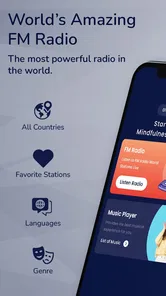
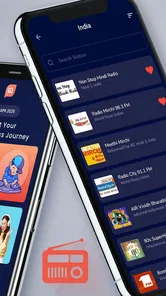
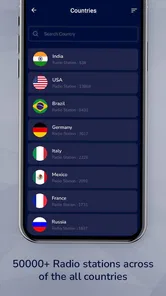
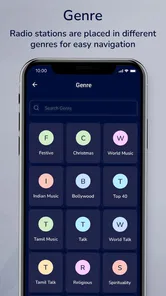
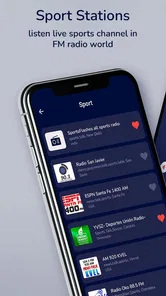
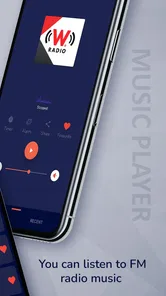
I tried Radio Fm Without Internet as a simple way to keep radio listening close at hand, and my first impression was that it aims for convenience rather than complexity. It belongs to the Music & Audio category, is free to use, and is made by San Valmout. The idea is easy to understand: open the app, find a station, and start listening online without working through a large music library or a complicated account setup.
That simplicity makes it interesting for a shared household device. A phone or tablet in a kitchen, workshop, bedroom, or living room can become a common radio without asking every person to create a profile or learn a detailed interface. I would not treat it as a complete replacement for every kind of audio service, but I found it useful when the goal was live radio rather than choosing individual songs, building playlists, or managing a personal collection.
How it fits into everyday shared listening
In a home where several people use the same device, a radio app has a different job from a personal streaming service. One person may want music while cooking, another may prefer spoken programming while doing chores, and someone else may simply want background sound without handing over a phone to manage a queue. A straightforward online radio app can work well in that situation because the listening session is usually more communal than personal.
I can imagine leaving an older Android phone near the kitchen and using it as a shared audio screen. One person starts a station before preparing breakfast, another changes it later while cleaning, and nobody has to worry about mixing recommendations between separate accounts. That shared-device strength is also a boundary: the app is better for a common listening space than for keeping everyone’s tastes, history, and preferences separate.
The app is free, which lowers the barrier for casual use. It is also marked for Everyone, so its general presentation is suitable for a broad household audience. That does not mean every station or broadcast will match every listener, of course. Radio content comes from the stations being played, so adults should still use ordinary judgement when choosing what younger listeners hear.
Its online nature matters in practical use. I would not plan a long drive, a remote camping trip, or a weak-signal commute around it unless I had already checked the connection. The word “radio” can make people expect traditional reception, but this app is designed around listening online. At home with dependable Wi-Fi, that is convenient. Away from a stable connection, it becomes much less predictable than a local broadcast or downloaded audio.
A useful routine for a household device
My preferred routine would be to choose a station before the room gets busy, set the device somewhere visible, and leave the controls accessible to the people who are actually listening. That avoids passing a phone around while someone is cooking or working. It also makes the app feel more like a shared radio than a personal entertainment hub.
More From Our News Desk

 Gmail
GmailGmail in a Busy Inbox: Who Benefits Most?
From first account to crowded workday, Gmail earns its place through dependable search and flexible sorting—but its best fit depends on how much inbox maintenance you can tolerate.

 Prime Video
Switching to Prime Video: What Changes in Your Viewing Routine
Prime Video can make a compelling second home for streaming, but switching means learning a different catalog, rental layer, and route from browsing to playback.

 Universal TV Remote Control
Universal TV Remote Control Works Best as a Reliable Backup
A phone remote earns its place through quick setup and reliable habits. Here is how to get more from Universal TV Remote Control—and where its limits show.

 Weather - By Xiaomi
Weather by Xiaomi Review: Clear at a Glance, Less Clear Up Close
Xiaomi’s weather app makes everyday forecasts quick to scan, but its calm surface can leave useful details and recovery paths harder to find than they should be.

 X
XX Under Pressure: Can It Recover When Posting Goes Wrong?
A resilience-focused review of X, examining setup, mistaken posts, interruptions, weak connections, and the gaps that matter when recovery needs to be dependable.

 Clash of Clans
Clash of Clans Is Won Between the Battles
Its raids are quick; its community is a long-term project of coordination, teaching, rivalry, and shared responsibility—with all the friction that entails.
Latest News



One small but important tip is to decide who gets to change the station during a shared session. This is not a built-in family-control recommendation; it is simply a household habit. If several people are using the same device, a clear agreement prevents the common problem of one person repeatedly interrupting everyone else’s listening. The app’s simplicity helps here because there are fewer layers of personal settings to negotiate.
Another practical tip is to test the app at the exact place where it will be used. A station that plays smoothly beside the router may behave differently in a back room or upstairs. Since the experience depends on online playback, the location of the shared device and the quality of the household connection can matter as much as the app itself.
Setup, account boundaries, and control of the experience
The appeal of this app is that it does not present itself as a service built around personal libraries or social identity. For a shared phone, that can be refreshing. I would install it on the device intended for listening, open it, and explore the available radio choices rather than preparing a profile for each family member. That keeps the starting point quick and makes it easier for a guest or relative to understand.
At the same time, the lack of a personal boundary can be a limitation for people who want a carefully separated experience. If two household members expect their own station history, private favorites, or individualized recommendations, a dedicated music service may be a better match. This app’s value is in direct access to radio, not in organizing a household’s listening identities.
That distinction is worth considering before installing it on a child’s personal device. The Everyone age classification is reassuring as a broad label, but it should not be mistaken for a detailed content filter. I would use it with younger listeners only when an adult is comfortable with the station choices and the device’s wider environment. The app can be part of a family listening routine, but it should not be treated as a substitute for supervision.
I also prefer to keep the app on a device whose notifications and other distractions are already under control. A shared tablet that constantly receives unrelated alerts can make radio listening feel interrupted, even when the app itself is working properly. This is one of those small environmental details that affects the experience more than a feature list suggests.
What the version and platform details mean in practice
The current version is 6.2, and the minimum operating-system requirement is Android 7.0. That gives the app a relatively broad reach across older Android hardware, which is especially useful if the household has a spare phone or tablet that is no longer suitable for demanding modern apps. I like this possibility because a basic shared radio does not need to consume the newest device in the home.
Before relying on an older device, I would still check that it runs smoothly, has enough battery health for the intended location, and can maintain its connection. Compatibility with the operating system is only one part of the setup. A device that overheats, sleeps aggressively, or loses Wi-Fi will make any online radio app frustrating.
For a shared device, I would also keep the setup deliberately narrow. Remove unnecessary clutter from the home screen, place the radio app where everyone can find it, and make sure the volume controls are understandable. This is not an advanced configuration inside the app; it is a way of making a simple application genuinely usable by people with different levels of technical confidence.
Coordinating listening without personal accounts
Shared listening works best when expectations are clear. I would use the app for a kitchen, garage, office corner, or family room where the current station is meant to serve whoever is present. I would not use the same arrangement for a private listening routine where each person needs a separate queue or wants to resume exactly where they stopped.
A useful compromise is to give the household a small rotation of preferred stations. Instead of searching from scratch every time, listeners can agree on a few familiar choices and switch between them according to the time of day or activity. This reduces decision fatigue and makes the app more approachable for someone who does not enjoy exploring menus.
There is also a practical difference between “radio for everyone” and “audio for one person.” With a personal streaming app, skipping, replaying, and selecting a precise track are central to the experience. With live radio, the listener accepts the station’s schedule and the presenter’s choices. I see that as both the charm and the trade-off. It creates a more shared, spontaneous atmosphere, but it offers less control.
For work or study, I would choose stations carefully. A music-focused station may be comfortable background sound, while talk-heavy programming can pull attention away from reading or writing. If the app is placed in a shared workspace, it helps to agree in advance whether conversation, concentration, or entertainment is the priority. The app itself cannot resolve that social question.
Where it differs from familiar alternatives
Compared with a standard music-streaming service, this app feels lighter and more immediate. You are not approaching it primarily to search for a particular album or build a long playlist. That makes it a better fit for someone who wants the feeling of turning on a radio, especially when several people are listening together.
Compared with a podcast app, it is less suited to deliberate, on-demand listening. Podcasts are usually chosen by episode and can fit a personal schedule. Radio is more continuous and less predictable. If I want a specific explanation, interview, or story, I would reach for a podcast platform instead. If I want sound already in progress while I move around the house, online radio is more natural.
Compared with traditional broadcast radio, the main difference is dependence on an internet connection. Online access can make radio more flexible on a compatible device, but it also introduces the possibility of buffering or interruptions when the network is weak. That trade-off is especially important for households with limited connectivity or for anyone who wants audio during travel outside reliable coverage.
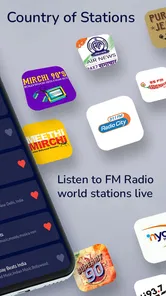
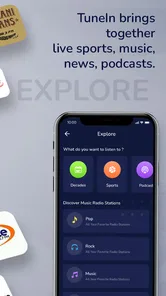
Compared with a large radio directory, the attraction here is the straightforward purpose. I did not approach it expecting deep station management, elaborate social tools, or a sophisticated recommendation engine. People who enjoy browsing huge catalogs and organizing everything into detailed collections may find it basic. People who want a quick path from opening an app to hearing a station may appreciate that restraint.
Age, trust, and sensible shared-device habits
The Everyone rating makes the app easy to consider for a family device, but the responsible question is not only whether the application is broadly accessible. It is also whether the selected listening fits the people in the room. Live radio can vary in tone, language, advertising, and subject matter, so I would choose stations with the actual listeners in mind rather than assuming one setting suits every age.
For younger children, I would keep the shared device in a common area and let an adult select the station. That approach does not require inventing controls the app may not have. It simply recognizes that a general radio tool is not the same thing as a child-focused audio environment. Older children and teenagers may be able to use it more independently, but the household should still agree on volume, device care, and acceptable listening times.
Trust also matters among adults. Because a shared app is easy to open and change, the device should not be treated as a private account manager. Anyone who needs personal recommendations, saved listening, or a separate content boundary will probably be happier with an individual service. This app works best when the device has a clear communal purpose.
I would also avoid leaving the volume at an uncomfortable level simply because the app is playing in the background. A shared radio can quietly become a source of irritation when one room hears it all day. Setting a reasonable routine—such as using it during meals, chores, or a particular work period—keeps the convenience from turning into noise.
Performance expectations and everyday friction
The strongest part of the experience is the low learning curve. Someone who understands the basic idea of choosing a radio station can approach it without needing a tutorial about playlists, downloads, or account switching. That is valuable in a household where not everyone uses apps in the same way.
The main friction comes from the limits of live online playback. A weak connection can affect the session, and a listener has less control than with downloaded music. I would not recommend it as the only audio option for emergencies, remote travel, or places where internet access is uncertain. Keeping an alternative available—such as local radio or offline audio—is sensible when uninterrupted sound matters.
Another trade-off is that a shared station can satisfy nobody perfectly. One person may want energetic music, another may prefer conversation, and a third may want silence. The app cannot solve conflicting tastes; it only makes a common radio source easy to provide. Its success therefore depends partly on the situation in which it is used.
The audience size suggests that the concept has reached beyond a tiny group of experimenters: the app has passed one million installs, with an average rating of 4.0 from around five and a half thousand ratings. I read that as a sign of generally positive interest rather than proof that it will suit everyone. The rating is helpful context, but my own recommendation still depends on whether you want live online radio or a more controlled audio library.
San Valmout has kept the product focused on that central purpose. I appreciate the lack of unnecessary ambition, particularly on an older shared device. Still, focus can feel like limitation when you expect the organization tools of a modern streaming platform. I would judge it as a utility for quick radio listening, not as an all-purpose replacement for every music and audio need.
My household verdict
I would recommend Radio Fm Without Internet to someone who wants a free, uncomplicated way to bring online radio into a shared room. It makes sense on an older Android phone, a spare tablet, or any household device whose main job is to provide background listening. The Everyone rating and broad Android compatibility make it approachable for mixed-age homes, provided an adult still pays attention to station content and the device’s shared use.
I would skip it if your priority is offline playback, precise song selection, private profiles, detailed parental controls, or a carefully synchronized personal library. In those cases, a dedicated music, podcast, or broadcast solution will be a better fit. I would also think twice before using it as the sole option in places with unreliable internet.
For the right scenario, though, its simplicity is a real advantage. Put it on a common device, establish a few household listening habits, and treat the station choice as a shared decision rather than a personal feed. That is where this app feels most natural: not as a feature-packed audio system, but as an accessible online radio for everyday moments when people simply want something playing.
Since it is free and the developer lists it for Android devices running Android 7.0 or later, trying it on an available phone or tablet is an easy experiment. My final view is positive but specific: it is worth installing for casual shared radio listening, as long as you understand that the experience depends on the internet and offers less personal control than modern on-demand alternatives.
Radio Fm Without Internet Frequently Asked Questions
Is Radio FM Without Internet available for both Android and iOS?
Radio FM Without Internet is a music and audio app, but whether it can run on your phone depends on the operating system and device support. Its listed minimum operating system is Android 7.0, so check your Android version before downloading. For either platform, compatibility also depends on whether the device can access an FM receiver; the app itself cannot add radio hardware that a phone does not have.
Who is the app intended for, and is it suitable for all ages?
The app is intended for people who want to listen to radio stations on a mobile device. Its content rating is Everyone, making it suitable for a broad audience. The developer is San Valmout, and the app is in the Music & Audio category. As with any radio service, the stations available and their programming may vary by location, so listeners can choose what is appropriate for them.
What is Radio FM Without Internet, and how does it work?
Radio FM Without Internet is designed to let you listen to local FM radio stations without using mobile data or Wi-Fi. However, its operation depends on your device having a built-in FM receiver and the necessary software support. In many cases, wired headphones must be connected because their cable works as the antenna. The app cannot provide offline access to online-only stations.
Can I use Radio FM Without Internet without mobile data or Wi-Fi?
Yes, the main purpose of Radio FM Without Internet is listening to compatible local FM broadcasts without an internet connection. This can help reduce data usage and make the app useful in areas with limited connectivity. Nevertheless, you may need internet access initially for installation, updates, permissions, station information, or advertisements, depending on the version installed on your Android or iOS device.
Will this app work on every Android or iPhone device?
No, compatibility is not guaranteed on every phone. Many modern smartphones, especially newer iPhones and some Android models, do not include an active FM radio chip. Even when the hardware is present, the manufacturer or carrier may disable access to it. Before downloading, check your device specifications, operating system compatibility, and whether the app supports your region and phone model.
Pros
- Works without mobile data after stations are saved or available offline.
- Simple interface makes it easy to browse and start listening quickly.
- Uses less battery than streaming music and radio apps.
- Useful during travel or in areas with weak cellular coverage.
- Provides quick access to local FM broadcasts on compatible devices.
Cons
- Requires an FM radio chip and wired headphones on many phones.
- Station availability depends heavily on your location and device hardware.
- Audio quality may suffer from interference
- static
- or poor reception.
- Usually cannot play stations from other countries without internet access.
- Some devices may not support background playback or wired antenna use.











