Radio FM AM Live Radio Station
- 544.00
- 4.0
- Installs
- 10.00M
- Price
- Free
Screenshots

Analysis by Reviewed
I reach for Radio FM AM Live Radio Station when I want something playing without having to choose every song myself. The appeal is the radio format: a station can bring music, news, or conversation I wouldn’t have picked on my own. It is a free Android music and audio app from AVIRISE LIMITED, and its broad selection makes it most useful for listeners who enjoy browsing across places and styles rather than sticking to one carefully curated playlist.
What the current version is best suited to
The app is rated for Everyone and has a 4.0 average from around 38,000 ratings, with more than 10 million installs. Those figures suggest a well-used option, but I would treat them as a starting point, not a guarantee that every station will suit your taste or work equally well in every listening situation. The current version is 2.4.2, and the app is free to install, with optional in-app purchases ranging from $0.99 to $29.99 per item.
For a practical trial, I’d start by saving just a few stations: one you already know, one from a genre you like, and one from a place you’re curious about. That small set makes it easier to judge whether the selection and station browsing fit your habits, without turning the first session into a long search. If a station becomes a regular choice, a favorite shortcut can make returning to it simpler than browsing from scratch.
Finding a station that fits the moment
Have you ever found yourself missing the good ol' days of tuning into a radio station and just letting the music, news, or talk shows flow through your speakers? Well, you're in luck! I recently got my hands on the Radio FM AM Live Radio Station app, and let me tell you, it's a game-changer for all the radio lovers out there.
Unleashing the Power of Radio on Your Phone
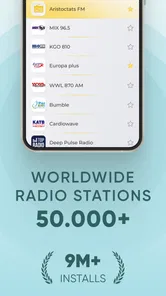
First things first, the Radio FM AM Live Radio Station app is a breeze to install and set up. I was up and running in no time. The app offers a vast selection of radio stations from all around the world. Whether you're into pop, rock, jazz, or even talk shows, there's something here for you. And, oh boy, the variety is just mind-blowing! It's like having the world’s radio in your pocket.
Features That Stand Out
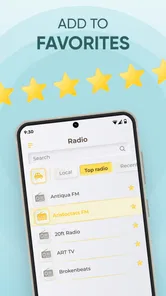
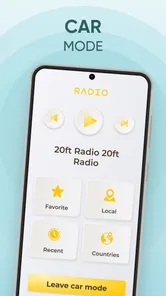
One of the features I absolutely love is the ability to save favorite stations. I'm a sucker for my local jazz station, and having it just a tap away is super convenient. The app also allows you to browse stations by genre or location, which is perfect if you're in the mood for something specific or want to explore music from another part of the globe.
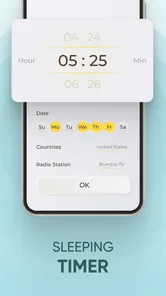
Another great feature is the sleep timer. I often like to fall asleep to the soothing sound of classical music, and this feature ensures the app won’t keep playing all night long. It’s those little touches that make a big difference!
More From Our News Desk

 Gmail
Gmail in a Busy Inbox: Who Benefits Most?
From first account to crowded workday, Gmail earns its place through dependable search and flexible sorting—but its best fit depends on how much inbox maintenance you can tolerate.

 Prime Video
Switching to Prime Video: What Changes in Your Viewing Routine
Prime Video can make a compelling second home for streaming, but switching means learning a different catalog, rental layer, and route from browsing to playback.

 Universal TV Remote Control
 Works Best as a Reliable Backup
A phone remote earns its place through quick setup and reliable habits. Here is how to get more from Universal TV Remote Control—and where its limits show.

 Weather - By Xiaomi
Weather by Xiaomi Review: Clear at a Glance, Less Clear Up Close
Xiaomi’s weather app makes everyday forecasts quick to scan, but its calm surface can leave useful details and recovery paths harder to find than they should be.

 X
X Under Pressure: Can It Recover When Posting Goes Wrong?
A resilience-focused review of X, examining setup, mistaken posts, interruptions, weak connections, and the gaps that matter when recovery needs to be dependable.

 Clash of Clans
 Is Won Between the Battles
Its raids are quick; its community is a long-term project of coordination, teaching, rivalry, and shared responsibility—with all the friction that entails.
Latest News



Using radio alongside playlists
Radio has a different job from an on-demand music service. A playlist gives me control over each track, which is better when I want a particular album or a predictable mood. Here, I trade that control for discovery and live programming. I’d choose this app for background listening while cooking, tidying, or getting ready, and switch to a playlist when I need a specific song or want to avoid interruptions from talk or adverts. If you mainly listen offline or need precise control of what plays next, a downloaded library or a conventional streaming service is likely a better fit.
For a realistic evening routine, I might browse by genre after dinner, save a station that suits the mood, then use the sleep timer if I keep listening in bed. The useful detail is to decide on the station before settling down: searching around once you’re ready to sleep can turn a relaxing habit into screen time. Favorites also help when I want to return to a familiar broadcast without repeating that search.
Everyday listening and practical trade-offs
Streaming radio depends on having a suitable internet connection, so I wouldn’t rely on it as my only audio option during a commute with patchy coverage or when I need guaranteed offline playback. If reception falters, trying a different station or waiting until the connection is steadier may be more sensible than repeatedly restarting the same stream. For international stations, the schedule and local time can also affect what you hear; a station’s location is a useful browsing clue, but not a promise that it will be playing a particular genre or program at that moment.
One small workflow that helps is to treat genre browsing as discovery and location browsing as a way to find a different broadcasting perspective. I would save only stations I genuinely expect to revisit, rather than filling favorites with every interesting result. That keeps the shortcut useful and makes it easier to pick something quickly when I have only a few minutes. The trade-off is that a broad catalog can take patience: having many choices is less helpful if I’m in a hurry and already know exactly what I want to hear.
A commute, a kitchen, and the right kind of listening
A useful way to test the app is to try it in different parts of an ordinary day rather than judging it from one long session. While making breakfast, I might choose a familiar local station so the listening feels effortless. Later, while doing chores, I could browse by location and let a station from somewhere else provide a change of pace. Those are situations where radio’s continuous flow is a benefit: I can keep moving instead of stopping to select each track.
For a commute, I’d be more cautious. If the route has reliable mobile internet, a station can make the journey feel less repetitive; if the signal drops in familiar places, I’d keep downloaded audio as a backup. That isn’t a fault unique to this app, but it matters because live radio depends on the stream staying available. I would also choose a station before setting off rather than browsing while moving. It is a simple habit that makes the app more practical and keeps attention on the journey.
How its radio format differs from other choices
Compared with a phone’s built-in FM receiver, an internet radio app can make stations from beyond local broadcast range accessible, provided the connection is good. The trade-off is that it uses streaming rather than receiving a local signal directly, so it is not the best substitute for a radio when mobile data or connectivity is unreliable. Compared with a music streaming service, the advantage is less time spent building queues and more chance of hearing a presenter or a program; the disadvantage is less control over the next song.
I would not use it as a replacement for every audio app on my phone. It works best as a companion for moments when I want a station to carry the listening, not as a searchable library for a particular artist, album, or track. If I’m planning a workout around specific songs, I’d choose a playlist. If I’m cooking and would rather hear a continuous broadcast than make another decision, I’d open the radio app. That difference is the clearest way to decide whether it earns a place on your device.
Who should choose it—and who may prefer something else
I’d recommend trying it if you enjoy live radio, like stumbling across unfamiliar stations, or want a simple way to keep a familiar broadcast close at hand. It can also suit someone who wants background sound without building a playlist for every task. It is less compelling for listeners who need downloaded audio, uninterrupted control over tracks, or a guaranteed station lineup for a particular occasion. In those cases, a music library or an on-demand service is the more practical choice; this app is strongest when the unpredictability of radio is part of the fun.
If you’re wondering whether it costs anything to begin, the app is free to install, though optional purchases are available. If you’re deciding whether it will run on an older device, its minimum Android requirement is version 8.0. The release date was October 18, 2020, which gives the app a history beyond a brand-new launch, but I wouldn’t assume from that alone that every part of the experience has changed recently. There are 544 written reviews, another useful source of user perspective if you want to compare other listeners’ experiences before installing.
Ease of Use and Interface
The user interface is sleek and intuitive. Even if you’re not particularly tech-savvy, navigating through the app feels natural. It’s designed to give you a seamless experience, and I never found myself getting lost or frustrated. Everything is exactly where you’d expect it to be, which is a big plus in my book.
Moreover, the sound quality is superb. I was genuinely impressed by how clear and crisp the audio was, even when streaming stations from halfway across the world. It’s like having a high-end radio right in your hands.
What existing listeners should assess after an update
Version 2.4.2 is the version in use now, but a version number by itself does not tell me what has changed since earlier releases. For existing listeners, the sensible approach is to check how their saved stations behave after updating and keep a short list of dependable favorites. If the app continues to make station discovery and quick listening straightforward, that is more meaningful in daily use than a change number alone. I’d also pay attention to whether the stations I rely on remain available and easy to find, since that matters more to my routine than simply having a large catalog.
There are 544 written reviews, and I’d read a handful with a specific question in mind—for example, whether other users find their preferred stations consistently. That is more useful than treating praise or complaints as universal. I would also judge the app by my own connection and listening habits: radio streaming is most satisfying when I can settle into a station, while frequent interruptions or a need for offline playback point toward a different kind of audio app.
What I would keep an eye on
For someone who already has favorite stations saved, the most useful measure of continued quality is whether those stations remain easy to reach and dependable in the places where they normally listen. I’d also notice whether browsing still helps me make a choice quickly. A large selection only matters if I can turn it into a short, useful list for everyday listening rather than repeatedly starting from an overwhelming catalog.
If you are new to internet radio, I’d treat the first few sessions as a test of fit, not a commitment. Try one station you know, one genre you like, and one location you are curious about, then see which you actually return to. That gives you a better sense of whether the app’s live-radio approach suits your routine than browsing dozens of stations in one sitting. The feature I’d watch most closely over time is not a particular version number, but whether the listening choices that matter to you remain convenient.
Final Thoughts
In a world dominated by streaming services and on-demand content, it’s refreshing to dive back into the unpredictable charm of radio. The Radio FM AM Live Radio Station app has captured that essence beautifully. So, whether you’re a nostalgic soul or just someone looking to try something new, I highly recommend giving this app a shot. It’s a delightful blend of the past and present, and who knows, you might just discover your new favorite station!
Radio FM AM Live Radio Station Frequently Asked Questions
Can I listen to radio without using mobile data?
Live radio streaming needs an internet connection, so listening over mobile data will use your data allowance. If you want to keep usage down, connect to Wi-Fi before starting a station. This is worth considering if you listen for long periods or have a limited mobile plan; the app is designed for streaming stations rather than offline playback.
Is Radio FM AM Live Radio Station suitable for children and family use?
The app has an Everyone content rating, which means it is classified for general audiences. It brings together radio stations from different places and with different kinds of programming, so what listeners encounter can vary by station. Families may want to help younger users choose stations that suit them, especially when browsing international or talk-radio content.
Can I keep listening while using other apps?
Yes. Radio FM AM Live Radio Station supports background play, so you can continue listening while switching to another app or carrying out other tasks on your device. This can be useful when you want music or radio in the background rather than keeping the listening screen open. Streaming still requires an internet connection, whether you use Wi-Fi or mobile data.
Can I save stations I enjoy for quicker access later?
The app lets users create a list of favorite stations, which is a convenient way to return to channels they like without searching for them each time. You can also look for stations by name, genre, or location. Together, these options make it easier to keep familiar listening choices close while still exploring other broadcasts.
Does the app let me wake up to a radio station?
Yes. Radio FM AM Live Radio Station includes an alarm feature that lets you wake up to a favorite station. This gives the app a use beyond casual listening, particularly if you prefer starting the day with radio rather than a standard alarm sound. Choose the station you want and check your alarm settings so they match your routine.
Pros
- Wide variety of global stations.
- Easy to navigate user interface.
- Offline listening available.
- High-quality audio streaming.
- Customizable station lists.
Cons
- Contains in-app advertisements.
- Limited features in free version.
- Requires internet for live streaming.
- Occasional buffering issues.
- Not all stations are available.