

Radio App
- 142.00
- 4.6
- Installs
- 100.00K
- Price
- Free

Screenshots
Analysis by Reviewed
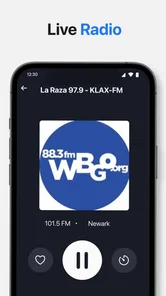
I like radio most when it asks very little of me. I want to open an app, choose something that fits the moment, and let the sound continue while I cook, commute, work, or take a break. Radio App, developed by RAFIKI APPS LLC, takes that simple idea and combines FM, AM, and online live radio in one place. After spending time with it, I see it as a practical choice for listeners who want access to music, news, sports, and local stations without building a complicated audio setup.
That does not mean it replaces every other listening option. Its value depends on what you expect from radio. If you enjoy live programming and the small surprise of hearing what a station has chosen, this app makes sense. If you mainly want albums, offline playlists, or exact control over every song, a dedicated music service will probably suit you better. My experience is that the right decision comes down less to the app’s broad station concept and more to how you actually listen.
What to consider before choosing it
The first question is whether you need live radio or on-demand audio. Radio App is built around live listening, so it is most useful when you want a station’s current broadcast rather than a personal queue. That distinction matters during a morning news programme, a live sports broadcast, a local talk show, or a music station where the presenter and the schedule are part of the experience.
The second question is variety. The app brings together FM, AM, and online stations, which gives it a wider purpose than an app tied to one broadcaster. I found that especially appealing when I wanted to move between local content and broader online programming without changing applications. The practical benefit is not simply having more choices; it is having several types of radio gathered around the same listening habit.
There is also a question of device compatibility. Radio App supports Android versions from 6.0 onward, making it accessible on many older phones as well as newer devices. That is useful if you keep a dependable older handset for the kitchen, car, workshop, or bedside table. Still, an older operating system does not automatically guarantee the same smooth experience as a modern phone, so I would judge performance on the device you plan to use rather than assuming every handset will behave identically.
Its current version is 1.1.2, and the application is rated for Teen users. Those details are worth considering for families who share devices or want an app available to younger listeners with appropriate supervision. The rating itself does not tell me how every station will sound or what every broadcast will discuss, so I would still use ordinary judgement when children are listening to live programming.
The app is free to install, which makes trying it low-risk. There are in-app purchases ranging from $2.99 to $24.99 per item, however, so I would pay attention to any purchase screen before confirming anything. For casual listeners, the free entry point is the main attraction. For someone who expects every function to remain unrestricted without spending money, the purchase model deserves a closer look before making Radio App the only radio tool on a phone.
More From Our News Desk

 Gmail
GmailGmail in a Busy Inbox: Who Benefits Most?
From first account to crowded workday, Gmail earns its place through dependable search and flexible sorting—but its best fit depends on how much inbox maintenance you can tolerate.

 Prime Video
Switching to Prime Video: What Changes in Your Viewing Routine
Prime Video can make a compelling second home for streaming, but switching means learning a different catalog, rental layer, and route from browsing to playback.

 Universal TV Remote Control
Universal TV Remote Control Works Best as a Reliable Backup
A phone remote earns its place through quick setup and reliable habits. Here is how to get more from Universal TV Remote Control—and where its limits show.

 Weather - By Xiaomi
Weather by Xiaomi Review: Clear at a Glance, Less Clear Up Close
Xiaomi’s weather app makes everyday forecasts quick to scan, but its calm surface can leave useful details and recovery paths harder to find than they should be.

 X
XX Under Pressure: Can It Recover When Posting Goes Wrong?
A resilience-focused review of X, examining setup, mistaken posts, interruptions, weak connections, and the gaps that matter when recovery needs to be dependable.

 Clash of Clans
Clash of Clans Is Won Between the Battles
Its raids are quick; its community is a long-term project of coordination, teaching, rivalry, and shared responsibility—with all the friction that entails.
Latest News



How I would test it in the first few minutes
I would not begin by trying to understand every station category. Instead, I would choose one familiar local station, one news or talk option, and one music station. This gives a quick sense of whether the app matches your real routine. A familiar station is useful because you can notice immediately whether the stream behaves as expected, while the other two choices show whether the wider selection is genuinely helpful.
I would also test the app in the place where I expect to use it most. A station that feels convenient at a desk may be less practical while moving around the house or using the phone in a car. Live audio depends on the listening environment, and the best choice is the one that gets you to reliable programming with the least interruption and searching.
One useful habit is to decide what you want before opening the app. If you are looking for local information, start with a local station rather than browsing music options. If you need background sound for a task, begin with a station style you already know you can tolerate for a longer period. This sounds obvious, but it prevents the common radio-app problem of spending more time selecting than listening.
Where Radio App feels strongest
The clearest strength is its combination of broadcast types. Many people keep one app for a favourite station and another for music, while a general radio application can act as a single doorway to several listening needs. I found that useful during an ordinary day: local programming for immediate context, a music station when I wanted less talking, and a sports or news station when the event mattered more than a carefully selected playlist.
The best reason to choose Radio App is convenience across live formats, not precise music control. That is an important distinction. The app is not trying to turn radio into a private library. Its appeal comes from the shared, current nature of a broadcast. You hear what is happening now, including presenter segments, scheduled shows, updates, and the occasional choice you would not have made yourself.
That makes it a good companion for repetitive tasks. I would use it while preparing breakfast, sorting laundry, doing light office work, or taking a walk where I want company without constantly touching the screen. Live radio fills the space between silence and active entertainment. It can be less demanding than a podcast and more varied than a fixed playlist.
The local-station angle is another meaningful advantage. Online music services are often excellent at personal discovery, but they do not always give the same sense of place as a local broadcaster. A local station can reflect nearby events, regional conversation, weather coverage, or community interests. For someone who has moved away from home, travels regularly, or wants a connection to a particular area, that can be more valuable than another algorithmic music mix.
A realistic everyday listening routine
Imagine starting the day with a short local news broadcast, switching to a music station while getting ready, and then moving to sports coverage later. With Radio App, that routine can stay within one radio-focused application instead of requiring a separate broadcaster app for each interest. The advantage is not dramatic technology; it is reduced friction during a busy day.
I would use the same approach during a long household task. I might begin with a talk station for context, change to music when concentrating on the task, and return to a live broadcast when I want updates. Because these are different listening moods, I would avoid searching randomly each time. I would keep a small mental shortlist of stations that worked well for each situation and return to them directly whenever possible.
That workflow also exposes a trade-off. Live radio is convenient when the station is right, but it gives me less control than a playlist. A presenter may interrupt a song, a programme may change tone, or a news segment may arrive when I would rather keep the music going. For me, that unpredictability is part of radio’s character. For you, it may feel like an inconvenience.
Small habits that make the experience better
My first tip is to separate discovery from daily use. Spend a little time finding stations when you are relaxed, then use the ones that fit your routines instead of browsing every time. This makes a general radio app feel much faster and prevents the large choice of FM, AM, and online content from becoming clutter.
My second tip is to match the station type to the task. News and talk are better when you can give them some attention, while music stations usually work better as background during chores or travel. Sports broadcasts deserve a different approach again, because the value comes from following a live event rather than simply filling silence. Thinking in terms of situations, not just genres, is the most effective way I found to use the app.
My third tip is to treat online radio and traditional radio as complementary rather than interchangeable. Local FM or AM programming may be the reason you opened the app, while an online station may be the better choice when you want a different region or a more specific musical atmosphere. Switching between these kinds of broadcasts is where the app earns its place, provided you are comfortable with the changing character of live content.
Finally, I would avoid judging the whole app by one station. A poor experience with a particular broadcast may reflect that station’s stream or programming rather than the usefulness of the application itself. Try several types before deciding whether the service fits you. This is especially important for anyone who expects radio to provide both local relevance and broad variety.
Where another kind of app may fit better
A dedicated music-streaming service is the better option if your priority is choosing an exact artist, album, or song every time. Those services are designed around control, repeat listening, personal libraries, and often offline access. Radio App is more suitable when you are happy to accept a station’s schedule and let live programming guide the session.
A podcast application may also be preferable if you want to pause, resume, skip, or finish long-form episodes on your own timetable. Radio has a flowing quality, but it is not ideal when you need to stop halfway through a discussion and return later. I would choose podcasts for planned listening and Radio App for current, continuous audio.
A broadcaster’s own application can be a stronger choice when you follow one particular station closely and want its dedicated presentation. The trade-off is that a single-station app may be less convenient when your interests change. Radio App makes more sense for people who move between local stations, news, sports, and music rather than staying loyal to one broadcaster.
There is also a case for a physical radio. If your main concern is simplicity, a traditional FM or AM radio can be easier: no browsing, no app interface, and no need to keep a phone available. Radio App wins when you want the portability and broader reach of a smartphone, especially for online stations, but it is not automatically better for someone who only wants a familiar local signal.
What switching to it really involves
Moving from separate station apps to Radio App should be relatively easy if your listening is casual. The main adjustment is learning where your preferred stations sit within a broader selection. I would expect the first session to involve more exploration than later sessions, so I would not make a judgement based solely on that initial browsing.
The larger adjustment comes when switching from on-demand music. You may need to accept that a station controls the order, timing, and rhythm. You cannot approach live radio with the same expectations as a personal playlist. If you dislike interruptions or want to repeat a particular track immediately, the change may feel like a step backward rather than a benefit.
Cost is another part of the decision. The free installation makes experimentation straightforward, but the presence of paid items means I would review what I am being offered before treating the app as a permanent replacement for other services. A free radio app is attractive when it covers your basic listening needs; it becomes less compelling if the features you consider essential require purchases you did not expect.
Privacy and battery habits are practical considerations too, even though they are not reasons by themselves to reject the app. Live listening naturally means keeping audio active for a period of time, so I would use it thoughtfully during long sessions and avoid assuming that a phone can stream indefinitely without affecting battery life. At home, a charger or a secondary device can make the routine more comfortable.
Who should use it, and who should skip it
I would recommend Radio App to someone who wants one straightforward place for live music, news, sports, and local radio. It is particularly appealing if you switch between station types during the week, use an older compatible Android phone, or want to explore online broadcasts without collecting several separate apps. The strong average rating of 4.5 from around 1.2 thousand ratings and more than 100 thousand installs suggest that the concept has already attracted a meaningful audience, although popularity alone should not decide whether it suits your habits.
I would be more cautious about recommending it to a listener whose main requirement is offline playback, exact song selection, or a carefully organized personal library. I would also suggest comparing it with a favourite broadcaster’s own app if one station accounts for nearly all your listening. In those cases, a more focused tool may feel clearer and more predictable.
The Teen content rating makes it a reasonable option for many older children and adults, but I would still pay attention to the nature of live broadcasts. Radio schedules can change, and live discussion is less controlled than a playlist chosen in advance. Families should decide together which stations are appropriate rather than relying on the age label alone.
My recommendation after using it
Radio App is worth trying if you see radio as a live companion rather than a catalogue of songs. Its combination of FM, AM, and online listening gives it a practical role for people who want local connection, current programming, and variety from one app. I especially like it for everyday tasks where I want sound and information without spending time building a queue.
I would not install it expecting a replacement for every audio service. Its strongest experience comes from accepting the rules of live radio: the station sets the pace, the programme may change, and discovery is part of the fun. If that sounds appealing, the free entry point gives you a sensible way to test it. If you need total control, offline access, or one carefully managed music collection, choose an on-demand alternative instead.
My final view is positive but specific: Radio App is a useful general-purpose live radio tool, especially for listeners who value local and varied broadcasts over personalisation. RAFIKI APPS LLC has aimed at a clear everyday need, and version 1.1.2 is most convincing when used as a simple bridge between different kinds of live audio. I would keep it on my phone for news, sports, local stations, and relaxed background listening, while using a conventional music or podcast service whenever I need control over exactly what plays next.
Radio App Frequently Asked Questions
Is Radio App suitable for casual listening as well as keeping up with current events?
Radio App is a music and audio app for tuning in to FM, AM, and online live radio. Its station selection is intended to cover music, news, sports, and local broadcasts, making it useful whether you want something playing in the background or prefer to follow spoken programming. It is developed by RAFIKI APPS LLC and has a Teen content rating.
Will Radio App work on my phone, and what should I check before downloading?
Radio App is available for Android and iOS, and its listed Android minimum is version 6.0. Before downloading, check that your device meets the operating-system requirement and that you have a reliable internet connection for streaming. The app is free to download, though in-app purchases are available, so review the purchase information shown on your device if you are concerned about optional costs.
What is Radio App and what can I use it for?
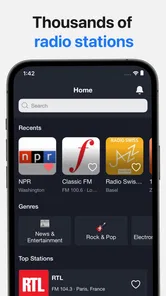
Radio App is a mobile platform for listening to radio stations and audio content directly from an Android or iOS device. After installing it, users can usually browse stations by country, genre, language, or popularity, then stream music, news, sports, talk shows, and podcasts. It is useful for discovering international broadcasts without needing a traditional radio or separate receiver.
Does Radio App require an internet connection to work?
Yes, Radio App generally needs an active internet connection because stations are streamed online rather than received through your phone’s FM hardware. It can work over Wi-Fi or mobile data, but streaming for long periods may use a noticeable amount of data. For a smoother experience and to avoid unexpected charges, Wi-Fi is recommended, especially when listening to high-quality audio.
Can I listen to stations from different countries and save favorites?
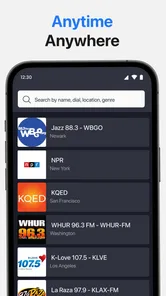
One of the most useful features of Radio App is the ability to explore stations from different regions and categories. During testing, this type of organization makes it easier to find local broadcasts as well as international music, news, and entertainment channels. Stations you enjoy can typically be added to a favorites list, allowing faster access the next time you open the app.
Pros
- Wide selection of stations across music
- news
- sports
- and talk formats.
- Simple interface makes finding and saving favorite stations quick.
- Background playback lets you listen while using other apps.
- Many stations provide clear audio with reliable streaming quality.
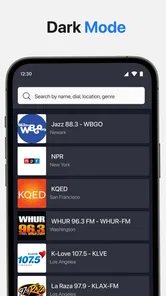
- Useful search tools help discover stations by name
- genre
- or location.
Cons
- Audio quality depends heavily on your internet connection.
- Some stations may be unavailable due to regional broadcasting restrictions.
- Advertisements can interrupt listening
- especially on free versions.
- Battery and mobile data usage may increase during extended streaming.
- Certain features or stations may require a subscription or account.











