Radarbot Speed Camera Detector
- 4.51K
- 4.1
- Installs
- 50.00M
- Price
- Free
Screenshots

Analysis by Reviewed
Before I rely on any driving alert app, I want to know what it can do, how to get it ready, and where its warnings fit into my attention on the road. Radarbot Speed Camera Detector is a navigation app focused on speed-camera alerts, with additional warnings intended to help drivers anticipate road hazards. I see it as a useful companion for a familiar commute or an unfamiliar route, not as a substitute for watching the road or following posted limits.
Getting ready for a first drive
When I first open Radarbot, I’d take a moment while parked to get comfortable with the map and alert settings. The app is free to download, is developed by Radarbot Company, and is available for Android and iOS. It is rated for Everyone. Its average rating is 4.1 from around 607,000 ratings, and it has been installed over 50 million times. Those figures suggest a widely used app, though they can’t tell me whether every alert will be right for my particular route.
What to expect from the alerts
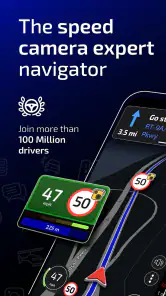
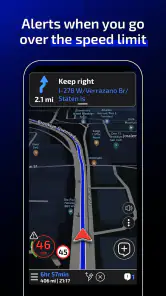
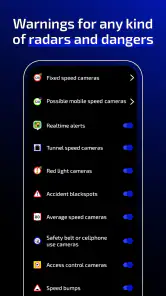
The app uses GPS to alert drivers to speed cameras, traffic lights, and mobile cameras, and it also flags potential black spots and dangerous curves. That mix is more useful than a camera-only warning when I’m driving somewhere unfamiliar: a curve warning can prompt me to pay attention to the road ahead rather than just the speed display. The key is to treat an alert as a cue to check the situation, not as permission to relax or assume the road is clear.
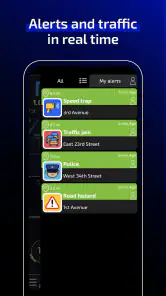
Radarbot also has community-based reports, so drivers can share information about newly spotted speed traps. That can help make alerts more timely, but community reporting is naturally dependent on other people noticing and submitting what they see. I wouldn’t assume a quiet screen means there are no cameras or hazards. For a first trip, I’d keep my usual awareness and use the warnings as a second source of information.
Making the first trip feel simple
Once I’m parked, I’d set the distance for advance alerts and choose miles or kilometers to match what I’m used to seeing. The app offers voice options, so I’d pick one I can understand clearly and then start with a short, familiar drive. That gives me a low-pressure way to learn how the warnings sound before relying on them on a longer journey. I’d also check that the phone is positioned safely and that I can hear the alerts without needing to look down.
On a regular commute, the practical win is not having to keep checking the map for every possible camera. If a warning comes through, I can stay focused on the road and make a sensible decision based on the signs and conditions around me. The app can run in the background, which means I can keep using another navigation app for directions while Radarbot provides its alerts. I’d test that setup before a busy trip, since two apps competing for attention or audio can be distracting rather than helpful.
How it fits alongside other navigation apps
For me, Radarbot’s specific strength is its focus on speed-camera and hazard alerts. A general navigation app is usually the better choice when I need turn-by-turn directions or want one app to handle the whole journey. Radarbot can complement that kind of app because it can keep running in the background, but it doesn’t remove the need to choose a main navigation tool that suits the route. Compared with relying only on a built-in car display, it adds phone-based alerts; compared with using a community navigation app such as Waze, it puts the camera-warning purpose front and center.
More From Our News Desk

Weather by Xiaomi Review: Clear at a Glance, Less Clear Up Close

X Under Pressure: Can It Recover When Posting Goes Wrong?

Clash of Clans Is Won Between the Battles

Android Auto Makes the Case for Quieter Car Software

MobiOffice: Transforming Mobile Productivity with Seamless Integration

EA SPORTS FC™ Mobile Soccer: Redefining Mobile Sports Gaming
A useful first success is simple: set the alert units, begin a familiar drive, and hear a warning without needing to handle the phone. I’d avoid changing settings once moving, and I’d never adjust my speed abruptly because an alert appeared. Laws and road signs take priority, and a camera alert is not a guarantee that a particular device is present or absent. The app’s store summary describes it as legal and reliable, but safe driving still depends on local rules and the driver’s judgement.
Who will get the most from it
I’d recommend trying Radarbot if you drive regularly, travel through unfamiliar areas, or want camera-focused alerts alongside another navigation app. It may be less useful if you rarely drive, already prefer a single all-in-one navigation setup, or find spoken warnings distracting. The free app gives newcomers a way to try the basic experience, while in-app purchases range from $1.99 to $79.99 per item. I’d use it for a few ordinary trips before deciding whether any paid option suits my needs, rather than paying on the assumption that it will prevent every fine.
One practical trade-off is that running GPS and audio alerts during a drive can make phone placement, sound levels, and battery planning worth considering. I’d start with a charged phone, keep it secured, and make any adjustments before leaving. If an alert seems misplaced, I’d avoid reacting suddenly; the road, signs, and traffic are the things to follow. Those habits make the app easier to use without letting it become another distraction.
From first alert to a settled routine
After a few drives, I’d review whether the chosen alert distance and voice are comfortable, then leave the setup alone unless something genuinely isn’t working. That small routine matters more than trying every setting at once: it helps me learn what an alert sounds like and keeps attention on driving. If I need detailed route guidance above all else, I’d use a dedicated navigation app as my primary tool; if camera awareness is the gap I want to fill, Radarbot has a clear role.
A practical commute test
For a first meaningful test, I would choose a route I already know rather than making the first run a long trip through unfamiliar roads. Before setting off, I’d confirm the alert units, choose a voice that is easy to distinguish from music or conversation, and place the phone where it cannot slide or tempt me to look down. Then I’d let the app run while I follow my usual route. The useful result is not simply hearing a warning; it is learning whether the timing and sound make sense to me without changing how carefully I drive.
That approach also helps separate a setup issue from an alert I simply did not expect. If I miss a spoken cue, I can adjust the volume while parked before the next drive instead of trying to fix it in traffic. If another navigation app is giving directions at the same time, I’d test the audio combination on an easy journey. Clear, non-competing sound matters more than having every available warning turned on.
When reports and alerts need context
Community reports are most useful as timely hints, not as a complete map of enforcement. A newly reported mobile camera may be relevant to one stretch and no longer be there later; a fixed-camera alert, meanwhile, still doesn’t tell me what the current limit or road conditions require. I’d use the warning to become more attentive and check the road signs, rather than treating the app as an authority on what I can safely do.
This is also why I would not use the app to plan a drive around avoiding enforcement. Its sensible role is to support awareness and encourage a driver to notice the road, not to justify speeding between alerts. If the warning seems inconsistent with what I see, I would trust the signs and conditions, keep a steady and lawful speed, and avoid any sudden maneuver.
Choosing the right tool for the journey
Radarbot makes the most sense when camera awareness is the specific gap in my driving setup. If I’m going somewhere new and need lane guidance, route choices, or a clear arrival plan, a full navigation app should remain in charge of directions. Running both can be practical, but it adds another audio source and another app to configure, so I would only keep the pair if the alerts are genuinely useful and not distracting.
For a short, familiar trip, a car’s built-in display or the navigation app I already use may be enough. For a long drive through changing areas, I can see the appeal of keeping a dedicated alert app active while another tool handles the route. The trade-off is attention and setup: more alerts do not automatically mean better driving. I’d rather have a modest configuration I understand than layer on tools whose sounds overlap.
Small habits that make it easier to use
One helpful habit is to settle on one unit system and alert distance before regular use, then avoid changing them casually. Consistency makes it easier to recognize what a warning means and when it tends to arrive. I would also keep the phone secured and make sure I can hear alerts at a comfortable level, especially if passengers are talking or the car audio is on. These are simple choices, but they determine whether a background alert stays in the background.
If I drive a route with poor or changing reception, I would not assume that every community update will arrive at the moment I need it. I’d treat the app as an added layer rather than my only source of road information. Likewise, if I’m a passenger helping the driver, I can handle setup or check a confusing alert safely; the person driving should not be asked to interact with the screen.
Who should leave it out of the setup
I would skip Radarbot if I rarely drive, find spoken prompts stressful, or want one app to provide every part of a trip without juggling audio. It is also a poor fit for anyone who tends to treat a warning as a guarantee that no risk exists elsewhere. Drivers who need clear route guidance should pick their primary navigation app first, then decide whether a separate camera-alert layer adds enough value to justify the extra phone use.
For someone who drives often, though, a short trial on ordinary roads is a low-pressure way to decide. I’d pay attention to whether the alerts are understandable, whether they arrive early enough to be useful without startling me, and whether background use works comfortably with my existing navigation. Those personal checks matter more than the popularity of the app or a promise that an alert will prevent a ticket.
From first alert to a settled routine
After a few drives, I’d review whether the chosen alert distance and voice are comfortable, then leave the setup alone unless something genuinely isn’t working. That small routine matters more than trying every setting at once: it helps me learn what an alert sounds like and keeps attention on driving. If I need detailed route guidance above all else, I’d use a dedicated navigation app as my primary tool; if camera awareness is the gap I want to fill, Radarbot has a clear role.
Features That Stand Out
This app doesn’t just beep at you when there’s a speed camera nearby. It’s got a bunch of features that make it worth the download. First up, it uses GPS to give you real-time alerts on speed cameras, traffic lights, and even mobile cameras. And it’s not just about speed traps; it also warns you about potential black spots and dangerous curves.
One cool thing is the community-based updates. Other drivers can report new speed traps, and these updates get shared with all users. It’s like Waze, but specifically for speed cameras. Plus, it runs in the background, so you can still use your navigation apps without a hitch.
Personal Experience on the Road
On my drive, I found the app to be pretty accurate. The voice alerts are clear, and you can choose different voices if you want a bit of variety. I liked knowing what was coming up on the road without having to keep checking my phone. It’s hands-free and safe, which is a big win in my book.
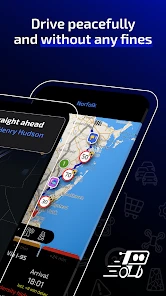
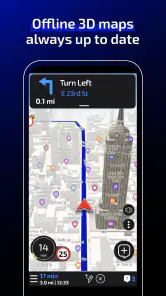
The app’s interface is user-friendly. Even if you’re not tech-savvy, you’ll find it easy to navigate. The map is clear, and the alerts are easy to understand. I also appreciate the customization options; you can set how far in advance you want to be alerted and switch between miles and kilometers, depending on your preference.
Is It Worth the Download?
If you’re someone who’s constantly on the road, the Radarbot Speed Camera Detector is definitely worth checking out. It’s like having an extra pair of eyes on the road, helping you avoid those pesky fines and keeping you safe. While there’s a free version with ads, I’d recommend going for the premium version if you want an ad-free experience and a few extra perks.
In conclusion, this app is a solid companion for your drives. It’s efficient, reliable, and user-friendly. So next time you’re planning a road trip, make sure to have Radarbot installed. It might just save you a ticket or two!
Radarbot Speed Camera Detector Frequently Asked Questions
Is Radarbot suitable for both short trips and longer journeys?
Radarbot is a Maps & Navigation app that combines speed-camera alerts with navigation, so it can be useful for planning everyday drives as well as longer trips. Before setting off, choose your route and review the alert settings while parked. During the journey, let the app support your awareness without taking your attention away from the road.
Who develops Radarbot Speed Camera Detector, and what age group is it for?
Radarbot Speed Camera Detector is developed by Radarbot Company and is rated Everyone, making it suitable for a general audience. Although the app is designed around driving alerts and navigation, users should still follow local rules and use it responsibly. Drivers should set it up before starting a trip and avoid interacting with the screen while the vehicle is moving.
Is Radarbot Speed Camera Detector free to download?
Radarbot is free to download, so you can try its speed-camera alerts and navigation without paying upfront. The app also offers in-app purchases, with prices ranging from around two dollars to around eighty dollars per item. Check the purchase options in the app before choosing any paid feature, and make sure you are comfortable with the price shown.
What is Radarbot Speed Camera Detector?
Radarbot Speed Camera Detector is a mobile application designed to help drivers avoid speeding tickets by alerting them to the presence of speed cameras, traffic lights, and other road hazards. It combines real-time alerts with an advanced GPS navigation system to ensure drivers stay informed and safe on the road. It is a Maps & Navigation app developed by Radarbot Company, and its content rating is Everyone.
How does Radarbot Speed Camera Detector work?
Radarbot works by using your device's GPS to detect and alert you to the presence of speed cameras and other road hazards in real-time. It relies on a community-based database that is constantly updated with the latest information about speed traps, allowing users to contribute and benefit from shared data to enhance driving safety.
Pros
- Real-time speed limit alerts.
- Accurate speed camera detection.
- User-friendly interface.
- Customizable alert settings.
- Regular database updates.
Cons
- Consumes battery quickly.
- Ads in free version.
- Requires GPS for full functionality.
- Limited offline capabilities.
- Subscription for premium features.
- Category
- Maps & Navigation
- Version
- Varies with device











