

PureStatus: ByeBye Blur Status
- 199.00
- 4.6
- Installs
- 5.00M
- Price
- Free

Screenshots

Analysis by Reviewed
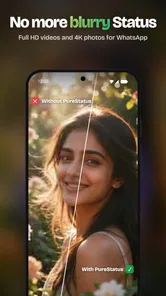
I tested PureStatus: ByeBye Blur Status as a focused video and photo tool for people who are tired of uploading media to WhatsApp Status and seeing it come out softer than the original. Its purpose is easy to understand: prepare HD photos and videos for Status sharing while trying to preserve a cleaner result. That narrow focus is also its biggest strength. This is not a general editor for building elaborate montages; it is aimed at the moment between choosing a file and posting it.
In my experience, the app makes the most sense when WhatsApp is the final destination. If you regularly share family clips, product demonstrations, travel moments, event highlights, or short updates, having a dedicated preparation step can be more convenient than repeatedly guessing which export settings will survive the platform’s compression. The useful question is not whether it replaces every editor, but whether it removes enough friction from Status publishing to justify keeping a separate app installed.
What PureStatus changes before you post
I find it useful to think of PureStatus as a checkpoint between the camera roll and WhatsApp, rather than another place to edit everything. In this section, I’d focus on choosing which files deserve that extra preparation and what to inspect before sharing; the next section looks at how the app’s current version fits into that routine.
A focused tool from DamTech Designs
PureStatus belongs to the video players and editors category, although its practical role is more specific than that label suggests. DamTech Designs presents it as a dedicated companion for sharing photos and videos through WhatsApp Status. The app is free to install, carries an Everyone age rating, and supports devices running Android 7.0 or later. That combination makes it accessible to a broad range of Android users, including people who do not own a recent phone.
The app has been available since December 21, 2022, and its current version is 2026.12. Its store presence is substantial, with more than five million installs and an average rating of 4.6 from roughly fifty-eight thousand ratings. Those figures do not prove that every upload will look perfect, but they do suggest that the problem it addresses is familiar to a large number of WhatsApp users.
What I like about the concept is that it starts with a real annoyance rather than trying to become another all-purpose social editor. WhatsApp Status is convenient, but media can lose clarity during preparation or upload. A specialized workflow gives the user one place to handle that handoff. For a quick status update, fewer decisions can be more valuable than a long list of editing tools.
The cost is straightforward, but the paid side needs context
The basic entry point is free, so you can decide whether the workflow suits you before spending anything. The app also includes optional in-app purchases ranging from $3.99 to $64.99 per item. That is a wide span, and it means the value question depends on what the free experience lets you do and whether the paid options solve a problem you actually have.
More From Our News Desk

 Gmail
GmailGmail in a Busy Inbox: Who Benefits Most?
From first account to crowded workday, Gmail earns its place through dependable search and flexible sorting—but its best fit depends on how much inbox maintenance you can tolerate.

 Prime Video
Switching to Prime Video: What Changes in Your Viewing Routine
Prime Video can make a compelling second home for streaming, but switching means learning a different catalog, rental layer, and route from browsing to playback.

 Universal TV Remote Control
Universal TV Remote Control Works Best as a Reliable Backup
A phone remote earns its place through quick setup and reliable habits. Here is how to get more from Universal TV Remote Control—and where its limits show.

 Weather - By Xiaomi
Weather by Xiaomi Review: Clear at a Glance, Less Clear Up Close
Xiaomi’s weather app makes everyday forecasts quick to scan, but its calm surface can leave useful details and recovery paths harder to find than they should be.

 X
XX Under Pressure: Can It Recover When Posting Goes Wrong?
A resilience-focused review of X, examining setup, mistaken posts, interruptions, weak connections, and the gaps that matter when recovery needs to be dependable.

 Clash of Clans
Clash of Clans Is Won Between the Battles
Its raids are quick; its community is a long-term project of coordination, teaching, rivalry, and shared responsibility—with all the friction that entails.
Latest News



I would not treat the existence of purchases as a reason to avoid the app automatically. A free tool can be worthwhile if it handles occasional Status sharing without asking for payment. On the other hand, frequent users should look carefully at which parts of the experience are included before assuming that every quality-focused function is free. The sensible approach is to begin with a normal upload workflow, compare the result with your usual WhatsApp post, and only then consider whether an optional purchase offers enough practical improvement.
There is no reason to buy anything simply because you share a lot of media. The paid value has to come from reducing repeated work or preserving a result you genuinely care about. Someone posting an occasional birthday photo may get everything needed from free access, while a small seller, event organizer, or creator who publishes Status updates every day may place a higher value on a smoother dedicated process. The important distinction is between free access for testing and casual use and paid value that must earn its place in a regular workflow.
How I would use it in an everyday situation
Imagine recording a short clip at a child’s school event. The original looks sharp in the phone gallery, but you know that sending it through a messaging app can change the result. Instead of immediately posting and hoping for the best, I would open the clip in PureStatus, use its Status-oriented workflow, inspect the prepared version, and then share it to WhatsApp. That extra pause is useful because it separates the original file from the copy intended for social sharing.
The same approach works for a small business owner showing a new item. A product video often depends on readable labels, fabric texture, or small details that become less convincing when the image is soft. A dedicated preparation step encourages you to check the actual Status-ready file rather than judging only the camera original. If the result still does not show the detail clearly, I would shorten the clip or record a closer shot instead of expecting an app to restore information that was never captured.
That last point matters. Tools like this can improve the way media is prepared, but they cannot turn a blurry recording into a genuinely detailed one. Good lighting, a steady phone, and a clean original still matter. PureStatus is most useful as a quality-preserving bridge, not as a replacement for careful shooting.
Where the focused workflow is better than ordinary alternatives
The usual alternative is to upload directly from WhatsApp. That is faster, and for throwaway updates it may be perfectly adequate. The disadvantage is that you have less control over the preparation step, and you may not notice the quality change until after publishing. PureStatus earns its place when the appearance of the post matters enough to justify checking the media first.
Another alternative is a general editor. A full editor is better when you need titles, music, transitions, color adjustments, trimming across several clips, or a carefully designed vertical composition. It can also be the better choice when you publish to multiple platforms and want one master export. PureStatus is more appealing when your destination is specifically WhatsApp Status and you do not want a large editing project between your gallery and the post.
There is also a practical trade-off in maintaining a separate tool. Every extra app adds another step, another interface to learn, and another place where a file may be copied or prepared. For a single photo, direct sharing remains the quickest route. For repeated uploads where clarity is important, the specialized workflow becomes easier to justify. I see it as a selective tool rather than something that needs to handle every image on the phone.
Small workflow decisions that make a difference
My first tip is to keep the original untouched. Treat the version prepared for Status as a sharing copy, especially when the photo or video may later be used elsewhere. This gives you flexibility if you need a higher-quality file for another platform, a presentation, or a private archive. It also makes comparisons easier when you are deciding whether the app is improving your routine enough to keep using it.
Second, judge the result on the phone you normally use for WhatsApp, not only on a large monitor. Status viewers are usually looking at a mobile screen, and the details that matter most are often faces, text, edges, and movement. A clip can look impressive in the gallery but still feel unclear once viewed as a quick vertical update. Checking the intended viewing context is a more useful test than relying on the original file alone.
Third, use it as part of a posting checklist rather than an emergency repair button. Before sharing, I would check whether the subject is centered, whether important text sits away from the edges, whether the first moment of the video makes sense without explanation, and whether the clip is worth posting at all. Better preparation cannot fix a poorly framed message. The app is most valuable when it supports good decisions instead of encouraging endless re-exports.
A fourth insight is to separate quality from audience expectations. Not every Status needs maximum clarity. A casual note to close friends may not justify an extra step, while a memorial photo, a work announcement, or a demonstration of a finished project probably does. Using PureStatus selectively keeps the free workflow convenient and prevents the app from becoming unnecessary overhead.
What may frustrate experienced users
The narrow purpose can feel limiting if you expect a complete creative suite. I would not choose it as my primary editor for a polished campaign, a multi-scene story, or a video that needs detailed sound and visual work. A general editing app is more suitable when the creative process matters as much as the final WhatsApp upload.
There is also no guarantee that every source file will benefit equally. A high-quality original with clear subjects is a better candidate than a dark, shaky, already-compressed clip. If your main problem is weak lighting, poor focus, or an unsuitable aspect ratio, you may need to fix the recording or composition first. A tool centered on Status sharing cannot remove all the limitations introduced by the camera or by the destination platform.
The optional purchase range is another point to approach carefully. Since the app is free to start but offers items from $3.99 up to $64.99, I would avoid paying until the free workflow has been tested with the kinds of media you actually post. The highest-priced option is not automatically the best value for a casual user. Paid value should be judged by time saved and results retained, not by the number attached to an upgrade.
Some users may also prefer not to add a specialized step to their routine. If you post only once in a while, direct WhatsApp sharing may be good enough. If you already have a trusted editor that prepares media for several social networks, adding PureStatus could duplicate part of your process. In that case, its advantage is strongest only if it handles the WhatsApp handoff more conveniently than your existing setup.
Who is most likely to get real value?
I think the best audience is made up of regular WhatsApp Status users who notice quality loss and want a simple destination-specific workflow. It is especially relevant for people sharing family videos, travel photos, shop updates, event material, or any post where small details affect the message. The free starting point also makes it reasonable for occasional users to try before deciding whether the extra step is worthwhile.
People with older Android phones may appreciate the broad operating-system support, provided their device meets the Android 7.0 requirement. That does not guarantee identical performance across every handset, but it avoids limiting the app to only the newest hardware. Users should still keep their expectations realistic when handling large or demanding media on less capable devices.
I would skip it if your main need is advanced editing rather than Status preparation. It is also not the right choice if you want a single tool for professional color work, layered graphics, long-form video, or publishing to many destinations. In those situations, a broader editor will probably provide more control, even if it takes longer to learn.
For a friend who asked me whether to install it, I would say: try the free workflow with three types of files—a sharp photo, a short moving clip, and something containing small text. Compare the posted result with your normal method. That test is more meaningful than judging the app from its name or from a single successful upload, because your own camera, phone, and posting habits determine how much benefit you will see.
My buy-or-skip verdict
PureStatus: ByeBye Blur Status is a sensible specialist app for Android users who care about how photos and videos look after reaching WhatsApp Status. I like its clear purpose, its free starting point, and the fact that it addresses a common sharing problem without pretending to be a complete production studio. Its strongest value is practical: it gives quality-conscious users a deliberate checkpoint before publishing.
I would install it if WhatsApp Status is one of my regular ways to communicate and I often feel that my uploads look worse than the originals. I would remain on the free path until I had confirmed that it improves my own routine. Only frequent users with a clear need for additional paid value should consider an in-app purchase, and even then, the decision should be based on repeated time savings or a consistently better sharing result.
I would skip it when direct sharing already satisfies me, when I need serious editing controls, or when another multi-platform editor already covers the same preparation step. In short, this is not an essential app for every phone, but it is a credible fit for a specific frustration. If that frustration is yours, the low-risk way to decide is to test the free experience with real Status material and keep it only if the difference is visible and the extra step feels justified.
PureStatus: ByeBye Blur Status Frequently Asked Questions
Will PureStatus work with status videos and photos I already have?
PureStatus is intended to help with clearer photos and videos shared as WhatsApp Status, and its store summary emphasizes HD sharing without quality loss. The final result still depends on the source media and how WhatsApp handles it, so an already compressed file may not look as clear as its original. Consider testing it with a copy of a file before relying on it for important posts.
Is PureStatus: ByeBye Blur Status suitable for beginners?
PureStatus is an app in the Video Players & Editors category, aimed at people who want clearer status media. If you are comfortable choosing photos or videos on your device and following an app’s on-screen controls, its purpose should be easy to understand. As with any editing or media tool, review each screen before sharing, so you know which file you are working with and where it will be posted.
Does PureStatus work with WhatsApp Status?
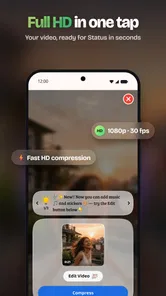
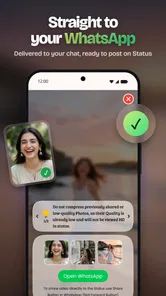
PureStatus is presented as a way to share clearer HD videos and photos on WhatsApp Status without quality loss. It is intended for people who want their shared media to look clearer, though the result can still depend on the original file and the platform’s handling of it. The app is in the Video Players & Editors category and is developed by DamTech Designs.
What devices can install PureStatus: ByeBye Blur Status?
The app requires Android 7.0 or later, so check your device’s Android version before downloading. PureStatus is a free app to install, with optional in-app purchases listed at prices ranging from $3.99 to $64.99 per item. It has an Everyone content rating, making it suitable for a broad audience, though individual users should still review the app’s permissions and features.
What is PureStatus: ByeBye Blur Status?
PureStatus: ByeBye Blur Status is designed to help users view and save clearer versions of status updates that may appear blurred or compressed in messaging and social apps. Its usefulness depends on the original media quality and the platform’s restrictions. It cannot magically restore details that were never included in the source image or video, so results may vary between different statuses and devices.
Pros
- Removes compression and blur from shared status images and videos.
- Simple interface with minimal setup required.
- Supports quick sharing to messaging and social apps.
- Useful for preserving clearer media in temporary posts.
- Lightweight app that is easy to navigate.
Cons
- Results depend on the original media quality and source resolution.
- Some features may require in-app purchases or display ads.
- Processing large videos can take longer on older devices.
- May need storage and media permissions to function properly.
- Compatibility can vary across Android versions and device brands.











