Pulsar Music Player Pro
- 1.98K
- 4.4
- Installs
- 100.00K
- Price
- $2.79

Screenshots
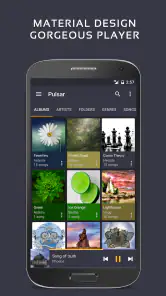
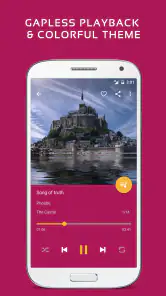
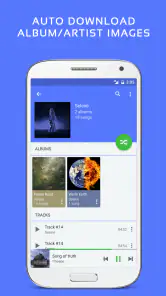
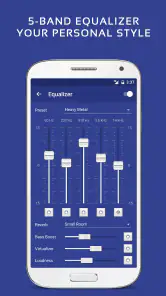
Analysis by Reviewed
I tend to judge a music player by how quickly I can get from unlocking my phone to hearing the track I want. Pulsar Music Player Pro is aimed at people who keep music files on their device and want a dedicated player rather than another streaming-service interface. Its uncluttered feel makes that simple job approachable, though the first impression is only part of what matters when a library grows or listening becomes an everyday habit.
Fast starts, familiar libraries
For a local collection, speed is less about dramatic animations and more about finding an album, starting playback, and getting back to it later without fuss. The restrained layout suits listeners who already know what they want to hear. If you mostly discover music through recommendations or browse huge online catalogs, a streaming app will likely feel more useful; Pulsar is strongest when your own files are the starting point.
That distinction also shapes the purchase decision. A subscription service bundles discovery and access to a changing catalog, while a standalone player is for managing and enjoying music you already have. I would choose this kind of app for a commute with downloaded albums, a personal collection of live recordings, or music kept on a device for places where connectivity is unreliable. It is less compelling if you expect it to replace a streaming library.
Where perceived speed comes from
With a local player, the quickest setup is often the one you prepare before you need it. I’d keep artist and album names consistent, then build a short playlist for the situations I repeat most: a morning walk, a drive, or a quiet hour at home. That way, the app’s library-first approach becomes an advantage rather than another reason to scroll through folders while heading out the door.
There is a useful trade-off here. Streaming apps can feel faster when you want to jump from a familiar song to something new, because search and recommendations are built around enormous catalogs. A local player can feel more direct when you already know the album, especially if you have curated the collection and don’t want to wait on a connection. Neither approach is automatically quicker; the difference is whether you are choosing from your own files or discovering beyond them.
Everyday listening, from a quick play to a full album
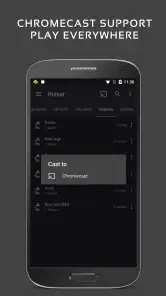
Imagine getting ready in the morning, choosing an album, and then continuing it on the way out without turning the whole routine into a search session. Gapless playback is especially useful for live or carefully sequenced albums, where a pause between tracks can disrupt the flow. With Chromecast and Android Auto support, the app also fits listening beyond the phone, though the best setup depends on the devices and habits you already use.
Features that matter during real listening
One of the standout features has to be the gapless playback. If you're someone who can't stand even a millisecond of silence between tracks, you'll appreciate this. Imagine listening to a live album or a concept album where every second counts—this feature makes it seamless.
More From Our News Desk

Clash of Clans Is Won Between the Battles

Android Auto Makes the Case for Quieter Car Software

MobiOffice: Transforming Mobile Productivity with Seamless Integration

EA SPORTS FC™ Mobile Soccer: Redefining Mobile Sports Gaming

How Microsoft OneDrive Became a Mobile Productivity Giant

How Google Translate Breaks Language Barriers Effortlessly
Plus, it supports almost every audio format you can think of. MP3, AAC, FLAC – you name it, Pulsar’s got it. And if you're an album art fanatic like me, you'll love the automatic artwork sync. It pulls in the right covers for your songs without you having to lift a finger.
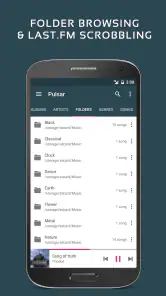
Make a messy collection easier to browse
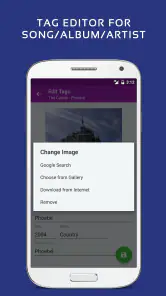
A practical way to get more from a local player is to keep album and artist tags tidy before relying on browsing or playlists. If tracks are tagged inconsistently, even a clean interface can’t make a collection feel organized. I’d also test a favorite album from beginning to end early on, especially if it is a live set; that gives you a better sense of whether the playback behavior suits the way you listen than jumping between unrelated tracks.
Artwork can make a library easier to scan, but it is not a substitute for accurate track information. When a cover or song appears in the wrong place, checking the file’s embedded details is a useful first step. This is a small bit of housekeeping, but it can save repeated searching later and makes playlists more dependable.
For someone moving a collection between devices, this is also a good reminder to think about the files themselves, not only the player. A carefully named album folder and consistent tags make it easier to find the same music in different apps, while artwork embedded in a file can travel with it. If you are troubleshooting a confusing library, change one thing at a time—such as correcting an album tag, then checking how it appears—rather than rearranging everything at once.
Sound adjustments without making them a chore
For those who like to fine-tune their listening experience, the built-in equalizer is a gift. It comes with a bunch of presets, but if you're feeling adventurous, you can tweak it to your heart's content. There's something satisfying about creating that perfect sound curve that hits all the right frequencies.
My practical advice is to start with a preset or a modest adjustment and compare it with the unaltered sound at a comfortable volume. A strong bass boost may flatter one playlist but make another feel muddy, so I would avoid chasing a single setting that has to suit every album. The equalizer is most useful when treated as a small correction for your headphones or preferences, not as a promise that every recording will suddenly sound better.
And let's not forget the smart playlists. They automatically update based on your listening habits. So, if you’ve been on a 90s rock binge, it’s got you covered. It’s like having a personal DJ who knows exactly what you're in the mood for.
What heavy listening reveals
A quick test track tells you whether the basic controls make sense; a longer session tells you more about whether a player belongs in your routine. I’d try a full album, switch between a playlist and a familiar record, and use the phone as I normally would. That gives a realistic feel for how easy it is to resume listening and whether the app’s way of organizing music remains comfortable after the novelty wears off.
For a car trip, Android Auto support can make an existing local library more convenient without turning the phone into the main point of attention. I’d prepare the album or playlist before setting off rather than relying on lengthy browsing while parked or driving. At home, Chromecast gives another route for listening beyond the handset, but it makes sense only if casting already fits your setup. Those are practical extensions of a local collection, not replacements for the convenience of a streaming catalog.
One non-obvious advantage of keeping a small, purpose-built playlist is that it can make a local player feel more responsive than a large library screen. A commute playlist avoids searching through albums in a hurry; a separate long-form playlist can keep a live set or soundtrack in sequence. The compromise is that playlists take a little curation, while a streaming service may offer ready-made mixes with less effort.
Performance and device fit
I wouldn’t assume that a player’s light visual style guarantees the same experience on every phone. A large or untidy music collection can make browsing feel less immediate than choosing from a short, well-labeled library, so it is worth organizing files and tags if search results seem messy. For the same reason, I’d avoid judging stability from a single quick play: try a longer album session and see whether playback and controls fit your routine.
For playback in the car, Android Auto support is a useful reason to consider it, while Chromecast support makes it relevant when you want to send music beyond the handset. Those options matter most if they match equipment you already use; they are not a reason to buy the app if your listening happens entirely through a different ecosystem. The minimum requirement is Android 5.0, so older devices need to meet that baseline before installation.
On an older or heavily used phone, I’d keep the test simple and practical: try the app with the amount of music you actually expect to browse, then see whether playback fits alongside your everyday use. I wouldn’t draw conclusions about battery use or resource demands from appearance alone. If the phone feels strained, compare a short playlist with browsing the whole library and check whether the issue is tied to the collection or to your wider device workload.
Reliability also means being sensible about recovery. Before changing tags, moving folders, or rebuilding a carefully arranged library, keep your music files organized and avoid making several changes at once. If one album is displayed incorrectly, correcting its details is a more useful first step than assuming the player itself has lost track of everything. That approach makes it easier to identify the cause of a problem and protects the organization you already rely on.
Who will get the most from it
Rhythm Software’s music player is for listeners who value a personal offline library, album-focused playback, and direct control over sound. If you mainly stream, want an ever-changing catalog, or prefer an app built around recommendations, your existing service is probably the better fit. The app is rated for Everyone, and its paid price is $2.79; I’d weigh that against how often you listen to files you already own rather than treating it as a substitute for a streaming subscription.
It has an average rating of 4.4 from around 19,000 ratings, with roughly 2,000 written reviews and over 100,000 installs. Those figures suggest an established audience, but they don’t tell me whether its approach suits your library. I’d use the ratings as context, then decide based on the features that matter in your own listening routine.
For a person who has ripped albums, saved music for offline listening, or collected recordings that are not part of a streaming catalog, the app’s focus is easy to understand. It is also a reasonable fit for someone who wants an equalizer and album-oriented playback in one dedicated place. I would steer a listener toward a streaming service instead if their favorite part of music is discovering new artists, sharing recommendations, or having a catalog ready without maintaining local files.
It is worth asking what you expect “offline” to mean in your own routine. A player can make local files convenient, but it does not supply the music catalog for you; you need the tracks on the device in a format it can play. If you already have a collection, that is a straightforward arrangement. If you are starting from nothing and want instant access to new releases, the effort of assembling files may outweigh the appeal of a dedicated player.
How it compares with other ways to listen
Compared with a phone’s basic preinstalled player, Pulsar’s appeal is the more deliberate set of listening tools: gapless playback, an equalizer, playlists, and routes such as Chromecast and Android Auto. The trade-off is that a basic player may already be enough if you only tap a few tracks now and then. I’d pay for a more focused app when the collection is important enough that browsing, album flow, and sound adjustments noticeably improve everyday listening.
Compared with streaming apps, it asks for a different kind of effort. You bring the music and organize it; in exchange, your listening is centered on your own collection rather than a service’s changing library. That is a meaningful distinction for people with live albums, personal recordings, or a stable set of favorites. It is less attractive if you switch constantly between unfamiliar artists or expect one search box to find nearly any song.
Is it worth choosing?
In a world where subscription services seem to rule, having a powerful offline player like Pulsar Music Player Pro is refreshing. It’s a one-time purchase, and you get to enjoy all its features without any interruptions. No ads, no in-app purchases sneaking up on you.
Honestly, if you're serious about your music and want an app that respects that, Pulsar Music Player Pro is a solid choice. It’s got the functionality of the big players without the clutter. Give it a shot, and let the music speak for itself.
Version context and final performance check
The app first released on September 8, 2015, and version 1.13.8 is the current version. That gives useful context for an established local-player option, but I still would not choose it solely on age or version number. In daily use, the better test is whether your collection is organized, the controls make sense to you, and the supported listening routes match your setup.
My verdict is that Pulsar is a focused choice, not a universal replacement for every music app. I’d recommend it to someone who wants to play and shape a personal library, especially across headphones, a car, or a Chromecast setup. If you need streaming discovery first, or your phone’s operating system does not meet Android 5.0, I’d look elsewhere. For everyone else, it is worth considering for a calmer, library-first way to listen.
Pulsar Music Player Pro Frequently Asked Questions
Can I install Pulsar Music Player Pro on an iPhone or iPad?
Pulsar Music Player Pro is an Android music player, so it is intended for Android devices rather than iPhones or iPads. Before downloading, check that your device runs Android 5.0 or later and that the app is available through the Android app store you use. If you mainly listen on an Apple device, you will need to look for a player designed for iOS.
What kind of music files is Pulsar Music Player Pro for?
Pulsar Music Player Pro is a full-featured player for MP3 and other audio files stored on your device. It is a practical choice if you already keep a personal music collection and want an app to browse and play it. The published feature description also notes support for almost all audio formats, though your individual files still need to be accessible to the app.
What Android version do I need to run Pulsar Music Player Pro?
Pulsar Music Player Pro requires Android 5.0 or later. That makes it suitable for a broad range of Android phones and tablets, provided they meet this minimum system requirement. Before downloading, check your device’s Android version in its settings, especially if you are using an older device. A compatible operating system is the key requirement to consider.
Can I use Pulsar Music Player Pro with Android Auto or Chromecast?
Yes. Pulsar Music Player Pro supports both Chromecast and Android Auto, so you can listen through compatible devices and use the player in supported car systems. These options complement its core role as a player for audio stored on your device, giving you more ways to enjoy your music at home or while travelling.
What should I know about the cost and age rating before downloading Pulsar Music Player Pro?
Pulsar Music Player Pro costs $2.79 and is rated Everyone, making its age classification suitable for a general audience. It is a paid music and audio app from Rhythm Software. If you are deciding whether it fits your needs, consider that it is focused on playing and organizing music rather than providing a streaming subscription.
Pros
- User-friendly interface design
- High-quality audio playback
- Extensive file format support
- Customizable themes and colors
- Offline music playback available
Cons
- Limited podcast support
- No integration with online streaming
- Occasional app crashes
- Ads in the free version
- Limited cloud sync options
- Category
- Music & Audio
- Version
- 1.13.8












