PSA | Pokémon and Sports Cards
- 783.00
- 4.7
- Installs
- 1.00M
- Price
- Free

Screenshots
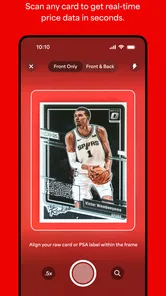
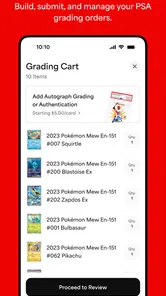
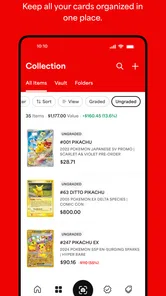
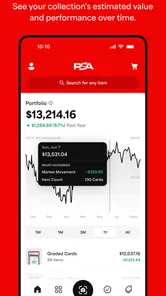

Analysis by Reviewed
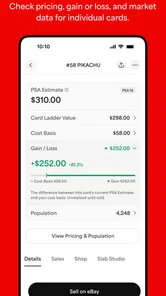
When I’m sorting cards, I want to know what deserves a closer look without turning a quick check into a research project. PSA | Card Grading Service is aimed at that part of collecting: identifying cards, considering their condition and value, and using PSA’s grading service. It’s a free Books & Reference app from Collectors, and its focus makes it most useful to people who already handle trading cards rather than anyone looking for a general reference library.
Quick checks and the pace of a session
The app’s “Scan. Price. Grade.” idea suggests a practical sequence: identify a card, assess whether it merits more attention, then consider grading. In a real collection, those steps are not equally quick. Scanning can help narrow down what you have, but a camera view cannot settle every question about a card’s condition. I’d treat the result as a starting point for inspection, not a substitute for looking closely at corners, edges, surface and centering under good light.
That distinction matters when you’re working through a stack. I’d scan cards in manageable batches, keeping the uncertain ones aside rather than interrupting the whole session to investigate each result. It’s a simple way to preserve momentum and avoid treating an initial match or estimate as a final decision. The app is more helpful as a triage tool than as an instant answer to whether every card should be submitted.
When a collection gets busy
A realistic use is sorting a recent trade or a box you haven’t reviewed in a while. I’d use the app to identify candidates, then compare those candidates with my own notes and the card’s actual condition before deciding what to do next. That extra step is especially useful when several cards look similar: a name or set match alone does not tell you whether a particular copy is worth grading.
For a larger collection, I’d avoid relying on memory as the workflow. Keep a separate shortlist of cards that need a second look, and make decisions in a quieter pass rather than while scanning quickly. That reduces the chance of confusing a promising card with one that has visible wear or an issue the camera didn’t make obvious. If your goal is simply to catalogue every item in detail, a dedicated spreadsheet or collection manager may give you more control over fields and personal notes.
Reliability, judgement and the grading decision
Collectors should separate three things that are easy to blur together: identifying a card, estimating its market relevance, and judging its physical grade. The app can support the process, but the final choice still calls for a collector’s judgement. A useful habit is to check the card itself before acting on a price or grade impression, especially when a small condition difference could change whether submission makes sense.
Submitting a card is a bigger commitment than looking it up. I’d first ask whether the card’s condition, likely value and personal importance justify sending it for professional grading. A card can be meaningful to keep even if grading is not practical, while a card that appears valuable may not be a good candidate once wear is inspected. This is where a familiar price guide or your own collection records can complement PSA rather than compete with it.
More From Our News Desk

Weather by Xiaomi Review: Clear at a Glance, Less Clear Up Close

X Under Pressure: Can It Recover When Posting Goes Wrong?

Clash of Clans Is Won Between the Battles

Android Auto Makes the Case for Quieter Car Software

MobiOffice: Transforming Mobile Productivity with Seamless Integration

EA SPORTS FC™ Mobile Soccer: Redefining Mobile Sports Gaming
Who will get the most from it?
The app makes the most sense for collectors who want a PSA-centered route from checking cards toward grading, particularly people who regularly sort, trade or consider selling. Beginners can use it to learn the vocabulary and build a more deliberate inspection habit, but I wouldn’t recommend trusting a scan as a lesson in condition by itself. Looking at a card carefully is still the skill that prevents an optimistic estimate from becoming an expensive assumption.
If you collect casually and rarely need grading, a general card database or a simple personal catalogue may be enough. Those alternatives can be better when your priority is broad organization rather than a grading workflow. On the other hand, collectors who already use PSA have a clearer reason to keep this app within reach: it brings the card-checking and grading purpose into one focused place.
Device expectations and everyday friction
PSA | Card Grading Service has been available since June 3, 2015, and its current version is 7.7.0. It requires iOS 8.0 or later, so it can suit devices that meet that minimum, though an older device may make camera-based work less comfortable than a newer one. I’d use a clean lens, steady lighting and a plain background when scanning; those small choices can make card details easier to capture and reduce the need to repeat a check.
The app is free and rated for Everyone. Its 4.6 average from around 5,300 ratings, alongside over 500,000 installs, suggests that many collectors have found a reason to try it, though those figures can’t tell you whether its workflow fits your own habits. If a scan stalls or gives an uncertain result, I’d move on to a manual check and return later rather than letting one card hold up the entire sorting session.
My performance verdict
My practical verdict is that this is best used as a focused helper, not as an authority that removes the need for inspection. It can make a sorting session more purposeful by helping you decide which cards deserve attention, while the grading decision still depends on condition, context and your goals. I’d recommend it to collectors who want to explore PSA’s process; I’d skip it if you only need a flexible inventory tool or expect a scan to settle every question.
Making a scan useful at home or at a card show
One small workflow choice makes a noticeable difference: decide what question you want the scan to answer before you pick up the phone. At home, that might be whether a card deserves a closer look; at a show, it may simply be a prompt to verify the identity later. I wouldn’t make a purchase or trade decision from a quick scan alone. Lighting, glare, sleeves and nearly identical versions can complicate visual identification, so treat any result as a lead to check, not a final verdict.
For a box of mixed cards, I’d separate the process into two passes. First, identify likely candidates and set aside anything ambiguous. Then inspect those cards individually, using a consistent light source and checking both the front and back. This avoids the common trap of letting a promising name or price distract from a flaw that matters to the card’s actual condition. It also gives you a more reliable basis for deciding which cards deserve time, rather than trying to make a grading decision while you are still sorting.
How it fits beside price guides and catalogues
PSA’s focus is its main advantage and its main boundary. Compared with a broad card database, it is more directly relevant when you are considering professional grading; compared with a spreadsheet, it is less suited to recording every personal detail about a collection. I’d use the app to support a grading-oriented check, then keep ownership notes, purchase history or condition observations wherever I already organize them. That division of labor is more practical than expecting one app to become a complete collection system.
Price information also needs context. A market figure is not a promise that your copy will sell for that amount, and a card’s condition can make a meaningful difference. Before treating an estimate as a reason to submit, compare it with the physical card and your own reason for collecting. If the goal is to decide whether a card belongs in your personal collection, resale value may matter much less than its meaning to you.
What to expect from repeated use
For occasional checks, the appeal is straightforward: open the app when a card raises a question, then return to sorting. During a long session, the camera and repeated decisions can become tiring even if the app itself is behaving normally. I’d take short breaks and keep a written shortlist, especially when comparing similar cards, because fatigue makes it easier to overlook a corner ding or mix up two candidates.
If a result seems wrong or unclear, I’d try again only after changing the conditions that could have affected the scan: remove distracting glare, steady the phone, and make sure the card is clearly framed. Repeating the same attempt under the same poor lighting is unlikely to resolve the uncertainty. If it remains unclear, a manual lookup or a second opinion from a knowledgeable collector is a sensible next step, not a failure of the workflow.
Who should leave it out of their routine?
This is not the tool I’d choose for someone who wants a complete digital archive with custom fields, detailed acquisition notes and flexible sorting. A spreadsheet or collection app built around inventory may be more suitable for that job. It may also be unnecessary if you rarely handle cards that you would consider grading. In those cases, the extra grading focus can feel like a detour rather than a benefit.
It is a better fit when checking cards is a recurring part of collecting and you want a direct path toward considering PSA grading. Even then, I’d keep expectations measured: the app can help organize a decision, but it cannot remove uncertainty about condition, market timing or whether submission is worthwhile for you. The most useful outcome may be deciding not to submit a card after a careful inspection.
A practical decision before sending a card
Before moving from a scan to a submission, I’d make a short checklist for myself: confirm the exact card, inspect its front and back, note visible wear, and decide what I hope grading will achieve. For a card I may sell, that means weighing its condition and likely market interest against the effort of the process. For a card I simply love, the reason may be preservation or personal satisfaction instead. Naming that reason helps prevent a scan from turning into an automatic instruction to submit.
For beginners, the most valuable habit is learning to distinguish identification from condition assessment. For experienced collectors, the useful habit is knowing when a quick check is enough and when a card merits slower research. In both cases, I’d use the app to narrow the field, then make the final call with the card in hand. That balance keeps the convenience without asking a camera or an estimate to do more than it can.
Alright folks, gather 'round because I've got something cool to share with you today. If you're a card collector or just dipping your toes into the world of collectibles, the PSA | Card Grading Service app is a must-check-out. Let me take you through my experience with it, and I promise, you'll be itching to try it yourself!
What’s the Buzz About?
So, here's the deal: card collecting is having a major comeback, and with that, the demand for authenticating and grading cards has skyrocketed. Enter the PSA | Card Grading Service app! This nifty tool is designed to make your card-collecting journey smoother than ever. I downloaded it with a bunch of skepticism, but guess what? It turned out to be a game-changer.
Easy Navigation and User-Friendly Interface
The first thing that struck me was how intuitive the app is. I mean, we've all had those moments where an app is so complicated, you feel like you need a degree just to figure it out. But not with this one. From the get-go, you can tell they’ve put a lot of thought into the user interface. A few taps and swipes, and I was exploring the app like a pro.
Comprehensive Grading Features
Now, let's talk about the main event: the grading service. The app allows you to submit your cards for grading, and it’s incredibly detailed about what each grade means. You get a breakdown of the card's condition, rarity, and market value. This information is gold for collectors looking to sell or trade their cards. Plus, the grading turnaround time is pretty decent. I was impressed by how seamless the whole process was.
Stay Updated with Real-Time Tracking
One of the coolest features has to be the real-time tracking of your card submissions. You can see where your cards are in the grading process, which is a huge relief for anyone who's ever sent off their prized possessions into the unknown. It’s like having a little grading assistant right in your pocket!
Engage with a Community of Fellow Collectors
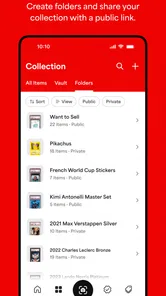
Being a part of the card-collecting community is a huge part of the experience, and the app taps into this beautifully. There’s a section where you can connect with other collectors, share your collections, and even trade tips and tricks. It adds a social element that makes the collecting journey a lot more fun and engaging.
In conclusion, if you’re serious about your card collection or even just curious, downloading the app is a no-brainer. It’s packed with features that cater to both newbies and seasoned collectors. Trust me, you’ll find yourself coming back to it again and again. Happy collecting, folks!
PSA | Pokémon and Sports Cards Frequently Asked Questions
Is PSA | Card Grading Service free to download?
Yes, PSA | Card Grading Service is free to download. It is a Books & Reference app from Collectors, with the short description “PSA” and the summary “Scan. Price. Grade.” The app may be useful for collectors who want PSA-related tools on their phone, while card grading itself is a separate service with its own submission process and fees.
What devices can run PSA | Card Grading Service?
PSA | Card Grading Service requires Android 8.0 or later. Before downloading, check your device’s operating system version to make sure it meets that requirement. The app is intended for mobile use, so having a compatible phone or tablet is the first practical step before exploring its scanning, pricing, and grading-related features.
What is PSA Card Grading Service?
PSA Card Grading Service is a professional service that evaluates and grades trading cards, including sports cards, collectible card games, and other trading card types. The service assesses the card’s condition, authenticity, and rarity to provide a standardized grade. This helps collectors and enthusiasts determine the card’s value and authenticity for buying, selling, or trading.
How does the PSA grading process work?
The PSA grading process involves sending your cards to PSA, where expert graders evaluate each card's condition, centering, corners, edges, and surface. After a thorough analysis, the card is assigned a grade on a scale from 1 to 10, with 10 being gem mint. The graded cards are then securely encapsulated in a tamper-evident holder for protection and display.
Why should I use PSA Card Grading Service?
Using PSA Card Grading Service can significantly enhance the value and credibility of your trading cards. A PSA grade provides a trusted, third-party assessment of a card’s condition, which is crucial for collectors looking to buy or sell cards at a fair market value. It also offers peace of mind regarding the card's authenticity and preservation.
Pros
- Accurate card grading results.
- Fast turnaround time for grading.
- User-friendly interface.
- Supports a wide variety of card types.
- Detailed grading report provided.
Cons
- Service can be expensive.
- Limited customer support options.
- Occasional delays in service.
- No mobile app version available.
- Complex submission process.











