ProCam X ( HD Camera Pro )
- 691.00
- 4.2
- Installs
- 1.00M
- Price
- $4.99

Screenshots
Analysis by Reviewed
I judge a phone camera app by whether its extra controls help me make better pictures, not by how many settings it can put on screen. ProCam X (HD Camera Pro) is aimed at people who want to take more control than the default camera usually offers, while keeping the convenience of shooting on a phone. That balance is its main appeal: it can make deliberate photography feel more accessible, but the controls matter most when you’re willing to slow down and use them.
More control, when the moment allows it
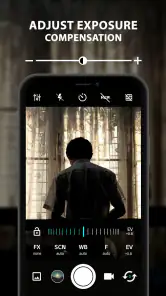
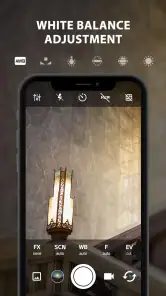
That slower approach is easiest to appreciate when a scene gives you a few seconds to think. Imagine taking a picture of a meal near a window: the food is in shade, while the background is bright. Instead of accepting the phone’s first automatic choice, you can use exposure and white balance adjustments to shape the result before you shoot. I’d make one change at a time and check the preview, rather than moving several controls at once and guessing which one helped.
This is also a useful way to learn. If a photo looks too dark, changing exposure and then comparing the result can teach you more than repeatedly tapping the shutter. The trade-off is that manual controls don’t remove the need to judge the scene. They give you more influence, but a poorly chosen setting can make a picture worse just as readily as a good one can improve it.
A more hands-on way to shoot
For a familiar everyday test, imagine photographing a friend beside a bright window. Automatic exposure may make the room look fine while turning the view outside pale; a live histogram gives you another way to judge brightness as you frame the shot. I’d use it as a guide, then adjust exposure and check the result rather than treating the display as a guarantee. That small habit can be more useful than trying to fix every problem after taking the picture.
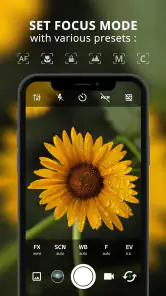
The same deliberate approach helps with close-ups and portraits. Manual focus can be useful when the phone keeps choosing the background or grabbing the wrong detail, but it also asks for steadier hands and a little patience. For a moving child, pet, or passing cyclist, I’d favor quick capture and burst shooting over carefully tuning several settings: control is valuable only when there’s time to use it.
Where it fits among camera apps
Compared with a phone’s built-in camera, this app is for someone who wants more direct input over the image rather than relying entirely on automatic decisions. Compared with a dedicated editing app, its value is at capture time: choosing how to take the picture instead of depending on later adjustments. Neither approach is automatically better. The standard camera is often the sensible choice for a spontaneous snapshot, while manual controls make more sense when lighting or focus is proving tricky.
One practical trade-off is that a feature-rich camera can add decisions at the exact moment you want to take a photo. I’d keep a simple routine: leave most controls alone for casual shots, then adjust focus, white balance, or ISO only when there’s a clear reason. In dim light, for instance, raising ISO may brighten the image but can also make it look less clean, so I wouldn’t assume that a brighter preview means a better photograph.
More From Our News Desk

Weather by Xiaomi Review: Clear at a Glance, Less Clear Up Close

X Under Pressure: Can It Recover When Posting Goes Wrong?

Clash of Clans Is Won Between the Battles

Android Auto Makes the Case for Quieter Car Software

MobiOffice: Transforming Mobile Productivity with Seamless Integration

EA SPORTS FC™ Mobile Soccer: Redefining Mobile Sports Gaming
A useful routine for everyday shooting
For a family gathering, I’d begin with the settings that already work for the room and save manual adjustments for a specific problem: a face that is too dark, a bright window stealing attention, or focus landing on the wrong object. Before taking a sequence of pictures, I’d check that a previous adjustment hasn’t left the exposure or white balance looking odd in the new lighting. This quick reset is easy to overlook when moving between a dim living room and a brighter kitchen.
The histogram is best treated as an aid, not a scorecard. It can help reveal when highlights or shadows are being pushed too far, but it cannot decide whether a dark background is an intentional mood or a mistake. I’d use it to catch an exposure issue, then trust the composition and the way the image looks on screen. That balance keeps technical information useful instead of letting it distract from the picture.
When control is worth the extra attention
I’d recommend ProCam X (HD Camera Pro) to curious phone photographers who want to learn how exposure and focus choices affect a shot, and to experienced users who miss having those adjustments close at hand. It is less suited to anyone who wants the camera to make every decision, or who mainly needs fast, uncomplicated photos for messaging. If you rarely change camera settings, the phone’s built-in app may be a better fit.
It can also suit someone who takes the same kind of careful shot repeatedly, such as documenting a craft project or photographing an object for a personal listing. In those situations, making a small adjustment and keeping the framing consistent can be more useful than applying a filter afterward. For fast-moving events, however, I’d choose the quickest camera workflow available; the chance to fine-tune a frame is not much help if the moment has already passed.
The app is a paid photography tool from Imagi Mobile, priced at $4.99. It has a 4.2 average from around 24,000 ratings, with over one million installs, which suggests it has found an audience among people looking for more control on mobile. It is rated for Everyone, runs on Android 5.0 or later, and its current version is 1.26. Those details make it straightforward to judge whether it fits your device and budget before you commit.
First Impressions and Practical Limits
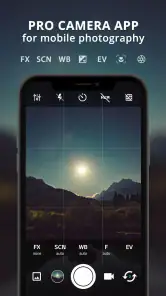
The first thing that strikes you about ProCam X (HD Camera Pro) is its sleek, user-friendly interface. As soon as I opened the app, I was greeted with a design that's intuitive and easy to navigate, even for someone who's not a tech whiz. It's like the app knows exactly what you need and places it right at your fingertips.
Still, an approachable layout and a capable camera are not the same thing as an automatic improvement in image quality. The result depends on the phone as well as the decisions made while shooting. I’d think of this app as a way to direct the camera more deliberately, not as a shortcut that turns every scene into a polished photograph without practice.
Features That Make You Go WOW!
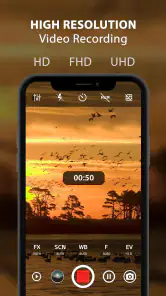
Now, diving into the features, let me just say, this app packs a punch! From manual controls that allow you to adjust the ISO, focus, and white balance to its rapid burst mode for capturing moments in quick succession, it's like having a DSLR in your pocket. The app's ability to shoot in 4K is a game-changer, especially when you're looking to capture those crystal-clear memories.
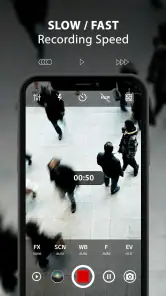
For video, I’d consider that resolution a choice to make before recording rather than a setting to turn on casually. Higher-resolution footage can be useful when fine detail matters, but it may not be necessary for a quick clip meant to be shared on a small screen. I’d match the capture choice to how I plan to use the video, instead of assuming the largest option is always the right one.
What really caught my attention was the live histogram feature. For those of you who geek out over technical details, this is a dream come true. It provides real-time exposure data, helping you nail that perfect shot every time. And let's not forget the impressive HDR mode that enhances the dynamic range of your photos, making them pop with vibrancy.
I’d be careful not to treat HDR as a universal fix. In a scene with strong contrast it can help keep more of the bright and dark areas visible, but the natural look of a picture still depends on the scene and the camera’s processing. When I want a restrained result, I’d compare the image with and without that extra processing rather than deciding from the feature name alone.
Performance: Smooth and Reliable
When it comes to performance, ProCam X doesn't disappoint. The app runs smoothly without any noticeable lag, which is crucial when you're trying to capture fast-moving subjects. It's reliable, and in my experience, it hasn't crashed once—a big thumbs up in my book!
For a moving subject, I’d still keep expectations practical. Burst shooting gives you more chances to catch a good expression or a moment of action, but it does not guarantee that every frame will be sharp or well timed. I’d use it for a brief sequence, then pick the strongest image rather than firing continuously and ending up with a cluttered camera roll.
Choosing it over a simpler camera
In a sea of photography apps, what makes ProCam X stand out? Well, it's the combination of professional-grade features and a user-friendly interface that makes it accessible to everyone. Whether you're capturing the breathtaking hues of a sunset or snapping candid shots at a family gathering, this app has got you covered.
That said, “accessible to everyone” does not mean everyone will want to use it every day. Someone who prefers the phone to choose focus and exposure automatically may find the built-in camera faster and less distracting. A dedicated editing app is the better choice when the main task is correcting or styling pictures that have already been taken. I’d choose this one when I want to influence capture itself, especially if the phone’s automatic result keeps missing what I’m trying to show.
And here's the kicker: all these features come without the hefty price tag of a professional camera. It's an investment that pays off, especially if you're someone who loves capturing life's moments in the best quality possible.
Before paying, I’d ask myself whether I’ll actually use controls such as ISO, focus, and white balance, or whether I’m simply hoping for better photos without changing how I shoot. The paid price makes the decision more deliberate than trying a free default camera, so the value is strongest for someone who wants to practice and expects to return to these tools. If I only take occasional snapshots, the extra control may stay unused.
My recommendation
So, if you're on the hunt for an app that transforms your smartphone into a powerhouse camera, give ProCam X (HD Camera Pro) a shot. It's more than just an app; it's your ticket to stunning photography. Happy snapping!
My recommendation is more measured: I’d choose it for planned photos, difficult focus, or learning how exposure affects a scene, and keep the standard camera ready for quick moments. That split makes the most of what this photography app offers without turning every snapshot into a settings exercise. If you enjoy making those choices, its manual approach is a worthwhile fit; if you want the phone to handle everything, a simpler camera will likely feel better.
ProCam X ( HD Camera Pro ) Frequently Asked Questions
Does ProCam X need camera or storage permissions to work?
A camera app needs permission to access your phone’s camera to take photos and record video. ProCam X may also request access to storage or media so you can save and manage what you capture. Review each permission request on your device and allow only the access you are comfortable with; you can also check or change app permissions in your phone’s settings.
Will ProCam X work with the camera hardware on my particular phone?
ProCam X is designed to provide photography controls on a mobile phone, but the camera hardware and Android implementation can vary from one device to another. The controls and results you see may therefore depend on your phone’s cameras and what they support. If you rely on a particular manual setting, try it on your device before making the app your main camera.
Can I use ProCam X without an internet connection?
Taking photos with a camera app is generally a device-based activity, so an internet connection is not usually needed simply to capture an image. ProCam X’s manual controls are intended for use while photographing, but store access, installation, updates, and any connected services may require a connection. If you plan to shoot somewhere offline, install the app beforehand and test the camera on your phone.
Will ProCam X replace my phone’s built-in camera app?
ProCam X can serve as an alternative camera interface for users who want manual controls such as focus, white balance, ISO, and shutter speed. Whether it replaces your built-in camera app in everyday use depends on your habits, phone, and preferred workflow. You can keep both apps installed and choose ProCam X when you want more hands-on control over a shot.
Can I try ProCam X before paying for it?
ProCam X is listed at $4.99, so check the app store purchase screen before proceeding to confirm the amount and terms shown for your account. If you want to assess its controls and interface first, look through the app’s store description and user reviews. The purchase price is worth weighing against how often you expect to use the manual photography options.
Pros
- High-resolution photo capture quality.
- Manual controls for professional photography.
- Intuitive and user-friendly interface.
- Supports RAW file format for editing.
- Variety of real-time photo effects.
Cons
- Limited features in free version.
- Battery consumption can be high.
- Occasional app crashes reported.
- Not compatible with all devices.
- Some features need improvement.
- Category
- Photography
- Version
- 1.26











