Pro Credit Card Reader NFC
- 53.00
- 4.4
- Installs
- 10.00K
- Price
- $5.99
Screenshots
Analysis by Reviewed
For me, the useful way to approach Pro Credit Card Reader NFC is not as a faster way to pay at a till, but as a tool for reading public data from a contactless bank card. That distinction matters: it is aimed at people who want to inspect what an NFC card makes available, rather than replace a wallet or a bank’s own account app. I would consider it when I have a specific reason to check a card, not as something I need open during every purchase.
A sensible first-use routine
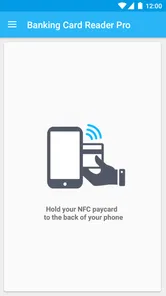
My baseline workflow would be deliberately simple: open the reader, hold the phone’s NFC area close to the card, and give the scan a moment to complete. NFC antennas can sit in different places on different phones, so if the first attempt does nothing, I would move the card slowly across the back of the phone instead of repeatedly tapping at random. A card left inside a wallet can also be harder to read, so taking it out is a practical first troubleshooting step.
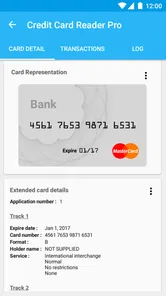
I would begin with one card and read only what I actually need. That makes it easier to tell whether the phone and card are communicating and avoids turning a quick check into a confusing pile of results. If the app presents card information, I would treat it as a snapshot of data available through contactless communication, not as a complete account statement or a substitute for the issuer’s records.
Check your expectations before scanning
The word “reader” can suggest more than one thing. Here, the useful expectation is that an NFC-enabled phone can inspect public data on a compatible contactless banking card. It does not mean the phone becomes a payment terminal, and it should not be approached as a way to authorize purchases or manage an account. For balances, posted transactions, disputed charges, or card controls, I would go to the bank’s official app or contact the issuer.
I would also check that NFC is enabled on the phone and that the device meets the app’s system requirement. The app is listed for Android from version 5.0, and its current version is 5.5.11. Since phone hardware and NFC placement vary, a supported operating system alone does not guarantee that every handset will read every card equally well. A short test with the card held still is a better guide than assuming the feature will behave identically across devices.
Getting Started with Ease
From the moment I downloaded the Pro Credit Card Reader NFC app, I was curious to see how it would integrate with my daily transactions. Setting it up was a piece of cake. You don't need to be a tech wizard to figure this one out. Just a few taps here and there, and you're ready to roll. I appreciate apps that value my time, and this one surely does.
Features That Stand Out
The app is a finance tool from developer Julien MILLAU, with an average rating of 4.3 from around 960 ratings and over 10,000 installs. It costs $5.99, is rated for Everyone, and has been available since November 5, 2015. That makes the paid decision worth thinking through: I would buy it for a recurring card-reading task, not just because I am curious about NFC once. Its focused purpose is more relevant than the install count when deciding whether the price makes sense for me.
More From Our News Desk

 Gmail
Gmail in a Busy Inbox: Who Benefits Most?
From first account to crowded workday, Gmail earns its place through dependable search and flexible sorting—but its best fit depends on how much inbox maintenance you can tolerate.

 Prime Video
Switching to Prime Video: What Changes in Your Viewing Routine
Prime Video can make a compelling second home for streaming, but switching means learning a different catalog, rental layer, and route from browsing to playback.

 Universal TV Remote Control
 Works Best as a Reliable Backup
A phone remote earns its place through quick setup and reliable habits. Here is how to get more from Universal TV Remote Control—and where its limits show.

 Weather - By Xiaomi
Weather by Xiaomi Review: Clear at a Glance, Less Clear Up Close
Xiaomi’s weather app makes everyday forecasts quick to scan, but its calm surface can leave useful details and recovery paths harder to find than they should be.

 X
X Under Pressure: Can It Recover When Posting Goes Wrong?
A resilience-focused review of X, examining setup, mistaken posts, interruptions, weak connections, and the gaps that matter when recovery needs to be dependable.

 Clash of Clans
 Is Won Between the Battles
Its raids are quick; its community is a long-term project of coordination, teaching, rivalry, and shared responsibility—with all the friction that entails.
Latest News



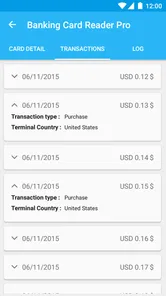
The app boasts several features designed to make your life easier. One of my personal favorites is the ability to read multiple card formats. Whether it’s a standard credit card or a fancy new NFC card, the app handles it all. I also found the transaction history feature particularly useful. It keeps track of all your interactions, which is great for someone like me who tends to forget what they’ve spent on.
Another feature worth mentioning is the security measures. In today's world, ensuring your financial data is secure is a top priority, and this app doesn't disappoint. With encryption and secure data storage, I felt at ease knowing my information was safe.
What I would check in the settings
Before making a habit of using any card reader, I would look through its available settings and decide what information I genuinely need to retain. If the app offers choices about saved scans or history, I would keep only what helps with my task and clear anything I no longer need. A saved record can make repeat checks easier, but a banking card is sensitive enough that convenience should not automatically mean keeping every result indefinitely.
I would also make a small, repeatable distinction between reading and record-keeping. If I need to compare a card’s public data with something from my bank, I would write down only the relevant detail in a secure place rather than treating a reader’s history as formal proof of a transaction. Card readers and banking apps serve different purposes; the issuer remains the right source for current account activity and official explanations.
Day-to-Day Use
Using the app daily was surprisingly smooth. I found it particularly helpful when I was in a rush, like when grabbing a quick coffee or making a swift purchase at a local store. The NFC capability is lightning-fast, making transactions almost instantaneous. No more fumbling with cash or cards when you're in a hurry.
For a more realistic everyday use, imagine checking which of two contactless cards I picked up before leaving home, or inspecting a card while sorting out which one I use for a particular account. I would do that at a calm moment, with the card out of its wallet and the phone ready, then close the reader and put the card away. That is where a dedicated NFC reader can be handy: it helps answer a narrow question without opening a bank account screen and searching through unrelated information.
It is not, however, a shortcut for checking whether a recent purchase has cleared. A quick coffee may be an easy example of contactless use, but an NFC scan of the physical card should not be confused with retrieving the merchant’s latest charge. If I needed to confirm a payment, I would check the bank’s transaction list. That boundary keeps the app useful without asking it to do a job it is not meant to do.
Repeatable habits for quicker checks
Experienced use here is less about hidden tricks and more about consistency. I would learn where my own phone’s NFC area sits, use the same card orientation each time, and avoid moving the card once a scan begins. Those habits reduce needless retries. If a read fails, I would first check NFC, remove the card from any wallet, and reposition it; changing one thing at a time makes it easier to identify the cause.
If I regularly inspect more than one card, I would scan them one at a time and label any notes outside the app in a way that does not expose full card details. That is a practical trade-off: a little organization helps avoid mixing up results, while copying sensitive information into an unsecured note creates a problem the reader cannot solve. The safest useful record is the minimum one that answers the question I had.
The app’s transaction-history feature can be convenient for revisiting past interactions, but I would not treat it as a spending tracker. A card scan is not the same thing as a confirmed purchase, and a reader’s record cannot replace the issuer’s account history. Keeping that distinction clear prevents a useful log from becoming misleading bookkeeping.
Where it fits among the alternatives
Compared with a bank’s own app, this reader has a narrower job: it focuses on public NFC card data rather than balances, statements, card freezes, or account support. The bank app is the better choice for managing money and verifying transactions. Compared with a generic NFC utility, a banking-card-focused reader may be more relevant when the object being examined is a payment card, but I would still judge it by whether it reads the particular card and information I need.
There is also a simple alternative: inspect the card itself or use the issuer’s documentation when all I need is a visible detail, such as the card’s printed information. Installing a paid reader is harder to justify for a one-off curiosity. Its $5.99 price makes most sense to someone who expects to use card reading repeatedly and values having a dedicated tool at hand. If I only need account activity, or want to accept contactless payments from customers, I would choose a different kind of service altogether.
One question people often have is whether every scan will reveal the same amount of information. I would not assume that. What a phone can read depends on the card and the data it makes available over NFC, so the app should be treated as a reader, not a promise that every card exposes a complete record. Another practical question is whether an unsuccessful scan means the card is incompatible; not necessarily. The phone’s NFC position, a wallet between the phone and card, or a disabled NFC setting can all be reasonable things to check before drawing that conclusion.
Privacy and the limits of confidence
Because the subject is a payment card, I would be cautious even when a reader feels straightforward. I would scan my own card, or one I have clear permission to inspect, and avoid passing a card around merely to demonstrate the app. I would keep the phone in my control during a scan and avoid saving or sharing card-related results unless there is a clear reason. Those are sensible habits for any tool that handles financial information, regardless of how convenient it feels.
The published description of encryption and secure storage is reassuring in principle, but I would still avoid treating any app as a vault for sensitive financial records. Security depends on more than one feature: the phone’s lock, who can access the device, and how carefully I handle anything I save all matter. If my goal is to protect an account, I would rely on the bank’s own controls rather than assume an NFC reader can provide account-level protection.
There are limits to what an NFC reader can tell me. It cannot settle a billing dispute, confirm a pending transaction, or explain why an issuer declined a purchase. Nor would I use a card scan to make a high-stakes financial decision without checking the relevant information through the bank. The app is most useful when the question is small and specific; the more consequential the question, the more important it is to use an official account channel.
Who should use it—and who should pass
I can see this being worthwhile for someone who repeatedly needs to inspect contactless banking cards, whether for personal organization, checking cards they are authorized to handle, or learning what a particular card makes available to an NFC reader. The focused workflow can be more convenient than opening a broad utility app each time. The rating of 4.3 from around 960 ratings suggests a generally positive reception, though ratings alone cannot tell me whether a specific phone-and-card combination will work smoothly.
I would skip it if I only want to tap my phone to pay, monitor spending, check a balance, or accept payments. Those needs call for a wallet, bank app, or payment service rather than a card reader. I would also pause before paying if I have no repeat use in mind. A one-time experiment may not justify buying a specialized finance app, especially when the card’s visible details or the issuer’s own tools already answer the question.
Final Thoughts
Overall, the Pro Credit Card Reader NFC has made my financial interactions so much easier and more secure. It's the kind of app that once you start using, you wonder how you ever managed without it. Whether you're tech-savvy or just someone looking for a simple solution to manage your contactless transactions, this app is definitely worth checking out.
So, if you're looking for a reliable and efficient way to handle your contactless payments, I'd say give this app a shot. It’s like having a little tech-savvy assistant in your pocket, making life just that much more convenient.
My practical verdict
I would describe this as a focused tool for a particular NFC-reading task, rather than an essential companion for everyday payments. The strongest reason to choose it is that you have a repeatable need to inspect public information from contactless bank cards and want a dedicated reader for that job. The strongest reason to look elsewhere is that you actually need payment processing, a full spending record, or authoritative account details.
My best advice is to decide what you expect to learn from a scan before installing it, then test with a card you are entitled to read and keep only the information you need. With that modest expectation, a compatible phone, and careful handling of results, the app has a clear place. Without those conditions, a bank app or a simpler way of checking the card is likely to be the more sensible choice.
Pro Credit Card Reader NFC Frequently Asked Questions
Is Pro Credit Card Reader NFC available for Android, and what does it cost?
Pro Credit Card Reader NFC is an Android finance app by Julien MILLAU. It costs $5.99, so it is a paid download rather than a free app. Before purchasing, make sure your device meets the Android requirement and has NFC, since the app is intended to read public data from contactless banking cards.
What does Pro Credit Card Reader NFC read from a contactless card?
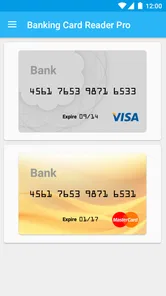
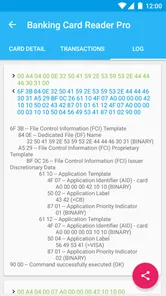
The app is described as reading and extracting public data from NFC contactless banking cards, including VISA and MasterCard. It is a reader for information exposed through a card’s NFC function, not a general-purpose payment terminal. A card’s available data can depend on its issuer and technology, so results may differ between cards.
What is the Pro Credit Card Reader NFC app?
The Pro Credit Card Reader NFC app is a powerful tool that allows users to read and manage data from their NFC-enabled credit cards directly on their smartphones. This app provides a convenient way to view card information, transaction history, and other relevant details securely, making it easier for users to keep track of their credit card usage.
Is the Pro Credit Card Reader NFC app safe to use?
Yes, the Pro Credit Card Reader NFC app is designed with security in mind. It uses advanced encryption protocols to ensure that all data read from the credit card is securely stored and transmitted. Users can rest assured that their sensitive information is protected while using this app. However, it's always recommended to use such apps in a secure and trusted environment.
What devices are compatible with the Pro Credit Card Reader NFC app?
The Pro Credit Card Reader NFC app is compatible with most modern Android and iOS devices that have NFC (Near Field Communication) capabilities. Users should ensure that their smartphone or tablet supports NFC technology before attempting to download and use the app, as this is essential for the app's functionality.
Pros
- Efficient NFC scanning capability.
- Supports various card types flawlessly.
- User-friendly interface design.
- Secure data handling measures.
- Quick setup and easy usage.
Cons
- Limited to NFC-enabled devices.
- Occasional connectivity issues.
- Needs regular updates for new cards.
- Privacy concerns with sensitive data.
- Not suitable for non-tech-savvy users.