

Podcast App
- 5.06K
- 4.3
- Installs
- 1.00M
- Price
- Free

Screenshots
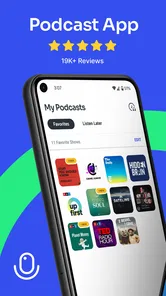
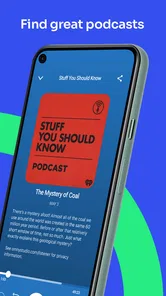
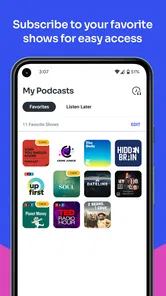
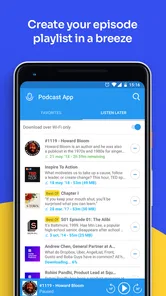
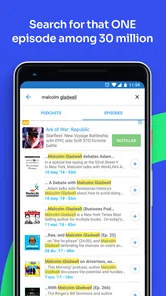
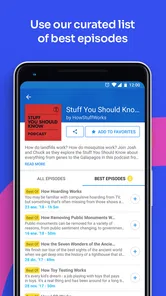
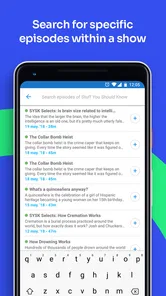
Analysis by Reviewed
I approached Podcast App as the sort of tool I would use during a commute, while cooking, or when I wanted spoken audio without spending time managing a complicated music library. It is a free Android app in the Music & Audio category, developed by Evolve Podcast App For Android, and its purpose is refreshingly clear: help me find and listen to podcasts from one place.
That simplicity is also the main question behind the app. A podcast player becomes part of a personal routine very quickly, so convenience matters, but so do visible choices around accounts, data, permissions, and paid features. My experience with this app is that it is easy to approach and broadly useful, yet it deserves a little attention before becoming the only place I keep my listening habits.
How Podcast App feels in everyday use
The first thing I notice is that the app is aimed at people who want a straightforward podcast experience rather than a platform filled with unrelated entertainment. The store summary calls it a podcast app for Android, and that description is accurate without telling the whole story: the useful part is not the label, but how quickly the app can fit into a normal day.
For example, I can imagine opening it before leaving home, choosing a show for the journey, and returning later when I have a few quiet minutes. That kind of stop-and-start listening is where a dedicated podcast player makes more sense than a general music service. Music apps often place podcasts beside albums, playlists, radio stations, and recommendations, while this app keeps the experience centered on spoken episodes.
It is also a practical choice for someone moving from radio to on-demand listening. Instead of waiting for a program to air, I can select an episode when it suits me. That matters for news discussions, interviews, language practice, history programs, and long-form conversations, where the ability to pause and continue is more valuable than a large music catalog.
The app has been available since March 18, 2016, which gives it a longer history than many newer podcast tools. Its current version is 3.35.2, and it runs on Android 7.0 or later. Those details make it accessible to people who keep an older phone, although anyone using a very old device should still pay attention to how smoothly the current build behaves on their particular hardware.
Its audience is not tiny. Podcast App has passed one million installs, with an average rating of 4.3 from about twenty-two thousand ratings and roughly five thousand one hundred written reviews. I would not treat those figures as a guarantee that every listener will have the same experience, but they do suggest that the app has reached a substantial group of Android users and has prompted enough feedback to be worth considering seriously.
More From Our News Desk

 Gmail
GmailGmail in a Busy Inbox: Who Benefits Most?
From first account to crowded workday, Gmail earns its place through dependable search and flexible sorting—but its best fit depends on how much inbox maintenance you can tolerate.

 Prime Video
Switching to Prime Video: What Changes in Your Viewing Routine
Prime Video can make a compelling second home for streaming, but switching means learning a different catalog, rental layer, and route from browsing to playback.

 Universal TV Remote Control
Universal TV Remote Control Works Best as a Reliable Backup
A phone remote earns its place through quick setup and reliable habits. Here is how to get more from Universal TV Remote Control—and where its limits show.

 Weather - By Xiaomi
Weather by Xiaomi Review: Clear at a Glance, Less Clear Up Close
Xiaomi’s weather app makes everyday forecasts quick to scan, but its calm surface can leave useful details and recovery paths harder to find than they should be.

 X
XX Under Pressure: Can It Recover When Posting Goes Wrong?
A resilience-focused review of X, examining setup, mistaken posts, interruptions, weak connections, and the gaps that matter when recovery needs to be dependable.

 Clash of Clans
Clash of Clans Is Won Between the Battles
Its raids are quick; its community is a long-term project of coordination, teaching, rivalry, and shared responsibility—with all the friction that entails.
Latest News



The listening routine I would recommend
I would start by using it with a small group of shows instead of immediately moving an entire listening history into the app. That makes it easier to judge whether discovery feels comfortable, whether playback fits my routine, and whether the app gives me enough control over the way I consume episodes.
A useful test is to choose three different kinds of programs: a short daily show, a longer weekly conversation, and an occasional series. The first reveals whether the app suits quick sessions, the second shows how well it handles extended listening, and the third helps me decide whether the organization tools are strong enough for irregular listening habits.
This approach also exposes an important trade-off. A focused podcast application can feel calmer than a broad audio platform, but it may not replace every feature I already use elsewhere. If my listening is split between podcasts, music, audiobooks, and live radio, keeping everything in one established service may be more convenient than maintaining a separate player.
Trust starts with what I can actually see
For me, trust is not created by a polished interface or a large install figure. It comes from being able to understand what I am choosing, what I am paying for, and what information I am sharing. With this app, I would review the permission prompts and privacy choices shown on my own device rather than assuming that every installation presents the same experience.
That is especially important because podcast listening can reveal personal interests. A show about health, finances, religion, relationships, politics, or work can say something sensitive about the listener even when the app is only being used for playback. I therefore prefer to grant only the access that is clearly needed for the action I am trying to perform, and I avoid accepting a prompt automatically just because I want to start listening.
The app is free to install, but it includes in-app purchases priced from $19.99 to $34.99 per item. That makes the purchase screen an important part of the trust experience. I would read the wording carefully, check whether a paid option is optional for my intended use, and make sure I understand whether a purchase is a one-time unlock or connected to another billing arrangement before confirming it.
My practical rule is simple: treat every permission and purchase screen as a decision, not as a formality. That habit is useful here and with any audio app that may become part of a daily routine.
Controls that deserve a deliberate check
Before settling in, I would look through the app’s visible settings and account-related screens. The important questions are practical: can I use the core listening experience without creating an account, can I see or change any profile information, can I control notifications, and can I manage paid access from a clear location?
I do not want to invent an answer to those questions because the screens presented can vary by device, release, and sign-in path. My advice is to inspect them directly during setup. If a service asks for an account, I consider whether that account provides a real benefit for my use, such as keeping preferences available across devices. If I only listen on one phone, I may prefer the least complicated route.
Notifications deserve special attention. Podcast reminders can be helpful when I follow a regular show, but they can also become noise when I subscribe casually. I would enable only the alerts that support an actual habit, then turn off anything that interrupts work, sleep, or travel. A quiet notification setup often makes a bigger difference than a crowded collection of extra features.
I would also check Android’s system controls after installation. The operating system gives me a useful second layer of oversight, because I can review permissions, restrict notifications, and remove the app if it no longer fits my needs. That is more reliable than assuming I will remember every choice made during the first launch.
Where data sensitivity becomes real
The most sensitive moment is not necessarily pressing play. It is the combination of search, subscriptions, listening history, and any account activity that may build a picture of my interests. Even when each individual action feels harmless, the pattern can become personal over time.
For that reason, I would avoid searching for highly private subjects on a shared phone or while signed into an account that other people can access. I would also think twice before leaving a personal listening queue visible on a device used by family members or colleagues. These are ordinary precautions, but they matter more when an app is used every day.
Another moment to watch is moving between networks. Listening over mobile data can consume a plan faster than expected, particularly with long episodes. I would check Android’s data controls and the app’s own playback options before using it away from Wi-Fi. If the app offers a download or offline workflow on my device, I would test it with one episode first, then confirm where the file is stored and whether it remains manageable.
That last step is easy to overlook. Offline listening is valuable on a train, during a flight, or in an area with unreliable reception, but downloaded episodes can quietly fill storage. I would make a habit of removing completed downloads and keeping only the episodes I genuinely plan to hear soon. This is a small workflow improvement that prevents the app from becoming a hidden storage problem.
Who will appreciate it most
I think Podcast App is best suited to Android listeners who want a dedicated home for spoken audio and do not need their podcast collection tied to a larger music ecosystem. It should appeal to people who listen in short sessions, follow a manageable number of shows, or want to separate podcasts from their music library.
It is also a reasonable starting point for someone who has never used a podcast player. The focused purpose makes the learning curve less intimidating than opening a large media service with several content types competing for attention. A new listener can concentrate on finding programs, building a routine, and deciding which subscriptions are genuinely useful.
People using older Android phones may also find the minimum operating system requirement encouraging, since Android 7.0 is not limited to recent hardware. Still, compatibility is only the first step. Performance, battery behavior, and available storage depend on the phone, so I would test the app during a normal day rather than judging it only from the installation screen.
Who should choose another route
I would hesitate to recommend it as the main audio app for someone who wants podcasts, music, audiobooks, and live content in one tightly integrated service. A general streaming platform may be a better fit in that case, especially if convenience matters more than having a dedicated podcast environment.
I would also be cautious if I need highly visible, fine-grained account controls or a very specific privacy workflow. The right choice depends on what the app shows during installation and use. If those controls are difficult for me to locate, I would prefer a player whose settings make data, account, and subscription choices immediately understandable.
Likewise, listeners who manage a very large archive should test organization before committing. A small collection can feel easy in almost any player, while hundreds of subscriptions and unfinished episodes place much greater demands on search, filtering, queues, and cleanup. I would not assume that a pleasant first session automatically means the app is ideal for heavy podcast management.
Small habits that make the experience better
My first tip is to keep subscriptions intentional. Rather than following every interesting result, I would listen to one episode before deciding whether a show deserves a permanent place in the library. This reduces notification clutter and makes the listening queue easier to trust.
My second tip is to separate discovery from commitment. I would use search to explore, but I would not treat every recommendation as something I need to save. That distinction is especially useful when the app presents many choices and I want a calm, predictable home screen.
My third tip is to review paid choices when I am not in a hurry. A purchase made while trying to start an episode is more likely to be misunderstood than one made after reading the description and checking the billing details. Since individual in-app items range from $19.99 to $34.99, I would take a moment to confirm exactly what I am unlocking and whether it matches my needs.
My fourth tip is to perform a monthly cleanup. I would remove shows I no longer follow, clear completed episodes, review notifications, and revisit Android permissions. This takes little time and keeps the app aligned with my current habits rather than the interests I had several months ago.
How it compares with familiar alternatives
Compared with a general music streaming service, this app has a clearer identity. It is not trying to make podcasts one tile among many types of media. That focus can make sense for someone who mostly listens to spoken programs and wants fewer distractions.
Compared with a phone’s built-in media tools, a dedicated podcast app is more appropriate for discovering and maintaining shows. Basic audio players are fine for files I already own, but they are not necessarily designed around ongoing podcast listening. Podcast App occupies that middle ground: more focused than a simple file player, but potentially less attractive than a large subscription platform for someone who wants every kind of audio under one account.
The decision therefore comes down to priorities. If I value a dedicated Android podcast space and a free starting point, this app is worth testing. If I value a unified media subscription, advanced cross-device continuity, or extremely detailed library management above all else, I would compare it carefully with the alternatives already installed on my phone.
My cautious verdict
After looking at it as both a listener and a privacy-conscious user, I see Podcast App as a sensible option rather than an automatic recommendation for everyone. Its purpose is easy to understand, its long availability and broad Android reach make it approachable, and the free entry point lowers the barrier to trying a dedicated podcast player.
At the same time, I would not ignore the paid items, permission prompts, notification settings, or the personal nature of listening history. Those details should be checked directly on the device before I build a long-term routine around the app. The best experience comes from making deliberate choices instead of accepting every default.
My recommendation is to try it with a small, low-risk podcast collection first. If the controls are clear, the playback routine feels comfortable, and the purchase and account choices match what I want, it can become a useful everyday Android companion. If I need a complete all-in-one media service or unusually deep library and privacy controls, another option may serve me better.
For a listener who wants a focused, free way to begin with podcasts, I think it is worth a careful trial. I would keep the app only if its visible choices continue to feel understandable after the novelty of the first session wears off. That is the standard I use for any app handling personal interests: convenience matters, but control matters just as much.
Podcast App Frequently Asked Questions
Does Podcast App work on iOS, or is it only for Android?
Podcast App is presented as an Android podcast app, and its stated system requirement is Android 7.0 or later. If you use an iPhone or iPad, check the app store on your device for availability and compatibility before downloading. The Android version is listed in the Music & Audio category and is free to install, with optional in-app purchases.
Is Podcast App free to download, and are there optional costs?
Podcast App is free to install, so you can try it without paying upfront. In-app purchases are available, with listed prices ranging from $19.99 to $34.99 per item. Check the purchase details shown in the app before confirming a transaction, and keep in mind that an optional purchase is separate from the initial download.
What is the app’s age rating, and what does that mean for families?
Podcast App has a Teen content rating. Podcast episodes come from different publishers and may discuss mature subjects, so it is worth considering whether the app suits a younger listener. Parents and guardians can review listening choices and any available parental controls to help make the experience appropriate for their family.
Is Podcast App compatible with my Android device?
Podcast App is an Android app in the Music & Audio category, and it requires Android 7.0 or later. Before downloading, check your device’s operating system version in its settings to make sure it meets that requirement. The app is free to install, so you can try it without paying upfront, though optional in-app purchases are available.
Who makes Podcast App, and how popular is it?
Podcast App is developed by Evolve Podcast App For Android. It has passed one million installs and holds an average rating of 4.3 from around 22,000 ratings, alongside roughly 5,100 written reviews. Those figures suggest it has attracted a substantial listener base, though individual experiences can differ. Reading recent reviews can help you judge whether the app suits your listening habits.
Pros
- Clean interface makes browsing and managing subscriptions straightforward.
- Supports offline downloads for listening without an internet connection.
- Playback speed controls help shorten long episodes efficiently.
- Personalized recommendations make it easier to discover new shows.
- Sleep timer is useful for listening before falling asleep.
Cons
- Some advanced features may require a premium subscription.
- Recommendations can become repetitive after extended use.
- Downloaded episodes may consume considerable device storage.
- Ad interruptions can reduce the enjoyment of free listening.
- Search results may vary in quality for smaller or newer podcasts.











