Plug AI: Texting Assistant
- 190.00
- 2.4
- Installs
- 1.00M
- Price
- Free

Screenshots
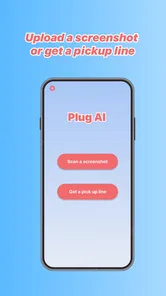
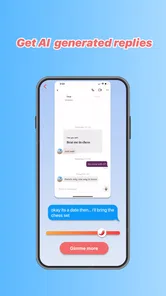
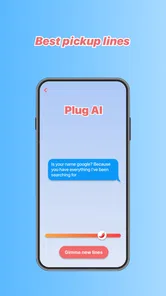
Analysis by Reviewed
I tried Plug AI: Texting Assistant as a practical companion for the awkward middle ground between matching with someone and knowing what to say next. It is a free lifestyle app from Vert Media Partners, aimed at dating conversations rather than general messaging. The idea is simple: bring a message or situation to an AI assistant, get help shaping a reply, and return to the conversation with something more considered than the first sentence that came to mind.
That sounds useful because dating chats often fail for small reasons. A reply can be too short, too intense, too formal, or so carefully polished that it no longer sounds like the person sending it. My experience with Plug AI was strongest when I treated it as a writing partner, not as an automatic replacement for my own judgement. The best results came from using it to improve a real thought, not asking it to invent a personality for me.
From an awkward message to a sendable reply
The starting condition is familiar. I might receive a message that deserves an answer but does not offer an obvious opening, or I might want to show interest without sounding over-eager. In that moment, the app’s appeal is speed: instead of switching between a dating app, a notes app, and a search engine for conversation advice, I can use one focused tool to work through the wording.
Plug AI is listed as an AI-powered dating assistant, but that description should not be mistaken for a complete dating service. It is not where I would go to browse profiles, manage matches, or replace the messaging screen of another platform. Its role is narrower and more useful: it helps with the language around dating, especially when the emotional stakes make ordinary writing feel harder than it should.
I found it helpful to begin with the actual situation rather than a vague request such as “write a good response.” A better starting point is something like: the other person suggested meeting, I am interested, but I need to propose a time without sounding too formal. That kind of context gives the assistant a clearer target. The more specific the intent, the easier it is to judge whether the suggested wording still sounds like me.
This is also where I would be careful with privacy. Dating messages can contain names, locations, workplace details, personal history, and sensitive information. I would remove anything unnecessary before putting a conversation into an AI tool. The app’s Mature 17+ rating is a useful reminder that its subject matter is adult-oriented, but it does not mean I should paste every private detail into a prompt.
Step one: define the intention before polishing the words
My first practical tip is to decide what outcome I want before asking for wording. Am I trying to keep a conversation going, set a boundary, apologize, flirt, clarify a misunderstanding, or move from chatting to a real plan? These goals require different tones. A playful answer that works after a light joke may be completely wrong after someone shares something vulnerable.
More From Our News Desk

Weather by Xiaomi Review: Clear at a Glance, Less Clear Up Close

X Under Pressure: Can It Recover When Posting Goes Wrong?

Clash of Clans Is Won Between the Battles

Android Auto Makes the Case for Quieter Car Software

MobiOffice: Transforming Mobile Productivity with Seamless Integration

EA SPORTS FC™ Mobile Soccer: Redefining Mobile Sports Gaming
Plug AI can be more useful when I provide that distinction directly. I would explain the goal in plain language, then include only the message that matters. This creates a small but important handoff: I provide the emotional context and the facts, while the assistant helps organize the sentence. If I leave the first part out, I am effectively asking it to guess what I feel.
For example, if someone writes, “You disappeared,” I would not simply request a clever comeback. I would say that I was busy, still interested, and want to acknowledge the delay without making an excuse. That produces a more responsible workflow than chasing a line designed only to sound confident. The assistant can help with phrasing, but I still need to own the explanation.
Step two: compare the suggestion with my real voice
Once a draft appears, I would read it aloud before using it. This sounds basic, but it exposes a common weakness in AI-assisted dating messages: a sentence can be grammatically smooth while feeling unnatural in a real chat. If I normally write briefly, a long, perfectly balanced paragraph will look suspicious. If I use dry humor, an overly enthusiastic reply may create the wrong impression.
I also look for emotional overreach. A draft may turn mild interest into strong affection, or turn a simple scheduling question into a miniature relationship discussion. That is not a bug I would expect the app to solve automatically, because the assistant does not know the history of the connection as well as I do. The useful trade-off is that it gives me a starting point, but the responsibility for accuracy stays with me.
A strong workflow is to ask for a few different directions rather than accepting the first answer. I might want one version that is warm, one that is direct, and one that is playful. Then I can borrow the useful part of each. This is one of the app’s more valuable roles: it helps me notice choices in tone that I might otherwise overlook when I am anxious and staring at an empty reply box.
Step three: edit for a real conversation, not a perfect performance
The handoff back to the dating app is where the quality of the experience is decided. Plug AI may help me formulate the response, but I still need to copy or retype it into the conversation, check the details, and decide whether sending it is appropriate. That extra step is not necessarily bad. It creates a pause between emotion and action, which can prevent an impulsive message from becoming a permanent part of a chat.
In everyday use, I would keep the final message shorter than the assistant’s first draft whenever possible. A dating conversation usually works better when it leaves room for the other person to respond. Instead of sending a complete explanation, I might keep the apology, add the actual plan, and finish with a simple question. The app can help me get there, but it should not turn every exchange into a formal statement.
Another useful habit is checking factual details manually. If the draft mentions a day, time, place, or previous comment, I would verify each one before sending. AI can make a message sound certain even when the underlying detail is wrong. That is especially important when arranging a first meeting, where confusion about timing or location is more than a minor writing flaw.
What the workflow is good at in daily dating situations
One realistic scenario is a late reply after a promising conversation. I have been away from my phone, the other person has sent a question, and I want to restart the exchange without pretending nothing happened. I would give Plug AI the short context, ask for a warm but uncomplicated reply, and then remove any wording that sounds too polished. The result I want is not a dazzling message; it is a believable bridge back into the conversation.
A second scenario is moving from vague interest to a concrete plan. If the other person says they would like to meet sometime, I can use the assistant to turn that opening into a clear suggestion. The important part is that I supply the available days and my preferred kind of activity. Without those details, the draft may sound positive but still leave the conversation stuck in “we should do that” territory.
A third scenario involves boundaries. Someone may be pushing for a faster pace, asking a question I do not want to answer, or repeatedly cancelling plans. Here I would use the app to test whether my wording is firm without being unnecessarily hostile. I would not ask it to decide whether the behavior is acceptable. That judgment belongs to me. Its value is in helping me express a decision clearly when nerves make me soften it too much.
The same applies to difficult endings. If I have decided not to continue, an assistant can help me remove mixed signals from a message. I would still avoid outsourcing compassion or responsibility. A short, honest explanation is usually better than a dramatic AI-written paragraph. Plug AI is most appropriate as an editing layer for a message I genuinely mean, not as a machine for manufacturing emotional closure.
Where it compares well with ordinary alternatives
The usual alternative is asking a friend to review a message. Friends can understand my personality and the broader story, which gives them an advantage that an AI assistant does not have. They may also tell me when I am overthinking. Plug AI is more convenient when I want immediate help, especially for a small wording problem that does not justify sending screenshots to someone else.
Another alternative is using a general-purpose chatbot. That can work, but a dating-focused tool has a clearer starting point for romantic conversation, tone, boundaries, and awkward exchanges. The trade-off is flexibility. A general assistant may be better for a message that mixes dating with work, travel, technical details, or a complicated personal situation. Plug AI makes more sense when the central problem is how to communicate within a dating context.
There is also the option of writing everything myself. For confident communicators, that remains the best choice. No assistant can reproduce the small details that make a message genuinely personal unless I provide them, and adding enough context can take almost as long as writing the message. I would skip this app if I already know what I want to say and only need the courage to press send.
Its free entry point makes experimentation easy, but the presence of in-app purchases priced at $4.99 per item means I would pay attention before confirming anything beyond the basic experience. I would not assume that paying automatically improves the emotional quality of a suggestion. The sensible approach is to test whether the workflow saves enough time or reduces enough friction for my own use before spending money.
Friction points that affect the outcome
The average rating is 2.4 from around 4.4 thousand ratings, so I would approach the app with measured expectations rather than assuming every interaction will feel polished. A rating like that does not tell me which individual issue matters most to every user, but it does signal that the experience may include frustrations. I would judge it by the quality of the specific help I need, not by the promise of an effortless dating life.
The app has reached over 1 million installs, which suggests that the concept has broad appeal, but popularity does not remove the central limitation: AI-generated language can become generic. If I accept every suggestion unchanged, my messages may start to sound alike. That can make a conversation feel less personal, particularly when the other person is sharing something that deserves a direct human response.
There is also a risk of using the tool too often. If I consult it for every short reply, I may become less comfortable with normal conversational uncertainty. Dating is not an exam in which every sentence needs optimization. Sometimes a slightly imperfect response creates more room for personality than a carefully tuned one. I would use Plug AI for moments of genuine friction, not as a permanent filter between me and another person.
Another break in the flow happens when the context is too complicated. A long history of mixed signals, sarcasm, voice messages, and off-platform events can be difficult to compress into a prompt. The assistant may produce a reasonable sentence that still misses the important issue. In those cases, a trusted friend or a direct conversation is better. The app can improve wording; it cannot reliably resolve a relationship problem it does not fully understand.
Technical compatibility is relatively broad: the current version is 1.2.0 and it supports devices running Android 5.0 or later. That makes it accessible on older Android hardware, although compatibility alone says nothing about how comfortable the app feels on a particular phone. I would still consider screen size, keyboard habits, and how easily I can move between the assistant and the dating app during the handoff.
Who should use it, and who should leave it alone
I would recommend Plug AI to someone who knows what they feel but struggles to express it under pressure. It can be especially useful for first-date planning, restarting a stalled chat, softening an unnecessarily blunt sentence, or making a boundary more direct. It is also a reasonable tool for people who want several tone options before choosing their own final wording.
I would be more cautious recommending it to someone looking for guaranteed flirtation, instant matches, or a substitute for social confidence. It cannot make another person interested, repair behavior that caused harm, or tell me whether a match is trustworthy. Someone who dislikes sharing personal conversations with AI should also avoid using it with identifiable details. The app’s purpose is narrow enough that skipping it is sensible when the real need is safety advice, emotional support, or a friend’s perspective.
For younger users, the Mature 17+ content rating is important. I would treat that as a clear boundary rather than a suggestion. Adult dating topics can involve consent, privacy, and emotional risk, so the app is not something I would present as a general-purpose chat helper for children.
My final workflow and verdict
After using it, my preferred process is straightforward: remove identifying details, describe the real intention, include only the relevant message, request a tone that matches the situation, compare the draft with my natural voice, verify every factual detail, and edit before sending. That sequence keeps the useful part of AI assistance while preventing the tool from taking over the conversation.
Plug AI: Texting Assistant works best as a small intervention at the point where a dating message feels harder than it should. Its strongest outcome is not a spectacular line; it is a clearer, more honest reply that helps the conversation move forward. Its weakest outcome is a polished but generic message that hides uncertainty instead of resolving it.
Because it is free to start and focused on dating communication, I think it is worth trying for occasional awkward moments. I would not build my entire dating style around it, and I would not pay for extras without first seeing a clear benefit in my own routine. Vert Media Partners has created a focused lifestyle app with a practical use case, but the quality of the final result still depends heavily on the person holding the phone.
My recommendation is therefore conditional but positive: use it as an editor, a tone checker, and a way to get unstuck. Keep the personal details, decisions, boundaries, and final voice yours. If you want help finding words without handing over responsibility for the relationship, Plug AI is at its most useful when the conversation reaches that uncomfortable pause between feeling something and saying it well.
Plug AI: Texting Assistant Frequently Asked Questions
What age rating does Plug AI: Texting Assistant have?
Plug AI: Texting Assistant is rated Mature 17+, so it may not be suitable for younger users. This is worth checking before downloading, particularly if you are choosing apps for a family device or a teenager. The age rating is a content suitability guideline, not a guarantee that every suggested message will fit your situation, so review and edit AI-generated text before using it.
What devices and operating systems can run Plug AI: Texting Assistant?
Plug AI: Texting Assistant is an app for mobile devices, and its listed minimum Android requirement is version 5.0. Before downloading, check that your device meets the operating system requirement and that the app is available for your platform. Compatibility can affect whether an app installs or runs properly, so it is sensible to confirm this in the relevant app store before proceeding.
What is Plug AI: Texting Assistant used for?
Plug AI: Texting Assistant is designed to help you write, rewrite, and improve messages with artificial intelligence. It can be useful when you need a quick reply, want to adjust the tone of a text, or are unsure how to start a conversation. The app may also help with grammar, clarity, and making messages sound more friendly, professional, casual, or confident.
How does Plug AI create suggested messages?
The assistant generally creates suggestions based on the text, situation, or instructions you provide. You can describe what you want to say, paste a draft, or request a particular style, and the app generates one or more possible responses. Results can vary depending on the wording of your request, so reviewing and personalizing each suggestion before sending it is recommended.
Does Plug AI: Texting Assistant work with messaging and social apps?
Plug AI is primarily a writing tool, so its exact integration options depend on the version of the app and your device. In many cases, you may need to copy generated text and paste it into another messaging or social application rather than sending messages directly from Plug AI. Check the app’s current permissions and supported features before downloading.
Pros
- Suggests replies quickly for different texting situations.
- Helps adjust messages to sound warmer
- clearer
- or more professional.
- Useful when you are unsure how to start a conversation.
- Can save time when writing repetitive or routine messages.
- Simple concept that may help reduce anxiety about replying.
Cons
- AI suggestions may sound generic or unlike your personal writing style.
- Some features may require a subscription or in-app purchase.
- Generated replies can miss context
- humor
- or relationship nuances.
- You should review messages carefully before sending them.
- Using the assistant may require sharing message context with the service.












