

Playnix - HD Video Player Home
- 5.00
- 4.5
- Installs
- 50.00K
- Price
- Free

Screenshots



Analysis by Reviewed
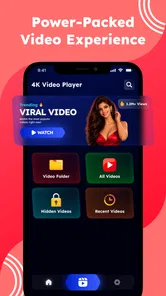
Playnix - HD Video Player Home is the kind of Android app that tries to be more than a simple place to press play. In my experience, its appeal comes from bringing video playback, a private vault, viral short-form clips, and a smart home launcher into one interface. That combination makes it interesting for people who want one entertainment hub, although it also means the app deserves a closer look than a standard video player.
Developed by FusionGrid Studio, Playnix sits in the video players and editors category, but its broader design gives it a different feel from a conventional media tool. It is free to use and rated for Everyone, which makes it approachable for a shared household device or a personal phone. The current version is 5.0, and it works on Android 8.0 or later, so compatibility should cover many devices that are still in everyday use.
What stood out to me most was the way connectivity changes the experience. Video playback can feel straightforward when the content is already available, while viral shorts and smart home functions naturally become more dependent on an active connection. I would not treat Playnix as a guaranteed replacement for every offline player. Instead, I see it as a connected home screen that also handles local viewing and private organization.
How Playnix feels when the connection is doing the work
The first thing to understand is that Playnix brings several different viewing habits together. Someone might open it to watch a regular video, move to short clips for a quick break, and then use the home-launcher side to reach connected entertainment or household functions. That flow can be convenient, but it also means the quality of the experience depends on which part of the app you are using at that moment.
For online short videos, the network is part of the feature rather than a background detail. A strong connection should make browsing feel more natural, while a weak or busy connection can turn quick entertainment into repeated waiting. I found this distinction important because short-form content encourages rapid scrolling. Any delay is more noticeable when the whole point is to move quickly from one clip to the next.
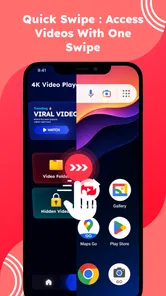
The smart home launcher adds another layer. A launcher is useful when it reduces the number of steps between opening the app and reaching the services or devices you use at home, but that convenience is tied to the wider connected environment. If the phone, home network, or destination service is having trouble, Playnix cannot make the entire chain reliable by itself. I would judge this part as a convenience layer, not as a replacement for dedicated control software.
That connected design is also why I would avoid opening the app with unrealistic expectations. If you want a focused player that does one job and stays out of the way, a traditional video player may feel cleaner. Playnix makes more sense when you appreciate having several media-related destinations gathered under one roof and do not mind the extra context switching.
More From Our News Desk

 Gmail
GmailGmail in a Busy Inbox: Who Benefits Most?
From first account to crowded workday, Gmail earns its place through dependable search and flexible sorting—but its best fit depends on how much inbox maintenance you can tolerate.

 Prime Video
Switching to Prime Video: What Changes in Your Viewing Routine
Prime Video can make a compelling second home for streaming, but switching means learning a different catalog, rental layer, and route from browsing to playback.

 Universal TV Remote Control
Universal TV Remote Control Works Best as a Reliable Backup
A phone remote earns its place through quick setup and reliable habits. Here is how to get more from Universal TV Remote Control—and where its limits show.

 Weather - By Xiaomi
Weather by Xiaomi Review: Clear at a Glance, Less Clear Up Close
Xiaomi’s weather app makes everyday forecasts quick to scan, but its calm surface can leave useful details and recovery paths harder to find than they should be.

 X
XX Under Pressure: Can It Recover When Posting Goes Wrong?
A resilience-focused review of X, examining setup, mistaken posts, interruptions, weak connections, and the gaps that matter when recovery needs to be dependable.

 Clash of Clans
Clash of Clans Is Won Between the Battles
Its raids are quick; its community is a long-term project of coordination, teaching, rivalry, and shared responsibility—with all the friction that entails.
Latest News



Where the combined design helps
A realistic everyday example would be a family tablet in the living room. One person can use Playnix for regular video watching, another can browse short clips, and someone else can use the home-launcher area to reach a connected entertainment destination. The value is not that every task becomes dramatically better; it is that the device has a single recognizable starting point.
I also see a use case for a personal phone used during short gaps in the day. You may want a full video at one moment and a few quick clips later, without keeping separate apps in mind. The private vault can make the same installation more useful for personal media that you do not want mixed into casual browsing. In that situation, the app’s range is more important than having the most specialized tool for each individual task.
There is a trade-off, though. A broad home screen can introduce more visual and functional noise than a dedicated player. People who mostly watch their own videos may find the shorts and launcher elements unnecessary. Conversely, someone who mainly wants a private vault may prefer an app designed around privacy rather than a multi-purpose media dashboard. Playnix is strongest for users who will genuinely use at least two of its main roles.
Using it on mobile networks
On a phone, the most practical question is not simply whether Playnix plays video, but how deliberately you move between connected and less connected situations. Short clips are easy to consume in small moments, yet they can also encourage more browsing than intended. If you are using mobile data, I would treat the shorts area as the part that needs the most restraint because continuous discovery can consume attention and data together.
A useful habit is to decide what you are opening the app for before launching it. If I want to watch a specific video, I go directly to that task instead of entering the short-video stream first. If I have only a few minutes, I avoid assuming that a quick visit will remain quick. This is less about a missing control and more about recognizing how an always-connected content area changes the way the app is used.
The private vault has a different mobile advantage. Personal media is often easier to manage when it is separated from the general viewing area, especially on a phone that other people occasionally borrow. I would still take a moment to understand how the vault behaves on your device before making it the sole home for important files. A private section can improve organization and discretion, but it should not automatically be treated as a complete backup strategy.
The smart home launcher is more convincing on a phone that regularly acts as a remote or control point. In that setting, the app can reduce the mental gap between watching something and reaching the connected environment around you. If you rarely use smart home services, however, that part may simply occupy space without improving your routine.
What happens when the connection is poor
Connectivity problems are where a multi-purpose app needs the most realistic evaluation. A video may pause, a stream of short clips may take longer to populate, or a launcher destination may respond slowly. These are not all the same failure, and I would not blame the player equally for each one. The important point is that Playnix brings network-sensitive activities together, so one unreliable connection can affect several parts of the experience at once.
My practical approach is to separate the tasks. When online content is slow, I stop repeatedly refreshing and move to a video or section that is already available to me. When the smart home area does not respond, I check whether the problem is limited to that destination rather than assuming the entire app is broken. This simple separation makes recovery less frustrating because it prevents one failed action from turning into a full restart of the app.
I would also avoid judging the app solely by a difficult moment on a crowded mobile network. A connected video experience is influenced by signal quality, network congestion, and the service being reached. Playnix can provide the interface, but it cannot remove every external point of failure. That is why I prefer to think of it as a useful front door, not a guarantee that every connected feature will always respond immediately.
For users who need dependable playback during travel, commutes, or places with inconsistent coverage, this distinction matters. A dedicated player built specifically around content stored on the device may be a safer choice if uninterrupted viewing is the priority. Playnix may still be useful on the same phone, but I would not make it my only plan for a long journey unless I had already tested the exact viewing workflow I needed.
Keeping data use under control
Playnix is free, but free does not mean every use pattern has the same practical cost. Online video and short clips can place a greater demand on a mobile connection than simply opening a player and watching content that is already accessible. I would use the app most comfortably on a trusted Wi-Fi connection when exploring lots of short-form material or moving between several connected destinations.
One of the less obvious trade-offs is that the app combines deliberate viewing with discovery. Watching a chosen video gives you a clear stopping point. Browsing viral shorts does the opposite: each clip leads naturally to another. If you are trying to limit mobile data or screen time, the best adjustment is behavioral. Enter the area with a specific purpose, avoid endless scrolling when connected through mobile data, and leave once that purpose is complete.
The private vault can also support a more data-conscious workflow because it gives personal media a separate place in the app’s overall structure. Rather than repeatedly searching through a mixed library or reopening online sources, you can keep the items you regularly need organized in one area. I would use that for convenience and privacy, while keeping a separate copy of anything genuinely important.
For a household device, the data question becomes even more relevant. Different people may use the same app in very different ways: one person watches selected videos, another scrolls through short clips, and another opens connected services. Setting a shared expectation about when to use Wi-Fi can prevent the app’s convenience from becoming an unexpected drain on a phone plan.
Who should choose it, and who should look elsewhere
I think Playnix is a good fit for someone who wants a flexible media starting point rather than a narrowly focused player. It is especially appealing if you value the combination of HD video playback, a private area for personal media, short-form entertainment, and a smart home entry point. The app has reached over fifty thousand installs and holds a 4.5 average from roughly two dozen ratings, which suggests an encouraging early reception without making it a universally proven choice.
The relatively small review footprint is worth keeping in mind when deciding how much confidence to place in other people’s experience. I would install it and test the parts that matter to me instead of assuming that a good average automatically means it will suit every phone or household setup. The free price makes that trial easier, particularly for users who are curious about the combined approach.
I would skip it if my main requirement were a minimal, distraction-free player with no connected extras. I would also look elsewhere if my priority were a highly specialized private-storage tool, a dedicated smart home controller, or a media player designed primarily around robust offline organization. In each of those cases, a focused alternative may offer a clearer workflow and fewer places where network conditions can affect the experience.
Playnix is also not the best match for someone who dislikes switching between different content modes. The app’s variety is its defining advantage, but variety can become clutter when only one feature matters. Before settling on it, I would ask myself whether I will actually use the vault, shorts, or launcher. If the answer is no for all but video playback, a simpler app may be more comfortable every day.
Small workflow changes that improve the experience
My first recommendation is to treat the home screen as a routing tool. Decide whether you are entering to watch, browse, protect personal media, or reach a connected destination. This prevents the app’s different roles from competing for your attention and makes the broad design feel intentional rather than busy.
Second, keep online discovery separate from planned viewing. If you are watching something specific, go straight there and leave the shorts area for moments when you deliberately want recommendations or quick entertainment. This reduces accidental scrolling and makes your mobile data use easier to understand.
Third, use the private vault as an organization boundary, not as your only safety measure for valuable files. Its usefulness comes from separating personal content from the general media experience, but important memories or work files deserve an additional copy elsewhere. That is a sensible precaution with any private-media feature.
Finally, test the app in the places where you will really use it. Try the video experience on your usual Wi-Fi, check how the connected launcher fits your home routine, and see whether the mobile interface remains comfortable on your phone. A short practical test tells you more than the broad promise of an all-in-one media app.
My connectivity verdict
After looking at the full experience, I see Playnix as a connected video hub with useful range, not merely another playback utility. Its strongest quality is the way it gathers several media habits into one place: watching videos, handling more private content, browsing short clips, and reaching smart home destinations. That can simplify a device when those activities genuinely belong in the same routine.
Its main limitation is closely tied to that strength. The more you rely on online shorts and connected destinations, the more the experience depends on network conditions outside the player itself. I would be comfortable recommending it to someone who has reliable connectivity, wants a flexible home screen, and appreciates having multiple media options together. I would be more cautious for travelers, data-sensitive users, or anyone seeking a strictly offline-first tool.
FusionGrid Studio has made an ambitious app for a free Android download, and version 5.0 presents a clear reason to try it: Playnix is designed around the way people move between different kinds of video and connected entertainment. Just remember that its convenience works best when your own network habits match the app’s design. If you want one adaptable media doorway rather than one specialized tool, Playnix is worth testing; if reliability without connectivity is your deciding factor, choose a simpler player instead.
Playnix - HD Video Player Home Frequently Asked Questions
What devices and operating systems can run Playnix - HD Video Player Home?
Playnix - HD Video Player Home is an app in the video player and editor category, and its listed minimum operating system is version 8.0. Before installing, check that your device meets this requirement and has enough available storage for the app and your media files. The app is free, and its content rating is Everyone.
Who develops Playnix, and how established is it?
Playnix is developed by FusionGrid Studio. It has passed 50 thousand installs and has an average rating of 4.5 from 23 ratings, giving prospective users a small but useful snapshot of its reception. These figures can help with initial expectations, though personal experience may depend on your device and the files you want to play.
What is Playnix - HD Video Player Home, and what can it do?
Playnix - HD Video Player Home is designed for playing locally stored videos on a mobile device. It supports common video formats, offers a straightforward playback interface, and may include useful controls such as seeking, volume adjustment, screen orientation, subtitles, and playback speed. Its store summary also presents it as a private vault, a place for viral shorts, and a smart home launcher. It is mainly intended for users who want a simple way to watch downloaded or transferred media files.
Which video formats are supported by Playnix - HD Video Player Home?
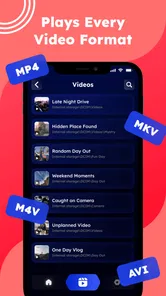
The exact list of supported formats can depend on the app version and the device’s built-in media capabilities. In general, users should expect compatibility with widely used formats such as MP4, MKV, AVI, MOV, and similar files. Before downloading large videos, it is worth testing a sample file, because unusual codecs, damaged files, or advanced audio tracks may not play correctly.
Does Playnix - HD Video Player Home require an internet connection?
An internet connection is generally not required to play videos that are already stored on your phone or tablet. This makes the app useful for offline viewing while traveling or when mobile data is limited. Internet access may still be needed for downloading the application, displaying advertisements, checking updates, or using any online features that may be included in the current release.
Pros
- Supports high-definition video playback with clear
- detailed images.
- Simple home screen makes accessing local videos quick and convenient.
- Handles common video formats without requiring separate converter tools.
- Useful for watching personal media without needing an internet connection.
- Compact player design keeps controls easy to find while viewing.
Cons
- May lack advanced subtitle and audio-track controls found in premium players.
- Playback quality can depend heavily on your device’s hardware capabilities.
- Some formats or codecs may not play correctly on every phone or tablet.
- The interface may feel basic for users wanting extensive customization options.
- Ads or optional paid features may interrupt the otherwise simple viewing experience.











