

PlantNet Plant Identification
- 9.64K
- 4.5
- Installs
- 10.00M
- Price
- Free

Screenshots
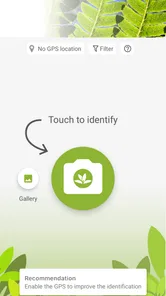
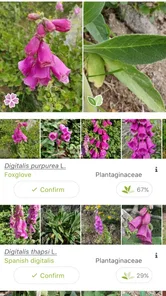
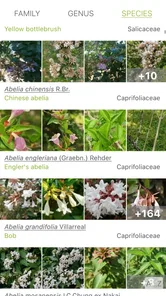
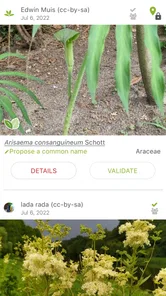
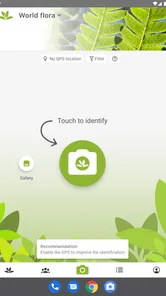
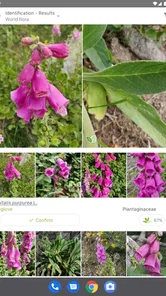
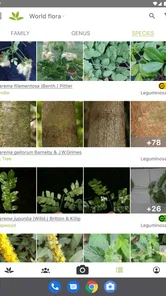
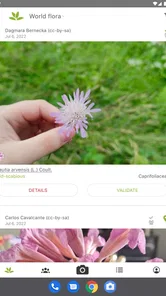
Analysis by Reviewed
For a first-time user, PlantNet Plant Identification is easiest to understand as a field guide you can consult with a photo, not a guaranteed answer machine. It’s an education app from PlantNet, and I find it most useful when I want to put a name to a wild plant and then look more closely at what makes that identification plausible.
The best way to begin is with a modest goal: identify one plant you can see clearly, then check whether the suggested name fits. You don’t need to know botanical terms before opening the app. A little patience and a useful photograph matter more than trying to capture an entire patch of greenery at once.
What to Expect from a Photo-Based Guide
PlantNet is designed around observation. It helps turn a picture into possible plant names and a reason to inspect the subject more carefully. That makes it different from a general search engine, where you first need to describe the plant in words, and from a printed guide, where you must browse pages and compare illustrations yourself. I like that it gives a curious beginner a direct starting point, while still leaving room for judgment.
The app is free, and its 4.5 average from around 257,000 ratings reflects a large audience of people using it for this sort of everyday discovery. It has more than 10 million installs, but I would treat popularity as a sign of broad interest, not proof that every suggestion is correct. A photo can only show what is in frame, and similar-looking plants can remain difficult to distinguish.
That distinction matters if your reason for identifying a plant is practical rather than educational. I use a suggested name to guide further learning, not to decide whether an unfamiliar plant is safe to eat, touch, or use as medicine. When consequences matter, a qualified local expert or authoritative reference is a better choice than any quick image match.
How It Works
First things first, using PlantNet Plant Identification is straightforward. You take a picture of the plant you want to identify—whether it's a leaf, flower, fruit, or bark. Then, the app analyzes the image and provides you with possible matches from its extensive database. I’ve tried it with several plants during my walks, and it’s impressively accurate most of the time.
Getting a Useful First Result
When I’m starting out, I choose a plant I can photograph clearly rather than trying to identify something from a rushed, distant shot. I frame one feature at a time, such as a flower or leaf, and avoid including lots of unrelated greenery. That simple choice makes the result easier to judge: the app can offer candidates, while I can compare their visible features with the plant in front of me.
More From Our News Desk

 Gmail
GmailGmail in a Busy Inbox: Who Benefits Most?
From first account to crowded workday, Gmail earns its place through dependable search and flexible sorting—but its best fit depends on how much inbox maintenance you can tolerate.

 Prime Video
Switching to Prime Video: What Changes in Your Viewing Routine
Prime Video can make a compelling second home for streaming, but switching means learning a different catalog, rental layer, and route from browsing to playback.

 Universal TV Remote Control
Universal TV Remote Control Works Best as a Reliable Backup
A phone remote earns its place through quick setup and reliable habits. Here is how to get more from Universal TV Remote Control—and where its limits show.

 Weather - By Xiaomi
Weather by Xiaomi Review: Clear at a Glance, Less Clear Up Close
Xiaomi’s weather app makes everyday forecasts quick to scan, but its calm surface can leave useful details and recovery paths harder to find than they should be.

 X
XX Under Pressure: Can It Recover When Posting Goes Wrong?
A resilience-focused review of X, examining setup, mistaken posts, interruptions, weak connections, and the gaps that matter when recovery needs to be dependable.

 Clash of Clans
Clash of Clans Is Won Between the Battles
Its raids are quick; its community is a long-term project of coordination, teaching, rivalry, and shared responsibility—with all the friction that entails.
Latest News



If the first match feels uncertain, I treat that as a reason to gather a better observation, not to keep tapping until I see the name I hoped for. A close view of another part of the same plant can give useful context. This is especially helpful when leaves look similar across different plants or when the flower is no longer present.
From Installation to a First Useful Observation
For a first session, I’d open the app when I’m already near a plant I’m curious about, rather than waiting for a perfect outing. Choose a subject that is easy to reach visually without disturbing it, find a clear angle, and take a close photograph of one distinctive part. Then read the candidate list as a shortlist to investigate, not a verdict. The first satisfying result is not necessarily a perfect species name; it can simply be recognizing which visible detail separates the leading suggestion from the alternatives.
If you’re using it with a child or a beginner, I’d make the process a small observation game: notice the shape of a leaf, look for a flower or fruit, and compare those details with the result. That keeps the learning grounded in what is actually present. It also makes a miss less frustrating, since the photograph and comparison still teach you what to notice next time.
The Magic Behind the App
One of the things that amazed me is that this app relies on a collaborative database powered by scientists and people like you and me. Every time someone identifies a plant, they contribute to improving the app’s database, making it smarter with each use. This means that the more we use it, the better it gets!
Another thing I love is the app’s ability to provide detailed information about each plant. You not only get the name but also a wealth of information about the plant's characteristics, habitat, and even its potential uses. It's a great way to learn more about the flora around us.
A Practical Routine for Better Matches
One useful habit is to take photographs in a small sequence instead of relying on one crowded image. I’d start with the clearest feature, then, if the result is ambiguous, photograph a different visible part of the same plant. That gives me a way to test a candidate against more than one clue. It’s a better use of time than repeatedly photographing the same angle or accepting whichever name appears first.
It also helps to separate observation from interpretation. First note what you can see—leaf shape, flower color, or whether fruit is present—then check whether the suggested plant makes sense in the setting. A candidate that conflicts with obvious features deserves skepticism. This simple two-step approach makes the app more educational and reduces the temptation to treat image recognition as certainty.
Using It on an Ordinary Walk
Imagine spotting an unfamiliar flower on a neighborhood path while walking the dog. I’d take a clear photo, check the suggested matches, and use the accompanying information to decide which candidate fits what I can actually see. Later, I could look at another plant nearby and compare observations instead of relying on memory. That turns a quick question into a small learning habit without needing a planned hike or specialist equipment.
The same approach suits a garden wander or a school nature activity, particularly when the goal is to notice differences rather than collect names. I’d keep the phone handy, but I wouldn’t pick or taste an unknown plant based on an identification. A photo-based suggestion is a useful starting point, not a safety check.
When a Different Tool Is Better
For a casual walk, PlantNet is more convenient than carrying a large reference book, and it can be more focused than searching the web with a vague phrase such as “small purple flower.” But it is not always the best tool. A printed field guide can be a better companion when I want to browse deliberately without relying on a connection, while a local expert is preferable when a correct identification affects safety, gardening decisions, or conservation work.
A general web search still has a place after I have a promising candidate: it can help me compare descriptions or learn about a plant in a wider context. I wouldn’t use a handful of search results as a substitute for verification, though. The app’s strength is the quick photo-led shortlist; the trade-off is that I need to do the careful comparison myself.
User Experience and Design
The user interface is clean and intuitive. Even if you’re not tech-savvy, navigating through the app feels like a breeze. It’s designed to ensure that users spend more time exploring nature and less time figuring out how to work the app.
However, like most apps, it does require an internet connection to retrieve data, which might be a bummer if you’re in a remote area with no service. But hey, that’s a small trade-off for the treasure trove of information you get.
That connection issue is worth planning around if you are heading somewhere with patchy reception. I’d make the identification attempt while I still have service, or simply enjoy taking photographs and return to the question later when I’m connected. The app is most useful when I can see the result and check its information on the spot, so I wouldn’t count on it as a fully self-contained offline field guide.
Common Confusion and Sensible Limits
A common beginner mistake is assuming that a plausible result means the plant has been confirmed. I find it more useful to ask, “What would I expect to see if this candidate were right?” Then I compare the visible details and setting with the information shown. If the photo is incomplete or several candidates remain plausible, I leave the identification open rather than forcing a conclusion.
Another point that can confuse new users is that a plant’s appearance changes with its growth stage. A flowering specimen offers different clues from a bare stem or a leaf on its own. That is why a match can feel convincing in one season and harder to judge in another. When possible, I photograph the feature that is currently most distinctive and revisit the observation when the plant has developed more visible details.
Where Its Answers Need a Careful Read
Plant identification from a single image has natural limits. A leaf-only photograph may not show the details that separate lookalike plants, and a blurred image can make the candidates harder to assess. I get better value by checking whether the suggested plant’s visible characteristics and habitat make sense, rather than treating the first result as certain.
Compared with a general web search, the app gives me a more focused route from a plant photo to possible names and related information. A field guide can be better when I want a deliberate, offline reference, while asking an experienced local botanist is the wiser choice when the identification has practical consequences. For casual curiosity and learning outdoors, this app strikes a helpful middle ground.
Who It Suits, and What to Expect
I’d recommend it to curious walkers, gardeners, families, and students who are happy to investigate a candidate rather than expect a perfect answer every time. Someone who needs dependable identification for eating, handling, or medical decisions should use a qualified source instead. The app is free, has an Everyone 10+ age rating, and has a 4.5 average from around 257,000 ratings; its 10 million-plus installs suggest it has found a broad audience, though popularity doesn’t make any single result infallible.
It has been available since January 21, 2014, and version 3.23.5 supports devices running Android 7.0 or later. Those details make it easier to judge compatibility, but the more important question for me is whether you enjoy looking closely at plants. If you do, the app can make ordinary outdoor moments more informative.
Who Might Prefer Something Else
I would skip it if I needed a definitive answer for a high-stakes decision, expected every photo to produce an unmistakable result, or wanted a reference that works independently of an internet connection. Someone who mainly needs to diagnose a sick houseplant may also prefer a resource focused on cultivation problems and care, rather than a photo-based route centered on identifying plants in the wild. PlantNet is at its best when curiosity is the point and an uncertain result is still a useful prompt to observe more closely.
For a first-time user, the practical question is not whether the app can replace expertise; it is whether it makes you more attentive to the plants around you. I think it does, provided you approach the suggestions with a little skepticism and use the visible evidence to guide your next step.
Why You’ll Love It
If you’re someone who enjoys the great outdoors, or if you're just curious about the greenery in your backyard, this app is a must-have. It’s educational, fun, and a fantastic tool for both amateur and professional botanists.
In conclusion, PlantNet Plant Identification offers an incredible blend of technology and nature, making it easier for everyone to connect with the environment. So, grab your phone, start exploring, and let this app turn you into a plant identification pro!
PlantNet Plant Identification Frequently Asked Questions
Can I use PlantNet Plant Identification while I’m outdoors on a walk?
Yes. PlantNet is designed around observing plants and using photos to explore possible identifications, so it can fit naturally into a walk, garden visit, or other outdoor activity. Take a clear picture of the plant and review the app’s suggestions. Treat the result as a learning aid, and keep observing the plant rather than relying on a name alone.
What kinds of plants can PlantNet Plant Identification help me explore?
PlantNet is intended to help with the identification of wild plants, and its educational focus makes it useful for exploring plants you encounter in nature. You can take a photo and consider the app’s suggestions as a starting point for learning. The app’s description also refers to flowers, trees, grasses, and other plant species, so it can support a range of observations.
Is PlantNet Plant Identification suitable for beginners?
Yes. PlantNet Plant Identification is approachable for people who are new to identifying plants: you take a photo and use the app’s suggestions as a starting point for learning about what you have observed. Its educational focus can make walks and garden visits more engaging, though beginners should treat an identification as a helpful lead rather than a substitute for careful observation.
What is PlantNet Plant Identification?
PlantNet Plant Identification is a mobile application designed to help users identify plants simply by taking a photo of them. Leveraging a vast database and advanced image recognition technology, the app provides users with detailed information about plant species, including flowers, trees, grasses, and more. It's an invaluable tool for botanists, gardeners, and nature enthusiasts alike.
How accurate is PlantNet Plant Identification?
PlantNet Plant Identification is highly regarded for its accuracy, thanks to its extensive database of plant images and expert-verified data. While it is generally accurate, users should note that environmental factors like lighting and image quality can affect identification results. However, the app continuously improves its accuracy as more users contribute photos and information to the database.
Pros
- Accurate plant recognition
- User-friendly interface
- Large plant database
- Offline mode available
- Free with no ads
Cons
- Requires good quality images
- Limited to plant identification
- No social sharing features
- Occasional misidentifications
- No additional plant care info











