

Plant App - Identifier & Care
- 278.00
- 3.9
- Installs
- 1.00M
- Price
- Free

Screenshots
Analysis by Reviewed
I like plant apps most when they help me make a better decision, not just put a name to a leaf. That distinction matters with Plant App - Identifier & Care: it brings identification and care guidance together, which is handy when a mystery plant is also looking unhappy. I’d treat its suggestions as a useful starting point, though, rather than a substitute for checking the plant’s actual conditions.
What the free starting point means
The app is free to install, and optional in-app purchases range from $1.99 to $104.99 per item. That spread is worth noticing before committing to a purchase: I would first try the free experience and decide whether the tools I actually use justify paying for anything. The price range alone doesn’t tell me what each purchase includes, so I wouldn’t assume a particular feature is behind a particular price.
It is an education app from IKONG JSC, rated for Everyone, and its current version is 2.3.5 for devices running Android 5.0 or later. Its 4.1 average from around 7,700 ratings, along with over 1 million installs, suggests that plenty of people have tried it, but popularity isn’t a guarantee that every identification will be right. I’d use the result as a lead, especially when a plant’s health or safety depends on getting the name correct.
Discovering the World of Plants
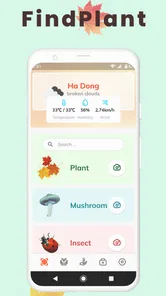
The first thing you’ll love about the Plant App - Identifier & Care is its ability to identify almost any plant you point your phone at. I mean, how cool is that? Just snap a picture, and voilà, you’ve got all the details from the plant's name to its care instructions. It’s perfect for those of us who can barely tell a fern from a ficus.
Making an identification more useful
For a better result, I’d photograph a clear leaf or flower in good light and keep the subject prominent in the frame. If the first suggestion seems off, I’d take another picture of a different part of the plant rather than immediately following the care advice. A single close-up can hide useful clues such as the overall shape or how leaves attach to a stem, so comparing more than one view is a practical check.
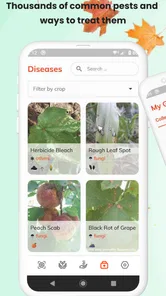
That makes the app particularly useful on a nursery visit or a walk: I can look up an unfamiliar plant while I’m standing beside it, then save the name in my notes or take a photo for later comparison. At home, the same habit can help me label a new pot before I forget which plant I brought in. For a plant with a serious pest or disease problem, though, I’d compare the result with advice from a knowledgeable local grower rather than treating a photo-based suggestion as a diagnosis.
Easy-to-Use Interface
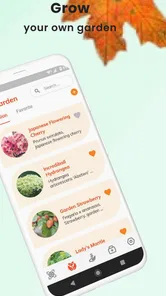
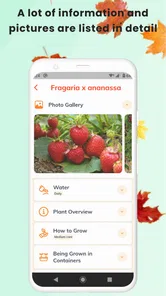
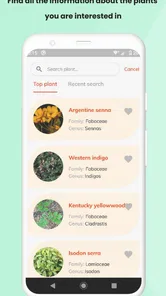
Let’s talk about usability. Navigating through the app is a breeze. The design is intuitive, and even if tech isn’t your thing, you’ll find it straightforward. The app is well-organized with clear categories and a search function that works like a charm. Plus, the images are crisp and the information is detailed, making it a joy to use.
More From Our News Desk

 Gmail
GmailGmail in a Busy Inbox: Who Benefits Most?
From first account to crowded workday, Gmail earns its place through dependable search and flexible sorting—but its best fit depends on how much inbox maintenance you can tolerate.

 Prime Video
Switching to Prime Video: What Changes in Your Viewing Routine
Prime Video can make a compelling second home for streaming, but switching means learning a different catalog, rental layer, and route from browsing to playback.

 Universal TV Remote Control
Universal TV Remote Control Works Best as a Reliable Backup
A phone remote earns its place through quick setup and reliable habits. Here is how to get more from Universal TV Remote Control—and where its limits show.

 Weather - By Xiaomi
Weather by Xiaomi Review: Clear at a Glance, Less Clear Up Close
Xiaomi’s weather app makes everyday forecasts quick to scan, but its calm surface can leave useful details and recovery paths harder to find than they should be.

 X
XX Under Pressure: Can It Recover When Posting Goes Wrong?
A resilience-focused review of X, examining setup, mistaken posts, interruptions, weak connections, and the gaps that matter when recovery needs to be dependable.

 Clash of Clans
Clash of Clans Is Won Between the Battles
Its raids are quick; its community is a long-term project of coordination, teaching, rivalry, and shared responsibility—with all the friction that entails.
Latest News



Plant Care Made Simple
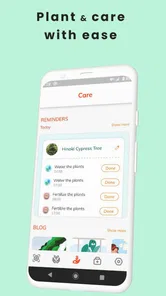
The app doesn’t just stop at identification; it goes a step further by providing care tips tailored to each plant. Whether it’s watering schedules, sunlight needs, or soil types, this app has got you covered. You can set reminders for watering, which is a lifesaver if you’re as forgetful as I am. It’s like having a personal plant assistant!
One feature I particularly enjoy is the care calendar. It allows you to track your plant care routine, ensuring your green buddies are always in top shape. You’ll find yourself checking the app regularly, not just for reminders but for the satisfaction of ticking off tasks.
Putting reminders in context
I’d use care prompts as a nudge to inspect a plant, not as an automatic command to water it. Soil can dry at different rates depending on the pot, room, season, and light, so a reminder is most useful when it sends me to check the soil first. That small pause helps avoid the common mistake of watering simply because a notification appeared.
A realistic routine might be checking the calendar while making coffee, then looking at the plants that are due for attention and adjusting the task to what I see. If a plant still feels moist, I can wait rather than follow a schedule blindly. This is where a calendar can support good habits, but it cannot observe the plant’s environment for me.
Community and Sharing
If you enjoy sharing your plant journey, the app also has a social aspect. You can connect with other plant enthusiasts, share photos, and exchange tips. It’s a wonderful community where everyone supports each other, and you can learn so much from fellow plant lovers.
When another approach is better
Compared with a general web search, a photo-first identifier can be quicker when I don’t know the right words to describe a plant. A book or trusted gardening reference may be better when I want to compare several similar species carefully, while a local expert is a stronger choice for a persistent disease or a high-stakes identification. The app’s advantage is convenience in the moment; its limitation is that a photo and general care guidance can’t account for every home, climate, or growing setup.
I’d recommend it most to curious beginners, casual plant owners, and anyone who wants one place to look up names and keep a care routine in view. It’s less compelling if you already rely on a specialist reference, need precise diagnosis, or only want a one-time identification and don’t plan to use the care tools. With 270 reviews alongside its broader rating history, there is some user feedback to consider, but I’d still judge it by whether its suggestions fit my own plants.
Using it in a real plant-care routine
Imagine bringing home a small plant from a market without remembering its label. I’d take a clear photo before moving it, check the suggested identity, and compare the result against visible features such as leaf shape and growth pattern. Then I’d use the care guidance to form a starting routine, not a rigid rule. Over the next few days, I’d pay attention to how the plant responds in its actual spot before making bigger changes.
That sequence matters because identification and care are linked, but they are not the same task. A plausible name can narrow down what to read next; it doesn’t prove that a plant in a dim apartment needs the same watering rhythm as one growing outdoors. I’d avoid changing several things at once, too. If a plant looks stressed, adjusting light, water, and soil all together makes it harder to tell what helped.
Getting more from photos and notes
A useful habit is to keep a reference photo of a healthy plant alongside later pictures when you are trying to understand a change. The app can help identify what you are looking at, while your own dated photos and notes give you context about when a leaf started yellowing or where the pot was sitting. That combination is more informative than repeatedly taking close-ups without recording what has changed around the plant.
For outdoor finds, I’d also photograph the plant in its setting if it is safe and practical to do so. A picture of the whole plant can capture its form, while a closer image shows leaf details. This is a simple way to reduce the risk of making a decision from one ambiguous feature. If the plant could be toxic or otherwise unsafe, I would not rely on an app result before handling or consuming it.
What to expect from the care guidance
Care recommendations are most useful as a checklist of questions: is the light suitable, is the soil staying wet, and does the plant need a different routine? I would not treat a suggested schedule as a promise that every plant of the same name behaves identically. A young plant, a mature one, and a cutting can react differently, and conditions in a home are rarely uniform from room to room.
That makes the app a better fit for building awareness than automating gardening. It can help a beginner remember to look after a plant and learn the vocabulary around it, but observation still does the important work. When a recommendation conflicts with what the plant is showing me, I’d pause and investigate rather than keep following the same prompt.
Choosing between free use and a purchase
The practical question is not whether a paid option sounds useful in general, but whether it solves a problem I actually have. I’d try the free access on the plants I own, see whether identification and routine care are enough, and only then consider an in-app purchase. Since the available price points vary widely, I would inspect the exact purchase description and terms before confirming anything rather than infer what is included from the price alone.
If I only want to identify one plant, a free web search or a local gardening group may be enough. If I expect to revisit care guidance and reminders over time, having identification and routine tracking together may make the app more worthwhile to me. Either way, I would avoid paying just because a plant is difficult to diagnose; a specialist or experienced local gardener is often the better route for a persistent problem.
Final Thoughts
In a nutshell, the Plant App - Identifier & Care is a must-have for anyone interested in plants, whether you’re a seasoned gardener or just starting out. It’s informative, easy to use, and packed with features that make plant care as easy as pie. Trust me, your plants will thank you, and you’ll feel like a pro gardener in no time!
My more measured verdict is that it’s worth trying if the free access covers the way you want to identify plants and organize routine care. I’d hold off on an optional purchase until I knew exactly what I wanted from it and had checked the purchase details in the app. For casual learning and reminders, it can be a convenient companion; for definitive identification or a stubborn plant-health problem, I’d pair it with a second source rather than relying on it alone.
Plant App - Identifier & Care Frequently Asked Questions
Who develops Plant App - Identifier & Care, and who might find it useful?
Plant App - Identifier & Care is an education app developed by IKONG JSC. It may appeal to people who are curious about plants, as well as gardeners looking for help identifying flowers, trees, weeds, and other plants. Its focus brings identification and plant-care information together, making it a useful option to consider whether you are learning about plants or tending a collection at home.
What devices can run Plant App - Identifier & Care?
Plant App - Identifier & Care is available for Android devices running Android 5.0 or later. Before downloading, check the Android version on your device and make sure it meets that requirement. The app is free to download, and its content rating is Everyone, so it is suitable for a broad audience. Checking compatibility first can help avoid installing an app your device cannot run.
What is Plant App - Identifier & Care?
Plant App - Identifier & Care is a mobile application designed for plant enthusiasts, gardeners, and anyone interested in identifying plants and learning about their care. The app uses advanced image recognition technology to identify plants from photos and provides detailed care instructions to help you maintain healthy plants.
How accurate is the plant identification feature?
The plant identification feature in Plant App - Identifier & Care is highly accurate, thanks to its advanced image recognition algorithms. While it correctly identifies most common plant species, there may be occasional inaccuracies with rare or visually similar plants. Users are encouraged to take clear photos and provide additional information if needed for the best results.
Does the app offer plant care tips and guides?
Yes, Plant App - Identifier & Care provides a comprehensive range of plant care tips and guides. Once a plant is identified, the app offers detailed information on watering schedules, sunlight requirements, soil types, and other essential care instructions tailored to each specific plant to ensure optimal growth and health.
Pros
- Accurate plant identification
- Comprehensive care tips
- User-friendly interface
- Offline mode available
- Extensive plant database
Cons
- Requires in-app purchases
- Occasional slow load times
- Limited free version features
- Ads can be intrusive
- Not all plants are covered











