Pixilart - Make Pixel Art
- 1.32K
- 4.3
- Installs
- 1.00M
- Price
- Free

Screenshots
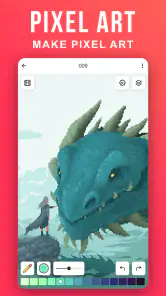
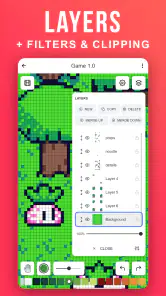
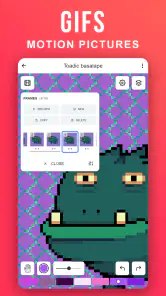
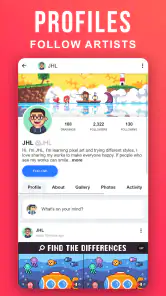
Analysis by Reviewed
If you're anything like me, you've probably spent countless hours doodling in notebooks or sketching on random bits of paper. Well, those days are behind us, my friends! Enter Pixilart - Make Pixel Art, the app that's here to unleash the digital artist in all of us. This nifty little tool brings pixel art to the palm of your hand, and trust me, it’s as addictive as it sounds.
Getting Started with Pixilart
First things first, you'll want to download Pixilart - Make Pixel Art from your app store. Installation is a breeze, and before you know it, you’re greeted with a colorful interface that’s both inviting and intuitive. The app is designed to be user-friendly, ensuring that whether you're a seasoned artist or a complete novice, you'll feel right at home.
Dive into Features
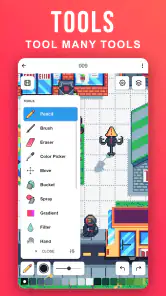
Here’s where the magic happens. Pixilart is packed with features that make pixel art creation a joy. You can customize your canvas size, choose from a variety of brushes, and even use layers to separate different elements of your artwork. The color palette is extensive, catering to every shade and hue an artist could dream of.
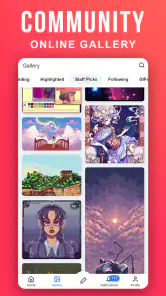
One of my favorite features is the community aspect of the app. You can share your creations with other users, get feedback, and even participate in fun challenges. It's like having a mini art community right in your pocket! Plus, there’s a built-in social media feed where you can follow other artists and draw inspiration from their work.
Personal Experience
I'll be honest, I wasn't sure what to expect when I first tried Pixilart. But after spending a few hours experimenting with different styles and techniques, I was hooked. I found myself creating pixel versions of everything from my favorite movie characters to abstract landscapes. The app is so versatile that the only limit is your imagination.
Another thing worth mentioning is the app's performance. It runs smoothly, with no annoying lags or crashes. The developers have clearly put a lot of thought into ensuring a seamless user experience, and it shows.
Final Thoughts
In a world where digital art is constantly evolving, Pixilart - Make Pixel Art stands out as a fantastic tool for both hobbyists and serious artists alike. Whether you’re looking to kill time or develop your artistic skills, this app offers endless possibilities. I highly recommend giving it a try—you might just discover a new passion for pixel art!
So, go ahead, download Pixilart, and start creating your pixel masterpieces today. Who knows, you might just become the next big thing in the pixel art world!
Pros
- Intuitive interface for easy pixel art creation
- Vast library of colors and tools
- Community sharing and collaboration features
- Supports animated GIF creation
- No intrusive ads
Cons
- Limited advanced features for professionals
- Occasional app crashes
- Requires internet for some features
- No offline mode
- Limited export formats

- Category
- Art & Design
- Version
- 1.7.0











