Standoff 2
- 43.91K
- 4.3
- Installs
- 100.00M
- Price
- Free

Screenshots
Analysis by Reviewed
I think Standoff 2 makes the most sense when a household treats it as a shared game, not as a shared account. One person can enjoy a quick match while another watches, but the competitive play is personal enough that it’s worth agreeing whose profile and progress are being used before handing over the device. If you’re choosing something for a family tablet, that small boundary can prevent a lot of confusion later.
Why a shared match needs a little planning
A realistic routine might be one person playing after school while a parent waits to use the same phone for a call or errands. I’d agree on a stopping point before the match begins, rather than promising to hand over the device “in a minute” once the action is underway. A live round is a poor place to negotiate turns, and the game’s competitive format makes it hard to treat a match like a video that can simply be paused.
Watching can be part of the fun, especially when someone wants to learn the pace before trying the controls. But I’d keep the spectator’s advice light during a round: too many voices can make it harder for the player to focus, and one person’s preferred tactics may not fit another’s style. A quick conversation between matches is more useful than trying to coach every decision in real time.
Immersive Gameplay and Graphics
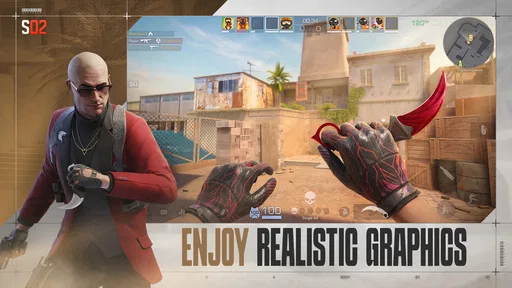
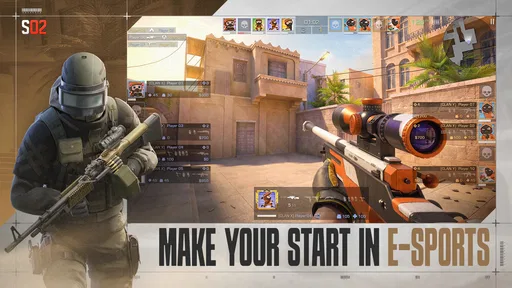
First off, let’s talk about the gameplay. Standoff 2 offers an intense, immersive experience that rivals many console games. The controls are smooth and intuitive, making it easy to jump right into the action. You’ll find yourself in various battlegrounds, from deserted warehouses to urban settings, each meticulously designed with impressive graphics. Honestly, the level of detail is something you'd expect from a PC game rather than a mobile app.
Setting up a fair turn
For shared-device use, I’d make the practical rules clear first: agree on who is playing, avoid changing another person’s settings, and give the device back only after the match is finished. That matters in a real everyday situation, such as a sibling borrowing a phone during a short break; an active round is a poor moment to switch players. I would also check that the device feels comfortable to hold and that the screen is easy to control before committing to a longer session.
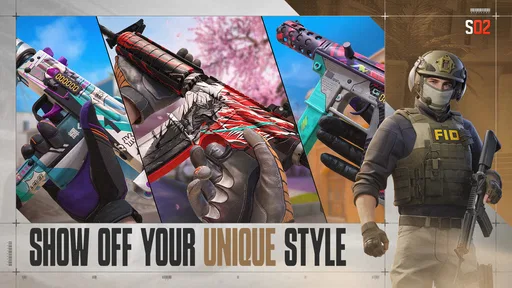
This is a free action game from AXLEBOLT LTD, with optional in-app purchases priced from $0.99 to $71.99 per item. I’d treat purchases as something the account holder should decide on, rather than letting a shared-device user tap through casually. Skins and stickers may be appealing, but they’re cosmetic choices, not a reason to spend in order to try the core shooting experience.
Keeping each player’s choices understandable
When different people use the same device, the main setup challenge is not just who gets the next turn; it’s remembering what was changed. I’d make one adjustment at a time and ask the next player before changing anything back. That is a simple way to avoid an argument about controls or weapon preferences, and it also makes it easier to tell whether a setting actually helped.
More From Our News Desk

 Gmail
Gmail in a Busy Inbox: Who Benefits Most?
From first account to crowded workday, Gmail earns its place through dependable search and flexible sorting—but its best fit depends on how much inbox maintenance you can tolerate.

 Prime Video
Switching to Prime Video: What Changes in Your Viewing Routine
Prime Video can make a compelling second home for streaming, but switching means learning a different catalog, rental layer, and route from browsing to playback.

 Universal TV Remote Control
 Works Best as a Reliable Backup
A phone remote earns its place through quick setup and reliable habits. Here is how to get more from Universal TV Remote Control—and where its limits show.

 Weather - By Xiaomi
Weather by Xiaomi Review: Clear at a Glance, Less Clear Up Close
Xiaomi’s weather app makes everyday forecasts quick to scan, but its calm surface can leave useful details and recovery paths harder to find than they should be.

 X
X Under Pressure: Can It Recover When Posting Goes Wrong?
A resilience-focused review of X, examining setup, mistaken posts, interruptions, weak connections, and the gaps that matter when recovery needs to be dependable.

 Clash of Clans
 Is Won Between the Battles
Its raids are quick; its community is a long-term project of coordination, teaching, rivalry, and shared responsibility—with all the friction that entails.
Latest News



Before playing away from home, I’d also check that the person holding the device is comfortable with the screen layout and can see what is happening without leaning into an awkward position. Small practical details matter more in a fast shooter than they do in a slower puzzle game. If the screen is shared in a public place, headphones and considerate volume are sensible, especially when other people are nearby.
Weapons and Customization
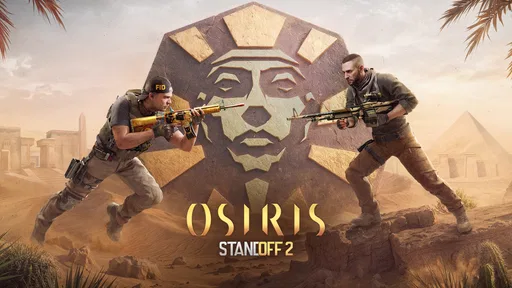
One of the standout features of this game is the extensive arsenal of weapons. Whether you’re a sniper at heart or prefer the up-close and personal approach of shotguns, there’s something for everyone. The customization options are also top-notch, allowing players to personalize their weapons with skins and stickers. It's these little touches that make the game feel uniquely yours.
A useful way to explore the arsenal is to change one preference at a time instead of switching everything between rounds. That makes it easier to notice whether a weapon suits your aim and preferred distance, rather than blaming a poor match on several changes at once. On a shared device, this also helps keep each player’s choices distinct without assuming the game provides separate household profiles.
What kind of shooter experience to expect
Compared with a story-focused shooter, this is a better pick when you want the match itself to be the main event rather than a narrative to follow. It also asks more from your attention than a casual arcade game: opponents can force quick reactions, and a short session can still feel intense. That’s appealing if you like improving through repetition, but it may be the wrong choice when you want something gentle to play while chatting or waiting for someone.
I’d approach the first few sessions as practice rather than as a test of whether I’m “good” at mobile shooters. Touch controls can feel natural after a little time, but aiming and movement compete for screen space in a way that takes getting used to. If you’re switching from a controller or mouse, it helps to focus on basic comfort and consistency before worrying about winning every exchange.
Multiplayer Madness
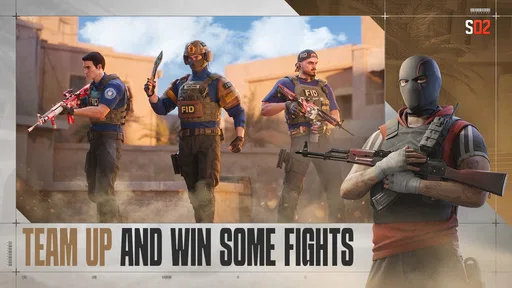
What’s a shooting game without some multiplayer action? Standoff 2 doesn’t disappoint with its real-time battles against players around the globe. The matchmaking system is quick, and the servers are stable, which means less waiting and more playing. Plus, the community is quite active, so you'll always find a match.
Multiplayer is the key trade-off: it gives each session a lively human opponent, but it also means the pace and outcome are not under your control. If friends or family want to coordinate, agree on a time to play and keep conversation simple; don’t assume everyone will be on the same team or that a match can be paused for household interruptions. Compared with a solo shooter, this is better for players who enjoy adapting to other people, but less suitable when you need a quiet, stoppable game.
Making a shared session work
If two people want to play around the same time, I’d settle the order before opening the game and leave a little breathing room for a handoff. That is more reliable than deciding after each round, when a close result can tempt someone to keep going. For friends coordinating remotely, it is also worth agreeing on a start time rather than assuming that one person will be ready whenever another sends a message.
One practical tip is to keep a short session focused on one goal, such as getting comfortable with a weapon or learning how a particular distance feels. That gives a player a reason to stop without making the session feel unfinished. It also makes sharing easier: the next person can start fresh instead of inheriting a device full of mid-session changes and expectations.
Age, trust, and choosing the right fit
The game is rated Mature 17+, so I would not treat it as a default choice for younger children just because it runs on a phone. A parent or guardian should make the age decision and consider the online multiplayer context, while older players should be comfortable with competitive shooting before joining in. The game has a 4.3 average from around 11 million ratings and over 100 million installs, which signals broad interest, but popularity alone does not decide whether its content or online setting suits your household.
For a shared phone or tablet, I’d keep the account holder in charge of account access and any spending decisions. A borrowed device does not make another person’s progress or purchases the borrower’s to manage. That boundary is especially useful when several household members take turns, because it avoids treating a cosmetic choice or account change as a casual part of passing the device around.
It is a stronger fit for someone who wants short, active FPS sessions and enjoys learning through repeated matches. If you prefer a relaxed pace, a story-led campaign, or a game that can be interrupted at any moment, a single-player alternative is likely a better match. The mobile controls also take practice: even when they feel intuitive, aiming under pressure is different from using a controller or mouse, so I’d give yourself time to adjust rather than judging the game after one round.
Challenges and Updates
The developers frequently update the game with new challenges and events, keeping the gameplay fresh and exciting. Whether it's a seasonal event or a new mode, there's always something new to explore. This commitment to updating content is what keeps players coming back for more.
The version is 0.32.3, and the game requires Android 6.0 or later. It was released on July 19, 2017, and its continuing updates make it worth checking what is currently available when you return after a break. I’d avoid planning a shared session around an event before opening the game; let the available content guide the plan instead.
Because the game is updated over time, I would not assume that a returning player will find every detail exactly as they remember it. If someone has been away for a while, it is sensible to spend a moment looking over what is currently available before promising a particular activity to a friend or family member. That small pause helps set expectations without turning a casual play session into a schedule to maintain.
There is also a useful distinction between a game that is free to start and a game with no spending decisions at all. Here, the core appeal is the shooting and competition, while optional purchases can add cosmetic choices. I’d decide on a household spending rule beforehand, especially if the device is used by more than one person; that is clearer than trying to settle a purchase question during a match.
For a group using one device, the simplest coordination is to set a turn length before anyone starts and leave time for a clean handoff. That avoids the awkward choice between abandoning a live match and keeping someone else waiting. It also makes the game easier to fit into a household routine without turning every spare minute into an argument over whose turn it is.
Choosing when to play—and when not to
The best everyday use I see is a planned gaming break when the player has enough uninterrupted time to finish a round. It is less suited to a waiting room, a quick pause before leaving the house, or any moment when the device may need to be returned immediately. If I only have a few minutes, I’d choose something that can be stopped without affecting other players; here, the match’s momentum makes that small difference matter.
For someone deciding between this and another mobile shooter, I’d ask what they want from the session. This leans toward direct competition and repeated practice, rather than a campaign built around characters and plot. A casual arcade shooter may be easier to dip into, while a story-driven game is more satisfying if progress through a narrative matters more than facing human opponents. The right alternative depends less on graphics than on whether you want a contest, a story, or something easy to interrupt.
A practical first-session approach
If you’re new to mobile FPS controls, I’d use the first session to get comfortable with movement, aiming, and the layout before judging performance. Try to notice one specific issue at a time: whether the screen feels crowded, whether a weapon suits your preferred range, or whether you’re reacting too quickly under pressure. This makes practice more useful than changing several things at once after a frustrating round.
It is also worth deciding in advance whether the device is personal or genuinely shared. When several people use one account, progress and customization can become tangled, so I’d avoid treating another person’s choices as disposable. A simple agreement about who is playing and who handles purchases solves more than trying to sort out a misunderstanding after a change has already been made.
All in all, Standoff 2 is a solid choice for anyone looking to get their shooter fix on the go. The combination of stunning graphics, a wide array of weapons, and the thrill of multiplayer battles makes it a must-try for any FPS fan. So, if you haven't already, give it a shot!
My household verdict is positive with a few clear boundaries: it works well for older players who enjoy competitive matches, while shared-device users should keep accounts, purchases, and turns clearly separated. I would recommend trying it if fast mobile shooting is what you want, but I’d choose a calmer or offline game for younger players, family downtime, or situations where interruptions are unavoidable.
Standoff 2 Frequently Asked Questions
Can Standoff 2 be downloaded for free?
Yes. Standoff 2 is free to download and play, so you can try its action-focused shooter gameplay without paying upfront. Optional in-app purchases are available, but they are not required to start playing. If you are downloading it for someone else, it is worth considering whether optional spending should be managed through the device’s purchase settings.
What kind of action can I expect from Standoff 2?
Standoff 2 is a mobile first-person shooter centered on armed combat and multiplayer action. Its dynamic shooter format is intended for players who want active matches rather than a quiet, story-led experience. The game’s tactical team play and competitive focus are important to consider before downloading, especially if you prefer games that can be played entirely at your own pace.
Who is Standoff 2 designed for?
Standoff 2 is best suited to players who enjoy first-person shooters, online competition, and armed-combat gameplay. It has a Mature 17+ rating, so it is aimed at older players rather than young children. Before installing it for yourself or someone else, consider both the rating and whether the intended player is comfortable with shooter content and competitive multiplayer.
Does Standoff 2 require a powerful phone or tablet?
Standoff 2 requires Android 6.0 or later, which gives Android users a clear starting point when checking compatibility. The game is also available on iOS, where you should review its App Store compatibility details. Meeting the operating-system requirement does not guarantee identical performance on every device, so consider your device’s age and available resources before installing.
Is Standoff 2 mostly a solo game or an online shooter?
Standoff 2 is primarily a multiplayer shooter, with competition and team-based play at the center of the experience. That makes it a stronger fit for players who want to take part in matches with other people than for those seeking a solo story or offline adventure. If multiplayer action is what you want, its focus may suit you; otherwise, consider that emphasis before downloading.
Pros
- Realistic graphics enhance gameplay.
- Diverse maps keep the game engaging.
- Smooth controls enhance user experience.
- Frequent updates add new content.
- Strong community support.
Cons
- In-app purchases can be costly.
- Occasional server issues.
- High battery usage on phones.
- Limited offline gameplay.
- Can be addictive for some users.