

Piggy Bank Allowance - Bomad
- 46.00
- 4.4
- Installs
- 50.00K
- Price
- Free

Screenshots





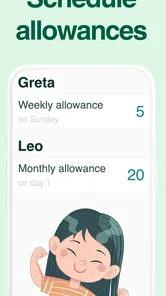


Analysis by Reviewed
Teaching children how money works is much easier when the lesson is visible, but many allowance tools make the process feel more complicated than the allowance itself. Piggy Bank Allowance - Bomad takes a simpler route: it gives families a digital way to track pocket money and separate it into saving and spending jars or pots. I found that idea useful because it turns an abstract conversation—“you have money available, but not all of it should be spent”—into something a child can see and discuss.
This is a free parenting app from Graeme P, with optional in-app purchases ranging from $1.99 to $29.99 per item. It is rated for Everyone, runs on Android versions from 9 onward, and the current release is version 2.0.266. Its focus is narrow, which is a strength when you want an allowance tracker rather than a full family finance system. It is also worth approaching with realistic expectations: this is a tool for recording and organizing pocket money, not a replacement for a bank account or a lesson in every part of personal finance.
Where families usually get stuck
I use this section to separate a confusing balance from a genuinely unclear family rule. Before changing entries, I would trace the last allowance and spending decisions in order; that often reveals whether the issue is a missed update or a disagreement about what should count. With that distinction in view, the next section focuses on preventing avoidable snags before the routine begins.
The first challenge is agreeing on the rules
The hardest part of an allowance app is often not tapping through the interface. It is deciding what the entries mean. Before I would hand this to a child, I would agree with them on the allowance amount, when it is earned, which portion is available to spend, and what belongs in savings. Without that conversation, a digital jar can look authoritative while the family is still changing the rules from week to week.
That matters particularly when parents use allowance as a reward for chores. A child may interpret an amount shown in the app as guaranteed, while a parent may see it as conditional. I recommend choosing one clear routine: update the allowance after the agreed task or at a fixed family check-in, then explain any adjustment immediately. The app can record the decision, but it cannot settle a disagreement about whether a task was completed.
Jars are helpful, but they can also oversimplify
The saving and spending structure is the most useful part of the concept for younger children. It gives them a visual distinction between money that can be used now and money reserved for a goal. I would use it to make a purchase plan concrete: a child can identify something they want, decide how much should remain available, and watch the saving side grow over time.
The trade-off is that real money does not always fit neatly into two containers. Families may want a third purpose for gifts, charitable giving, school activities, or a shared goal. If your household needs many categories, detailed records, or separate budgets for several children, a spreadsheet or a more advanced family finance app may be more flexible. Bomad is at its best when the family wants a small number of understandable choices rather than a complete accounting system.
More From Our News Desk

 Gmail
GmailGmail in a Busy Inbox: Who Benefits Most?
From first account to crowded workday, Gmail earns its place through dependable search and flexible sorting—but its best fit depends on how much inbox maintenance you can tolerate.

 Prime Video
Switching to Prime Video: What Changes in Your Viewing Routine
Prime Video can make a compelling second home for streaming, but switching means learning a different catalog, rental layer, and route from browsing to playback.

 Universal TV Remote Control
Universal TV Remote Control Works Best as a Reliable Backup
A phone remote earns its place through quick setup and reliable habits. Here is how to get more from Universal TV Remote Control—and where its limits show.

 Weather - By Xiaomi
Weather by Xiaomi Review: Clear at a Glance, Less Clear Up Close
Xiaomi’s weather app makes everyday forecasts quick to scan, but its calm surface can leave useful details and recovery paths harder to find than they should be.

 X
XX Under Pressure: Can It Recover When Posting Goes Wrong?
A resilience-focused review of X, examining setup, mistaken posts, interruptions, weak connections, and the gaps that matter when recovery needs to be dependable.

 Clash of Clans
Clash of Clans Is Won Between the Battles
Its raids are quick; its community is a long-term project of coordination, teaching, rivalry, and shared responsibility—with all the friction that entails.
Latest News



Do not assume a digital balance equals cash
One practical source of confusion is the difference between a recorded balance and money physically held by the child. If a child spends cash in a shop, the app will only reflect that change when someone records it. Likewise, adding a digital allowance does not automatically move funds into a bank account. I would make this distinction part of the routine: every entry should answer whether it is money received, money promised, or money actually spent.
This is also why I would avoid using the app as the sole record for a large amount of money. For ordinary pocket money, a family can quickly correct a missed entry. For substantial savings, a parent should keep the real-world record and treat the app as a teaching aid. That approach prevents a child from believing that the number on screen is independently protected or spendable everywhere.
What to check before blaming the app
If an allowance seems wrong, I would first review the most recent transaction rather than repeatedly adding money. Check whether the entry was made in the intended jar, whether a spending action was recorded, and whether the family’s agreed schedule has changed. A duplicate update can make the balance appear incorrect even when the app is behaving consistently with the entries it received.
I would also check which device and account the family member is using before assuming that information has disappeared. A child and parent may be looking at different screens or different local records. If several people update the allowance independently, write down the intended change first and make one person responsible for applying it. That simple rule avoids many “the balance changed by itself” moments.
Setup checks that make the routine smoother
I would treat setup as a small family agreement, not just a sequence of taps. A quick check of the device, the allowance schedule, and who is responsible for each update can prevent duplicate entries and make the first review less stressful. The next section looks at how to put things right if a mistake still slips through.
Start with one child and one simple cycle
Although it is tempting to enter every possible rule at once, I would begin with one child, one allowance cycle, and two clear purposes: spending and saving. Use the first week as a trial. The goal is not to create a perfect financial system; it is to see whether the child understands when the balance changes and why the jars are different.
A short trial also exposes family friction early. Perhaps the child wants to save everything, or perhaps the parent keeps making exceptions for treats. That is useful information. Adjust the household agreement before adding complexity. The app works better when the family’s routine is settled enough that the entries tell a consistent story.
Make the first saving goal specific
A vague instruction such as “save some money” is difficult for a child to act on. I would connect the saving jar to a visible goal and discuss the target in ordinary language. The point is not to turn the app into a lesson full of calculations; it is to give the child a reason to leave money untouched.
A good routine is to review the saving jar at the same time as the allowance update. Ask what the child is saving for, whether the goal still matters, and how much remains available for spending. This makes the app a conversation starter instead of a silent balance display. It also teaches that a plan can change without treating the previous choice as a failure.
Keep parent and child responsibilities separate
I would decide in advance who records allowance, who records spending, and who corrects mistakes. For a younger child, the parent may handle entries while the child observes. An older child may be ready to record purchases, with the parent checking the result during a weekly review. The best arrangement depends on maturity, but the responsibility should be explicit.
This separation is an important safeguard against accidental double counting. If both people enter the same allowance, the balance no longer represents the family’s agreement. If neither person records a cash purchase, the spending jar becomes misleading. A short written rule—“one person updates, the other confirms”—is more valuable than asking everyone to remember informally.
Check the device basics before troubleshooting deeper
Because the app requires Android 9 or later, I would confirm the phone or tablet meets that minimum before trying anything else. If the device is older, installation or normal operation may be limited by the operating system rather than by the allowance tracker itself. On a supported device, I would also close and reopen the app after a change that appears not to display correctly, then review the entry rather than immediately creating another one.
I would keep the first setup on the device the family intends to use regularly. Moving between devices during the trial can make it harder to tell whether a problem comes from an entry, a device, or the family workflow. If the app is being used by more than one person, agree on how updates will be communicated so that two people do not try to repair the same balance independently.
Understand the free starting point and optional purchases
The app is free to download, but it includes optional purchases priced from $1.99 to $29.99 per item. I would let the family use the basic experience first and only consider a purchase if it solves a clearly understood need. Children should not be left to make purchase decisions on their own, especially when the app is part of a money lesson.
This pricing structure also affects who should choose it. Families looking for a completely fixed, no-purchase environment may prefer a basic paper chart or a tool without optional spending. Families comfortable evaluating extras themselves may appreciate being able to start without paying. Either way, I would treat the purchase screen as a parent decision, not part of the child’s allowance routine.
Recovering when the workflow goes wrong
When something goes wrong, I find it helps to preserve a clear account of what actually happened instead of adjusting the balance until it looks plausible. A brief pause and a simple note of the intended change can help the family compare the real event with the record, then resume the routine without creating more confusion.
Repair the story, not just the number
When a balance is incorrect, the fastest-looking solution is often to add or subtract a random amount until the displayed figure seems right. I would avoid that. It may fix the visible number while making the record impossible to understand later. Instead, identify the real event: missed allowance, duplicate allowance, unrecorded purchase, or money moved between purposes. Then correct the record in a way that matches that event.
This is one of the most valuable habits the app can teach. A balance is meaningful only when it has an explanation. If a child sees a correction, explain it plainly: “We recorded this allowance twice,” or “You spent this cash yesterday, so we are updating the spending jar.” That turns an error into a lesson about checking records rather than hiding mistakes.
Use a short pause before repeating an action
If a tap appears not to work, I would pause before trying it again. Repeated taps can create duplicate entries or make the family unsure which action was accepted. Review the screen, reopen the relevant area if needed, and check the balance before making another change. This is especially important when a child is excited to see money added and quickly presses the same control several times.
For a weekly allowance, keeping a small note of the intended amount and date can help during recovery. The note is not a replacement for the app; it is a reference that lets you compare the planned event with what was recorded. Once the balance is corrected, discard the temporary note or mark it complete so that two records do not continue to compete.
Decide what happens after an accidental purchase
If an optional in-app purchase is made accidentally, the family should handle it through the device’s normal purchase-management process rather than trying to alter the allowance balance. The allowance record and the app-store transaction are separate matters. I would also review the device’s purchase controls before allowing a child to use the app independently.
This is a good example of a problem that does not belong inside the jars. A spending jar should represent the child’s agreed pocket money, while an app purchase is a household device expense. Keeping those categories separate prevents an adult purchase from being mistaken for a child’s spending decision.
When the app is not the cause
Not every mismatch points to a technical problem: forgotten cash purchases, inconsistent household rules, or different expectations can all produce a balance that feels wrong. I would check those everyday causes before changing the app or its records, while remembering that manual tracking depends on people sharing updates. The next section considers when another approach may suit the family better.
Family inconsistency can look like a technical fault
If the amount changes differently from one week to the next, the cause may be an unclear allowance policy. Perhaps one parent includes bonuses while another records only the regular amount. Perhaps chores are being paid immediately in cash but entered later. Before reinstalling anything, compare the household rule with the recent entries. If the rule is inconsistent, no tracker can produce a stable result.
The same applies to shared devices. A child may spend money and forget to report it, while a parent may update the app based on an old conversation. The resulting mismatch feels like a synchronization problem, but it is really a communication gap. A fixed review time—such as the end of the weekend—can reduce that friction without requiring constant supervision.
Cash handling remains a human responsibility
Bomad can help explain money, but it cannot know what happened to coins or notes outside the device. If cash is lost, borrowed, gifted, or spent without being reported, the app cannot infer the event. I would use the weekly review to compare the recorded spending jar with the child’s actual cash and ask neutral questions rather than treating every mismatch as dishonesty.
This limitation is not a reason to reject the app; it simply defines its role. It is strongest as a shared record and teaching prompt. A family that wants automatic bank balances, card controls, or transaction imports should choose a financial product designed for those tasks instead. For a child learning the difference between available money and reserved money, manual tracking may actually be more educational.
Age and independence change the fit
The Everyone rating makes the app approachable for families with children at different stages, but suitability still depends on the child’s reading ability, attention, and understanding of money. A younger child may benefit from using it with a parent, while an older child may find the simple jar model too limited if they want detailed categories or more independence.
I would also skip it for a family that does not want to maintain entries. A tracker that is updated sporadically will create more arguments than clarity. In that situation, a physical piggy bank with a handwritten goal may be better because it makes the limits obvious and requires no device routine. The digital format is worthwhile when the family will actually review it together.
My practical verdict after using it as a family tool
Piggy Bank Allowance - Bomad has a clear purpose and generally stays close to it. I like the way the saving and spending jars can turn an allowance into a visual choice instead of one undifferentiated amount. The app is particularly suitable for parents who want to introduce budgeting gently, without exposing a child to the complexity of a bank account or a household finance dashboard.
Its strongest use case is a regular family ritual. Imagine a child receives pocket money at the weekend, and the parent records it while the child decides how much remains available and how much is reserved for a chosen goal. Later, after a cash purchase, the child reports what happened and the spending side is adjusted. That sequence teaches planning, delayed gratification, and honest record-keeping in a way a static explanation rarely does.
The main weakness is that the app depends on disciplined human input. It cannot distinguish a real purchase from a forgotten entry, and it cannot resolve disagreements about chores or rewards. The simple jar approach may also feel restrictive for teenagers who need several categories, recurring obligations, or a more complete view of their finances. In those cases, a spreadsheet, a paper system, or a dedicated youth banking product may be a better match.
With an average rating of 4.4 from over 600 ratings and more than 50 thousand installs, it has found a meaningful audience without pretending to be a full financial platform. Those figures suggest a practical, focused tool rather than an all-purpose money manager. I would recommend it to parents who want a free starting point, are comfortable reviewing optional purchases themselves, and will keep the real-world allowance rules consistent.
My recommendation is to treat it as a conversation tool first and a balance tracker second. Set one simple routine, make the saving goal visible, assign one person to update each allowance event, and correct mistakes by explaining the real transaction. Used that way, this parenting app can make pocket money easier to understand. Used as an automatic source of truth, it will disappoint families expecting bank-level automation or detailed financial control.
For a child who is just beginning to learn that spending today affects what is possible tomorrow, that focused approach is exactly why I would keep it in consideration. It is not the right answer for every household, but for a family willing to pair the screen with a few minutes of honest discussion, Piggy Bank Allowance - Bomad offers a practical bridge between a traditional piggy bank and more complicated money-management tools.
Piggy Bank Allowance - Bomad Frequently Asked Questions
Is Piggy Bank Allowance - Bomad free to download, and are there in-app purchases?
Piggy Bank Allowance - Bomad is free to download, so families can try the app without paying an upfront purchase price. It also offers in-app purchases, with individual items ranging from $1.99 to $29.99. Check the purchase options before confirming anything, and consider setting appropriate purchase controls on a child’s device if children will have access to it.
What devices and operating systems can run Piggy Bank Allowance - Bomad?
The app is available for devices running Android 9 or later. Before downloading, check your device’s operating system version and ensure there is enough space for the installation and any updates. If you are choosing between devices for family use, it is also practical to consider who will manage the parent account and how children will access the allowance information.
What is Piggy Bank Allowance - Bomad, and who is it designed for?
Piggy Bank Allowance - Bomad is an allowance-management app designed to help parents and children organize pocket money, chores, savings, and spending goals in one place. Parents can use it to set allowances or rewards, while children can learn how money is earned and managed. It is best suited to families looking for a simple digital tool for teaching basic financial responsibility. The app is in the Parenting category and has an Everyone content rating.
How does the allowance and reward system work in the app?
The app generally allows parents to create recurring allowances, assign chores or tasks, and record completed work before granting rewards. Depending on the family’s setup, payments may be tracked as virtual balances rather than transferred automatically to a bank account. Before downloading, parents should review the available settings to confirm whether the app supports their preferred allowance schedule, currencies, approval process, and reward rules.
Can children use Piggy Bank Allowance - Bomad independently?
Children may be able to view their balance, tasks, savings progress, and completed allowances through their own access, but parental involvement is still important. The app is intended to support family communication rather than replace it. Parents should configure accounts, explain the rules, and check transactions or completed chores regularly, especially when younger children are learning how earning, saving, and spending work.
Pros
- Simple way for parents to manage and track children’s allowances.
- Encourages children to learn budgeting and saving habits.
- Digital records make allowance payments easy to monitor.
- Useful for setting regular payments and financial goals.
- Can reduce the need to handle cash for everyday allowances.
Cons
- May require both parents and children to use compatible devices.
- Some features may depend on account setup or parental approval.
- Children may lose interest without consistent parental involvement.
- Digital allowances may not suit families who prefer cash payments.
- Availability and features can vary between Android and iOS versions.











