PickNovel - Novels & Stories
- 385.00
- 4.5
- Installs
- 1.00M
- Price
- Free

Screenshots





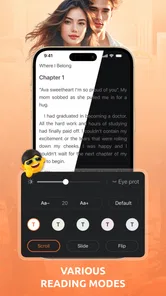


Analysis by Reviewed
I installed PickNovel - Novels & Stories expecting a straightforward way to read fiction when I had a few spare minutes, and that is exactly the role it fills best. This free Books & Reference app from RUIPAI is built around serialized novels rather than the broad reference material I would expect from an encyclopedia or ebook library. Its mature 17+ rating also sets the right expectation: this is aimed at adult readers, not children looking for an all-ages reading shelf.
My first impression was that PickNovel works best when I arrive with a simple goal: find a story, read a chapter, and decide whether I want to continue. It is not trying to replace every reading tool on my phone. Instead, it focuses on the habit of following ongoing fiction. That makes it appealing for commutes, waiting rooms, and evenings when I want something lighter than a long book but more absorbing than casual scrolling.
From a spare moment to a regular reading routine
I find that PickNovel is easiest to enjoy when I treat a short break as a chance to test a story, not a promise to keep reading indefinitely. A small routine—one novel at a time, with a natural stopping point—also makes it easier to notice whether the writing holds my attention beyond its opening hook. From there, the next question is how that habit fits into everyday reading.
Choosing the right starting point
The most important decision happens before reading begins: choosing a story that matches my mood. With a novel app, the cover and title can pull me in quickly, but they can also create the first point of friction. A dramatic premise is not enough if the pacing feels slow or the writing style is not my taste. I found it useful to treat the opening chapters as a trial rather than committing immediately to a long series.
That approach is especially helpful here because serialized fiction encourages continuation. A story may end a chapter with a strong hook, making it easy to keep reading even when I originally planned to spend only a few minutes in the app. I recommend starting with a clear reading limit, such as one chapter during a break, and then deciding whether the story deserves a longer session. This keeps discovery enjoyable instead of turning the library into an overwhelming queue.
PickNovel’s store summary, “Quality Novels Anytime,” describes the intended convenience, but the practical benefit is more specific: the app gives casual readers a dedicated place for fiction without requiring them to carry a physical book. I can open it when I want a story immediately, browse for something new, and return to reading without setting up a separate workflow on a desktop.
Reading in small sessions
My most realistic use case was a short evening session after finishing daily tasks. I opened the app, selected a novel, read for a while, and stopped at a natural break rather than trying to finish a complete book. That format suits serialized reading because the story is already divided into manageable pieces. It also works during a commute, although I would avoid reading while walking or in any situation where the screen takes attention away from safety.
More From Our News Desk

Weather by Xiaomi Review: Clear at a Glance, Less Clear Up Close

X Under Pressure: Can It Recover When Posting Goes Wrong?

Clash of Clans Is Won Between the Battles

Android Auto Makes the Case for Quieter Car Software

MobiOffice: Transforming Mobile Productivity with Seamless Integration

EA SPORTS FC™ Mobile Soccer: Redefining Mobile Sports Gaming
The app is more useful when I make it part of a routine. For example, I can reserve it for a train ride, a lunch break, or the final half hour before sleep. The advantage over a general web browser is focus: I am opening a reading app with a specific intention instead of navigating through unrelated tabs and notifications. The disadvantage is that the same easy access can encourage me to continue longer than planned, particularly when a chapter ends on a cliffhanger.
One practical tip is to judge a novel on three separate points: the opening hook, the rhythm after that hook, and whether the chapter endings feel satisfying. Many reading apps make the first impression easy but leave the reader to discover later whether the pacing holds up. Applying this quick test helps me avoid spending several sessions on a story that only looked promising at the beginning.
Keeping discovery under control
Browsing is enjoyable, but it can become the least efficient part of the experience. I found that choosing a theme or mood before opening the catalog makes the process more manageable. If I want something relaxing, I look for a gentler premise; if I want tension, I choose a story with a stronger central conflict. This sounds simple, yet it prevents random browsing from replacing actual reading time.
I also prefer to finish a small sample before opening several other novels. Jumping between too many stories makes it difficult to remember characters and weakens the emotional connection that serialized fiction depends on. PickNovel is at its best when I use discovery as a doorway to one story, not as an endless activity in itself.
What the handoff looks like between sessions
A reading app succeeds or fails at the moment I leave and return. The useful handoff is not just closing the screen; it is knowing where the story continues when I come back. In my workflow, I stop at the end of a chapter whenever possible, note the title mentally, and reopen the same novel later rather than beginning a fresh search. That small habit reduces the chance of losing momentum.
This is also where I would pay attention to how much effort the app asks from me. If returning to a story requires repeated browsing, the convenience advantage over a normal ebook reader becomes smaller. If the next reading session starts naturally, PickNovel feels much more like a personal fiction shelf. Readers who follow several stories at once should be especially deliberate about remembering their current position, because serialized reading can become confusing when multiple plots and character names overlap.
My advice is to keep a simple priority order: one main novel for regular reading, one backup for a different mood, and new discoveries only after those have received a fair trial. This is a more reliable workflow than opening every attractive title. It also makes it easier to tell whether the app is helping me read more or merely giving me more choices.
From a chapter to a finished reading outcome
The result I get from PickNovel depends on what I want from fiction. If my goal is quick access to continuing stories, it performs a useful job. I can turn an idle moment into a focused reading session without carrying a paperback or searching across unrelated websites. The experience is particularly suitable for readers who enjoy episodic progress and like having a new chapter waiting when they return.
If my goal is a carefully edited, complete literary work, I would choose a conventional ebook reader or a library service instead. Those alternatives are usually better suited to owning or borrowing finished books, managing a personal collection, and reading without the feeling of an ongoing serial. PickNovel should be judged as a novel-discovery and serialized-reading app, not as a universal replacement for every form of digital reading.
The app’s popularity suggests that this focused approach has found an audience: it has passed one million installs and holds a 4.5 average from around eight thousand ratings. Those figures do not decide whether a particular story will suit me, but they do indicate that the format is established enough to attract a substantial reading community. RUIPAI has continued the app through version 5.2.3, which is the version I would look for when checking compatibility before installing.
Cost, age suitability, and the decision to continue
PickNovel is free to install, which makes trying the reading experience low-risk. However, the app includes in-app purchases ranging from $0.99 to $299.99 per item. That is the point where I would slow down and read each purchase prompt carefully rather than treating every chapter or reading option as automatically included. The wide range means the financial side deserves attention, especially for readers who tend to buy impulsively when a story ends at an exciting moment.
I would also keep the mature 17+ rating in mind before recommending it to someone else. Parents looking for a children’s reading app should choose a service designed for younger audiences instead. Adult readers may appreciate the broader tone that the rating allows, but the label is a reminder to consider personal comfort with the themes and presentation of individual novels.
The technical entry point is reasonably accessible for older devices because the app supports Android 6.0 and later. That does not guarantee identical performance on every phone, but it means the minimum requirement is not limited to recent hardware. I would still install it on the device I plan to use most often, since reading comfort depends as much on screen size, battery condition, and notification habits as it does on the app itself.
Where the workflow breaks
The first weakness is the risk of choice fatigue. A large fiction catalog can feel generous at first, but too many possible stories make it harder to begin one. PickNovel works better for readers willing to sample, choose, and commit for a while. If I want a tightly curated reading list with little browsing, a traditional library app may feel calmer.
The second issue is the serialized format itself. Cliffhangers are effective for maintaining interest, but they can make reading feel fragmented. Someone who prefers a complete beginning-to-end novel may find the rhythm less satisfying than downloading a finished ebook. This is not a defect in every situation; it is a trade-off built into the kind of reading PickNovel encourages.
Purchases are another point of friction. The free entry makes exploration easy, yet the presence of optional items means I need to manage my spending actively. I would never hand the phone to a child with unrestricted access, and I would avoid tapping quickly through prompts simply to reach the next part of a story. A reader who wants a predictable one-time price may be happier with an ebook store where the cost of a complete title is clear before reading.
There is also a personal attention cost. Because the app is designed to make the next story or chapter easy to reach, it can compete with other priorities. My workaround is to read at planned times and stop at a chapter boundary. That turns the app from an automatic time sink into a controlled leisure activity.
Who should install it, and who should pass
I would recommend PickNovel to adults who enjoy discovering serialized fiction, want a reading option for short breaks, and do not mind evaluating stories as they go. It is a good fit for someone who reads on a phone, likes switching between genres or moods, and values immediate access more than a formal personal ebook library.
I would be more cautious about recommending it to readers who require a fully finished book, dislike in-app purchase decisions, or prefer highly structured library management. Students seeking factual reference material should also look elsewhere; although it sits in the Books & Reference category, its practical identity is fiction reading rather than research.
For me, the best workflow is simple: install it, choose one promising novel, read enough to test the pacing, and set a boundary for future sessions. If the story earns my attention, the app becomes a convenient companion for everyday reading. If it does not, I can move on without pretending that a large selection automatically equals a good match.
My recommendation after using it
PickNovel - Novels & Stories is a focused choice for adult readers who want fiction available whenever a spare moment appears. I like its low barrier to entry, its suitability for chapter-sized sessions, and the way it turns a phone into a dedicated place for ongoing stories. The experience is most rewarding when I approach it with a plan instead of endlessly browsing.
It is not the right tool for every reader. The mature audience, serialized structure, and possible purchase costs all deserve consideration before settling into a reading habit. Still, if you enjoy discovering a story one chapter at a time and want something more purposeful than casual scrolling, I think it is worth trying. My final advice is to start slowly, watch the spending prompts, and choose novels based on sustained pacing rather than an attractive opening alone. Used that way, PickNovel - Novels & Stories delivers a convenient, personal reading routine without pretending to be a replacement for every other kind of book app.
PickNovel - Novels & Stories Frequently Asked Questions
Who develops PickNovel, and what devices can run it?
PickNovel - Novels & Stories is published by RUIPAI and is a reading app for Android devices that run Android 6.0 or later. Before downloading, check your device’s operating system version and make sure you have enough storage for the app and any content you choose to save. The app is free to download, though purchases inside the app may be offered.
What is PickNovel - Novels & Stories?
PickNovel - Novels & Stories is a mobile reading platform featuring serialized fiction, romance, fantasy, drama, mystery, and other popular genres. After opening the app, readers can browse recommended titles, explore categories, and follow stories chapter by chapter. Its catalog may include both completed books and ongoing novels, so the reading experience can vary depending on the title selected.
Is PickNovel - Novels & Stories free to use?
The app can generally be downloaded and used without an upfront purchase, and some stories or chapters may be available for free. However, access to later chapters can depend on the individual novel and the app’s credit, coin, reward, or subscription system. In-app purchases range from $0.99 to $299.99 per item, so before spending money, readers should check the pricing information shown inside the app and review any available daily rewards or promotional options.
Does PickNovel require an internet connection?
An internet connection is normally needed to download the app, load the catalog, synchronize your reading progress, and open chapters that have not been cached. Depending on the version and title, some content may be available for offline reading after it has been downloaded, but users should not assume that every novel supports this feature. Offline availability and download limits may also change.
What types of stories can I read on PickNovel?
PickNovel is mainly aimed at readers who enjoy serialized fiction, with categories commonly including romance, contemporary drama, fantasy, werewolf or vampire fiction, mystery, historical stories, and adventure. The exact selection can change as new books are added. Because many novels are released chapter by chapter, readers should check whether a title is completed or still being updated before starting it.
Pros
- Large library of romance
- fantasy
- and drama stories
- Personalized recommendations help discover new novels
- Offline reading is convenient for travel or limited data
- Regular updates add fresh chapters and new titles
- Reading progress syncs across supported devices
Cons
- Many premium chapters may require coins or subscriptions
- Some stories contain frequent grammar or translation errors
- New chapters can take time to arrive for ongoing novels
- The catalog may feel repetitive for non-romance readers
- Ads can interrupt browsing and reduce reading comfort











