Piano fun - Magic Music
- 492.00
- 4.3
- Installs
- 5.00M
- Price
- Free

Screenshots


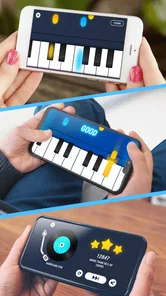
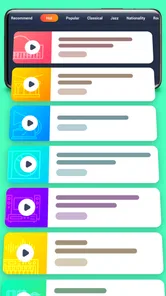
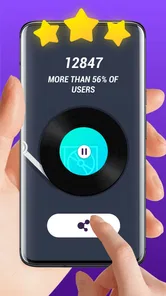

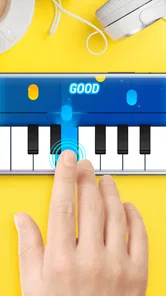
Analysis by Reviewed
I treat a piano app as a low-stakes way to explore music, not as a substitute for a real instrument or a teacher. Piano fun - Magic Music is a music and audio app from DrawAPP, and its appeal is easy to understand: it makes tapping out a tune feel approachable on a phone. It is free to install and rated for Everyone, though optional in-app purchases range from $4.99 to $46.99 per item. I’d keep that distinction in mind if a child will be using it: free to start does not necessarily mean every option is free.
Start with a clear idea of what you want
Before downloading, I’d decide whether I want a playful way to interact with music or a tool for learning piano fundamentals. Those are different goals. A virtual piano can make a short break more musical, and guided note prompts can be less intimidating than a blank keyboard. But if I want to learn posture, fingering, dynamics, or how to read notation, a phone game is not a replacement for lessons or a properly sized instrument.
This distinction also helps set expectations for the app’s guided activities. The store summary frames it as a musical game, so I’d approach it first as entertainment with a piano theme, rather than assume it provides a complete curriculum. If I find the experience enjoyable, I can use that interest as a reason to explore more formal practice elsewhere.
Its current version is 1.3.1, and the listed Android requirement is 4.4 or later. That makes it potentially usable on older Android devices, although practical comfort depends on the phone’s screen and responsiveness. A small display can make note targets crowded, so I’d try it on the device the intended player will actually use rather than judge it from the idea of a full-width keyboard.
What a phone piano is good for
The main strength of a virtual keyboard is convenience. You can try a short session while waiting for someone, take a musical break between tasks, or let a beginner see whether they enjoy following notes before committing to lessons or buying a keyboard. A touchscreen is also forgiving for casual experimenting: there is no setup beyond opening the app and tapping.
That convenience comes with a real trade-off. A phone screen cannot offer the spacing, touch response, or two-handed reach of a piano, so I would not use this as my only practice tool if my goal were to build dependable technique. It makes more sense as an introduction or playful extra, especially for someone who wants quick interaction rather than a structured course.
A realistic use is a few minutes at home while waiting for dinner or during a quiet break. I’d choose one activity, give it my attention, and stop when the screen starts to feel cramped or the session stops being fun. That is a better fit than trying to turn every spare moment into a serious lesson; the app’s value is partly that starting can feel easy.
More From Our News Desk

 Gmail
Gmail in a Busy Inbox: Who Benefits Most?
From first account to crowded workday, Gmail earns its place through dependable search and flexible sorting—but its best fit depends on how much inbox maintenance you can tolerate.

 Prime Video
Switching to Prime Video: What Changes in Your Viewing Routine
Prime Video can make a compelling second home for streaming, but switching means learning a different catalog, rental layer, and route from browsing to playback.

 Universal TV Remote Control
 Works Best as a Reliable Backup
A phone remote earns its place through quick setup and reliable habits. Here is how to get more from Universal TV Remote Control—and where its limits show.

 Weather - By Xiaomi
Weather by Xiaomi Review: Clear at a Glance, Less Clear Up Close
Xiaomi’s weather app makes everyday forecasts quick to scan, but its calm surface can leave useful details and recovery paths harder to find than they should be.

 X
X Under Pressure: Can It Recover When Posting Goes Wrong?
A resilience-focused review of X, examining setup, mistaken posts, interruptions, weak connections, and the gaps that matter when recovery needs to be dependable.

 Clash of Clans
 Is Won Between the Battles
Its raids are quick; its community is a long-term project of coordination, teaching, rivalry, and shared responsibility—with all the friction that entails.
Latest News



Trust, choices, and a sensible first session
For me, trust starts with keeping expectations grounded. The app has an average rating of 4.3 from around 11,000 ratings, with 492 written reviews and over 5 million installs. Those figures suggest that many people have tried it, but they do not tell me whether its current options suit my needs or what choices appear on my own device.
Before settling in, I’d look at the prompts the app displays and the purchase details shown in the store, then decide which choices make sense for me. I wouldn’t enter personal information or approve a payment just to explore a music game unless I understood why it was needed. If a child is playing, I’d check the device’s purchase controls with them and keep an eye on any on-screen prompts rather than assuming the age rating answers every question about use.
A practical way to test it is to open a short session, try the basic interaction, and see whether the screen feels comfortable to tap. If an option asks for a commitment you do not want to make, skip it and judge the experience on what remains available. This gives you a clearer sense of whether the app is enjoyable without turning a quick trial into an unwanted purchase.
I also make a habit of pausing before accepting any request that seems unrelated to playing. Permissions and data practices matter, but I don’t infer them from a music app’s category or age rating. I’d read the wording presented on my device, consider whether the request makes sense for the task, and decline anything I’m not comfortable with. That keeps the decision tied to visible choices instead of assumptions.
For families, the useful question is not only whether a child can open the app, but how the device is set up around purchases. A parent can check the available purchase controls before handing over a phone and explain that an attractive button is not automatically part of the free experience. That simple routine is more reliable than expecting a young player to distinguish every optional offer on their own.
Unleashing Your Inner Pianist
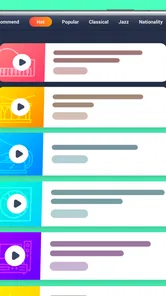
The moment I launched Piano fun - Magic Music, I was greeted with a vibrant and inviting interface. The app is designed for both beginners and seasoned pianists, offering a wide range of songs and tutorials that cater to all skill levels. Whether you’re picking up a virtual instrument for the first time or looking to refine your skills, this app has got you covered.
Features That Hit the Right Notes
One thing I love about this app is its extensive song library. It covers everything from classical masterpieces to pop hits, allowing you to play along with your favorite tracks. The app also includes a Magic Music mode, where you can follow along with the notes as they light up on the screen, making the learning process both fun and intuitive.
Moreover, the app offers a recording feature, which I found particularly useful. You can record your sessions and listen to them later, giving you the chance to hear your progress and areas for improvement. It’s like having a personal music diary!
That recording option is most useful when I give it a specific job. Rather than save every casual attempt, I’d record the same short passage before and after a few tries, then listen for whether it sounds more even or whether I’m rushing. It is a small self-check, not a substitute for a teacher’s ear, but it can make a brief session feel more purposeful.
The visual note prompts also change how I’d approach a tune. They can help a new player follow an immediate sequence without first decoding a page of notation, which is encouraging when the goal is simply to get started. The trade-off is that following lit notes does not necessarily teach why those notes belong together. I’d use the prompts to explore, then seek another resource if understanding scales, rhythm notation, or harmony becomes important.
When trying a new activity, I’d keep the phone steady and use a comfortable surface if possible. Tapping while holding the device can make accuracy harder, particularly for longer sequences. This is a practical adjustment rather than a hidden feature, but it can make the difference between judging the app fairly and blaming the interaction for awkward hand positioning.
Learning Made Easy
What sets this app apart is its user-friendly approach to learning. The tutorials are clear and easy to follow, with step-by-step guidance that makes it impossible to get lost. And if you’re someone who learns by playing, the app’s game-like features keep you motivated and engaged.
The app also provides feedback on your performance, highlighting the notes you hit right and those you need to work on. It’s an excellent way to improve without feeling overwhelmed or discouraged.
I’d still read that feedback narrowly. A note-based result can show where an attempt went off track, but it cannot tell me whether my hand is relaxed, whether I am using a sensible fingering, or whether the music sounds expressive. If repeated mistakes cluster in one spot, I’d slow down and isolate that part instead of replaying the entire piece at speed. That turns feedback into a practical next step rather than a score to chase.
There is also a useful distinction between copying a sequence and remembering it. A player can follow the screen successfully in the moment yet struggle to reproduce the tune without prompts. I’d occasionally look away between attempts and see what I can recall. If recall is not the aim, there is no problem; if I’m hoping to learn a passage, that quick check keeps me honest about what has actually stuck.
Compared with a metronome, this app offers a more visual and playful route into music, while a metronome is better for steady beat work without game-style guidance. Compared with a full piano-learning course, it can feel lighter and easier to dip into, but a course is the stronger choice for a planned progression. A real keyboard remains preferable for building finger independence and playing with both hands across a wider range.
Who Will Get the Most From It
I’d recommend it most to curious beginners, casual players, and families looking for a quick shared activity. A useful habit is to pick one short passage, replay it, and listen back to the recording rather than jumping between lots of songs; that makes it easier to notice whether timing or note choices are improving. The performance feedback can help direct attention, but I’d treat it as a prompt for another try, not a complete assessment of musicianship.
Compared with a metronome or a conventional piano-learning course, this is the more playful choice: the visual prompts and game-like feel can lower the barrier to starting, while a dedicated lesson tool or real keyboard is better for disciplined technique and sustained practice. If you already read music comfortably or need detailed instruction, you may outgrow a phone-first approach. The version listed is 1.3.1, and it supports Android 4.4 and later, making it an option for some older Android devices too.
I’d be less likely to recommend it to someone who wants a quiet, distraction-free practice instrument, needs a full keyboard layout, or expects a carefully staged course that builds technique lesson by lesson. It may also be a poor fit for anyone who dislikes tapping on a compact display. In those cases, a physical keyboard, music-reading app, or teacher-led approach is likely to serve the goal better, even if it takes more effort to set up.
For someone who is unsure whether piano practice will hold their interest, however, a low-commitment trial can be sensible. I would use the free starting point to decide whether the interaction is enjoyable, while treating optional purchases as a separate decision rather than a necessary step. If the app keeps a beginner curious enough to return to music, that is a worthwhile result; if it does not, there is no need to force it into a role it was not chosen for.
One question people often have is whether it can replace a keyboard. In my view, no: it can offer a convenient way to tap through music and experiment, but the screen’s size and touch surface limit what can be practiced comfortably. Another is whether it is suitable for a first-time player. Its guided, game-like approach can make an approachable starting point, provided the player understands that following prompts is not the same as learning every part of piano technique.
Someone deciding whether to pay should first spend time with the options they can access without purchasing and read each purchase prompt carefully. The listed price range for optional items is broad, so I would not treat every paid choice as equivalent or assume one is needed to enjoy the app. Likewise, an Everyone rating is useful context for age suitability, but it is not a substitute for adult supervision around device settings and purchases.
If you’ve ever wanted to learn the piano but didn’t know where to start, Piano fun - Magic Music might just be your new best friend. It’s like having a piano teacher in your pocket, ready to guide you at any time. I genuinely enjoyed my time with this app and would recommend it to anyone looking to dive into the world of music. So, why not give it a try and let your musical journey begin?
My recommendation is more cautious than the “teacher in your pocket” comparison suggests: I see it as a playful first step, not a personal instructor. The app’s appeal is easiest to appreciate when I want a quick, guided music activity and keep purchases and device prompts under my own control. If that matches what you need, it is worth trying; if your priority is serious piano study, I’d choose a real keyboard and structured instruction instead.
Piano fun - Magic Music Frequently Asked Questions
What devices can run Piano fun - Magic Music?
Piano fun - Magic Music is a Music & Audio app from DrawAPP for Android devices running Android 4.4 or later. It is a free download, with optional in-app purchases. Before downloading, check that your device meets the minimum system requirement and has enough available storage for the app and any content you choose to download.
Is Piano fun - Magic Music appropriate for children?
The app has an Everyone content rating, so its stated age classification is suitable for a broad audience. Its musical, tap-to-play format may appeal to children as well as adults, though parents can decide whether the app’s features and any optional purchases are appropriate for their family. If a child uses it, consider reviewing purchase settings on the device beforehand.
What is Piano fun - Magic Music and how does it work?
Piano fun - Magic Music is an engaging and interactive mobile app designed to help users learn and play their favorite songs on a virtual piano. It offers a variety of features including a wide selection of songs, interactive lessons, and fun challenges. The app uses a tap-to-play mechanism where users can follow along with on-screen prompts to play songs, making it accessible for both beginners and experienced players.
Is Piano fun - Magic Music free to download and use?
Yes, Piano fun - Magic Music is free to download. While the app offers a wide array of free content, it also includes optional in-app purchases, with items priced from $4.99 to $46.99. Users can enjoy the basic functionalities without spending any money, and should keep the purchase options in mind when deciding whether the available free content meets their needs.
What are the key features of Piano fun - Magic Music?
Piano fun - Magic Music boasts several key features designed to enhance your musical journey. These include a large library of popular songs from various genres, interactive lessons for all skill levels, and a competitive leaderboard to motivate users. Additionally, the app offers customizable piano sounds and themes, making it a versatile tool for anyone looking to improve their piano skills.
Pros
- Engaging user interface design.
- Wide variety of songs available.
- Interactive and fun gameplay.
- Suitable for all age groups.
- Offline mode available.
Cons
- Contains in-app purchases.
- Advertisements can be intrusive.
- Limited free features.
- Requires frequent updates.
- Battery usage is high.