Pi Video Player - Media Player
- 230.00
- 4.3
- Installs
- 10.00M
- Price
- Free

Screenshots
Analysis by Reviewed
I judge a video player less by how impressive it feels on the first day than by whether I still reach for it when I need to watch something specific. Pi Video Player - Media Player makes its case through locally stored videos, subtitles, and handy playback controls. That is a useful combination if your phone doubles as a place for saved lessons, films, or personal recordings, but it matters less if nearly all your viewing happens inside streaming services.
Why it can earn a place in the first week
Pi Video Player is a free video player from 100Pi Labs, and its focus is straightforward: playing videos stored on your device, including files with subtitles. It is rated for Everyone, works on Android 5.0 and later, and its current version is 1.3.0.0_release_1. Those basics make it easy to try as a practical alternative to a phone’s built-in player, especially if you already keep films, lessons, or personal clips on your device.
The first-week appeal is less about learning a new media library and more about having a familiar place to open a video. If you download a lecture before a commute, for example, you can open it offline and use subtitles when the carriage is noisy or the speaker is hard to understand. A useful habit is to check that the subtitle file is available alongside the video before leaving home; an offline player cannot help if the material itself was never saved locally.
For a quick trial, I would start with a video you already know well rather than making the first test a long film. That makes it easier to notice whether the controls suit you and whether the subtitle timing and sound are comfortable. It also gives you a low-stakes way to decide whether a separate player is more convenient than tapping the default option each time.
Seamless Playback Experience
The first thing that caught my attention with the Pi Video Player is its seamless playback. It's like magic! You load up a video, and boom, it starts playing without any hiccups. Whether you’re watching high-resolution movies or those cute cat videos, the playback is smooth as butter. And trust me, there's nothing more annoying than a video player that stutters and lags.
Controls that reward a little practice
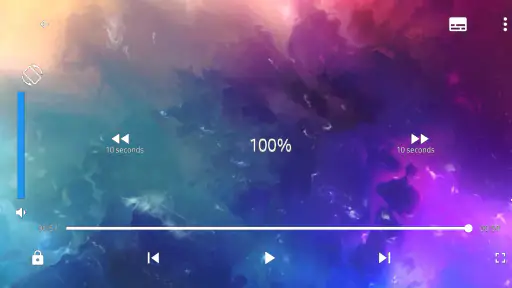
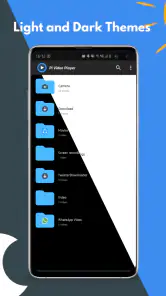
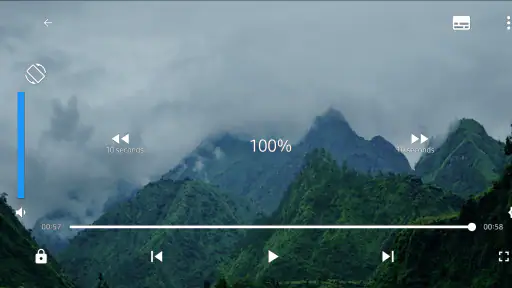
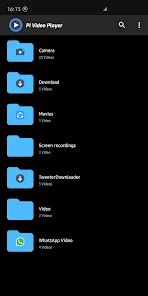
Now, let’s talk about the user interface. It’s incredibly intuitive. The developers did a fantastic job making sure that everything is just where you’d expect it to be. You won’t find yourself fumbling around trying to find the settings or wondering how to adjust the volume. Everything is laid out in a way that feels natural, almost like the app knows what you're thinking.
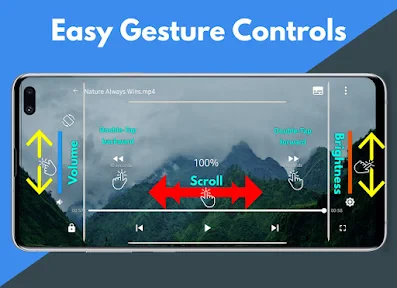
Another feature I absolutely love is the gesture controls. Want to skip forward? Just swipe! Need to adjust the brightness? A simple up or down gesture does the trick. It’s these little touches that make using the app a genuinely pleasant experience.
More From Our News Desk

Weather by Xiaomi Review: Clear at a Glance, Less Clear Up Close

X Under Pressure: Can It Recover When Posting Goes Wrong?

Clash of Clans Is Won Between the Battles

Android Auto Makes the Case for Quieter Car Software

MobiOffice: Transforming Mobile Productivity with Seamless Integration

EA SPORTS FC™ Mobile Soccer: Redefining Mobile Sports Gaming
There is a small trade-off with gesture-driven viewing: until the swipes become familiar, it is possible to adjust the wrong thing while watching. I’d take a minute during a short clip to learn how the controls respond, rather than discovering them halfway through a scene. Once they feel natural, being able to make quick changes without hunting through menus is especially handy when holding the phone one-handed.
That one-handed advantage is particularly practical when you are watching on a crowded bus or keeping a phone steady in a waiting room. I would avoid experimenting with gestures while the phone is balanced somewhere precarious; learn them while seated, then use only the adjustments you actually need. If you prefer visible buttons that never depend on a swipe, a conventional player with more obvious on-screen controls may feel less surprising.
What it offers—and what it does not need to replace
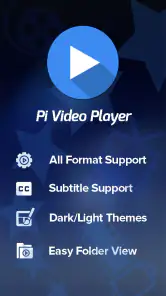
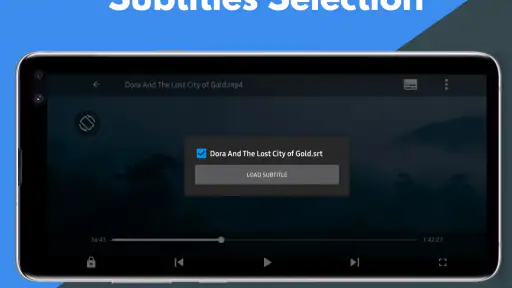
What really sets the Pi Video Player apart from its competitors is the sheer number of features it packs. From subtitle support to picture-in-picture mode, this app has it all. You can even stream your videos to other devices, which is perfect for those movie nights with friends. Oh, and did I mention the equalizer? Yes, it has a built-in equalizer to tweak the sound to your liking. It’s like having a mini home theater system right in your pocket!
In practical terms, subtitles are useful beyond films: they can make a recorded presentation easier to follow in a shared space, while the equalizer gives you a way to tailor sound when dialogue feels less clear than music. Picture-in-picture can suit a situation where you want a video to remain visible while you do something else, but it is not a substitute for a dedicated streaming service or a full desktop media setup. If your routine is mainly watching subscription content online, the service’s own app is usually the more direct choice.
These tools also work best when they solve a clear viewing problem instead of becoming a checklist to explore. For example, subtitles can help when you cannot turn up the volume, while picture-in-picture makes more sense for a short reference video than for a film you want to watch attentively. I would adjust the equalizer only after trying the same scene at a comfortable volume; changing several sound settings at once makes it harder to tell what actually improved speech clarity.
Compared with a basic built-in player, Pi Video Player gives you more viewing controls and a broader set of playback tools in one place. Compared with a large media-library app, its appeal is simpler: open a local video and watch it, rather than organizing a whole collection. That distinction matters over time. If you want elaborate cataloguing, synced watch history, or a central home for online services, a more specialized alternative may fit better. If your videos are already on your phone, a lighter routine can be an advantage.
There is also a practical difference between a local player and a streaming app when you are planning ahead. With local files, you can prepare a particular video before leaving and watch without relying on a live connection; with a streaming service, browsing and continuing across devices may be more convenient. I see them as tools for different jobs, not rivals where one must replace the other. Keeping a local player makes sense when saved files recur in your week, not just because it has more controls than the default option.
Keeping it useful month after month
At the end of the day, a media player needs to do one thing well: play media. The Pi Video Player not only does this but does it with style and efficiency. It’s reliable, feature-rich, and incredibly user-friendly. So, if you're on the hunt for a new media player, give this one a shot. You might just find it to be the perfect fit for your media needs.
Its lasting value depends on whether offline video is part of your regular life. A student with saved lessons, a traveler who prepares entertainment before a trip, or someone who watches personal recordings may return to it often. For a smoother routine, keep files in a folder you can find easily and test an unfamiliar video before relying on it away from home. That simple check can reveal whether the file and its subtitles behave as you expect, without turning a journey into troubleshooting time.
A realistic routine might be to save a class recording and its subtitle file the evening before a commute, then open both at home for a quick check. On the journey, the player is ready for the task instead of becoming part of a last-minute search through folders. If the file is long, noting where you stopped can also be useful when you are switching between a lesson and other phone tasks; a local player is most helpful when the video itself is easy to locate again.
For family clips or recordings you revisit occasionally, a consistent folder can make the app useful without requiring you to build a complicated library. I would sort files by a simple label that makes sense to me—such as course or trip—rather than relying on memory. The trade-off is that this kind of organization remains your responsibility: a player focused on opening files is not the same thing as an app that automatically manages a large collection for you.
For people who only watch occasional clips in a browser or stream everything through other apps, installing another player may add little to their daily habits. Pi Video Player is most convincing when it solves a recurring need: opening your own video files and having playback controls ready. It is not a reason to change how you watch everything, and it does not need to be. Its 4.3 average rating across around 38,000 ratings and more than 10 million installs suggest broad uptake, but personal fit still comes down to what you watch and how often.
The practical question is whether it handles the files you already depend on. I would test a representative video and subtitle before moving a whole viewing routine over, especially if a lesson or presentation matters. A successful short test is more useful than assuming every file will behave alike, and it tells you whether the app’s controls feel comfortable enough for repeated use.
Maintenance that stays manageable
For a local-video player, the ongoing upkeep is less about curating an online account and more about keeping the files you want to watch accessible. I would remove or move videos I no longer need and keep the ones I expect to revisit in a predictable place. That small bit of housekeeping prevents the common annoyance of having a player ready but not knowing where the actual file went.
Subtitles deserve their own quick check when you move or rename a video. If they are separate files, keeping them together is a simple way to avoid a frustrating search when you press play. It is not a sophisticated media-management system, but it is a useful habit for anyone who watches downloaded material regularly, especially on a trip or during study sessions.
Pi Video Player is a modest maintenance choice if your collection is small and familiar. If you keep a large archive and want automatic sorting, synchronized progress, or detailed metadata, the manual side of a straightforward local-player workflow may become tiring. In that case, a library-oriented app is worth considering; convenience is not only about how playback starts, but also how easily you find what you want next.
When the novelty fades
The main source of fatigue is not a steep learning curve; it is simply that a player can feel unnecessary if your viewing is already covered elsewhere. Extra controls are valuable only when you use them, and switching between a local player and streaming apps can feel like needless friction for someone whose library lives online. I would keep it installed if I regularly watched downloaded or personal videos, but would not expect it to become central to a streaming-first routine.
Another possible source of friction is expecting one app to cover every kind of viewing. A local player can be a comfortable home for saved files, but it does not replace the browsing, recommendations, and account continuity that make a streaming service convenient. If you mostly choose what to watch from a service’s catalogue, opening a separate player adds a step without addressing your main need.
Likewise, someone who watches on a larger screen as part of a shared home setup may prefer a dedicated television or desktop workflow. Pi Video Player is most naturally suited to a phone-based routine built around local video. Its support for sending videos to other devices can be useful for sharing, but I would not choose it solely to create a full home-media system when a purpose-built setup is what I really want.
As a video player in the Video Players & Editors category, Pi Video Player earns space through practical repeat use rather than novelty. I’d recommend trying it if subtitle support, offline viewing, gesture controls, or picture-in-picture would solve a real problem for you. If you mainly want an online catalog with recommendations and account-based continuity, stick with the service built around that job instead.
My recommendation is therefore conditional, not universal. It suits people who can name the videos they expect to open: saved lessons, downloaded films, or personal recordings. It is easier to skip if you have no local video habit, dislike gesture controls, or want a single app to organize a broad collection and online services together. The useful test is simple: think of the next time you will need an offline file, and ask whether this player would remove friction from that moment.
In conclusion, the Pi Video Player - Media Player stands out as a top contender in the crowded space of media players. Whether you're a movie buff or just someone who enjoys a good video now and then, this app is sure to enhance your viewing experience. Go ahead, download it, and see for yourself why it's quickly becoming a favorite among users.
Pi Video Player - Media Player Frequently Asked Questions
Is Pi Video Player available for iPhone or iPad?
Pi Video Player is an Android app, so it is intended for Android phones and tablets rather than iPhone or iPad. If you are choosing a player for an Apple device, make sure the app you download is compatible with iOS. For Android, check that your device meets the minimum system requirement before installing Pi Video Player.
How much storage should I have before downloading Pi Video Player?
The app is free to download, but you will also need room on your device for the videos you plan to watch. Video files can take up varying amounts of space, so it is sensible to check your available storage before saving several videos. Keeping your library manageable can help you avoid running short of room on your device.
What is Pi Video Player, and what is it designed for?
Pi Video Player is a media player app in the Video Players & Editors category. Its main purpose is to play video files, including stored videos, and its description highlights offline playback and subtitle support. It is a practical option to consider if you want a dedicated player for watching videos on an Android device rather than relying only on online streaming.
Can Pi Video Player run on my Android device?
Pi Video Player is an Android app for playing videos, and it requires Android 5.0 or later. If your device meets that minimum, you can install it and use it to watch compatible videos. It is listed for everyone, so its stated age suitability is broad; check your device’s available storage before downloading large video files.
Is Pi Video Player suitable for watching videos without an internet connection?
Yes. Pi Video Player is described as an offline video player, so it is suited to watching video files already saved on your device without needing an internet connection for playback. This can be useful when travelling or when you want to avoid streaming. The app also supports subtitles, giving you an option to follow dialogue while watching stored videos.
Pros
- Supports all video formats
- Easy-to-use interface
- High-definition video playback
- Subtitle support included
- Free to download
Cons
- Contains ads
- Limited customization features
- Occasional playback lag
- No advanced editing tools
- No cloud storage integration
- Category
- Video Players & Editors
- Version
- 1.3.0.0_release_1











