Photo Recover Fast
- 20.00
- 4.0
- Installs
- 100.00K
- Price
- Free

Screenshots


Analysis by Reviewed
Deleting the wrong photo is one of those small mistakes that can become surprisingly stressful. I have had that moment myself: clearing a crowded gallery, tapping too quickly, and then realizing that an important image or document was gone. Photo Recover Fast is built for that exact kind of situation. It is a free Android tool from Aivora Green that focuses on finding deleted photos and documents on the device, rather than trying to become a full file manager, cloud drive, or editing suite.
After looking at how it fits into a normal Android recovery workflow, I see it as a straightforward utility for people who want to check whether a recently deleted file can still be found. Its appeal is easy to understand, especially for casual users who do not want to learn desktop recovery software. At the same time, recovery apps deserve realistic expectations. A deleted file is not automatically recoverable just because an app searches for it, and the result can depend heavily on what happened after deletion.
What Photo Recover Fast is like to use today
The app belongs in the tools category, and that description feels accurate. Its purpose is narrow: help you look for missing photos and documents on an Android device. That narrow focus is useful because the app does not need to compete with gallery apps or cloud storage services. I would open it when a file has disappeared and I want a quick, device-based attempt before moving on to more complicated options.
The current release is version 1.5.0.0, and the app is available for Android 7.0 and later. That gives it a broad potential audience, including people using older phones that may not support newer recovery utilities. The age rating is Everyone, which matches the practical nature of the tool. It is not presented as a specialist forensic product; it is an accessible utility for ordinary recovery attempts.
The first thing I would do with any recovery app is avoid creating more activity on the phone. New photos, videos, downloads, app installations, and even some background processes can use storage space that may otherwise still contain traces of a deleted file. In other words, I would install and run Photo Recover Fast as soon as possible, preferably before taking more pictures or downloading large files. That is one of the most important practical tips, and it matters more than simply choosing one recovery app over another.
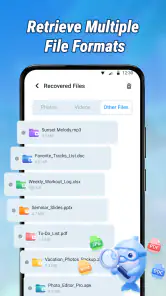
The app’s main strength is its immediate purpose. If you accidentally removed a family photo, a scanned receipt, a work document, or an image received through messaging, you can try a focused search without first connecting the phone to a computer. That convenience is valuable in everyday situations where the missing file is needed quickly and the user does not have technical experience.
A realistic everyday recovery situation
Imagine that I am preparing expense records and delete a photo of a receipt while cleaning up my camera folder. I notice the mistake later, after the image is no longer visible where I expect it. My first step would be to stop taking new pictures, avoid downloading anything, and open Photo Recover Fast. I would search carefully, checking whether the result looks like the original receipt rather than restoring every item shown by the scan.
If the document appears, I would restore or copy it to a different safe location when possible, rather than repeatedly moving it around the same storage area. I would also check the recovered file immediately: can it open, is the text readable, and does the image contain the complete receipt? A recovery result is only useful if the file is actually usable. This workflow is more reliable than blindly selecting every result and hoping the correct item is among them.
That example also shows why recovery should be treated as a first response, not a guaranteed undo button. If the phone has continued to save new content, the old file may have been partly or completely overwritten. Photo Recover Fast can provide a search opportunity, but it cannot reverse every storage change that happened after deletion.
Where it fits beside the usual alternatives
The most obvious alternative is the built-in trash or recently deleted folder in a gallery or file manager. I would check that first because it is usually easier to understand and may preserve the original file with less effort. Photo Recover Fast becomes more interesting when the item is no longer visible there, or when the deleted material was a document rather than a normal gallery photo.
Cloud backups are another important comparison. If the phone automatically backed up the image, restoring it from that service may produce a cleaner result than scanning local storage. Cloud recovery can also be better when the device has been heavily used since deletion. However, it only helps if backup was enabled and the file had already synchronized. A local recovery tool is useful precisely when the user is unsure whether a backup exists.
Desktop recovery software can offer a more advanced workflow, but it usually requires a computer, a cable, extra setup, and a willingness to deal with technical instructions. For a single accidentally deleted photo, that may be excessive. Photo Recover Fast is better suited to the first attempt: quick, local, and understandable. If the file is particularly important or the first scan produces nothing useful, a specialist desktop solution may be the more sensible next step.
There is also a privacy trade-off. A device-based recovery attempt can feel preferable to uploading personal images to an unknown online service. I would still review what the app asks to access and avoid granting unrelated permissions. A recovery tool needs access to the areas it searches, but that does not mean a user should ignore normal privacy checks. The safest approach is to use it only when needed and remove access or uninstall it afterward if it no longer has a purpose.
What the current release means for existing users
People already using the app should see version 1.5.0.0 as the current point of reference when comparing their experience with older installations. The release history indicates that the product has moved beyond its earliest build, but I would not assume that a version number alone guarantees a particular recovery result. The important question is whether the current search fits the file and storage situation you are dealing with.
For an existing user, the practical benefit of staying current is mainly consistency with the present app experience. If an older installation behaves differently, updating may be worth considering before beginning a serious recovery attempt. I would avoid updating repeatedly while trying to recover a very important file, though, because the priority should be minimizing unnecessary activity on the device. If the app is already installed, I would first use it carefully, record what I find, and then decide whether an update is appropriate.
The app has reached over one hundred thousand installs and holds a four-point-zero average from roughly one hundred eighty ratings, with about twenty written reviews. Those figures suggest that it has attracted real interest, but they do not tell me whether it will recover a particular file from a particular phone. Recovery success is unusually dependent on timing, storage type, deletion method, and later device use, so I would treat the rating as a general signal of usability rather than proof of technical success in every case.
The developer, Aivora Green, keeps the product’s identity clear through the short name Photo Recover Fast. I like that the app does not need a complicated explanation to tell users what problem it addresses. Still, simple wording should not be confused with simple storage technology. The app may be easy to open, but the recovery problem itself can be difficult.
Small workflow choices that make a big difference
My first non-obvious recommendation is to search by urgency, not curiosity. If one missing document matters, look for that item before browsing through every recoverable image. The longer you spend creating, previewing, or moving new files on the phone, the less ideal the storage situation may become. Recovery is not a good time to reorganize the entire gallery.
Second, separate discovery from preservation. Finding a thumbnail does not prove that the original file is intact. I would inspect the recovered copy at full size, open documents rather than trusting their names, and compare visible details with what I remember. If the app offers more than one way to save a result, I would choose a location that is not the same crowded folder where the deletion occurred.
Third, use the tool differently for photos and documents. A photo can look acceptable in a small preview while showing corruption when enlarged. A document may appear in a result list but fail to open or contain missing pages. For documents, I would verify the file format and readability immediately. For photos, I would check resolution, missing sections, and whether the recovered image is actually the original rather than a cached preview.
Fourth, do not repeatedly run scans without a reason. A second attempt can make sense if the first search used the wrong location or filter, but repeated scanning will not magically recreate data that has already been overwritten. I would change one part of the process at a time and keep the phone as inactive as possible between attempts.
Where the app still has limits
The biggest limitation is inherent to deleted-file recovery: local storage does not promise that a removed file will remain available. Modern Android devices may manage storage in ways that make recovery difficult, and a file can become unavailable after new data occupies the same space. Photo Recover Fast is therefore best viewed as a chance to recover something, not as a guaranteed restoration service.
It is also not the right choice for every type of loss. If the missing photo was synchronized to a cloud account, the cloud copy may be the better source. If the phone has been reset, encrypted, damaged, or used extensively after deletion, a professional recovery service or carefully chosen desktop tool may be more appropriate. I would not rely on this app alone for irreplaceable evidence, essential business records, or a large collection of files.
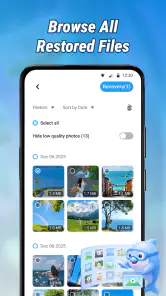
Another point of friction is decision-making. A recovery scan can present more results than the user actually needs, and similar filenames or thumbnails may make selection confusing. Anyone expecting a single button labeled “restore everything” may find the process less reassuring than a normal trash folder. That is not necessarily a flaw in this particular app; it is a consequence of searching for remnants rather than retrieving items from a clearly preserved recycle bin.
I would also skip it if the goal is prevention rather than recovery. The app is useful after a mistake, but it should not replace a backup routine. Important photos and documents deserve at least one additional copy, whether that means a trusted cloud service, a computer, or another storage device. Recovery software is an emergency measure; backup is the dependable habit.
Who should try it, and who should choose another route
I would recommend Photo Recover Fast to an Android user who has just deleted a photo or document, has no obvious copy in a trash folder, and wants a simple first attempt. It is especially suitable for people who do not want to start with desktop software. The free price removes the need to commit money before knowing whether a local search is worthwhile, which makes it practical for an isolated mistake.
I would be more cautious about recommending it as the sole solution for someone managing a large archive or a professional workflow. Those users should already have backups and may need more controlled recovery, file verification, and preservation steps. A computer-based tool or specialist service can be a better fit when the material is valuable enough to justify a more technical process.
I would also tell a user with a recently deleted image to check the phone’s gallery trash, messaging conversations, email attachments, and cloud storage before doing anything complicated. Photo Recover Fast is most useful when those ordinary paths fail or when the file was stored locally in a less obvious place. Using the easiest source first saves time and reduces unnecessary activity on the device.
What I would watch as the app develops
Because the current release is 1.5.0.0, I would watch future updates for clearer handling of scan results, better separation between photos and documents, and more guidance during recovery. Those are the areas that would most improve confidence without changing the app’s basic purpose. I would especially value explanations that help users understand whether a result is a complete file, a preview, or a damaged remnant.
I would also pay attention to how the app balances convenience with privacy. A recovery tool needs to inspect personal storage, so transparent controls and clear choices matter just as much as search speed. Users should be able to understand what is being scanned and where a recovered file is saved. These details can make the difference between a tool that feels reassuring and one that creates a second problem.
For now, my view is measured but positive. Photo Recover Fast is a sensible first response to accidental deletion, particularly when the missing item is a local photo or document and the phone has not been used much since the mistake. Its free access and support for older Android versions make it approachable, while its focused design keeps the purpose clear. The key is to use it quickly, carefully, and with realistic expectations.
I would keep it in mind as an emergency utility rather than depend on it as a backup plan. Check easier recovery locations first, stop unnecessary phone activity, verify every recovered file, and save successful results somewhere safer. Used that way, Photo Recover Fast can be genuinely helpful when a simple deletion turns into an urgent search, even though no local recovery app can promise that every lost file will return.
Pros
- Quickly scans device storage for recently deleted photos.
- Simple interface makes recovery accessible for beginners.
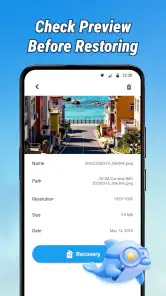
- Supports previewing images before restoring them.
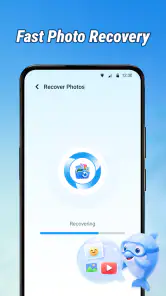
- Can recover photos without requiring a computer.
- Useful for finding accidentally deleted pictures.
Cons
- Recovery success depends heavily on how recently files were deleted.
- Deep scans may take time and use considerable battery power.
- Recovered images may have reduced quality or missing details.
- Some features may require in-app purchases or subscriptions.
- Results can include duplicates
- thumbnails
- and unrelated images.

- Category
- Tools
- Version
- 1.5.0.0











