Photo Recover - Easy Restore
- 53.00
- 3.8
- Installs
- 100.00K
- Price
- Free

Screenshots

Analysis by Reviewed
Recovering a deleted photo sounds simple until the picture is suddenly important: a family moment, a work document, or a video you forgot to back up. Photo Recover - Easy Restore is a free Android tool from Lazy Project that focuses on that one problem. I approached it less like a magic rescue button and more like a practical file-recovery utility, paying attention to what it lets me do, how much control it gives me, and where its limits become important.
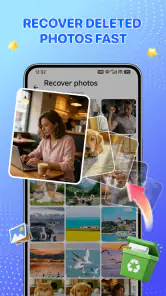
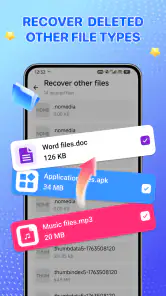
The app belongs to the tools category, and its straightforward purpose is easy to understand. It is designed to look for deleted photos and videos on the device and help bring back files that may still be recoverable. Its store summary also highlights local processing for privacy, which is a meaningful point when the files involved are personal. I would still treat it as a recovery attempt rather than a guarantee: deletion, storage cleanup, overwriting, and device behavior can all affect the result.
My overall impression is that Photo Recover - Easy Restore is most useful when you act quickly and keep your expectations realistic. It is a sensible option for someone who needs a focused recovery tool without paying upfront, but it is not a replacement for a proper backup routine or a specialist recovery service in difficult cases.
What it feels like to use when a file disappears
The most convincing use case is an ordinary mistake. Imagine taking several pictures at a birthday gathering, clearing what looks like a duplicate, and then realizing later that one of the deleted images was the best shot. In that situation, I would install the app as soon as possible, start a scan, and review the results carefully instead of continuing to fill the phone with new photos and videos.
That last part matters. Recovery tools generally have a better chance when deleted space has not been reused, so using the phone heavily after deletion is a poor habit. I would avoid recording new video, downloading large files, or repeatedly installing and removing apps before trying recovery. This is not a special button inside Photo Recover - Easy Restore; it is a practical workflow that makes any recovery attempt more sensible.
The app’s focus is helpful because it avoids turning a simple emergency into a large file-management project. I would use it for recently deleted media, accidental removal, or a quick search after discovering that a file is missing. It is less appropriate when the phone has been reset, the storage has been securely wiped, or the missing content was stored somewhere other than the device area the app can inspect.
One useful habit is to decide what you want before starting the scan. If I am looking for a single short video, I do not want to restore every thumbnail or image that appears. A targeted review reduces clutter and makes it easier to notice the file that matters. It also encourages a safer second step: restore only what I recognize, then copy it to another location rather than leaving the only recovered version in the same place.
Why local processing changes the privacy conversation
Photo recovery involves unusually sensitive material. A scan can expose personal photographs, screenshots, identification documents, private messages saved as images, and videos that I would not want uploaded casually. The app’s emphasis on local processing is therefore relevant. Keeping the work on the device can reduce the need to send those files to a remote service, which is a more comfortable approach for private media.
That does not mean I would switch off all caution. Local processing is a useful privacy signal, but I would still read the screens shown during setup and scanning, check the permissions Android requests, and pay attention to any prompt asking for access beyond what the task requires. The important distinction is between a permission I understand and a permission I accept automatically because I am in a hurry.
For a recovery app, access to photos and videos is central to the job. I would expect to see a clear Android permission request before the app can inspect media. If a prompt is vague, I would pause and check the wording rather than granting access blindly. I would also avoid treating a request for unrelated access as normal. The safest approach is to grant only what is needed for the scan and revisit access in Android settings afterward if I no longer need the tool.
There is another privacy moment people often overlook: the recovery results themselves. Even if scanning happens locally, the preview grid may display private images on the screen. I would use the app in a place where other people cannot see the phone, especially if the device contains sensitive documents or personal videos. A recovery tool can protect data from unnecessary transfer while still showing that data to anyone nearby who can view the screen.
Controls that matter more than a polished scan screen
When I test a tool like this, I care less about dramatic language and more about visible choices. Can I understand what is being scanned? Can I recognize files before restoring them? Can I stop if the results are irrelevant? Can I decide where the recovered item goes? Those questions determine whether the app feels safe to use during a stressful moment.
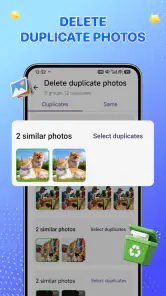
Photo Recover - Easy Restore is best approached as a review-and-select workflow. I would not restore a large batch simply because the app found many entries. Recovery results can include duplicates, thumbnails, incomplete files, or items with unhelpful names. Looking at previews and checking file details where available is worth the extra time, particularly when storage space is limited.
A practical trick is to compare the recovered item with your memory of the original. A photo may appear with a changed name or a different date, so I would check the image content rather than relying only on filenames. For videos, I would open the restored copy and watch enough of it to confirm that it plays correctly. A file that appears in a result list is not automatically a complete, usable recovery.
I would also keep the original phone state in mind. If the app offers a choice of destination during restoration, I would choose a separate folder or another storage location when possible, then make a second copy. If the only available destination is the same internal storage, I would restore the smallest necessary set first. That reduces unnecessary writing and makes it easier to verify what worked.
Where the app fits among the usual alternatives
The first alternative many people forget is the phone’s own trash or recently deleted area. Gallery apps and cloud photo services sometimes retain removed media for a limited period. I would check those places before using a recovery scanner because they usually preserve the original file more cleanly and make restoration easier. If the photo is still there, Photo Recover - Easy Restore is unnecessary.
The second alternative is a backup. A synchronized photo library, a computer copy, or a manual transfer can restore a missing file without asking a recovery tool to search old storage. Backups are normally the better long-term solution because they protect against more than accidental deletion. They can also help after a damaged phone or a factory reset, situations where a simple on-device scanner may not be enough.
Compared with those options, this app’s advantage is immediacy. It is aimed at the moment when the normal trash is empty or the user did not have a backup. Its weakness is the same: it depends on what remains accessible on the device. I would choose it before paying for a recovery service when the loss is recent and the files are not irreplaceable. I would choose professional help instead when the phone has serious storage damage, the data is business-critical, or repeated attempts could make the situation worse.
Desktop recovery software can sometimes offer deeper inspection, but it may require technical steps, a cable, extra software, or a computer. That makes it a poor fit for someone who only needs to check a recently deleted picture. On the other hand, a technically experienced user dealing with a larger incident may prefer a computer-based workflow with more control. Photo Recover - Easy Restore is not trying to replace every recovery method; it is the convenient first attempt for a narrower problem.
Trust, permissions, and the choices I would make
Lazy Project presents this as a free app, which removes the immediate price barrier for a recovery attempt. That is useful when someone is already dealing with accidental loss and does not want to commit money before knowing whether anything can be found. I would still avoid installing it casually on a phone with almost no free storage, because scanning and restoring media can create additional storage pressure.
The app is rated for Everyone, but that label does not make every use case equally simple. A younger user may understand the basic scan, yet a parent or guardian should still explain why photo access is being requested and what kinds of images may appear in the results. On a shared device, I would be especially careful because the scan could reveal media belonging to more than one person.
Its current version is 1.1, and it runs on Android 8.0 or later. In practical terms, that gives it a broad place on older Android phones, but compatibility alone does not predict recovery quality. Different manufacturers manage deleted files and media storage differently. I would judge the result on the particular device rather than assuming that success on one phone will repeat on another.
The app has reached over one hundred thousand installs and holds a 3.8 average from around three hundred fifty ratings, with dozens of written reviews. I read those figures as signs of real interest, not as proof that every scan will succeed. A recovery app naturally receives mixed experiences because the result depends heavily on when deletion happened, what storage was used, and whether the missing file was overwritten.
One of my strongest recommendations is to avoid granting more access than necessary and to remove access after the recovery attempt if the app no longer has a job. Android’s permission controls make that review possible. I would also delete recovered duplicates and temporary files after confirming the important originals, then move the final copies into a backup location. Privacy is not only about the scan; it is also about what remains on the phone afterward.
Questions I would answer before installing it
Can it recover every deleted photo or video? No recovery app should be treated that way, and I would not use Photo Recover - Easy Restore with that expectation. It may help when recoverable traces remain, but permanent deletion, storage reuse, device encryption, cleanup tools, and damaged storage can all reduce the chances. The earlier I stop using the phone and begin a careful scan, the more sensible the attempt becomes.
Should I use it instead of the gallery trash? I would check the gallery’s recently deleted area first. That route is usually simpler and less intrusive. I would turn to this app when the file is not available there, when the gallery does not provide a useful recovery option, or when I want a focused second attempt before considering more complicated tools.
Is local processing enough to make it completely private? It is a valuable part of the app’s privacy approach because the recovery work is described as happening locally. I would still inspect Android permission prompts, avoid exposing the result screen in public, and manage restored copies carefully. Privacy depends on the complete workflow, including access, previews, destinations, and cleanup.
Does restoring a file guarantee that it will work? No. A recovered image may be incomplete, and a video can be especially sensitive to missing data. I would open every important result, check its quality, and create a backup immediately. For an irreplaceable file, I would preserve the phone’s state and avoid repeated experiments while considering specialist assistance.
Who should skip this app? I would skip it if the missing files already exist in a reliable backup, if the phone has been reset or physically damaged, or if the data is so important that an informal recovery attempt is not worth the risk. I would also skip it if I am unwilling to review permissions and results carefully. Convenience is its strength, but convenience should not replace judgment.
My cautious verdict
I like Photo Recover - Easy Restore as a first response to an accidental media deletion. It is free, focused on a clear problem, available for Android 8.0 and later, and its local-processing emphasis addresses a genuine concern around private photos and videos. The lack of an upfront cost makes it easy to try before moving to more involved recovery methods.
My recommendation comes with a clear condition: use it promptly, scan thoughtfully, restore selectively, and verify every important file. Do not fill the phone with new content while deciding what to do, and do not mistake a result list for a confirmed recovery. I would also check the phone’s own deleted-items folder and any existing backup before beginning.
For someone who deleted a picture recently and needs a convenient on-device attempt, this is a reasonable tool to keep in mind. For long-term protection, backups remain the better answer. Photo Recover - Easy Restore is worth trying for a recent mistake, but the safest recovery strategy is still prevention plus a second copy.
Pros
- Simple interface makes photo recovery easy for beginners.
- Scans device storage quickly for recently deleted images.
- Lets you preview recoverable photos before restoring them.
- Supports common image formats for broader recovery coverage.
- Recovered files can be saved directly to your device.
Cons
- Recovery success depends heavily on how long ago files were deleted.
- Deep scans may take longer and use considerable battery power.
- Some features may require in-app purchases or subscriptions.
- Recovered images may have reduced quality or missing metadata.
- Usually cannot restore files securely erased or overwritten.

- Category
- Tools
- Version
- 1.1











