

Phone Number Location
- 85.00
- 4.1
- Installs
- 5.00M
- Price
- Free
Screenshots
Analysis by Reviewed
I judge a number-location app by a practical question: does it help me make a sensible next move, or does it promise more certainty than a phone number can provide? Phone Number Location is aimed at people who want location-related information and a way to share location with family or friends. That makes it worth considering for everyday coordination, but I would approach any claim about pinpointing another person with care. A phone number alone should not be treated as proof of someone’s exact, live whereabouts.
What I would decide before installing
My first decision would be whether I need location sharing with willing family members or a tool for investigating unfamiliar callers. Those are different jobs. Sharing can be useful when everyone involved understands what is being shared; trying to locate someone who has not agreed is a different matter, and this is not a substitute for consent, a conversation, or emergency services.
I would also think about what information I actually need. If I want to meet a relative at a busy station, a shared location can help us coordinate. If I merely want to identify a nuisance call, a caller-identification or call-blocking option may be a better fit. A number-location tool is most useful when I have a clear, legitimate reason to use it, rather than when I expect it to solve every phone-related uncertainty.
The app is free to install, though it includes in-app purchases priced from $5.99 to $39.99 per item. I would explore the basic experience before paying for anything and read each purchase screen carefully, especially if the app presents an upgrade at a moment when I am trying to solve a problem quickly. That small pause helps me distinguish a feature I genuinely need from one that simply sounds reassuring.
Where it can fit into everyday life
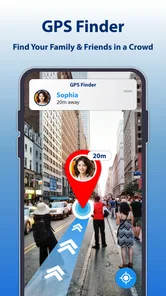
For family coordination, the appeal is straightforward: location information and sharing are brought into a phone-number-focused app. Imagine a parent arranging to meet an older child after an activity. Rather than sending a string of “where are you?” messages, they can agree in advance to share location and use that information to choose a meeting point. The important part is that the sharing is discussed beforehand and used for coordination, not as a surprise way to monitor someone.
A second useful case is a household trying to make a pickup less stressful. If a family member is travelling to meet you, location sharing may help you decide when to head outside or which entrance to use. I would still send a direct message if timing matters: a map view can offer context, but it cannot tell me why someone has stopped or whether plans have changed.
There is also a modest benefit for people who want to keep location-sharing arrangements in one place rather than relying on scattered messages. Before depending on that setup, I would agree with the other person on when sharing is appropriate, how to pause it, and what to do if the app is unavailable. A shared location should support a plan, not become the plan itself.
More From Our News Desk

 Weather - By Xiaomi
Weather by Xiaomi Review: Clear at a Glance, Less Clear Up Close
Xiaomi’s weather app makes everyday forecasts quick to scan, but its calm surface can leave useful details and recovery paths harder to find than they should be.

 X
XX Under Pressure: Can It Recover When Posting Goes Wrong?
A resilience-focused review of X, examining setup, mistaken posts, interruptions, weak connections, and the gaps that matter when recovery needs to be dependable.

 Clash of Clans
Clash of Clans Is Won Between the Battles
Its raids are quick; its community is a long-term project of coordination, teaching, rivalry, and shared responsibility—with all the friction that entails.

 Android Auto
Android Auto Makes the Case for Quieter Car Software
The car interface is no longer judged by how much it can do, but by how quietly it helps. Android Auto shows what drivers now expect—and what still gets in the way.

 MobiOffice: Word, Sheets, PDF
MobiOffice: Transforming Mobile Productivity with Seamless Integration
MobiOffice: Word, Sheets, PDF is redefining mobile productivity with a surprising blend of functionality and innovation.

 EA SPORTS FC Soccer Mobile 26
EA SPORTS FC™ Mobile Soccer: Redefining Mobile Sports Gaming
Dive into EA SPORTS FC™ Mobile Soccer, where immersive gameplay and strategic depth transform mobile sports gaming.
Latest News



For an unknown call, I would keep expectations narrower. Location information may be one clue to consider, but it does not establish who made the call or whether the call is safe. Numbers can be misleading, and location-related information should not be used to confront or accuse anyone. If a caller is suspicious, I would avoid sharing personal details and use my phone’s built-in blocking or reporting tools where appropriate.
How it compares with familiar alternatives
Compared with built-in location sharing on a phone, this app’s stated focus is more directly tied to phone numbers and location information. A built-in option may be more convenient for people already sharing within the same phone ecosystem, while a dedicated app may be more appealing to someone who wants a separate place to explore number-related location features. I would choose based on the people I need to coordinate with and the controls I can understand, not on the assumption that one approach is automatically more accurate.
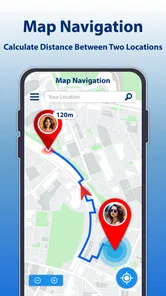
Compared with map and navigation apps, Phone Number Location serves a different purpose. A standard map is usually the better choice when I need directions, traffic context, or help finding a public place. This app is not the one I would reach for to plan a route across town. Its value, if it suits my needs, is the connection between a phone number and location-related information or sharing—not replacing a full navigation tool.
Caller-ID and spam-filtering apps are another distinct alternative. They are designed around deciding whether to answer, silence, or block a call, whereas location sharing is about coordinating with people. If the only problem is repeated unwanted calls, I would start with call controls rather than assume a location app will resolve it. If the goal is finding a misplaced device, I would first check the device maker’s own find-my-device service, since a phone-number tool should not be confused with a guaranteed recovery method.
Practical checks before relying on sharing
My most useful tip is to set expectations with the other person before enabling any location-sharing arrangement. Agree on the purpose, who can see the information, and when it is reasonable to check it. That conversation avoids turning a helpful pickup tool into an uncomfortable source of pressure. It also gives both people a clear way to say that they no longer want to share.
I would test the workflow during a low-stakes moment, such as coordinating a visit nearby, rather than waiting until someone is late or lost. Check whether both people can understand what is being shown and how to communicate if the information seems out of date. This is a practical way to learn whether the app fits your routine without treating a location display as infallible.
Another sensible habit is to keep a backup channel. If a location view does not answer the question, call or message the person directly. In a genuine emergency, contact local emergency services instead of relying on a consumer app to locate someone. These distinctions matter because location tools are aids for ordinary coordination, not a guarantee of rescue or real-time certainty.
I would also be deliberate about the number I enter and the information I share. Avoid using another person’s number without a legitimate reason, and do not pass along location information casually. The convenience of seeing a map can make sensitive details feel less serious than they are. Treating them as private from the start is the safer, more respectful approach.
Who should consider it—and who should look elsewhere
I can see this app appealing to someone who wants a simple, phone-number-oriented way to explore location information and coordinate sharing with family or friends. Its broad audience is reflected in an Everyone content rating, and it is published by Quality App Zone. It has a 4.1 average from around 6,600 ratings, with over 5 million installs, so it has attracted a substantial audience without that popularity being a reason to overlook whether its purpose matches yours.
The app was released on March 13, 2024, and its current version is 1.0.5.7. It supports Android 7.0 and later, which makes the listed minimum relatively accessible for Android users with older devices. I would still check that my device can run it and review the app’s current screens before building an important family routine around it.
I would skip it if I want turn-by-turn directions, a dependable way to recover a lost phone, or a tool that can identify a caller with certainty. Those expectations belong to other services or to direct verification. I would also avoid using any location feature to monitor someone without their knowledge. The app is not a shortcut around another person’s consent, and no map display should be treated as a reason to take action against someone.
Cost, setup, and the effort of switching
Because the app is free to download, trying it does not require an upfront purchase, but the optional items cost from $5.99 to $39.99 each. I would make the first session an evaluation rather than a commitment: see whether the main workflow is understandable, decide whether sharing is relevant, and only then consider whether a paid item solves a real need. If a feature is unclear, I would not buy it on the assumption that it will deliver more precise results.
Switching from another location-sharing method can involve more than installing a new app. Everyone who needs to participate may have to agree to use the same arrangement, and they may prefer the tools already on their phones. Before asking family members to change habits, I would compare the steps they already take with the steps this app requires. If the new routine adds confusion or makes someone uncomfortable, the familiar alternative may be the better choice.
If I decide it is not useful, I would stop using it rather than keep it installed out of habit. I would also review any sharing arrangements I set up and end those that are no longer needed. That is a good general practice for location apps: the original reason for sharing can disappear, while access can otherwise continue simply because nobody revisits the setup.
My recommendation
Overall, I would treat Phone Number Location as a focused option for people who want number-related location information and consensual sharing, not as an all-purpose tracker. Its strongest case is everyday coordination with family or friends when everyone understands the arrangement. For navigation, unwanted-call screening, or recovering a missing device, I would choose a tool built specifically for that task.
Ever wondered where that mysterious call is coming from? Or perhaps you're just trying to find a way to track your lost phone? Well, you're in luck, because the Phone Number Location app is here to save the day. Let me walk you through my experience with this nifty little tool that's been buzzing around in the tech circles.
What's the Buzz About?
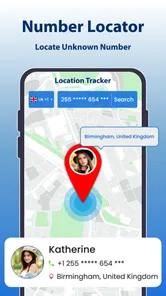
Alright, let's cut to the chase. The Phone Number Location app is designed to help you pinpoint the exact location of any phone number. Sounds like magic, right? But hold your horses, it’s not quite a magic wand, but it sure gets the job done impressively well. It's like having a mini detective in your pocket, ready to spring into action whenever you need it.
Setting Up Shop
Getting started with the app was a breeze. A quick download from the app store and I was ready to dive in. The user interface is straightforward and intuitive, which means you don’t need a tech degree to navigate through it. Just pop in the number you’re curious about, and voila – the app does its thing. It’s as simple as making a cup of coffee, really.
Features Worth a Shout
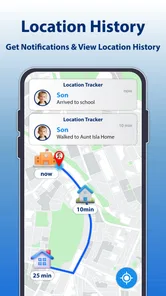
Now, let’s talk about the features. The app is packed with some pretty cool functionalities. Not only does it show the current location of the phone number, but it also provides a history of locations, which is pretty neat if you ask me. You can also set alerts for specific numbers, so you’re always in the loop about their whereabouts. It’s like having your personal little watchdog, but without the barking.
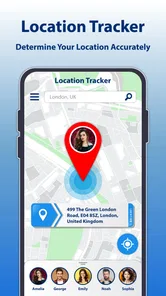
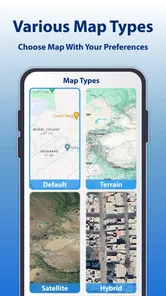
Another feature that caught my eye is the integration with maps. It’s super handy – just a tap and you can see the exact spot on the map. Perfect for those of us who are visual learners. Plus, the app runs smoothly without any hiccups, which is always a win in my book.
The Verdict
So, what’s the final word? The Phone Number Location app is a solid choice for anyone looking to keep tabs on phone numbers. Whether you’re trying to track a lost phone or just curious about an unknown caller, this app has got your back.
It’s reliable, easy to use, and it comes packed with features that are actually useful. So why not give it a whirl? Who knows, it might just become your new favorite app. Just remember, with great power comes great responsibility – use it wisely!
Phone Number Location Frequently Asked Questions
Can Phone Number Location share my location with family and friends?
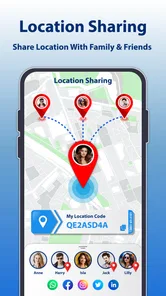
Sharing your own location is a separate purpose from identifying where a phone number is associated. Phone Number Location describes location sharing with family and friends as one of its features, so it may be useful if you want to let people close to you see your location. Review the app’s sharing controls and choose carefully who you share with before using this feature.
Which devices can install Phone Number Location?
Phone Number Location is an app in the Maps & Navigation category, and it requires Android 7.0 or later. Before downloading, check the operating system version on your device to make sure it meets that requirement. The app is free to download, though some features are offered through in-app purchases, so consider that when deciding whether it suits your needs.
What is the primary function of the Phone Number Location app?
The primary function of the Phone Number Location app is to help users identify the geographical location of a phone number. This app can provide insights into where a call is coming from, which is particularly useful for screening unknown numbers and avoiding potential scams or unwanted calls. It serves as a valuable tool for those who frequently receive calls from unfamiliar numbers.
Is the Phone Number Location app free to use?
The Phone Number Location app is free to download and offers a free version with basic features that allow users to identify the location of phone numbers. Some additional features are available through in-app purchases, with prices ranging from $5.99 to $39.99 per item. Check the purchase details in the app before buying, and decide whether the extra functionality is worth the cost for you.
How accurate is the location information provided by the app?
The accuracy of the Phone Number Location app largely depends on the data sources it uses. Generally, it can provide a fairly accurate location at the city or regional level. However, it may not pinpoint the exact address due to privacy and data limitations. Users should use this app as a general guide rather than an exact locator.
Pros
- Accurate location tracking feature.
- User-friendly interface.
- Quick and easy setup.
- No registration required.
- Supports multiple languages.
Cons
- Requires internet connection.
- Limited features in free version.
- May drain battery quickly.
- Privacy concerns with data usage.
- Ads in free version can be intrusive.












