

Live Street Camera View
- 643.00
- 3.5
- Installs
- 5.00M
- Price
- Free

Screenshots







Analysis by Reviewed
I like the idea of turning a spare moment at home into a quick look at somewhere unfamiliar. Live Street Camera View gives that curiosity a map to wander through, so I can browse views of places without treating the experience like a trip planner. It makes most sense as a casual window onto the world: interesting when I have a few minutes, but not something I’d rely on for directions or decisions that need current, complete information.
Choosing a place together
I can see this working well as a casual shared-device activity: one person chooses a place, and everyone else follows along on the map. For example, while waiting for dinner, you might look at a camera near a city you hope to visit, then switch to somewhere entirely different and compare the scenes. It is an easy way to turn a few spare minutes into a small geography break without planning a trip or passing around multiple accounts.
That shared use is best treated as taking turns with the screen, rather than assuming the app offers household profiles or coordination tools. If several people use the same device, I would agree on which bookmarked places are personal favorites and which are simply there for everyone to revisit. That small habit keeps a shared list useful instead of letting it become a jumble.
A simple way to make the activity feel less random is to give each person a turn choosing a broad region, then let the next person pick a camera or nearby area. You can make it a small guessing game—what kind of place might appear, or what would you notice first—without needing to set up a formal itinerary. I’d keep the pace relaxed: the point is to look and talk, not to turn the app into a test of who can find the most locations.
For a family or group sharing one phone, the practical boundary is also straightforward: the person holding the device controls what gets opened and saved. I would avoid treating a bookmark as a shared household plan unless everyone agrees that it should be one. If children use the app, an adult can stay nearby and help distinguish a camera view from a complete picture of a destination or a live safety check.
Exploring the World from Your Sofa
The Live Street Camera View app is all about giving you access to live camera feeds from various locations around the globe. Imagine being able to see the bustling streets of Tokyo or the serene beaches of the Maldives in real-time. It’s seriously cool! Navigating through the app is a breeze, and I found the interface to be quite user-friendly. You can easily search for specific locations or just explore random places if you’re feeling adventurous.
Features That Stand Out
One of the standout features of this app is its vast selection of cameras. Whether you’re interested in cityscapes, natural wonders, or iconic landmarks, there’s something for everyone. I particularly enjoyed the ability to bookmark my favorite spots. It’s like creating a personalized travel bucket list, and I can revisit these places anytime I want.
More From Our News Desk

 Weather - By Xiaomi
Weather by Xiaomi Review: Clear at a Glance, Less Clear Up Close
Xiaomi’s weather app makes everyday forecasts quick to scan, but its calm surface can leave useful details and recovery paths harder to find than they should be.

 X
XX Under Pressure: Can It Recover When Posting Goes Wrong?
A resilience-focused review of X, examining setup, mistaken posts, interruptions, weak connections, and the gaps that matter when recovery needs to be dependable.

 Clash of Clans
Clash of Clans Is Won Between the Battles
Its raids are quick; its community is a long-term project of coordination, teaching, rivalry, and shared responsibility—with all the friction that entails.

 Android Auto
Android Auto Makes the Case for Quieter Car Software
The car interface is no longer judged by how much it can do, but by how quietly it helps. Android Auto shows what drivers now expect—and what still gets in the way.

 MobiOffice: Word, Sheets, PDF
MobiOffice: Transforming Mobile Productivity with Seamless Integration
MobiOffice: Word, Sheets, PDF is redefining mobile productivity with a surprising blend of functionality and innovation.

 EA SPORTS FC Soccer Mobile 26
EA SPORTS FC™ Mobile Soccer: Redefining Mobile Sports Gaming
Dive into EA SPORTS FC™ Mobile Soccer, where immersive gameplay and strategic depth transform mobile sports gaming.
Latest News



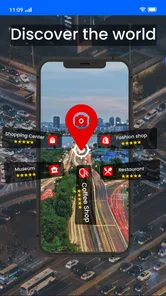
Another cool feature is the interactive map. You can zoom in and out to find cameras in specific regions. This map feature is incredibly intuitive and makes the whole experience feel like a virtual tour around the world.
For a more satisfying browse, I’d start with a broad region on the map, then zoom in gradually rather than searching for a camera by name straight away. Once a view catches your eye, bookmarking it gives you a simple route back; you can then use that saved location as a starting point for exploring nearby areas. This is especially handy when you want to show someone a particular scene without repeating the whole search.
It also helps to treat a feed as a glimpse, not a dependable report about what a place is like today. A camera view can make a street or landmark feel immediate, but the picture is only one angle and may not tell you what is happening across the wider area. I find that distinction important if I’m using the app to satisfy travel curiosity rather than to make practical plans.
One useful habit is to save only views you can recognize later, rather than bookmarking every camera that looks interesting for a moment. If you use the app alone, that keeps your personal revisit list manageable; on a shared device, it also makes it easier for someone else to pick up where you left off. I’d think of a bookmark as a shortcut to a view, not as a guarantee that the scene will look the same next time.
If your goal is to get a feel for a destination before a trip, use the map to compare a few different kinds of locations rather than judging the whole place from a single camera. A central street, a landmark, and a quieter area can create a more rounded impression, though still only a visual one. For actual opening hours, access, or route choices, I’d check a dedicated source instead of inferring those details from what happens to be on screen.
Visuals and Performance
When it comes to visuals, the app does a pretty decent job. The quality of the camera feeds can vary depending on the location, but for the most part, the streams are smooth and clear. I did notice some lag when switching between cameras, but it wasn’t a deal-breaker. It’s important to have a stable internet connection to get the best experience, though.
In a real everyday situation, I would use it during a quiet moment at home: search for a familiar destination, save a view worth revisiting, then pass the phone to someone else to pick the next stop. If the connection is weak, I’d avoid rapid camera-hopping, since each switch can make the delay more noticeable. A steadier connection and a little patience make the browsing feel less choppy.
Compared with a conventional navigation map, this app is more about looking around than getting somewhere. If I needed reliable directions, route planning, or a practical way to reach an address, I’d choose a navigation-focused alternative. The camera-and-map combination is better for visual curiosity and casual exploration than for time-sensitive decisions on the road.
There is also a difference between this kind of browsing and using a general map service with street-level imagery. A conventional map is usually the more useful starting point when I need place names, route context, or a way to orient myself before leaving home. Here, the draw is opening a camera view and seeing a scene, so I’d choose it when the visual experience is the point, not when I need the broadest set of travel tools in one place.
For someone planning a journey, I’d use the two approaches in sequence rather than expecting one to replace the other: check a reliable navigation app for the route, then use camera views for a little informal sightseeing or to satisfy curiosity about a location. I would not use a camera feed to decide whether a road is clear, whether a place is safe, or whether conditions have changed. The limited viewpoint and possible delay make that a poor trade-off when the answer matters.
The app performs well overall, with minimal crashes or bugs. It’s lightweight, so it doesn’t hog your phone’s resources, which is always a plus. I was able to run it alongside other apps without any noticeable slowdown.
For a household deciding whether to keep it around, the practical question is whether everyone enjoys browsing places for its own sake. It suits curious adults and families who want a low-pressure way to explore scenes together, but it is less useful for someone who expects a street-level view of every location or needs a camera feed to be consistently current. I’d also keep the app’s purpose clear for younger users: viewing public place scenes is different from using a map to make a travel or safety decision.
On a shared phone or tablet, I’d also make the installation decision with the usual device boundaries in mind. The app is free to download, but it includes in-app purchases, so whoever manages the device should consider how purchases are handled before handing it to a child or leaving it available for casual use. That is a household choice, not a reason to assume there are family profiles or special child settings inside the app.
The age rating is Everyone, which makes the stated audience broad, but I would still guide younger users toward the right expectations. A camera view can prompt questions about geography and travel, yet it should not be presented as a dependable way to monitor people or confirm what is happening somewhere. For shared use, I prefer an adult to frame it as looking at places, with privacy and respectful curiosity in mind.
There is a practical reason to be selective about who will enjoy it. Someone who likes browsing visual scenes, recognizing landmarks, or comparing places may find the map-and-camera approach appealing. Someone who opens a map mainly to check traffic, save a route, or get turn-by-turn guidance will probably be happier with a conventional navigation app. The difference is not a minor feature gap; it is a different reason to open the app in the first place.
Final Thoughts
In conclusion, if you’re a travel enthusiast or just someone who loves to explore new places, the Live Street Camera View app is definitely worth checking out. It’s a fun way to experience the world from the comfort of your home. While it’s not a perfect app, its unique concept and ease of use make it a standout choice for anyone looking to broaden their horizons.
There are a few sensible details to weigh before installing it. Quality App Zone’s Maps & Navigation app is free, rated for Everyone, and has reached over five million installs, though in-app purchases range from $9.99 to $39.99 per item. Its average rating is 3.2 from around eleven thousand ratings, so I’d approach it as an interesting, imperfect browsing tool rather than a polished replacement for a standard map. Version 3.3.1.2 requires Android 7.0 or later.
That rating is a useful reminder to keep expectations measured: the idea may be appealing, but the experience depends on the usefulness and quality of the particular views you choose. I’d try a few searches across different areas before deciding whether it deserves a regular place on a shared device. The app was released on April 15, 2020, and the current version is 3.3.1.2; those details matter less to me than whether its camera-led browsing fits how my household actually uses maps.
If you are deciding whether to install it for everyone at home, I would start with one short, supervised browsing session rather than assuming it will become a regular family activity. Let each person choose a place, see whether the map makes it easy to find something worth looking at, and agree on how shared bookmarks should be used. If the appeal fades quickly or the feeds feel too inconsistent for your needs, a regular map app may be the more practical choice.
So, next time you’re itching for an adventure but can’t make it out the door, fire up this app and take a journey around the world. Who knows what amazing sights you’ll discover!
Live Street Camera View Frequently Asked Questions
Which devices can run Live Street Camera View?
Live Street Camera View is available for Android devices running version 7.0 or later. Before downloading, check your device’s operating system version and make sure you have enough storage for the app. The app is listed as suitable for everyone, while its map and camera features are intended for exploring locations and viewing street scenes.
Who develops Live Street Camera View, and is it a well-established app?
Live Street Camera View is developed by Quality App Zone and is in the Maps & Navigation category. It has more than 5 million installs, with an average rating of 3.2 from around 11,000 ratings. Those figures offer a quick sense of its reach and user feedback, though your experience may depend on your device, connection, and expectations for live camera coverage.
What is Live Street Camera View and how does it work?
Live Street Camera View is an app that allows users to view live footage from street cameras around the world. It works by connecting to a network of public cameras and displaying real-time video feeds on your device. Users can explore different locations, view traffic conditions, and even check the weather in various cities. The app is designed to provide a virtual travel experience right from your phone.
Is Live Street Camera View free to use?
Yes, Live Street Camera View is free to download and use. However, it may offer in-app purchases or ads to support its development and maintenance. While the core features are accessible without any charges, some advanced functionalities or ad-free experiences might require payment. Always check the app's store page for detailed information on any potential costs. In-app purchases are listed at $9.99 to $39.99 per item, so review any purchase prompt carefully before proceeding.
What are the main features of Live Street Camera View?
Live Street Camera View offers a range of features including access to live street cameras worldwide, real-time traffic updates, and weather conditions. The app also allows users to bookmark their favorite locations for quick access and provides various viewing modes such as map view and satellite view. These features are designed to enhance user experience and provide comprehensive information about different locales.
Pros
- Real-time street viewing globally.
- User-friendly interface and design.
- High-quality video streaming.
- Multiple camera angles available.
- Regular updates with new locations.
Cons
- Requires stable internet connection.
- Can drain battery quickly.
- Some locations may have limited views.
- Privacy concerns for certain areas.
- Ads can be intrusive at times.












