

Perfect Piano
- 25.10K
- 4.2
- Installs
- 100.00M
- Price
- Free

Screenshots
Analysis by Reviewed
When I have a tune in my head but no piano nearby, I want a quick way to find the notes without turning the moment into a full studio session. That is the kind of small creative task Perfect Piano handles well: it gives me a keyboard to explore, practice tools to work through a phrase, and a place to capture a rough musical idea. It is a music-making app from Revontulet Soft, and I see it as a portable starting point rather than a substitute for lessons or production software.
A quick place to begin
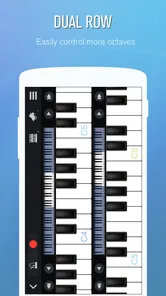
The first decision is how to fit the keyboard to your hands and screen. A phone is convenient, but its narrow display can make two-handed playing awkward; on a larger screen, the keys feel easier to navigate. I’d start with single-row mode to learn where notes sit, then try the dual-row layout when I need a wider range visible. That small setup choice can make practice feel less like tapping at a screen and more like working through a phrase.
It is also worth deciding what “learning” means for you. If you want to recognize a melody or get familiar with a song’s notes, the tutor and song library offer a guided route. If your goal is to build technique, hand coordination, and reliable timing, use the app as a supplement and keep a real keyboard or teacher in the picture. Touchscreen keys are helpful for starting, but they do not give the same physical feedback as piano keys.
From first notes to a repeatable routine
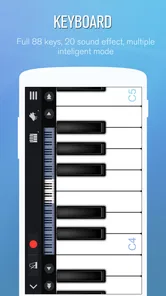
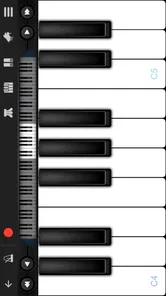
Upon launching Perfect Piano, you're greeted with a sleek, virtual keyboard that spans the length of your screen. The app is designed to mimic a real piano, and it does so quite convincingly with its 88-key full keyboard. You can even switch between single-row mode and dual-row mode depending on your preference, which is a neat feature for those who want to see more keys at once or for those with smaller screens.
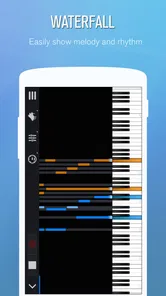
For an everyday routine, I’d choose one short passage rather than jumping among songs. Use the tutor to get oriented, slow the playback when a phrase is too quick, and repeat that section until the hand movement feels familiar. Then record a take and listen back. The recording is most useful as a check on consistency: it can help you notice where you rush or hesitate, even when you don’t yet have the vocabulary to describe the problem.
Fitting a small session into a real day
A realistic use for this app is a short break between other tasks: I might open it while waiting for an appointment, pick a melody I already know, and work out a few notes before I lose the idea. In that situation, portability matters more than perfect piano technique. I can explore a phrase privately without setting up an instrument, then return to it later on a keyboard if I decide it is worth developing.
That workflow also helps answer whether a phone is enough. For single-note melodies, basic familiarization, or a brief warm-up, it often is. For sustained two-handed practice, a tablet or external MIDI keyboard is more comfortable, and for building dependable finger strength or touch control, a physical piano remains the better tool. I would treat the screen as a convenient sketch surface, not expect it to teach my hands the feel of a real instrument.
More From Our News Desk

 Gmail
GmailGmail in a Busy Inbox: Who Benefits Most?
From first account to crowded workday, Gmail earns its place through dependable search and flexible sorting—but its best fit depends on how much inbox maintenance you can tolerate.

 Prime Video
Switching to Prime Video: What Changes in Your Viewing Routine
Prime Video can make a compelling second home for streaming, but switching means learning a different catalog, rental layer, and route from browsing to playback.

 Universal TV Remote Control
Universal TV Remote Control Works Best as a Reliable Backup
A phone remote earns its place through quick setup and reliable habits. Here is how to get more from Universal TV Remote Control—and where its limits show.

 Weather - By Xiaomi
Weather by Xiaomi Review: Clear at a Glance, Less Clear Up Close
Xiaomi’s weather app makes everyday forecasts quick to scan, but its calm surface can leave useful details and recovery paths harder to find than they should be.

 X
XX Under Pressure: Can It Recover When Posting Goes Wrong?
A resilience-focused review of X, examining setup, mistaken posts, interruptions, weak connections, and the gaps that matter when recovery needs to be dependable.

 Clash of Clans
Clash of Clans Is Won Between the Battles
Its raids are quick; its community is a long-term project of coordination, teaching, rivalry, and shared responsibility—with all the friction that entails.
Latest News



Making, revising, and sharing a musical idea
I use this section to consider how a musical thought can move from a quick first try into a more deliberate practice draft, without treating a phone recording as a finished release. A useful habit is to keep each session focused on one phrase, then listen for a single change to make before trying again. That makes the next step—working through a draft—feel purposeful rather than like aimless repetition.
Learning material and creative play
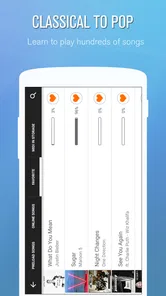
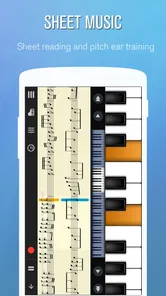
One of the standout features of the app is its impressive library of songs. Whether you're into classical masterpieces, pop hits, or jazz standards, there's something to suit your taste. The app breaks down each song into manageable chunks, allowing you to learn at your own pace. Plus, the built-in music tutor is like having a personal piano teacher who never gets tired of repeating the same lesson.
The library makes this more than a blank keyboard, but I wouldn’t assume every song will suit every learner. Browse with a practical aim: pick something you genuinely want to play, then focus on the passages that challenge you. A familiar tune can keep a beginner engaged, while a player who already reads music may prefer to use the keyboard for testing a melody or warming up. If a lesson feels too easy or too demanding, changing the playback speed is a useful way to make the practice fit the moment rather than forcing yourself through it at full pace.
Working through a draft
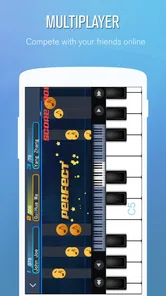
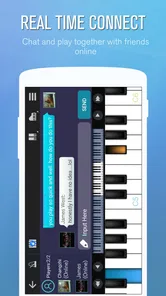
Another feature worth mentioning is the multiplayer connection. You can connect with other players around the world and even challenge them to a piano duel. It’s a fun and interactive way to improve your skills and maybe show off a little.
I see multiplayer as a change of pace, not a substitute for focused practice. A friendly challenge can give you a reason to play when solo exercises feel dull, but competition may not help if you are still trying to locate notes or learn a tricky section. I’d save it for a short break after practice, or use it as a low-pressure way to make playing feel social. The app’s strength is that it can shift between private repetition and shared play without asking you to bring a full instrument along.
Making practice more deliberate
One useful way to get more from a short session is to decide what you are listening for before recording. I might focus on whether the melody stays even, whether I pause at the same spot each time, or whether a slower tempo makes a phrase clearer. That gives playback a purpose beyond simply hearing myself again. It is a modest form of self-checking, not a substitute for feedback from a teacher, but it can make casual practice feel more intentional.
I would also avoid changing several things at once. If a passage feels wrong, slow it down first and repeat it; only after that would I adjust the sound or try a different layout. Keeping one variable steady makes it easier to tell whether the change helped. This is especially useful on a phone, where the convenience can tempt you to bounce between songs and settings instead of staying with the musical problem you meant to solve.
Refining the sound and setup
For those who are serious about learning the piano, the app offers a variety of settings to customize your learning experience. You can adjust the speed of the song playback, record your sessions, and even switch to a different instrument sound if you're feeling experimental. It’s like having a full band at your disposal.
Changing instrument sounds is best treated as a sketching tool: it can help you hear a musical idea in a different color, but it won’t turn the app into a full production studio. If you are shaping a melody, record a few versions at different tempos and compare which one feels most natural. That simple loop—play, listen, adjust—gives the recording feature a practical role beyond keeping a souvenir of a session.
The app also supports external USB MIDI keyboard, which is fantastic if you have a physical keyboard lying around. This feature bridges the gap between digital and real-life playing, making it a great tool for practice on-the-go.
A MIDI keyboard is the better choice when you want full-size keys and a more familiar playing feel, while the phone keyboard is handy when you are away from your equipment. If you already own a compatible setup, connecting it can make practice more comfortable; if you don’t, there is no need to buy one just to try the app. I’d also think of recordings here as practice captures, not finished tracks ready for distribution. For polished arrangement and delivery, a dedicated music-production app is the more appropriate next step.
From musical sketch to handoff
If your goal is to pass an idea to a bandmate, build a layered arrangement, or prepare a finished recording for release, this is where I would switch tools. Perfect Piano is useful earlier in the process: finding a melody, rehearsing a passage, or checking how a musical thought feels under the fingers. A dedicated recording or composing app is better suited to the later work of arranging parts and preparing a deliverable.
That distinction can save frustration. I would not choose this as my main workspace for a song that needs detailed editing or a polished final mix. I would use it to discover the shape of the piano part, make a practice recording for my own reference, and then move to a more suitable tool if the idea grows. Its creative value is in lowering the barrier to trying something, not in covering every step from first note to publication.
Who it suits—and where it gets in the way
While Perfect Piano offers a plethora of features, it does come with a few quirks. The ads can be a bit intrusive at times, especially when you're in the middle of a practice session. However, these can be removed with a small in-app purchase, which might be worth it if you plan on using the app regularly.
For a casual learner, an occasional ad may be a tolerable trade-off for a free app. If you practice often and interruptions break your concentration, the purchase option may be worth considering; individual in-app purchases range from $0.99 to $5.99. I’d try the free version first and decide based on how often the interruptions affect your actual routine, rather than paying before you know whether the keyboard and lessons suit you.
Additionally, while the app is user-friendly, beginners might need a little time to get accustomed to the interface, especially if it's their first time playing the piano. But hey, learning something new always comes with a learning curve, right?
In practical terms, I would recommend it to curious beginners, casual players who want a portable practice option, and keyboard owners who want a convenient way to work through song material. I’d steer someone seeking structured theory lessons, realistic weighted-key technique, or a complete recording-and-publishing workflow toward a teacher, a physical instrument, or dedicated production software instead. The touchscreen is a helpful starting point, but your expectations matter: it supports playing and practice rather than replacing every part of learning or making music.
How it compares with other ways to learn
Against a bare-bones piano simulator, the combination of song material, a tutor, recording, alternative sounds, and multiplayer gives me more reasons to open it than just tapping notes on a keyboard. A structured course, on the other hand, is usually the stronger choice when I want a planned sequence of lessons and a clear progression in technique. Perfect Piano sits between those options: more guided than an empty keyboard, but still flexible enough for quick experimentation.
It is also different from a full piano-learning setup because a touchscreen cannot respond to pressure and movement like physical keys. If your priority is accurate playing mechanics, choose a real keyboard and use this app as a companion rather than the central instrument. If your priority is convenience, exploration, or learning the outline of a tune, the phone format can be a genuine advantage rather than merely a compromise.
My creator’s verdict
With a 4.2 average from around one million ratings and over 100 million installs, it has clearly found a large audience. It is free to start, rated for everyone, and its current version is 7.9.4; it runs on Android 6.0 or later. Those details make it an easy app to try, though I’d judge it by whether its keyboard layout and practice flow work for your hands and habits—not by popularity alone.
Compared with a basic piano simulator, the tutor, song material, recording, sound choices, and multiplayer give me more reasons to return. Compared with a formal learning course, it offers less of a complete curriculum; compared with a production app, it is much more focused on playing than finishing and delivering a track. That middle ground is exactly where it works best: a convenient place to learn a passage, test an idea, or enjoy a quick musical break.
Overall, Perfect Piano is a fantastic app for anyone looking to dive into the world of piano playing. Whether you're a beginner looking to learn or an experienced player wanting to practice on the go, this app has got you covered. So go ahead, download it, and let your musical journey begin. Who knows, you might just discover your inner Beethoven!
Perfect Piano Frequently Asked Questions
Does Perfect Piano need an internet connection to play?
Perfect Piano provides a virtual piano keyboard for playing and practicing on a mobile device, so you can use it as a portable music tool. Its real-time multiplayer feature is designed for connecting with other players, making an internet connection relevant when you want to play together online. If multiplayer is not your goal, the keyboard and practice features are the main things to explore.
What kinds of music can I play in Perfect Piano?
Perfect Piano is presented as a smart piano keyboard for music ranging from classical to pop. That makes it appealing whether you want to work on familiar piano pieces or try playing songs from different styles. You can use the keyboard for casual playing as well as practice, so it suits users who want a flexible music app rather than one focused on a single genre.
Is Perfect Piano suitable for casual play as well as practice?
Yes. Perfect Piano can be used simply to play piano on a phone or tablet, and it also offers features aimed at learning and practice. The virtual keyboard gives casual players a quick way to make music, while guided learning options can help beginners build familiarity with the instrument. More experienced players can use the app as a convenient way to practice when a piano is not nearby.
What devices and operating systems can run Perfect Piano?
Perfect Piano is available for Android and iOS devices, making it possible to practice on a phone or tablet. On Android, it requires version 6.0 or later. The app is a convenient option for playing away from a traditional piano, while a compatible device gives you access to its virtual keyboard and music features.
Is Perfect Piano free to download, and are there in-app purchases?
Perfect Piano is free to download, so you can try its piano-playing features without paying for the initial download. The app also offers in-app purchases, with individual items ranging from $0.99 to $5.99. Those optional purchases may be worth considering if you want to explore additional offerings, but you can decide whether to buy anything after installing the app.
Pros
- Easy-to-use interface for beginners
- Wide variety of songs and tutorials
- Realistic piano sound quality
- Supports MIDI keyboards
- Offline mode available
Cons
- Ads can be intrusive
- Limited free content
- Occasional app crashes
- Some features need in-app purchases
- Requires substantial storage space











