

PennyGems: Screen Penny Stocks
- 75.00
- 4.8
- Installs
- 50.00K
- Price
- Free

Screenshots
Analysis by Reviewed
I approached PennyGems as a watchlist companion rather than a magic shortcut to stock-market profits. This finance app focuses on AI-generated buy and sell signals for trending penny stocks, with price alerts intended for people who want to follow fast-moving opportunities. That sounds narrow, and it is. The app is not trying to replace a full brokerage account or teach every part of investing. Its value is in helping me notice possible movements without manually scanning a long list of low-priced shares every day.
That focus makes the experience easy to understand, but it also sets the right expectations from the beginning. Penny stocks can move sharply, and a signal is only an indication, not a guarantee. I found the app most useful when I treated each alert as a prompt for further checking rather than as an instruction to buy immediately. If you already have a separate investing account and want a compact way to monitor speculative ideas, it can fit into that routine. If you want a conservative portfolio builder, detailed company research, or direct trading in one place, another kind of finance app will serve you better.
How I built a practical daily workflow
I build a daily routine around a clear boundary: discovery happens in the app, while decisions wait until I can check the wider context. In this section, I explain how I keep that routine useful on busy days, including what I do when an alert arrives at an inconvenient moment. From there, I’ll look at the small settings checks and habits that help the workflow stay manageable.
Starting with observation instead of action
My preferred way to use PennyGems is to begin with a short observation period. I open the app, review the stocks that have attracted attention, and note which names continue to appear relevant instead of reacting to the first interesting signal. This simple pause matters because penny-stock activity can be noisy. A list of trending names is useful for discovery, but it does not automatically explain why a stock is moving or whether the movement is likely to last.
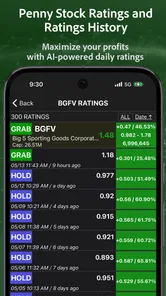
The app’s AI buy and sell signals give the workflow a clear starting point. Rather than searching randomly, I can use the signals to create a small group of candidates for closer inspection. I then compare that shortlist with information from my usual brokerage or research sources before making any decision. This division of labor is one of the app’s strongest practical uses: PennyGems helps with attention, while the brokerage and research tools remain responsible for execution, account information, and deeper context.
A realistic everyday scenario would be checking the app during a morning planning session, selecting only a few names that deserve attention, and setting alerts around prices I have already considered. Later, an alert can tell me that a stock has reached a level worth reviewing. It does not force me to trade while I am busy, and it gives me a repeatable checkpoint instead of encouraging constant screen-watching.
Separating discovery from decision-making
I would not use the signal feed as a substitute for reading a company’s basic information. Before acting, I want to know what the business does, why the stock is attracting attention, how much volatility I can tolerate, and where I would exit if the idea fails. PennyGems is better at helping me find a candidate than at answering all of those questions. That distinction prevents one of the most common mistakes with signal-based finance tools: confusing a convenient notification with a complete investment thesis.
More From Our News Desk

 Gmail
GmailGmail in a Busy Inbox: Who Benefits Most?
From first account to crowded workday, Gmail earns its place through dependable search and flexible sorting—but its best fit depends on how much inbox maintenance you can tolerate.

 Prime Video
Switching to Prime Video: What Changes in Your Viewing Routine
Prime Video can make a compelling second home for streaming, but switching means learning a different catalog, rental layer, and route from browsing to playback.

 Universal TV Remote Control
Universal TV Remote Control Works Best as a Reliable Backup
A phone remote earns its place through quick setup and reliable habits. Here is how to get more from Universal TV Remote Control—and where its limits show.

 Weather - By Xiaomi
Weather by Xiaomi Review: Clear at a Glance, Less Clear Up Close
Xiaomi’s weather app makes everyday forecasts quick to scan, but its calm surface can leave useful details and recovery paths harder to find than they should be.

 X
XX Under Pressure: Can It Recover When Posting Goes Wrong?
A resilience-focused review of X, examining setup, mistaken posts, interruptions, weak connections, and the gaps that matter when recovery needs to be dependable.

 Clash of Clans
Clash of Clans Is Won Between the Battles
Its raids are quick; its community is a long-term project of coordination, teaching, rivalry, and shared responsibility—with all the friction that entails.
Latest News



It also helps to keep a written reason for every position. For example, I might record that I am watching a stock because it crossed a chosen price level after appearing in the app’s trend view. If the price later moves against me, I can review whether my original reasoning still makes sense instead of inventing a new explanation after the fact. This habit makes the app more useful because it turns alerts into part of a process rather than isolated emotional triggers.
Using alerts as checkpoints
The price-alert feature is most valuable when I define the alert before the market becomes exciting. I prefer levels that correspond to a planned entry, a point where I would reconsider the trade, or a level where I would protect a gain. Setting alerts around every small movement would create noise and make the app harder to use. A smaller number of meaningful alerts keeps the phone from becoming a source of constant pressure.
There is also a practical trade-off here. Alerts can save time, but they may tempt a user to respond instantly to a volatile move. I found it better to treat the notification as a reminder to open the app and reassess the situation. That extra step is especially important with penny stocks, where a price can look attractive simply because it has moved quickly. The app can reduce the effort of monitoring, but it cannot remove the need for judgment.
What I would check before relying on it
New users may wonder whether PennyGems is a broker. I would not approach it that way. Its central role is screening, signaling, and alerting. I would expect to use a separate brokerage account for placing trades and a separate source when I need extensive financial statements, analyst coverage, charting depth, or portfolio reporting. That may feel less convenient than an all-in-one platform, but it is also clearer: this app has a focused job.
I would also ask whether the signals suit my time horizon. Someone who invests in broad funds for years may find little value in frequent penny-stock signals. Someone who actively watches speculative names may find the focused feed more relevant. The answer depends less on the app’s rating and more on whether its narrow purpose matches the way I already make decisions.
Settings, shortcuts, and repeatable habits
I focus here on keeping the app organized without turning it into another source of constant interruptions. A quick review of active alerts and a consistent note-taking habit can make it easier to distinguish a fresh idea from one I have already ruled out. Next, I’ll cover how I recover my routine when notifications or market conditions make the app feel less helpful.
Settings worth checking first
My first settings check would be the alert behavior. I want to understand which price notifications are active and whether they are attached to stocks I still care about. An old alert can become a distraction, especially after a trade is closed or a watchlist idea no longer fits my plan. Reviewing alerts regularly is a small maintenance task, but it has a large effect on how calm and useful the app feels.
I would also review notification permissions at the phone level. If notifications are blocked, the alert feature cannot play its intended role; if every notification is allowed without thought, the app may compete with more important messages. The best arrangement is the one that lets genuinely relevant price changes reach me while preserving enough quiet time to think. I would rather check a focused list at planned moments than allow a stream of alerts to dictate my day.
Because the app includes in-app purchases priced from $7.99 to $79.99 per item, I would examine what is available at no cost and what requires payment before building a routine around a premium function. The app itself is free to download, which lowers the barrier to trying it, but free access and optional purchases are not the same thing. I would only pay if a feature clearly reduces work in my own process, not simply because a signal feels urgent.
Creating a personal signal checklist
PennyGems becomes more dependable when I pair every signal with the same short checklist. I would ask whether the stock is already moving too quickly, whether the alert level was planned in advance, whether the possible loss is acceptable, and whether I can explain the trade in one sentence. If I cannot answer those questions, I would keep the stock on watch rather than act.
This is a non-obvious advantage of a focused app: it can make discipline easier because the list of candidates is smaller. A broad financial platform often contains so many charts, research panels, and account screens that I can mistake activity for analysis. PennyGems encourages a narrower workflow. The limitation is that the narrow workflow must be supplemented with outside research, but the benefit is that I am less likely to confuse having more information with having better information.
Making the app fit a weekly routine
I would use a weekly review to remove stale ideas and reconsider alert levels. During that review, I would compare the stocks I saved or monitored with the reasons I originally wrote down. If the reason has disappeared, I would remove the candidate. This keeps the app from becoming a storage box for every interesting ticker that appeared during a busy market session.
A second useful habit is to separate observation lists by purpose in my own notes, even if the app’s available organization is limited. I might distinguish between stocks I am researching, stocks waiting for a price level, and stocks I have decided to ignore. That prevents a new signal from receiving the same attention as a carefully researched setup. The app supplies the stream; my notes supply the memory and structure.
Comparing it with familiar alternatives
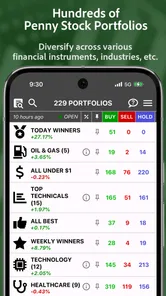
Compared with a standard brokerage app, PennyGems is more specialized. A brokerage usually gives me order entry, balances, holdings, and account management, while this app is centered on finding and monitoring penny-stock ideas. Compared with a general market-news app, it is more action-oriented because the experience is built around signals and price alerts rather than a broad news feed. Compared with a full research terminal, it is lighter and faster to approach, but it does not occupy the same role for deep analysis.
That comparison explains who benefits most. I would recommend it to an investor who already has execution and research tools, but wants a focused discovery layer for speculative stocks. I would skip it if I wanted automatic diversification, retirement planning, detailed portfolio allocation, or a single app for every financial task. Its specialization is a strength only when I actually need that specialization.
Faster patterns without rushing
Experienced use is less about checking the app constantly and more about reducing repeated decisions. I would decide in advance how many candidates deserve attention, which price levels matter, and what information I need before considering a trade. Then I could open PennyGems, review the signals, and move through the same sequence each time. A repeatable process is faster than improvising, and it also makes emotional reactions easier to spot.
Another efficient pattern is to use the app for the first pass and stop there if a candidate fails a basic rule. For instance, if I do not understand why the stock is moving or cannot accept the possible downside, I do not need to spend the rest of the session researching it. This prevents the app’s discovery function from expanding into an endless research obligation.
I would be careful with the phrase “daily gains,” even though the app’s positioning emphasizes price alerts for that purpose. Daily movement is not the same as dependable profit. A signal may arrive after a move has started, and a low share price does not make a stock low-risk. The faster the opportunity appears, the more important it is to know whether I am looking at a planned trade or simply chasing attention.
Advanced limits to keep in mind
The biggest limitation is inherent in the subject matter. Penny stocks can be thinly traded, volatile, and difficult to evaluate, so an alert may be technically useful while still leading to a poor decision. AI can organize patterns and produce signals, but it cannot guarantee liquidity, explain every company-specific event, or match the result to my personal finances. I would never let a notification determine position size or risk by itself.
There is also a timing limitation. An alert is helpful only if I can respond in a way that fits my plan. If I am at work, asleep, traveling, or unable to verify the underlying information, the notification may be more frustrating than useful. For that reason, I prefer alerts that support scheduled review rather than a promise that I must act immediately.
Users should also think about the cost boundary. Since optional purchases range from $7.99 to $79.99 per item, the right question is not whether a paid option sounds advanced, but whether it improves a specific part of the workflow. I would try the free experience first, observe how often I genuinely use the signals and alerts, and only then decide whether an upgrade has practical value. Paying for more notifications does not automatically improve risk control.
Who should use it, and who should pass
I see PennyGems as a reasonable fit for curious, active investors who want a dedicated way to discover trending penny stocks and receive price reminders. It can also suit someone who already understands basic order types and risk management but wants to spend less time manually scanning for candidates. The app’s Everyone content rating makes it broadly accessible, but accessibility should not be confused with suitability for every experience level.
A beginner can use it, but I would not recommend beginning with real money solely because the interface makes signals easy to find. A new investor should first learn how trades work through a brokerage, understand losses, and practice recording a plan. Someone who prefers stable, diversified investments should probably choose a fund-focused or long-term portfolio app instead. The more a person dislikes short-term volatility, the less likely this particular tool will feel comfortable.
My final assessment after fitting it into a routine
Stockring, Inc. has kept the product’s purpose focused: PennyGems is a finance app for spotting and monitoring penny-stock possibilities, not a complete investing ecosystem. Its average rating is 4.8 from around 364 ratings, and it has passed 50K+ installs, which suggests that the concept has found an interested audience. It has been available since August 4, 2020, and the current version is 7.2.6. Those details give the app a useful track record without changing the central question of whether its workflow matches my needs.
I like the app most when I use it as a disciplined filter. The signals help me decide where to look, and the alerts help me return to a planned price level without watching the market every minute. The strongest results come from combining those tools with a written checklist, independent research, and a separate brokerage account. The app is a prompt for better attention, not permission to skip judgment.
My recommendation is therefore conditional but positive. Try PennyGems if you specifically want a focused penny-stock discovery and alert tool, and begin by learning its notification rhythm before considering any optional purchase. Keep the number of active ideas manageable, review alerts regularly, and never treat an AI signal as a guaranteed outcome. For my own use, that balance makes it worthwhile: it adds structure to a speculative watchlist while leaving the most important decisions where they belong—with the investor.
PennyGems: Screen Penny Stocks Frequently Asked Questions
Who develops PennyGems: Screen Penny Stocks, and is it available for iOS and Android?
PennyGems: Screen Penny Stocks is a finance app developed by Stockring, Inc. It is listed for mobile users, and its core purpose is to help people explore penny stocks and market signals. The exact availability and feature set can vary by platform, so check the Apple App Store or Google Play page for your device before downloading.
What is PennyGems: Screen Penny Stocks used for?
PennyGems: Screen Penny Stocks is designed to help investors discover and filter low-priced stocks using customizable screening tools. Its main value is the ability to narrow a large list of penny stocks by criteria such as price, market capitalization, volume, performance, and other market data. It is best viewed as a research and watchlist tool rather than a complete investment platform.
Does PennyGems provide real-time stock prices and market data?
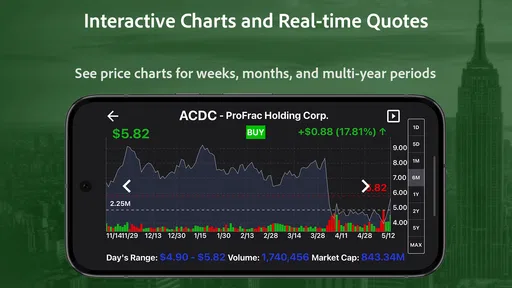
The app may provide stock quotes, charts, screening results, and related market information, but the timing and availability of data can depend on the selected market, data provider, subscription level, and exchange coverage. Users should check whether quotes are real-time or delayed before making decisions. PennyGems should not be treated as a guaranteed source of live trading information without independently confirming prices through a broker or official market source.
Can I buy or sell penny stocks directly through PennyGems?
PennyGems: Screen Penny Stocks is primarily intended for finding and analyzing potential penny-stock opportunities, not necessarily for executing trades. Screening an investment and placing an order are separate steps, so users will generally need a compatible brokerage account to buy or sell shares. Before downloading, confirm the app’s current features and integrations, and remember that availability may differ between Android and iOS versions.
Is PennyGems suitable for beginners in stock investing?
Beginners can use PennyGems to learn how stock filters, watchlists, price movements, and trading volume work, but the app does not remove the risks associated with penny stocks. These securities can be highly volatile, difficult to sell, and vulnerable to limited liquidity or misleading promotion. New investors should research every company independently, understand order types, and avoid risking money they cannot afford to lose.
Pros
- Simple interface makes penny-stock research quick for beginners.
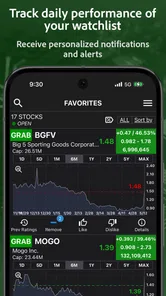
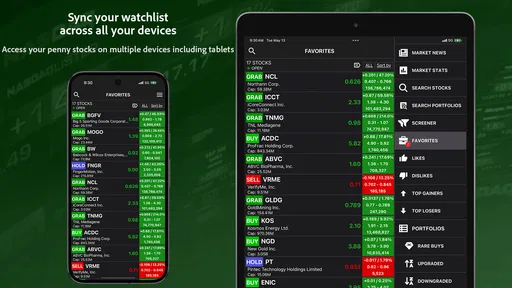
- Watchlists help track selected stocks without opening multiple finance apps.
- Useful for spotting low-priced stocks across different market sectors.
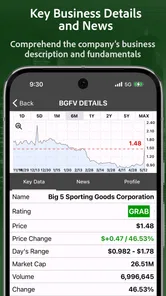
- Stock quotes and basic market data are presented in an easy-to-scan format.
- Can support idea generation before conducting deeper independent research.
Cons
- Penny stocks can be highly volatile and carry a significant risk of loss.
- Some listings may have limited trading volume and wide bid-ask spreads.
- Data or quotes may be delayed
- depending on the supported market sources.
- The app is not a substitute for professional financial advice or analysis.
- Limited research tools may frustrate experienced investors seeking advanced metrics.











