

Payme: Class Action Payout
- 36.00
- 3.0
- Installs
- 50.00K
- Price
- Free

Screenshots
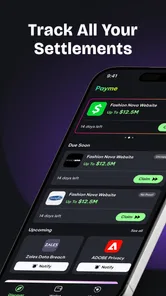


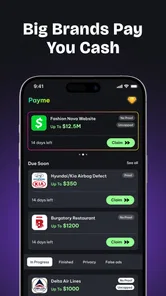
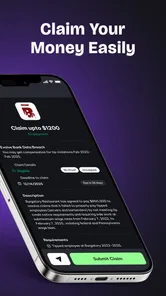
Analysis by Reviewed
I approached Payme: Class Action Payout as a practical finance app rather than something I would open every day for budgeting. Its purpose is narrower: it helps people submit class-action settlement claims, keep an eye on payout progress, and organize the follow-up that usually gets lost in email, browser tabs, or paper notices. That focus can be useful in a busy household, especially when several people share a device or one person handles administrative tasks for others.
The app is free to install, although it includes in-app purchases ranging from $7.99 to $14.99 per item. That immediately makes it worth using thoughtfully. I would not treat every settlement notification as an invitation to pay for assistance, and I would read each screen carefully before accepting anything that costs money. The basic appeal is convenience, but convenience only matters when the claim itself is relevant and the terms are clear.
How Payme fits into real household claim management
I find Payme most useful when a household treats settlement claims as small administrative projects rather than quick windfalls. A shared routine—one person coordinating, the claimant checking the details, and a private record of each submission—can make it easier to stay organized without confusing people’s information. That approach also helps clarify which tasks belong in the app and which are better handled through the settlement’s official process.
A realistic shared-device situation
Imagine a household where one person regularly checks mail, handles online forms, and keeps track of deadlines. Another household member may receive a settlement notice but postpone dealing with it because the form looks confusing or the notice is easy to misplace. In that situation, this app can act as a central place to review a claim and monitor what happens afterward, while the person whose information is involved remains part of the decision.
I like this use case because it reflects how administrative work actually happens. A partner might spot a possible claim while the other person is at work. An adult child might help a parent review a notice on a shared tablet. Roommates might use the same device for unrelated accounts. The important point is that shared access should not become shared identity. The app may be convenient for coordination, but each claim still belongs to the person who meets its requirements.
My practical advice is to use a separate note, folder, or clearly labeled email thread for each household member. Record the settlement name, the relevant purchase or service details, and the date the claim was submitted. That simple habit prevents a common mistake: submitting the same information twice because two people assumed the other person had already handled it.
Setting boundaries before anyone submits a claim
The first step should be deciding who is allowed to use the device and who is only providing assistance. If I were helping someone else, I would let that person read the eligibility wording and approve the final submission rather than silently completing everything on their behalf. This is especially important when a form asks for personal details, purchase history, contact information, or payment-related information.
More From Our News Desk

 Gmail
GmailGmail in a Busy Inbox: Who Benefits Most?
From first account to crowded workday, Gmail earns its place through dependable search and flexible sorting—but its best fit depends on how much inbox maintenance you can tolerate.

 Prime Video
Switching to Prime Video: What Changes in Your Viewing Routine
Prime Video can make a compelling second home for streaming, but switching means learning a different catalog, rental layer, and route from browsing to playback.

 Universal TV Remote Control
Universal TV Remote Control Works Best as a Reliable Backup
A phone remote earns its place through quick setup and reliable habits. Here is how to get more from Universal TV Remote Control—and where its limits show.

 Weather - By Xiaomi
Weather by Xiaomi Review: Clear at a Glance, Less Clear Up Close
Xiaomi’s weather app makes everyday forecasts quick to scan, but its calm surface can leave useful details and recovery paths harder to find than they should be.

 X
XX Under Pressure: Can It Recover When Posting Goes Wrong?
A resilience-focused review of X, examining setup, mistaken posts, interruptions, weak connections, and the gaps that matter when recovery needs to be dependable.

 Clash of Clans
Clash of Clans Is Won Between the Battles
Its raids are quick; its community is a long-term project of coordination, teaching, rivalry, and shared responsibility—with all the friction that entails.
Latest News



I would also avoid saving another person’s sensitive details in an ordinary shared note. A better workflow is to gather the notice, check the claim requirements, enter only what is necessary, and then close the session when finished. If the device is used by several people, I would make sure the next user can immediately tell whose claim is open. Confusing one person’s settlement with another’s is a small organizational error that can create a much bigger privacy problem.
Payme is not a replacement for reading the official settlement terms. The app can make the process easier to follow, but it cannot make an ineligible claim valid. Before submitting, I would check the covered dates, product or service definition, proof requirements, and deadline shown in the relevant materials. A short review at this stage is more valuable than rushing through a polished-looking form.
What the tracking function is useful for
The most helpful part of the concept is the ability to track a payout after submitting a claim. In everyday use, that means I can avoid repeatedly searching an inbox or wondering whether a form went through. For a household coordinator, a visible status can also reduce unnecessary reminders: instead of asking someone whether they completed the claim, I can check the record and follow up only when action is actually needed.
There is a subtle trade-off here. A tracking screen is a record of progress, not a guarantee that money will arrive immediately or that a claim will be approved. I would treat any status as a prompt for the next action, not as proof of a final result. If the status appears unclear, I would compare it with the settlement notice or official communication instead of guessing what an unfamiliar label means.
A useful routine is to review open claims once a week or every other week, depending on how many matters are active. I would keep completed claims separate from claims that still need documents. This avoids the opposite problem of overchecking: spending time on a claim that is already finished while overlooking one that requires a response.
Coordinating without turning one account into a family account
Households often share responsibilities, but that does not mean one login should represent everyone. I would choose one person as the coordinator for a specific claim and tell the claimant exactly what has been submitted. If someone else later takes over, I would pass along the settlement name and current status rather than handing over a device with several unrelated sessions open.
This approach is particularly important on a shared phone. Notifications, saved passwords, and open forms can expose information to the next person who picks it up. I would review the device’s general privacy settings and avoid assuming that a finance app automatically separates family members. The app’s usefulness depends partly on disciplined household habits outside the app itself.
For couples, the best arrangement may be a quick two-person check before submission: one person verifies eligibility and dates, while the other checks contact and payment details. For an adult helping a parent, I would ask the parent to confirm every important answer aloud. For roommates, I would keep use strictly individual unless both people have agreed on a clear process. These small boundaries make the app safer to use without pretending it provides family-management tools.
Teen rating and the question of trust
The content rating is Teen, which is worth considering when a shared tablet is used by younger family members. That rating does not mean I would give a child responsibility for settlement claims. Finance-related forms involve judgment, personal information, and sometimes decisions about whether a paid option is worthwhile. In my view, an adult should supervise any meaningful use, even when a teenager is only helping with navigation.
The developer is GAMEPEAK LIMITED, and the app has attracted a modest early audience: it is listed at over 50 thousand installs, with a 3.0 average from 109 ratings and 36 written reviews. I read those figures as a reason to stay observant rather than as a final verdict. They suggest that people are trying the app, but the middling average also tells me not to assume every user will find the process smooth.
Trust should be based on the specific screen in front of me, not on the app’s name or a promise of a payout. I would look for a clear explanation of what information is being requested and whether a charge applies before continuing. If a family member is uncomfortable sharing details through a shared device, the better choice may be to use the official settlement process directly or handle the claim on a private device.
Where it beats the usual alternatives
The usual alternative is manual tracking: search the inbox, open a settlement website, fill out a form, save a confirmation, and set a reminder in a calendar. That method costs nothing beyond time, but it is easy to lose track of several claims. Payme’s appeal is the attempt to put submission and payout monitoring into one workflow instead of scattering the process across different tools.
Compared with a general budgeting app, it is more focused on one-off legal settlements and less concerned with recurring spending, bank balances, or monthly categories. I would not install it expecting a household budget, expense dashboard, bill calendar, or investment overview. Its value comes from a very specific administrative problem.
Compared with going directly through an official settlement website, the app may feel more organized for someone who wants a single place to review claims. The direct route may still be preferable when I want maximum control over the source of the information, when a settlement has unusual eligibility rules, or when I do not want to consider in-app purchases. The better option depends on whether organization or direct verification matters more for that particular claim.
Three habits that make the app more useful
First, I would photograph or save the original notice before entering anything. This preserves the wording that explains who qualifies and what proof may be needed. It also gives the household coordinator something concrete to refer back to if another person takes over.
Second, I would use a claim-specific naming system in my own notes, such as the settlement name followed by the claimant’s initials. I would not put sensitive information into the label. The goal is simply to prevent a shared-device mix-up when several claims are being handled in the same week.
Third, I would review the payment choice and any purchase prompt separately from the eligibility decision. A person can qualify for a settlement without every optional convenience being worth its cost. Keeping those two decisions apart helps prevent the excitement of a possible payout from making the household spend money too quickly.
A fourth habit is to save the confirmation or reference information immediately after submission, if one is shown. I would store it in a private place and note the submission date in the same record. That gives me a useful trail when checking the payout status later, without relying entirely on memory.
Where the experience may create friction
The narrow purpose can also be a limitation. If I only encounter one settlement occasionally, setting up another finance-related app may feel like more work than using the official claim page and a calendar reminder. People who prefer to keep personal information in as few services as possible may also decide that the organizational benefit is not enough.
The paid items deserve particular attention. Since the app is free to download but offers purchases from $7.99 to $14.99 per item, I would slow down whenever a button suggests upgrading, unlocking, or paying for help. I would want to understand exactly what the purchase changes before confirming it. For a small or uncertain payout, the cost could reduce the practical benefit of using the app.
The average rating of 3.0 also makes me cautious about relying on it as the only record of an important claim. I would keep my own confirmation details and original documents. That is good practice for any settlement process, but it matters even more when the app is still on version 1.0.20 and a user may encounter an interface change or an unclear status message.
The minimum operating-system requirement is Android 7.0, so the app is aimed at a wide range of Android devices rather than only recent phones. That can help in a household with an older spare device. Still, an older shared phone may have its own privacy and storage concerns, so I would not use a device that is routinely left unlocked or passed among many people without checking its general security first.
Who should use it and who should skip it
I can recommend trying Payme to someone who regularly receives settlement notices, dislikes maintaining several browser tabs, and wants a focused way to follow submitted claims. It is also a reasonable fit for a trusted household coordinator who helps an adult family member stay organized while keeping the claimant involved in every important decision.
I would be more hesitant to recommend it to someone who expects a full personal-finance suite. It is not the tool I would choose for tracking groceries, splitting recurring bills, planning savings, or monitoring investments. I would also suggest skipping it if a person is uncomfortable with in-app purchases or prefers to submit every claim directly through the official administrator.
It is not a shortcut around eligibility rules, and it should not be used to guess, exaggerate, or combine different people’s information. A claim made quickly but inaccurately is worse than a claim made carefully through a slower alternative. The app works best as an organizer for legitimate claims, not as a promise of easy money.
My household verdict
After looking at the app through a shared-device lens, I see a useful but specialized finance tool. Its strongest idea is keeping settlement submissions and payout follow-up together, which can save time when a household is managing several notices. The practical wins come from disciplined use: one claimant per record, a clear coordinator, private handling of personal details, and independent notes for confirmations.
I would install it for a specific settlement-management need, not simply because it is free. I would read every eligibility condition, separate no-cost claim activity from paid items, and keep the original notice outside the app. Those steps make the experience more dependable and protect against the most likely household mistakes.
For me, the decision comes down to organization versus control. Payme is more convenient than a scattered collection of emails and reminders, but the official direct route may be better for users who want the fewest intermediaries. With a 3.0 average and a still-developing version history, I would use it as a helpful assistant while keeping my own records. That balance—convenience without surrendering judgment—is the right way to approach this app.
In short, I would recommend it selectively: to adults who need a focused claim tracker and can manage shared-device boundaries carefully. I would not hand it over as a casual family utility or assume that a payout is guaranteed. Used for the narrow job it is designed around, it can make an annoying administrative task easier to coordinate; used carelessly, it can create confusion about identity, eligibility, and cost.
Payme: Class Action Payout Frequently Asked Questions
Who is Payme: Class Action Payout intended for?
Payme: Class Action Payout is aimed at people who want to find out whether they may qualify for class action settlement payments and keep track of claim steps. It belongs to the finance category and is rated for teens. Before downloading, consider whether you are comfortable using an app to explore claims and handle related information, and review each settlement’s requirements before acting.
What devices can run Payme: Class Action Payout?
The app is available for Android devices running Android 7.0 or later. Check your device’s operating system before installing, and make sure you download the app from an official app store. Payme: Class Action Payout is a finance app, so it may be most useful on a device you can access securely when reviewing claim details or following payout updates.
What is Payme: Class Action Payout?
Payme: Class Action Payout is an app designed to help users discover and claim eligible payments from class action settlements. It may organize settlement information, explain eligibility requirements, and guide you through submitting a claim. Before using it, read each case description carefully, because eligibility, deadlines, required documentation, and payout amounts vary from one settlement to another.
How does Payme: Class Action Payout work?
After opening the app, users can typically browse available class action cases and review details such as the company involved, qualifying purchase or usage dates, estimated compensation, and claim deadlines. If you appear eligible, the app may direct you through the claim process or provide access to the official settlement form. Always confirm that the final submission is made through an authorized settlement administrator.
Is Payme: Class Action Payout free to download and use?
Payme: Class Action Payout is free to download, though optional in-app purchases are offered. Review any purchase carefully before confirming it, and check the app’s current store page for pricing details. You should also understand whether any fee is deducted from a settlement payment or charged for assistance. Legitimate claims generally should not require you to pay unnecessary fees to receive money.
Pros
- Simple claim-filing process with guided instructions
- Provides access to eligible class action settlement payouts
- Useful deadline and case information in one place
- Supports digital document submission for convenience
- Can help users track claim-related updates more easily
Cons
- Eligibility varies and many users may not qualify for a payout
- Settlement amounts can be small or take months to arrive
- Requires sharing personal and payment information
- Availability may depend on supported cases and regions
- App usefulness is limited when no relevant settlements are active











