

Parker's Rewards
- 304.00
- 4.1
- Installs
- 100.00K
- Price
- Free

Screenshots
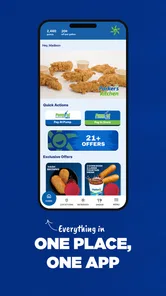
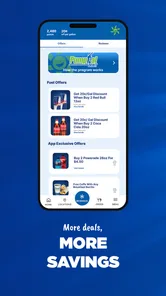
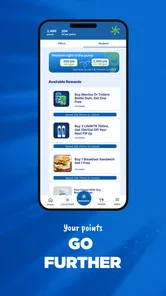
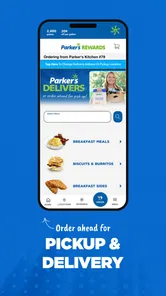
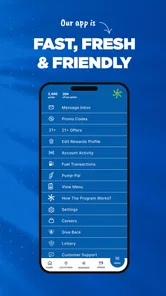
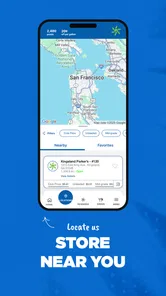
Analysis by Reviewed
When I first looked at Parker's Rewards, I understood its appeal immediately: it is a free Food & Drink app built around making visits to Parker’s a little more rewarding. The opening offer is simple, with a free large drink for new members, but the real question is whether the app remains useful after that first redemption. In my experience, the answer depends less on flashy extras and more on how smoothly it handles the moments when you are standing at a counter, waiting in a drive-through, or trying to use it with an unreliable mobile connection.
Developed by Parkers Admin, the app is focused on the Parker’s Rewards program rather than trying to become a general restaurant guide, delivery service, or meal-planning tool. That narrow purpose is a strength. I did not have to sort through unrelated content to understand why I would open it. If Parker’s is already part of your routine, the app has a clear job: keep your rewards close at hand and make eligible visits more worthwhile.
How Parker's Rewards fits into an ordinary Parker’s visit
The best way to judge this app is to imagine a normal stop rather than a carefully planned one. You are on the road, you decide to grab a drink, and you remember that the rewards app may help. That is the kind of situation where a loyalty app either earns its place on your phone or becomes something you forget after signing up. Parker's Rewards works best when it is treated as a quick companion to an existing visit, not as an app you browse for entertainment.
The first-use incentive gives a new member an immediate reason to complete registration. A free large drink is more practical than a vague promise of future savings, especially for someone who regularly stops for beverages. I also like that the offer connects directly to the kind of purchase the business is known for. It is not an abstract points balance that requires several visits before feeling meaningful.
That said, the opening reward should not be the only reason to install it. If you rarely visit Parker’s, the app will probably have limited value after the welcome offer is used. A loyalty program is naturally strongest for repeat customers, and this one is no different. I would recommend it to someone who already makes regular stops, while a visitor passing through once may find the setup more effort than the long-term benefit justifies.
What the app does well in mobile situations
Most loyalty apps are used with one hand and very little patience. I may be carrying a drink, sitting in a parked car, or trying to check something before reaching the register. Parker's Rewards makes sense in those contexts because its purpose is tied to a physical location and a short transaction. The less time I need to spend navigating, the better the experience feels.
There is also a useful difference between checking a reward before ordering and trying to solve a problem after payment. I recommend opening the app before joining a line whenever possible. That gives the account and reward information time to load while I am still stationary, instead of discovering at the counter that the phone needs to reconnect or refresh. This small habit reduces pressure and makes the app feel more dependable.
More From Our News Desk

 Instagram
Instagram’s Power Comes From Its Place in Your Phone
A close look at how Instagram turns Meta’s reach, recommendation systems and everyday camera habits into durable platform power—and what that costs users.

 Gmail
GmailGmail in a Busy Inbox: Who Benefits Most?
From first account to crowded workday, Gmail earns its place through dependable search and flexible sorting—but its best fit depends on how much inbox maintenance you can tolerate.

 Prime Video
Switching to Prime Video: What Changes in Your Viewing Routine
Prime Video can make a compelling second home for streaming, but switching means learning a different catalog, rental layer, and route from browsing to playback.

 Universal TV Remote Control
Universal TV Remote Control Works Best as a Reliable Backup
A phone remote earns its place through quick setup and reliable habits. Here is how to get more from Universal TV Remote Control—and where its limits show.

 Weather - By Xiaomi
Weather by Xiaomi Review: Clear at a Glance, Less Clear Up Close
Xiaomi’s weather app makes everyday forecasts quick to scan, but its calm surface can leave useful details and recovery paths harder to find than they should be.

 X
XX Under Pressure: Can It Recover When Posting Goes Wrong?
A resilience-focused review of X, examining setup, mistaken posts, interruptions, weak connections, and the gaps that matter when recovery needs to be dependable.
Latest News



For drive-through users, preparation matters even more. A phone mounted out of reach or buried in a pocket is not a convenient place to troubleshoot a loyalty account. I would check the app before pulling forward, especially if I am expecting to use the introductory drink offer. This is not a criticism unique to Parker's Rewards; it is a practical limitation of using any phone-based rewards system during a fast transaction.
The app is rated for Everyone, which fits its straightforward subject matter. I can see it being accessible to a broad range of customers, including people who do not want to learn a complicated points system. The current version is 42.02.01, and the minimum operating system is Android 7.0, so it should remain relevant to many older Android phones. Users on older devices should still keep their phone software and app installation in a workable state, since a supported operating system alone cannot guarantee a smooth experience on every handset.
Why connectivity matters more than it first appears
A rewards app may look simple because the screen is simple, but the important information often has to be retrieved at exactly the wrong time: when you are placing an order, presenting a reward, or checking whether an offer is ready. That makes connectivity part of the user experience. I would not assume that every account detail or reward will be available without a connection. Instead, I treat the app as something to open while I have a reliable signal and verify before beginning the purchase.
This approach is particularly useful at busy stores, where a weak connection can turn a two-minute stop into an awkward wait. If the app has already opened successfully, I am less likely to be caught refreshing a screen while other customers are waiting. The practical lesson is simple: load the reward before the transaction, not during the most rushed part of it.
Connectivity can also vary inside buildings, near fuel pumps, or in areas where mobile service is inconsistent. A page that loads quickly at home may behave differently in a crowded store or at the edge of town. I would not interpret a delayed screen as proof that the account is broken. First I would move to a place with a stronger signal, check whether other apps can connect, and then retry. This basic troubleshooting step is easy to overlook when the delay happens at the register.
There is a trade-off here. A dedicated loyalty app can put the reward closer than an email or paper coupon, but it also makes the phone and network part of the redemption process. If you prefer rewards that can be clipped from a printed card or remembered without a device, this model may feel less convenient. For me, the convenience wins when I visit often, but it is not universal.
Handling failed loads, missed timing, and recovery
The most frustrating moment with any rewards app is not discovering that it has no benefits. It is believing a reward is ready, then being unable to display it when ordering. Parker's Rewards is most comfortable when I give it a little preparation time. I would sign in before leaving home or before the final approach to the store, rather than waiting until I am already being served.
If a screen fails to load, I would avoid repeatedly tapping every button. I would pause, check the connection, close and reopen the app, and try again when the phone has a stronger signal. If the problem is limited to one location, moving outside or toward an open area may help. If the same issue continues elsewhere, checking whether the app needs an update is a more sensible next step than assuming the reward has disappeared.
Another useful habit is to keep expectations realistic around the welcome offer. I would not begin an order assuming that a reward can be applied automatically simply because the account has been created. I would look for the reward in the app first and make sure I understand how it is presented before ordering. That avoids the uncomfortable situation of trying to explain an unseen offer after the purchase is already complete.
Phone battery is another overlooked part of recovery. A rewards app cannot help if the device is nearly dead, especially during a long drive or a day away from a charger. I would take a screenshot only if the app clearly presents information that is intended to be shown that way, and I would not assume a screenshot can replace a live reward screen. The safer workflow is to open the app shortly before paying and keep the phone available until the transaction is finished.
These are small precautions, but they reveal the app’s main limitation: the experience is dependent on a chain of events outside the reward itself. The account must be accessible, the phone must be usable, the connection must cooperate, and the store transaction must accept the reward at the right time. That does not make the service poor, but it does mean that convenience comes from preparation rather than from complete automation.
Using it without wasting mobile data
Parker's Rewards is unlikely to be the type of app I would open repeatedly throughout the day. That is helpful for data-conscious users. I would use it at home on Wi-Fi to sign in, inspect the available reward, and prepare for a visit. Then I would open it once more shortly before ordering. This pattern keeps the app’s network activity purposeful instead of turning every trip into repeated refreshing.
If your mobile plan is limited, avoid leaving the app open and manually reloading while waiting in a slow line. A single planned check is more sensible than constant attempts to force an update. I would also avoid uninstalling and reinstalling the app as a first response to a loading problem, because that creates extra downloads and may add sign-in friction without addressing a weak signal.
People who travel between areas with different levels of coverage should be especially deliberate. I would check the account while connected at a familiar location and make sure I know what I intend to use before driving. This is not about consuming a large amount of data; it is about avoiding an important check at the least reliable moment. The same strategy helps people who use older phones, where repeated loading can feel slower even when the connection is adequate.
Privacy-minded users may also prefer this limited-use routine. A rewards app is naturally connected to purchases and visits, so I would install it only if I am comfortable participating in Parker’s loyalty program. I would read the permissions and account prompts during setup rather than accepting everything automatically. The app’s free price removes a financial barrier, but “free” does not mean every user will consider the exchange of account information worthwhile. For frequent Parker’s customers, the reward may justify that exchange; for occasional visitors, it may not.
How it compares with paper coupons and broader loyalty apps
Compared with paper coupons, Parker's Rewards is easier to carry and less likely to be left in a drawer. The phone is already with me, and a digital reward can be checked before I order. The downside is that paper does not need a battery, signal, or app screen. Someone who often shops in areas with weak coverage may prefer a more physical reminder or may find that a loyalty card with a simpler presentation suits them better.
Compared with a broad food-rewards platform, this app is more focused. A general service may let me compare restaurants, collect different offers, or manage several businesses in one place. Parker's Rewards is not trying to replace those tools. Its value comes from keeping Parker’s participation separate and direct. That is convenient if Parker’s is part of my routine, but unnecessary if I want one app for every restaurant I visit.
The focused design also changes how I measure success. I would not judge it by the number of browsing features or by how much food content it contains. I would judge it by whether I can join, find the relevant reward, and use it during a genuine Parker’s visit without confusion. On that narrower test, the concept is sensible. The app does not need to be a full dining platform to be useful.
Who should install it, and who should skip it
I think Parker's Rewards is a good match for regular Parker’s customers, people who frequently buy drinks there, and anyone who prefers keeping loyalty benefits on a phone instead of carrying cards or coupons. The free large drink gives new members a clear first step, while repeat visitors have a reason to keep checking the program rather than deleting it immediately.
I would be more cautious if you are only visiting Parker’s once, dislike creating accounts for individual businesses, or regularly use a phone with an unreliable battery or mobile connection. The app may still be worth trying for the introductory offer, but the long-term value will be limited unless your habits bring you back. Likewise, travelers who want a single rewards wallet for many restaurants may find a broader loyalty solution more convenient.
Families can also benefit, but they should decide in advance which person will present the account. Passing one phone around at the counter is less efficient than having the account holder ready. For shared purchases, it is worth checking the reward conditions before ordering rather than assuming that every item in a group order will qualify. A few seconds of preparation can prevent an argument about whether the offer was applied.
For someone who visits Parker’s during commuting hours, the app’s usefulness is tied to routine. Open it before starting the drive, not while moving and not while standing at the last moment. That workflow is safer, less stressful, and more likely to succeed than treating the phone as an emergency coupon drawer.
The overall experience after regular use
With a 4.1 average from around 760 ratings and more than 300 written reviews, the app appears to have a generally positive reception without suggesting that every customer has the same experience. I read that as a reasonable match for the product’s focused purpose: many people can find value in a Parker’s loyalty account, while others will encounter the ordinary friction of mobile rewards and store-based redemption.
Its reach is also substantial, with over 100,000 installs, which makes it more than a niche experiment. Still, popularity does not remove the practical limitations. A large user base cannot guarantee that a reward will load at the exact counter where you need it, and a free app can still be inconvenient if it is opened too late or used in a dead-signal area.
What I appreciate most is that the app gives a regular Parker’s customer a direct reason to keep the loyalty program nearby. What I appreciate least is the dependence on timing. The app is not difficult because it has too many menus; it is difficult when the user expects a last-second solution. My recommendation is therefore conditional but clear: install it before a planned visit, complete the account setup calmly, and test the reward display while you still have a dependable connection.
Parker's Rewards is free, available for Everyone, and was released on May 29, 2020. Those details matter less than the everyday fit, but they help explain who is likely to get the most from it. It is an established, narrowly focused Food & Drink app rather than a general-purpose restaurant companion, and its development by Parkers Admin keeps the experience centered on the Parker’s rewards relationship.
My final view is positive for the right user. If Parker’s is already one of your regular stops, the app is worth having because the welcome drink gives immediate value and the digital format is easier to keep nearby than a paper coupon. I would not call it essential for occasional visitors, and I would not rely on it without checking the account before reaching the register. Use it as a prepared loyalty tool, not as a last-second rescue plan, and its connectivity demands become manageable rather than frustrating.
Parker's Rewards Frequently Asked Questions
Is Parker’s Rewards available for my phone, and how much does it cost?
Parker’s Rewards is a free Food & Drink app for Android, with a minimum operating-system requirement of Android 7.0. Its age rating is Everyone, so it is intended for a broad audience. Before downloading, check that your phone meets the system requirement and that you are installing the app under the correct Parker’s Rewards name.
What welcome offer can new members expect?
The app promotes a free large drink for joining Parker’s Rewards. It is a welcome offer worth checking when you sign up, but make sure to read the offer’s terms in the app so you understand how to claim it and whether any conditions apply. The offer may be especially useful if you already visit Parker’s locations.
What is Parker’s Rewards, and how does it work?
Parker’s Rewards is the loyalty program connected to Parker’s convenience stores and food-service locations. After creating an account and registering an eligible payment card or using the available app-based rewards features, you can earn points or receive promotional benefits on qualifying purchases. The exact rewards, earning rules, and participating locations may vary, so it is worth checking the current terms before relying on a specific offer.
How do I earn and redeem rewards in Parker’s Rewards?
You generally earn rewards by making qualifying purchases at participating Parker’s locations while using the account, card, phone number, or other identification method linked to your membership. Available rewards may include discounts, free items, fuel-related offers, or limited-time promotions. Redemption instructions can differ by offer, and some rewards may require activation in advance, have minimum purchase conditions, or expire after a stated period.
Is Parker’s Rewards free to join, and what information is required?
Joining Parker’s Rewards is typically free, although users should review the current registration screen and program terms for any changes. The app or service may request information such as your name, email address, phone number, location, and account credentials. You may also be asked to add a payment card or loyalty identifier so purchases can be matched to your account and eligible rewards can be applied.
Pros
- Earn points on eligible purchases and redeem them for rewards.
- Simple way to track offers
- points
- and available benefits in one place.
- Exclusive promotions can provide extra value for regular Parker’s customers.
- Digital rewards reduce the need to carry physical coupons or cards.
- Useful store locator helps find nearby Parker’s locations quickly.
Cons
- Rewards and offers may vary by location or participating store.
- Points may expire or have redemption restrictions and minimum requirements.
- The app is less useful if you rarely shop at Parker’s locations.
- Some features may require account registration and personal information.
- Promotional notifications can become frequent unless notification settings are adjusted.











