Palm Beach Post: Local News
- 105.00
- 2.7
- Installs
- 10.00K
- Price
- Free

Screenshots




Analysis by Reviewed
I opened Palm Beach Post: Local News expecting a straightforward way to follow nearby reporting, but its identity is more specific than that. The app is published by USA TODAY Co. and sits in the News & Magazines category, while its store summary points toward North Jersey high school sports, including schedules, scores, and related coverage. That mismatch with the short description, which says “Palm Beach Post,” is the first thing a prospective reader should notice: the app’s presentation may not immediately make its intended local focus clear.
In practical terms, this is a free news app for someone who wants a local publication available on a phone rather than relying only on a mobile browser. I found the idea useful when I wanted a quick route from a developing local story to the surrounding context, especially sports information that is easy to miss in a broad national news feed. At the same time, I would not treat it as a universal replacement for every news source. Its value depends heavily on whether the coverage area and subjects match what you actually follow.
Following a local story from first alert to useful context
When I follow a local story, I find it useful to separate the first update from the information that helps me understand what happened. A quick check can answer whether a game is scheduled or a score is available; returning later for the related reporting gives that detail more meaning. That step-by-step habit also makes it easier to judge whether the app’s local coverage is worth making part of my routine.
Starting with the right expectation
The most important first step is deciding what kind of reader you are. If you want national headlines, international reporting, or a large general-purpose news dashboard, this is probably too narrow. If you care about local reporting and want sports details such as upcoming schedules or completed scores close at hand, the app has a clearer purpose.
I would especially consider it for a parent checking a school team’s latest result, a student following a rival school, or a local reader who wants more than a headline. A general search engine can find an isolated score, but it usually does not provide the same sense of an ongoing local beat. The useful outcome here is not simply seeing one item; it is building a repeatable habit around the publication’s coverage.
There is also a practical naming issue. The app is presented as Palm Beach Post: Local News, yet the store summary emphasizes North Jersey high school sports. I would check the first-run content carefully before committing time to it. That does not automatically make the app unusable, but it does mean the title alone should not determine your expectations. Confirm the local coverage that appears on your device before making it your primary news source.
Moving from a headline to a complete update
My preferred workflow begins with a specific question rather than aimless scrolling. For example, I might want to know whether a local game has taken place, what the score was, and whether there is a related report that explains the result. Starting with that question makes the app easier to judge because it tests the entire path from discovery to understanding.
More From Our News Desk

Weather by Xiaomi Review: Clear at a Glance, Less Clear Up Close

X Under Pressure: Can It Recover When Posting Goes Wrong?

Clash of Clans Is Won Between the Battles

Android Auto Makes the Case for Quieter Car Software

MobiOffice: Transforming Mobile Productivity with Seamless Integration

EA SPORTS FC™ Mobile Soccer: Redefining Mobile Sports Gaming
The schedules and scores are the most immediately practical part of the stated focus. They can serve as a quick reference during a busy day, when opening a site in a browser and searching through several pages feels unnecessarily slow. A schedule is also useful before an event, while a score answers the more urgent question afterward. The two needs are related, but they are not interchangeable, and a good local sports workflow depends on having both available in the same general destination.
Once I find a relevant item, I look for the surrounding reporting rather than stopping at the first line. A score tells me what happened; a story may help explain why it mattered. That distinction is where a local publication can be more valuable than a generic results service. The trade-off is that a dedicated score tool may be faster for a single number, while this app is more suitable when I want that number connected to local coverage.
A realistic school-day scenario
Imagine checking the app on a Friday afternoon before leaving work. I want to know whether a school game is scheduled, then I want to revisit the app later that evening to see whether the result has been posted. If the result is available, I can read the related coverage instead of piecing together information from social posts, search results, and a separate sports scoreboard.
That workflow has a natural handoff: the schedule answers what is supposed to happen, the score answers what did happen, and the article supplies the human context. I would save the app for those moments when local timing matters. It is less compelling when I am simply looking for a broad stream of unrelated headlines, because a larger news app will normally offer more variety and stronger personalization.
Handling the handoff between app and reader
A local news app does not do the whole job by itself. The app presents the reporting, but I still have to decide which items deserve attention. That handoff is important because local feeds can contain several updates that look similar at a glance. I recommend scanning for the event, school, or subject that matches the question I started with, then reading beyond the first sentence before drawing a conclusion.
This is also where the app’s narrow focus can be an advantage. A broad aggregator may bury a local sports update under national politics, entertainment, and general breaking news. A publication-focused app reduces that noise when its coverage matches your interests. The downside is equally clear: if the local material does not match your area, the reduced noise becomes reduced usefulness.
For families, the handoff can extend beyond one person. One reader may check the schedule, another may open the score later, and a third may use the article to understand the result. I would not assume that everyone needs the app installed, though. If one person regularly monitors the coverage and shares the relevant outcome through their usual communication method, the rest of the household may prefer receiving the conclusion rather than managing another news application.
What the app contributes beyond a browser search
The main advantage over a browser is continuity. A search is excellent when I already know the exact phrase to type, but it becomes less convenient when I want to revisit the same local subject repeatedly. An app gives that routine a dedicated place, which can reduce the number of steps between opening the phone and reaching the publication’s coverage.
That advantage should not be overstated. A browser may be better when I want to compare several publications, inspect a wider range of sources, or avoid installing a separate app for one occasional question. I would choose the app for repeated local use and the browser for cross-checking. That is a sensible division rather than a competition in which one tool must replace the other.
Compared with a general news aggregator, this app appears more focused on a publication’s local identity. Aggregators are usually better for breadth and rapid scanning across many outlets. They can also be more convenient when I want one place for national and international stories. The local app becomes the better choice when the story’s geographic relevance matters more than the size of the overall feed.
Version, access, and cost in everyday use
The current version is 8.10.3, and the app requires Android 8.0 or later. That makes the operating-system requirement an important installation check for anyone using an older phone. I would verify compatibility before planning to rely on it during an event, because discovering an installation problem at the moment a score is expected is avoidable friction.
The app itself is free to install and carries an Everyone content rating, which makes it approachable for a household audience. However, in-app purchases are listed from $19.99 to $69.99 per item. I would pay attention to any subscription or purchase prompt during use rather than assuming that every part of the reading experience is included simply because the download costs nothing. For a casual reader, that distinction may determine whether the app remains worthwhile.
The app has been available since Mar 20, 2013, so it is not a brand-new experiment. Its current version suggests ongoing maintenance, but longevity alone does not guarantee that its coverage will match every reader’s needs. I judge it by the usefulness of the local workflow: can I reach the relevant schedule, score, or report without unnecessary confusion, and does the result justify keeping it installed?
Reading the public response without overreacting
The app holds a 2.7 average from 187 ratings, with 105 written reviews. I see that as a reason to approach it thoughtfully rather than as an automatic rejection. A low average can reflect problems with usability, expectations, coverage, or purchase friction, and those issues may affect different readers in different ways.
For me, the rating reinforces the need to test the app against a real use case. I would not install it merely because I like the publication name. I would open the relevant local section, look for the type of sports information I need, and decide whether the path from question to answer feels dependable enough for regular use. If it fails that simple test, a browser bookmark or a specialized scoreboard may be the better option.
Where the workflow breaks down
The first possible break is the identity mismatch between the app title and the store summary. Someone looking for Palm Beach local news may reasonably expect one geographic focus, while the summary highlights North Jersey high school sports. That uncertainty can waste time before the first article is even read. My advice is to treat the opening content as a verification step, not as a minor detail.
The second break is scope. A reader who expects complete coverage of every kind of local news may find the sports-oriented description too narrow. Schedules and scores are useful, but they do not automatically make an app a complete civic information source. I would pair it with another publication or official source when the subject involves broader community reporting, public decisions, weather, or urgent details where one outlet should not be the only reference.
The third break is the difference between a quick fact and a full story. If all I need is one final score, a dedicated sports results service may deliver it with fewer taps. If I want local reporting and the story around the result, this app has a stronger reason to exist. Choosing the wrong tool for the question is the most common source of disappointment here.
Purchase prompts are another point where the flow may stop. A free download can attract a casual reader, but the listed in-app purchase range means I would review the terms presented inside the app before treating it as a long-term reading habit. Someone who only checks an occasional score may prefer not to enter a paid relationship at all. A committed local-news reader may consider that cost differently if the coverage is consistently relevant.
Who should install it, and who should skip it
I would recommend trying it to readers who follow local school sports, want schedules and scores in a publication-centered environment, and prefer an app over repeatedly searching the web. It may also suit families who need a shared reference point before and after games. The strongest use case is repeated, geographically relevant checking rather than occasional curiosity.
I would skip it if my priority were a broad national news mix, multi-source comparison, or a simple scoreboard with no surrounding articles. I would also hesitate if the content shown after installation did not match my location or interests. In that situation, the app’s local specialization becomes a limitation, and a general aggregator or browser search would be more efficient.
My final assessment after following the full path
Palm Beach Post: Local News makes the most sense when I begin with a local sports question and want to end with more than a bare result. Its useful path runs from a schedule to a score and then to reporting that gives the event context. That is a real benefit for readers who repeatedly follow the same schools or local coverage area.
My recommendation is conditional rather than universal. Test the geographic focus first, watch carefully for purchase prompts, and compare the experience with the browser or scoreboard you already use. The app is free, suitable for Everyone, and maintained in a current version, but its modest public average and possible mismatch in presentation deserve attention. For the right local reader, it can become a convenient daily reference; for everyone else, it is likely more specialized than its title initially suggests.
Palm Beach Post: Local News Frequently Asked Questions
Is Palm Beach Post: Local News suitable for high school sports fans?
The app’s store summary highlights high school sports coverage, including schedules and scores, making it relevant to readers who want to follow local teams and games. Its short description identifies it as Palm Beach Post, while the sports summary specifically mentions North Jersey coverage. If sports are your main reason for downloading, review the available sections in the app to see which coverage matches your interests.
What should I know about the app’s age rating and device requirements?
Palm Beach Post: Local News is rated Everyone and requires Android 8.0 or later. Checking your device’s operating system before downloading can help you avoid compatibility problems. The app is in the News & Magazines category and is published by USA TODAY Co., so it is intended for readers looking for news rather than a game or general-purpose utility.
What is Palm Beach Post: Local News?
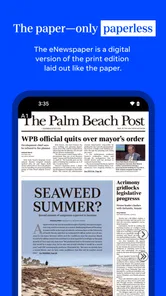
Palm Beach Post: Local News is a mobile news app focused on reporting from Palm Beach County and the surrounding South Florida area. It typically provides access to local breaking news, politics, crime reports, community updates, sports, entertainment, business coverage, weather information, and opinion content. The app is designed for readers who want regional news in a convenient format rather than relying only on a desktop website or printed newspaper.
Is Palm Beach Post: Local News free to download and use?
The application is free to download, but free access may be limited depending on the article, subscription policy, and current publisher settings. Some stories or features may require a Palm Beach Post subscription or a digital account, while selected news and headlines may remain available to non-subscribers. In-app purchase options range from $19.99 to $69.99 per item, so review the subscription details, trial terms, renewal conditions, and purchase options before committing.
What type of news and features can I find in the app?
The app is mainly intended for local and regional coverage, including breaking stories, public safety, local government, education, sports, business, lifestyle, entertainment, weather, and community events. Depending on the version installed, it may also offer personalized news feeds, article saving, sharing tools, alerts for important developments, photo galleries, videos, and access to additional newspaper content. Available sections can change as the publisher updates the app.
Pros
- Covers breaking news and community updates across Palm Beach County.
- Offers local sports coverage
- including high school and professional teams.
- News alerts help readers stay informed about important regional events.
- Includes opinion
- lifestyle
- entertainment
- and business content.
- Digital access makes the newspaper convenient to read while traveling.
Cons
- Some articles may require a paid subscription or account to access.
- Advertising can make parts of the app feel cluttered.
- Coverage is focused on Palm Beach County and may feel limited elsewhere.
- Notifications may become frequent if too many topics are enabled.
- App performance and content availability can vary with internet quality.













