Paint my Room - Try wall color
- 218.00
- 4.0
- Installs
- 1.00M
- Price
- Free

Screenshots
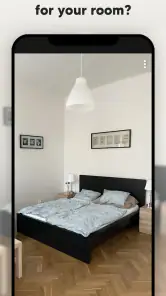
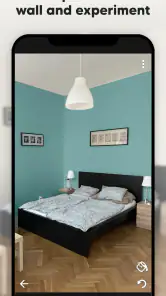
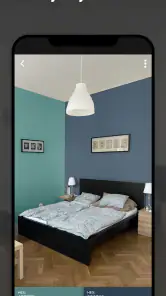
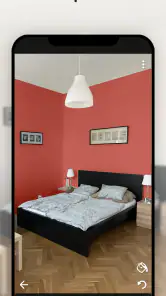
Analysis by Reviewed
When I am choosing a wall color, the hard part is imagining how a shade will look across an entire room rather than on a tiny sample. Paint my Room - Try wall color gives me a quick way to explore that question using a photo of my space. It is a practical starting point for home decorating, not a substitute for seeing paint on the actual wall.
When a room photo is a better starting point than a swatch
I find this kind of preview most useful before I have settled on a color family. A pale beige, a soft green, and a dusty blue can all look appealing on separate paint cards, yet feel very different beside the same floor, curtains, and furniture. Seeing the room as a whole helps me ask a more useful question: which direction works with what is already here?
That makes the app a good fit for someone planning a modest refresh, collecting ideas before a shop visit, or trying to involve a partner or housemate in the choice. It is also handy when I am considering repainting a room that is used every day and do not want to make a rushed decision based on a small swatch. I would not use it as a final authority on a paint purchase, but it can help turn vague preferences into a shortlist.
A useful first look at room color
Made by Try the Colors s.r.o., this free House & Home app is aimed at people who want to test ideas before committing to a repaint. It has a 4.0 average from around 19,000 ratings, and more than a million installs. Those figures suggest that the basic idea appeals to plenty of people, though they cannot tell you whether a particular room photo will give a convincing result.
The workflow is most useful when you already have a room in mind: take or choose a picture, try a color, and compare the overall impression. I would use it to narrow a long list of possibilities to a couple worth testing with real paint. That small change in approach matters; choosing a shade from a screen as if it were an exact preview is likely to disappoint.
Visualize Your Space
One of the coolest features of Paint my Room - Try wall color is its ability to let you visualize your space with different colors, all without lifting a physical paintbrush. You snap a picture of your room and boom! You can try out a myriad of hues to see what fits best. It's pretty nifty and saves you from the dreaded buyer’s remorse of picking a color that looked great on the swatch but not so much on your walls.
Making a room photo useful
For a more useful comparison, photograph the room in steady, even daylight and keep the camera angle consistent as you try alternatives. Move distracting objects out of the way if practical, and include the full wall rather than a tight crop. These choices do not guarantee a perfect match, but they make it easier to judge whether a color feels too cold, too strong, or balanced beside your furnishings.
More From Our News Desk

Weather by Xiaomi Review: Clear at a Glance, Less Clear Up Close

X Under Pressure: Can It Recover When Posting Goes Wrong?

Clash of Clans Is Won Between the Battles

Android Auto Makes the Case for Quieter Car Software

MobiOffice: Transforming Mobile Productivity with Seamless Integration

EA SPORTS FC™ Mobile Soccer: Redefining Mobile Sports Gaming
A small bit of preparation can make the result easier to read. I would avoid taking one picture in bright sunlight and another after dark, because the changing light can make the color itself seem different even when I have not changed the selection. If the room has a large window, a shadowed corner, and a lamp that is usually on, I would try to include those details in the same frame. That gives me a better sense of the room’s overall mood, while still reminding me that a phone image is only an approximation.
Ease of Use
Now, onto how user-friendly this app is. From the moment you open it, you’ll notice its sleek and intuitive design. No need to be a tech wizard here; the app guides you through each step with ease. The interface is smooth, and loading times are swift, making the entire process as painless as possible. Plus, it’s available on both Android and iOS, so no one's left out!
The simple photo-based approach is part of the appeal: I can focus on the visual decision instead of planning a detailed room model. It is especially convenient for a quick conversation at home. For example, someone deciding whether to repaint a dining room can take a picture before dinner, compare a few directions, and show the same image to a family member later. That is more concrete than describing a color from memory or passing around separate paint cards.
Color Options and Features
The color selection is impressive. You not only get the usual spectrum of colors, but the app also offers trending shades and exclusive palettes from popular paint brands. This means you can stay ahead of the curve with the latest in home décor trends. Additionally, there's a feature that suggests complementary colors, which is super helpful for those of us who might not have the best eye for design.
Another handy feature is the ability to save your favorite color combinations. So, if you’re stuck between two shades of blue, you can save both and compare them later. Trust me, this comes in handy more than you’d think!
Use saved ideas to make the decision easier
I would treat saved options as a working shortlist rather than a collection of final answers. Keep the comparison focused: choose a few noticeably different directions first, then save the one or two that still seem promising after looking at the room as a whole. If I save every shade that catches my eye, I end up with the same problem I started with—too many choices and no clear reason to prefer one.
There is also a useful social side to saving alternatives. Instead of asking someone, “Do you like blue or green?” I can show both possibilities in the room and ask which sits better with the existing sofa or woodwork. That does not remove personal taste from the decision, but it gives the conversation a shared reference. For a color choice that affects a common space, that is a more practical way to narrow things down than debating names or relying on memory.
Where the preview helps—and where it falls short
A realistic use case is planning a bedroom refresh over a few evenings: I can photograph the room, save a warm neutral and a muted blue, then revisit both before deciding which sample to buy. Saved options are especially useful when another person is weighing in, because you can compare the same room rather than relying on memory or separate paint cards.
That said, a phone display and room lighting can shift how colors appear. A digital preview is better for comparing broad directions than for predicting the exact finish on a wall. I would still test a small real-world sample, especially for pale shades, strong colors, or rooms that look very different in morning and evening light. If you need precise paint matching, a physical sample and advice from a paint specialist are the better tools.
One trade-off is that a photo captures only the moment and viewpoint in which it was taken. A color that seems calm in a bright, uncluttered image may feel more intense when the room is busy or the lights are on. I would also be cautious about using the preview to judge subtle differences between near-identical shades; the screen may not show those distinctions reliably. The strongest use is comparing broad choices, such as warm versus cool or subdued versus bold, before spending time on exact swatches.
Compared with browsing paint swatches alone, the app puts color into the context of your own walls and furniture, which can make early decisions easier. Compared with a full interior-design service, it is a lighter, hands-on way to experiment, but it should not be treated as a professional specification. It suits renters planning a future refresh, homeowners collecting ideas, and anyone who wants a visual prompt before shopping. It is less suitable if you need exact color calibration or a complete renovation plan.
It also has a different job from a full room-planning tool. If I need to work out furniture dimensions, circulation, storage, or a coordinated renovation, a color preview will not answer those questions. A decorator or a more comprehensive planning method is better for decisions involving several materials and contractors. If the question is simply whether a wall might look more welcoming in a warmer shade, this focused approach can be quicker and less involved than building a detailed design project.
Who will get the most from it
I would recommend trying it if you are at the early, uncertain stage of decorating and want to make a few visual comparisons without buying paint first. It can be particularly useful for people who struggle to picture a color across a wall, anyone comparing options with another person, or someone who wants to arrive at the paint counter with a clearer idea. Its value is less about making the decision for you and more about helping you identify which choices deserve a real-world test.
I would skip it, or keep expectations modest, if you need a guaranteed match to a paint code, a professional color consultation, or a complete plan for redecorating a whole home. It is also not the best tool for someone who prefers to decide by seeing large physical samples under their own lighting. In those cases, paint cards, sample patches, and professional guidance offer stronger evidence than a screen image.
What to expect from the current app
The app was released on April 13, 2020, and its current version is 3.3.91. That establishes its place as an established tool rather than a brand-new experiment, but a version number alone does not tell me exactly which features have changed over time. For existing users, the practical question is whether the current experience still makes it easy to compare ideas and keep preferred combinations together; I would check the app itself for any changes that affect a familiar workflow.
For someone returning after a while, I would begin with a room and color comparison rather than assuming the app has changed in a particular way. Product versions can evolve, but the meaningful test for me is whether the current process still fits how I make decisions: can I get a clear enough preview, keep a short list, and use it to guide a sample purchase? That keeps expectations tied to what I can actually see and use, rather than treating a version number as proof of a specific new feature.
It is rated for Everyone and is free to download, with optional in-app purchases ranging from $0.99 to $29.99 per item. I would start with the free experience and decide whether any paid option is worthwhile only after seeing how often I use it. It requires Android 7.0 or later on Android, so an older device may not be compatible.
The sensible approach is to try the basic workflow first and only consider paying if a particular option solves a real need for you. A one-time decorating decision may not justify spending on extras, while someone who regularly experiments with room colors may judge that differently. I would check the purchase details in the app before confirming anything, and keep the actual paint sample in the budget if accuracy matters more than convenience.
What I would watch before choosing a shade
My main test would be whether the preview helps me make a better next decision, not whether it looks like a flawless photograph of a finished renovation. If it helps me drop an unsuitable color family and choose a couple of samples to inspect, it has done its job. If I find myself treating the image as an exact promise about the finished wall, I would step back and compare a physical sample in the room instead.
I would also look at how the chosen shade behaves alongside fixed features that are expensive or awkward to change, such as flooring, cabinets, and large pieces of furniture. A wall color can look attractive by itself yet clash with one of those elements. Keeping the same room photo while comparing alternatives makes that relationship easier to notice, but it still cannot replace checking the paint under the room’s actual light conditions.
The Verdict
So, is Paint my Room - Try wall color worth a download? In my opinion, absolutely! Whether you're planning a full-scale renovation or just pondering a fresh coat of paint, this app is a game-changer. It’s user-friendly, packed with features, and ultimately, a fun way to bring your interior design ideas to life. So go ahead, give it a whirl and let your creativity flow!
Remember, while it’s great for visualization, it’s always a good idea to test your chosen colors in real life too. Happy painting!
Paint my Room - Try wall color Frequently Asked Questions
Can I use Paint My Room to plan a full room makeover, or only choose wall colors?
Paint My Room focuses on changing the color of walls in a room photo, so it is most useful for exploring paint ideas rather than planning every part of a makeover. You can use it to consider how different wall shades might work with the room’s existing look, then make separate decisions about furniture, flooring, and other finishes.
Do I need design experience to use Paint My Room?
No design background is needed to explore color ideas with Paint My Room. Its central purpose is to help you try wall colors in a room image and see which options you prefer. It is still worth comparing several shades and considering the room’s lighting and furnishings, but the app gives you a straightforward visual starting point.
Can Paint My Room help me decide between several wall colors before I repaint?
Yes. Paint My Room is designed to let you preview different wall colors in a room photo, making it easier to compare options before choosing a paint shade. It can help you narrow down ideas and picture how a color may change the feel of your space, though a digital preview is best treated as a guide rather than a final color match.
What is Paint My Room - Try Wall Color and how does it work?
Paint My Room - Try Wall Color is an intuitive mobile application designed to help users visualize different paint colors on their walls before committing to a purchase. The app employs augmented reality (AR) technology, allowing users to upload photos of their rooms and virtually 'paint' them with a wide range of color options, helping to make informed decisions about color choices.
Is Paint My Room - Try Wall Color available for both Android and iOS devices?
Yes, Paint My Room - Try Wall Color is available for download on both Android and iOS platforms. Users can find the app in the Google Play Store for Android devices and the Apple App Store for iOS devices. This cross-platform availability ensures that a wide range of users can benefit from its features regardless of their preferred mobile operating system.
Pros
- Easy to use interface for quick navigation.
- Visualizes paint colors in real-time.
- Offers a wide range of color choices.
- Adjusts to different room lighting conditions.
- Compatible with most smartphones and tablets.
Cons
- Limited customization options available.
- Requires stable internet for best performance.
- In-app ads can be intrusive.
- Occasional app crashes reported.
- Color accuracy might vary on older devices.
- Category
- House & Home
- Version
- 3.3.91










