PAeDocket
- 376.00
- 3.9
- Installs
- 500.00K
- Price
- Free

Screenshots
Analysis by Reviewed
When a Pennsylvania court matter comes up, I find that the hardest part is often knowing where to begin looking. PAeDocket gives me a direct way to search case information from a phone, which is useful when I need an initial check rather than a full legal research setup. It is a free Books & Reference app from the Supreme Court of Pennsylvania, and its focus is deliberately narrow: finding Pennsylvania court cases.
Choose the Right Tool for the Question
I find it helps to decide what I need before opening a court-search app. If I have a docket number and want to check the case while away from my desk, a focused phone lookup makes sense. If I need to understand a legal issue, compare statutes, or interpret what a filing means, a case search is only one small part of the job. For that work, I’d turn to court materials, a larger research setup, or a qualified legal professional.
That distinction matters because a case result can orient me without answering every question I bring to it. Someone checking a family matter may simply want to confirm they have the right case before calling the courthouse. A journalist may want to verify that a case lead is worth following. Neither use requires treating a brief mobile lookup as a complete account of the proceedings.
Getting Started and Building a Reliable Routine
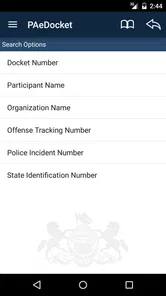
So, first off, downloading the app was a breeze. Available on both Android and iOS, PAeDocket requires minimal space and the installation process is straightforward. Once you’ve got it on your phone, you’re welcomed by a clean and intuitive interface. No overwhelming menus or confusing jargon, just the essential tools you need to get started.
Start with the Search Details You Have
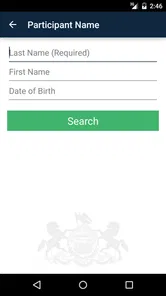
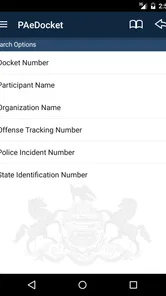
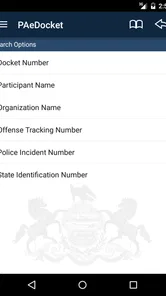
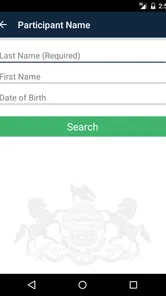
What’s really cool about this app is its ability to search for court cases with just a few taps. You can look up cases using the participant’s name, the docket number, or even the county. This makes it super handy for lawyers, journalists, or even curious citizens wanting to keep up with legal proceedings.
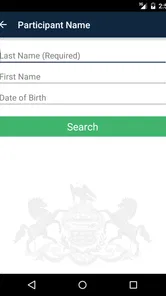
In everyday use, I’d begin with the most distinctive detail available. A docket number is a practical starting point when it appears on paperwork; if I only know a participant’s name, I’d use the county as an additional clue rather than assume a broad name search will be clear. Before relying on a result, I’d compare the names and case details with the document or message that prompted the search. That small habit helps avoid treating a similar-looking case as the right one.
A realistic example: if a family member mentions a hearing and shares a docket number, I can check the case from my phone while arranging the day, instead of waiting until I’m back at a computer. For a reporter following several matters, it can also serve as a quick first stop between appointments. I would still treat the result as a way to orient myself, not as legal advice or a substitute for checking the underlying court record when an exact detail matters.
More From Our News Desk

Weather by Xiaomi Review: Clear at a Glance, Less Clear Up Close

X Under Pressure: Can It Recover When Posting Goes Wrong?

Clash of Clans Is Won Between the Battles

Android Auto Makes the Case for Quieter Car Software

MobiOffice: Transforming Mobile Productivity with Seamless Integration

EA SPORTS FC™ Mobile Soccer: Redefining Mobile Sports Gaming
When I’m searching from a name rather than a docket number, I’d avoid rushing through the first plausible match. Names can be shared, and a county clue can help narrow the task, but the useful check is whether the result fits the matter I was told about. If I cannot connect the result to the document or conversation that prompted the search, I’d pause and ask for another identifying detail instead of guessing.
For a one-off search, that careful comparison is usually enough to keep the lookup in perspective. For recurring work, I’d use a consistent note-taking habit outside the search itself: record the docket number alongside a short description of why I saved it. That gives me a dependable starting point the next time I return, without relying on memory to distinguish two cases or remember which result mattered.
Use Alerts Carefully and Keep Your Own Notes
Another neat feature is the notifications. You can set up alerts for specific cases, so you’re always in the loop about any updates or changes. Trust me, this feature can save you a lot of time and worry, especially if you’re involved in ongoing litigation.
For a repeatable routine, I’d search for the case, confirm that I have the correct matter, and then use an alert if I need to watch for activity. I’d also keep a simple note of the docket number and why I’m tracking it; that makes it easier to return to the right case later, especially when several matters have similar names. Alerts are helpful prompts, but I wouldn’t make them my only record of a deadline or hearing. If timing has legal consequences, confirm it through the appropriate court source or a qualified professional.
Settings are worth a quick look before depending on alerts day to day. I’d check that notifications are allowed on the phone and that the app’s alert choices suit how closely I need to follow a case. This is less about tuning a complicated system and more about avoiding the simple frustration of expecting a notice while device settings prevent it from appearing. For a one-time lookup, there may be no need to set anything up at all.
I’d also think about whether every case deserves an alert. For a matter I only need to identify once, a saved note with the docket number may be simpler than keeping notifications active. For an ongoing matter, alerts can reduce the need to repeat manual checks, but I’d still build a habit of verifying important developments directly rather than assuming a notification covers every practical question. Choosing alerts selectively keeps them meaningful instead of turning them into background noise.
A useful division of labor is to let the app help with discovery and reminders, while keeping dates and action items in a separate calendar or case-management routine that I already trust. That avoids confusing a notification with a formal deadline system. It also gives me a clear next step: if an alert prompts concern, I can open the relevant court information, check the exact details, and then decide whether I need professional guidance.
Where a Court Lookup App Fits
Now, let’s talk about why I think this app is worth having. For starters, it’s free! Yep, you heard me right. Accessing court records and staying updated on legal matters won’t cost you a dime. Plus, the app’s reliability and speed are top-notch. I didn’t experience any glitches or crashes, which is a huge plus in my book.
More broadly, I see its best role as a convenient mobile starting point. Compared with a general web search, a dedicated Pennsylvania docket tool keeps the task focused on court cases instead of mixing results with unrelated pages. Compared with a full desktop research workflow, it is easier to reach when I’m away from my desk, but a phone screen is not where I’d want to do careful, extensive legal analysis. If I need broader legal context, filings, or help interpreting what a docket entry means, I’d turn to the relevant court resources or a legal professional rather than expect a search app to answer those questions.
The app suits Pennsylvania residents checking a matter, lawyers who want a quick reference while away from a computer, and journalists who need to confirm a case lead. It is less suitable for someone searching outside Pennsylvania, looking for general legal guidance, or expecting a docket check to explain what action to take. Those users will be better served by the relevant jurisdiction’s resources or qualified legal help.
It is also a better fit for a quick, focused question than for a long research session. I’d use it while travelling between appointments, when a client or colleague gives me a docket number, or when I want to establish whether I have identified the right Pennsylvania matter. If I need to compare many documents, write a detailed chronology, or keep a team coordinated, I’d move to a desktop workflow and keep the app as a convenient point of reference rather than the main workspace.
That comparison with general search is especially useful for people who are new to court records. A web search can surface commentary, news coverage, or pages that share a person’s name, none of which necessarily answers whether a particular docket is the right one. A targeted court-search app keeps the task narrower. The trade-off is that a narrow search does not replace broader context: once I have located a case, I may still need other appropriate sources to understand what its entries mean.
For anyone wondering whether the app is intended for casual public use or only legal professionals, I’d say its focused lookup is approachable for either. You do not need to be a lawyer to have a reason to check a case, but you do need to be careful about what you conclude from the result. I would skip it if my real need were advice, representation, or a search in another state; the app’s usefulness comes from its Pennsylvania case-search focus, not from covering every legal need.
A Practical Recommendation, With Sensible Limits
Moreover, the accessibility factor is a big win. Whether you’re a lawyer needing quick access to case details or a citizen wanting to be informed, it caters to a wide audience. The app bridges the gap between the public and the often opaque world of the legal system.
Its audience is substantial, with over 500,000 installs and an average rating of 3.9 from around 1,300 ratings. It is rated for Everyone, and the current version is 1.4; it runs on Android 5.0 or later. Those details make it easy to judge whether it fits your device, while the rating suggests a useful tool that may not be equally smooth for every user. I’d keep expectations grounded: a focused case-search app can make access more convenient, but it cannot replace careful verification when the stakes are high.
One practical question is whether I should rely on an alert as proof that I will not miss a significant event. I wouldn’t. I’d treat a notification as a nudge to check, not as a guarantee or a substitute for meeting a legal obligation. The same caution applies to a search result: it helps me locate and review a matter, but it does not tell me what a party should do next or whether a deadline applies to my situation.
Another question is whether it makes sense to install the app if I only need a single lookup. If I already have a clear docket number and want to check a Pennsylvania case from my phone, its focused purpose can still be convenient. If I need an extensive legal research environment, a tool for another jurisdiction, or interpretation rather than identification, I’d choose a different resource. The best way to use this app is to match it to the scale of the question.
In conclusion, if you’re residing in Pennsylvania and have any dealings with court cases, it is an app you should definitely check out. It’s user-friendly, packed with useful features, and best of all, it’s free. I’d say give it a whirl, and you might find it’s just the tool you need to demystify the legal proceedings you’re dealing with.
My recommendation comes with one simple habit: search with the clearest detail available, confirm the result against the matter you mean, and use alerts as reminders rather than authority. That approach gets the most from a focused mobile reference without asking it to do the work of a lawyer, a full research system, or a deadline tracker. For quick Pennsylvania case checks, that is a sensible role, and one I’d be comfortable recommending to a friend who understands its limits.
PAeDocket Frequently Asked Questions
Can PAeDocket help me search for a Pennsylvania court case while I’m away from a computer?
Yes. PAeDocket is designed for quick and easy Pennsylvania court case searches from a device, making it useful when you need to look up a case on the go. Its purpose is to make court case information accessible through a mobile app, so you can search without having to sit down at a computer.
Who develops PAeDocket, and is it intended for people without legal experience?
PAeDocket is developed by the Supreme Court of Pennsylvania and is intended for people interested in Pennsylvania court case information, not just legal professionals. Its straightforward search purpose makes it relevant to members of the public as well as legal professionals and law students. You do not need to be a lawyer simply to use the app to look up case information.
What is PAeDocket and what does it offer?
PAeDocket is a mobile application designed to provide users with access to court case information within the Pennsylvania judicial system. It aims to make it easier for individuals to track and manage court case details, including schedules, dockets, and other legal proceedings. The app is ideal for legal professionals, law students, and anyone interested in staying informed about court activities in Pennsylvania.
How can I download and install PAeDocket on my device?
PAeDocket is available for download on both Android and iOS devices. Users can find it on the Google Play Store for Android devices and the Apple App Store for iOS devices. Simply search for 'PAeDocket' in the respective app store, select the app from the search results, and click 'Install' or 'Get' to download it onto your device.
Is PAeDocket free to use, or does it require a subscription?
PAeDocket is completely free to use. There are no hidden fees or subscription charges associated with accessing the app’s features. Users can freely access court case information without any financial commitment. This makes it an accessible tool for anyone needing to stay updated on court proceedings in Pennsylvania.
Pros
- User-friendly interface for all ages.
- Real-time updates on case statuses.
- Comprehensive search functionality.
- Secure and protected user data.
- Available for both Android and iOS.
Cons
- Limited to Pennsylvania jurisdiction.
- Requires internet for full functionality.
- Occasional app crashes reported.
- No offline access to case details.
- Limited customization options.











