Olive Garden Italian Kitchen
- 5.51K
- 3.5
- Installs
- 1.00M
- Price
- Free

Screenshots
Analysis by Reviewed
If you’re deciding whether to install the Olive Garden Italian Kitchen app, the main question is how often you want to handle Olive Garden plans from your phone. I see it as a practical companion for checking a nearby restaurant, joining its wait list, arranging a ToGo order, or buying a gift card—not as a general restaurant-finding or meal-delivery app. Its usefulness depends less on how many features it has than on whether Olive Garden is already part of your routine.
Free to install, with value tied to how you use it
The app is free, so trying it does not require an upfront purchase. That is different from saying every meal or order is free: the app is a way to access restaurant services, not a substitute for paying for food. I’d judge its value by whether it saves you effort when arranging a visit or takeaway, rather than by expecting the app itself to create savings.
It comes from Darden Restaurants, Inc. and sits in the food-and-drink category. It has a 3.7 average from around 17,000 ratings, with more than 5,000 written reviews, and over a million installs. Those figures suggest plenty of people have tried it, but they are not a guarantee that every location or visit will feel equally smooth. The app is rated for everyone, and version 6.40.1 requires Android 11 or later.
What “free” means in everyday use
There is no purchase price to access the app, which makes it easy to keep available for the next time you need it. I would separate that free access from the value of anything you buy through it: ordering food or purchasing a gift card is still a spending decision. The app’s financial value is mainly practical—whether it makes a task easier—not a promise of lower meal costs.
If you are comparing it with a paid membership or a service that charges for delivery, the important distinction is that this is Olive Garden’s own app and its stated price is free. That does not tell you what a particular order will cost, so I would review the total presented for the transaction before placing it. For a person who visits only once in a while, even free software is worthwhile only if the convenience outweighs having another app to manage.
A useful tool when Olive Garden is already the plan
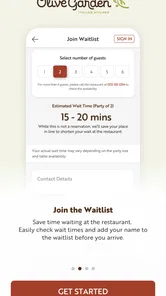
The strongest case for installing it is convenience around a specific restaurant visit. If you’re heading out with family and would rather not arrive without knowing the wait, joining the wait list can help you organize that part of the outing. For pickup, placing a ToGo order through the app can be more comfortable than calling while you’re commuting or trying to coordinate dinner at home.
A small but useful habit is to check the location before you commit to an order or wait-list plan. Restaurant details and availability are tied to where you intend to go, so confirming the right destination first can prevent avoidable confusion. For group meals, I’d also settle the order with everyone before entering it; using an app makes submission convenient, but it cannot resolve last-minute changes between diners.
More From Our News Desk

Weather by Xiaomi Review: Clear at a Glance, Less Clear Up Close

X Under Pressure: Can It Recover When Posting Goes Wrong?

Clash of Clans Is Won Between the Battles

Android Auto Makes the Case for Quieter Car Software

MobiOffice: Transforming Mobile Productivity with Seamless Integration

EA SPORTS FC™ Mobile Soccer: Redefining Mobile Sports Gaming
Small workflow choices that can prevent mix-ups
For pickup, I’d decide who is collecting the food before anyone starts ordering. That makes it easier to keep the restaurant and pickup plan aligned, especially if several people are sharing the meal. I would also take a moment to review the order before submitting it rather than rushing through while the group is still choosing. The app can make entry more convenient, but careful checking is still the best defense against a wrong location or a forgotten item.
For a visit, treat the wait-list step as part of planning rather than as a guarantee about when you will sit down. If you are meeting friends, agree on the restaurant first and then have one person manage the wait-list task. That avoids multiple people trying to organize the same outing in parallel and gives everyone a clearer plan. When timing is tight, I would contact the location directly to confirm what arrangements are available.
Where the convenience has limits
I find the app most useful when a dinner plan is already taking shape, but the convenience still depends on choosing the right task and location before tapping through. In this section, I’ll look at where a restaurant-specific tool can fall short compared with broader options, and why a little advance coordination can make the difference between a smooth plan and an awkward one.
Helpful for restaurant tasks, not a broad dining guide
Compared with general food apps, this one is deliberately narrow. A restaurant-discovery service is better when you want to compare unrelated places, and a broad delivery app may suit you better when you want to browse many restaurants in one cart. Olive Garden’s app makes more sense when you already want that restaurant and need its own tools in one place.
That specialization can be a genuine advantage if your decision is already made: you do not have to start by filtering a large collection of restaurants. But it becomes a limitation as soon as your group is undecided, or someone wants another cuisine. I would use a map or restaurant-search service to choose where to eat, then turn to this app only once Olive Garden is the destination. It is a focused companion, not a neutral comparison tool.
Wait-list convenience is not a seating promise
The wait list is also not the same thing as a guaranteed table reservation. It can help you join a queue, but I would not plan a time-sensitive evening around assuming that it promises an exact seating time. If your plans are flexible, that convenience may be enough; if you need a confirmed reservation, check what the particular location offers before setting your schedule.
This distinction matters most for celebrations, a tight evening schedule, or a group that needs to arrive together. A queue can be useful for organizing a casual meal, but it should not be treated as confirmation that a table will be waiting at a chosen hour. Before leaving home, I would check the actual arrangement offered by the location and make a backup plan if being seated promptly is essential.
Good value for regulars, optional for everyone else
Buying a gift card in the app can be handy when you already know the recipient likes Olive Garden, especially if you’re arranging a present at short notice. But it is only useful if that restaurant suits them. Likewise, someone who visits often may appreciate having ordering and wait-list options close at hand, while an occasional diner may find it simpler to use the restaurant’s usual options when a visit comes up.
The best fit is someone who already chooses Olive Garden often enough to benefit from having its restaurant-specific tasks together. A household that regularly coordinates pickup may appreciate having one person place the order while everyone else settles the meal. A person who visits rarely, prefers calling, or wants to compare several chains may get little lasting benefit from installing it.
When I would choose another option
I’d skip it if you mainly want to discover new restaurants, compare menus across chains, or manage dining plans for places other than Olive Garden. It is also not the right fix if your priority is certainty about seating or if you prefer speaking directly with staff to clarify a complicated group order. In those situations, a call or a broader restaurant service can be a better fit.
There is also a practical reason to choose a direct conversation: unusual requests can be easier to explain and confirm with a person. If a detail is essential to your plans, I would not assume an app workflow has answered it unless the restaurant makes that clear. For ordinary, straightforward pickup or a flexible visit, the app is more appealing; for a complicated occasion, direct contact may save back-and-forth.
A realistic dinner plan
Picture deciding on dinner during a busy afternoon: you can use the app to find an Olive Garden, arrange a ToGo order, and keep the pickup plan together rather than making a separate call. For a night out, joining the wait list is a different workflow, so I’d choose that only after deciding which location works for everyone. Keeping those two use cases distinct makes the app easier to use and helps avoid assuming that an order and a place in line are the same service.
Here is how I would handle a family dinner: first agree whether everyone wants pickup or to eat at the restaurant, then choose the location, and only then use the relevant feature. If plans change from dining in to takeaway, I would revisit the order rather than assume the wait-list action carries over. That little bit of planning is more useful than tapping quickly and hoping one task automatically covers the other.
Know when to double-check
One practical trade-off is that app-based convenience depends on your plan being settled. If the group is still debating where to eat, a general search tool is more useful; if you’ve chosen Olive Garden, the dedicated app removes some friction. I’d also treat any menu or ordering details shown in the app as a starting point for your decision, and check directly with the restaurant when a special request is important enough that you need a clear answer.
The same approach helps with gift cards: they are a convenient option when you know the recipient would welcome one, but not a universal gift for someone who may prefer another restaurant. For a last-minute present, the ability to handle the purchase in the app may be useful; for a recipient with uncertain tastes, a more flexible gift is probably better. The tool helps complete a choice, but it cannot make the choice suitable for someone.
Ordering Made Easy
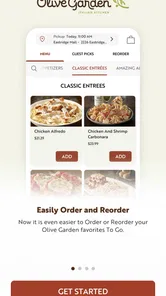
First off, let me tell you about how the app simplifies the ordering process. Remember those times when you were craving some fettuccine alfredo but dreaded the thought of making a phone call? Yeah, me too. With the Olive Garden Italian Kitchen app, you can effortlessly browse their extensive menu, customize your order to your heart's content, and have it ready for pickup or delivery in just a few taps. It's all about convenience, and I’m all for it!
Explore the Menu
The app features a clean and intuitive interface, which makes navigating through the menu a breeze. You can explore various categories like appetizers, soups, and of course, their famous pasta dishes. Each menu item comes with a detailed description and even nutrition facts for the health-conscious folks out there. So whether you're in the mood for some classic spaghetti or want to try something new like their chicken scampi, the app has got you covered.
Rewards and Special Offers
Who doesn't love a good deal? The app also includes a rewards program that lets you earn points with every purchase. It's pretty straightforward – the more you dine, the more you earn. These points can be redeemed for discounts on future orders, which is a sweet deal if you ask me. Plus, they frequently update the app with special offers and discounts, so it's worth keeping an eye out for those notifications.
Table Reservation
Planning a special night out? The app has a nifty feature that allows you to book a table at your nearest Olive Garden location. No more waiting around at the restaurant entrance hoping for a table to free up. Just reserve your spot through the app and enjoy a hassle-free dining experience. It’s like having a personal concierge right in your pocket!
User Experience
Overall, the user experience is top-notch. The app runs smoothly, and I didn't encounter any bugs or crashes during my time using it. The design is pleasing to the eye, and everything is well-organized, making it easy for even the least tech-savvy among us to navigate. Plus, the app is available for both Android and iOS, so no one gets left out of the pizza party!
In conclusion, the Olive Garden Italian Kitchen app is a must-have for anyone who loves Italian food and values convenience. From seamless ordering to exclusive rewards and easy table reservations, it’s designed with the user in mind. So next time you're in the mood for some delicious Italian cuisine, give the app a try. Trust me, your taste buds will thank you!
My buy-or-skip verdict
I’d install it if I already visit Olive Garden and want a direct way to handle a takeaway order, check a location, or join the wait list. Since access is free, trying it is a low-commitment choice; the real payoff is saving a little coordination when the restaurant is already where I want to eat. I’d skip it if I rarely go there or expect it to replace a multi-restaurant search and delivery service.
One caution: the app’s store summary highlights a wait list, while the original experience described above treats that feature as a table reservation. Those are not necessarily interchangeable, so I would verify the exact option available for my chosen location rather than assume I can reserve a specific time. With that distinction in mind, this is a useful restaurant-specific tool, not a reason on its own to choose Olive Garden.
Olive Garden Italian Kitchen Frequently Asked Questions
Can I browse Olive Garden locations before deciding where to order?
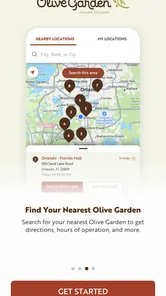
Yes. Finding an Olive Garden is one of the app’s core features, so you can use it to look for a restaurant before choosing where to place a ToGo order or join the Wait List. This makes the app useful both when you already have a destination in mind and when you are trying to plan a visit around a convenient location.
Can the app help me plan a dine-in visit as well as a pickup order?
Yes. Olive Garden Italian Kitchen brings together tools for planning a visit and ordering food to take away. You can find a restaurant and use the Wait List feature when you are thinking about dining in, or use ToGo ordering when you would rather take your meal home. Having both options in one app makes it handy for different kinds of dining plans.
Is the Olive Garden Italian Kitchen app free to download?
Yes. The Olive Garden Italian Kitchen app is free to download and is listed for users of all ages. It is a Food & Drink app from Darden Restaurants, Inc., intended for people who want to find an Olive Garden, join the Wait List, place a ToGo order, or buy gift cards. The app itself does not require a purchase to install.
What is Olive Garden Italian Kitchen app?
The Olive Garden Italian Kitchen app is a convenient tool designed for users to explore the menu, make reservations, and order takeout from Olive Garden restaurants directly from their mobile devices. It offers a seamless way to enjoy authentic Italian cuisine and manage dining experiences, whether you're planning to eat in or take food home. Its main features also include finding a restaurant, joining the Wait List, and buying gift cards.
How can I use the Olive Garden app to make reservations?
Using the Olive Garden Italian Kitchen app, making reservations is straightforward. Users can select the preferred location, choose the date and time, and confirm the number of guests. The app provides an easy interface to ensure your table is ready for your arrival, minimizing wait times and enhancing your dining experience. It also offers a Wait List option, which can be useful when you are planning a visit.
Pros
- Intuitive user interface
- easy to navigate.
- Extensive menu with detailed descriptions.
- Offers exclusive online promotions.
- Allows easy table reservations.
- Fast-loading and responsive design.
Cons
- Limited customization for orders.
- Occasional app crashes reported.
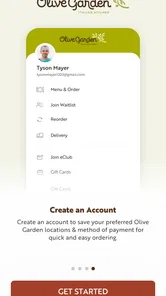
- Requires account registration to order.
- Notifications can be overwhelming.
- Limited payment options available.











