Cheddar's Scratch Kitchen
- 623.00
- 3.6
- Installs
- 100.00K
- Price
- Free
Screenshots
Analysis by Reviewed
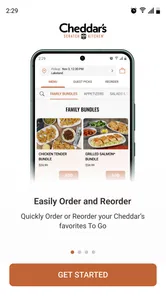
When I want to check a Cheddar’s menu without making a phone call, the Cheddar’s Scratch Kitchen app is the most direct place to start. It is a free Food & Drink app from Darden Restaurants, Inc., built around three practical jobs: browsing what is available, arranging a To Go order, and getting directions to a restaurant. That focus is both its strength and its boundary. I found it useful when I already knew I wanted Cheddar’s and needed to move from “what should we eat?” to “where do I pick it up?” without jumping between several tools.
The app is available for everyone and has passed the point where it feels like an experimental download. It has more than one hundred thousand installs, an average rating of 3.6 from roughly two thousand ratings, and several hundred written reviews. Those figures suggest a serviceable but not universally smooth experience, which matches my impression: the core path is understandable, while the quality of the experience depends heavily on how clearly you know your order plans and which restaurant you intend to use.
What to expect before placing your first order
The first thing to understand is that this is not trying to replace a full restaurant discovery platform. I would not install it expecting broad searches across unrelated restaurants, extensive food journalism, or a general-purpose delivery marketplace. Its useful territory is narrower and more concrete: Cheddar’s menu information, To Go ordering, and restaurant directions in one brand-specific app.
That narrow purpose makes the app easier to judge. If you are already considering Cheddar’s for dinner, it can reduce the small bits of friction that often make ordering annoying. You can look through the menu before everyone in the group starts debating, decide whether the available choices suit the occasion, and then continue toward pickup. If you are still comparing several restaurants, a map app or a broad ordering service may be a better first stop because it gives you more context outside the Cheddar’s network.
I also found the menu useful before ordering, not just as a catalog to scroll through. A group can use it to settle on a direction while travelling, at work, or at home. Someone looking for a particular type of meal can check the available choices before committing to a drive. That is a small benefit, but it matters when the alternative is arriving at the restaurant and discovering that the group cannot agree or that the selected location is inconvenient.
The app’s store summary emphasizes browsing, To Go orders, and directions, and those three functions describe the experience accurately. I would treat it as a companion for a planned visit rather than as a complete dining assistant. Its value is greatest when the restaurant decision is mostly made and you need reliable next steps.
One practical trade-off is that the app’s simplicity leaves less room for exploration. A general restaurant app may be better for comparing distance, delivery choices, reviews, and competing menus in one screen. Cheddar’s Scratch Kitchen is better when you want fewer distractions and a path dedicated to one restaurant brand.
More From Our News Desk

Weather by Xiaomi Review: Clear at a Glance, Less Clear Up Close

X Under Pressure: Can It Recover When Posting Goes Wrong?

Clash of Clans Is Won Between the Battles

Android Auto Makes the Case for Quieter Car Software

MobiOffice: Transforming Mobile Productivity with Seamless Integration

EA SPORTS FC™ Mobile Soccer: Redefining Mobile Sports Gaming
Who gets the most from it
I would recommend it to someone who visits Cheddar’s occasionally and wants a repeatable way to inspect the menu and arrange pickup. It also suits households where one person coordinates the meal for several others. The organizer can browse first, discuss choices, and only then begin the order, instead of trying to remember a menu from a previous visit.
It is especially practical for a simple weekday scenario. Imagine finishing work later than expected while two other people at home are waiting for dinner. I would open the app, check the menu while deciding what fits the group, select the relevant restaurant, and use the To Go route rather than calling during a busy period. Once the order is arranged, the directions function becomes useful if I am collecting from an unfamiliar location. The app does not remove every decision, but it keeps the important ones together.
People who should skip it are those looking mainly for delivery comparisons, restaurant reviews across many brands, or a way to discover nearby food without already considering Cheddar’s. They may get more value from their usual map or ordering application. The same is true if you rarely eat at Cheddar’s and do not expect to use the menu or pickup workflow again; a temporary web search may be enough for a single visit.
Getting ready without overthinking the setup
My advice for a first-time user is to install it when you have a few minutes to make an actual decision, not while standing in a queue with everyone waiting. The app is free, and the current version is 7.10.0. It requires iOS 11 or later, so older devices should be checked before relying on it for a time-sensitive meal. That requirement is not a concern for many users, but it is worth remembering if the app is being installed on an older iPhone kept for occasional use.
After opening it, I would begin with the location you are most likely to use rather than browsing aimlessly. The restaurant choice affects the usefulness of the later steps, especially when you are planning a pickup or need directions. Selecting the intended location early helps prevent a common mistake: preparing a meal plan around one restaurant and then discovering that the route or ordering step is tied to another.
Before starting the order, I would also ask two simple questions: am I collecting To Go, and do I need directions? If the answer to both is yes, the app has a clear role. If the answer is no to both and I only want general inspiration, I might stay in the menu section and avoid going further. This keeps the first session focused and reduces the chance of treating every screen as part of a mandatory checkout process.
There is no benefit in rushing through the menu just because the app is designed for ordering. I prefer to use the browsing stage as a planning tool. For a family or group, I would read through the choices before passing the phone around. That makes it easier to identify disagreements early, especially when one person wants a substantial meal and another is looking for something lighter. The app works best when it supports that conversation rather than when it is used as a substitute for making decisions.
A useful habit is to confirm the restaurant before you become invested in the rest of the process. This is one of the less obvious ways to avoid frustration. Location tools are helpful only when they are connected to the place where you actually intend to collect the food. I would rather spend a moment checking the selected restaurant than reach the final stage and realize I have been planning around the wrong branch.
Turning the first visit into a meaningful success
For a first successful action, I would not aim to explore every corner of the app. I would choose one realistic goal: find the menu for the intended restaurant and move far enough into the To Go process to understand how the pickup plan is organized. If I am ready to eat there, I would continue with the order. If I am only evaluating the app, that menu-to-order transition is enough to show whether it fits my habits.
The most reassuring workflow is deliberate. First, I check the menu and identify what the group actually wants. Next, I make sure the selected restaurant is the right one. Then I use the To Go option and review the order carefully before treating the process as complete. Finally, if the location is unfamiliar, I use the directions feature to prepare for the drive. Each step has a distinct purpose, so I do not have to guess why I am moving through the app.
That order of operations also exposes a useful trade-off. Browsing first takes a little longer than immediately searching for a familiar item, but it reduces the chance of building an order around the wrong location or an unsuitable choice. For a first session, I would value that clarity over speed. Once I know how the app behaves, I can move more quickly on later visits.
I would review the order at the end with the same care I use when ordering by phone. Check the selected items, the restaurant, and the intended pickup plan before leaving the app. This is not because the interface is necessarily difficult; it is because mobile ordering encourages quick taps, particularly when I am distracted. A short review is the simplest protection against an avoidable correction later.
For a group order, I would keep a written note or message with everyone’s choices before opening the final ordering flow. This is a practical workaround for a problem that belongs to the situation more than to the app: several people changing their minds while one person is entering everything. Having the choices settled first makes the app feel much faster and gives the organizer a clear reference when reviewing the order.
Where first-time users may feel uncertain
The most likely confusion is assuming that menu browsing, ordering, and directions are one continuous process. They are related, but I found it more helpful to treat them as separate tools. You can browse without being ready to order, arrange a To Go meal when the decision is made, and use directions when the journey itself is the next concern. Thinking in those stages makes the app less intimidating.
Another possible source of hesitation is location selection. If you are near more than one Cheddar’s restaurant, do not choose the first result automatically. Compare it with your actual route and pickup plan. This matters particularly when someone else will collect the food. The person placing the order may be at home, while the person driving is at work or already on the road. Agreeing on the restaurant before ordering prevents a surprisingly common coordination problem.
It is also easy to confuse a menu check with a commitment to buy. I use the browsing area to answer questions such as “Will this work for the group?” and “Is this the restaurant we want tonight?” Only after those questions are settled do I treat the To Go path as an action rather than research. That distinction is helpful for first-time users who want to look around without accidentally rushing into an order.
If directions are the main reason for opening the app, I would use them after confirming the restaurant rather than before. Beginning with navigation can make the visit feel finished even though the food decision has not been made. The better sequence depends on your goal: menu first for planning, To Go first for pickup, or directions after the location is certain.
The average rating of 3.6 is a useful reminder to keep expectations balanced. I would not describe the app as flawless, and I would leave enough time to recover if the ordering flow feels slower than expected. For an important meal, I would not wait until the last possible minute to start. That is sensible with any restaurant-ordering tool, but it is particularly relevant here because the app is a focused convenience rather than something I would depend on for every dining contingency.
How it compares with calling, maps, and broad food apps
Compared with calling the restaurant, the app gives me more time to inspect the menu before committing. That is helpful when I need to coordinate several people or when I do not want to explain an order verbally. A phone call can still be better for unusual questions or situations that do not fit a straightforward To Go request. I would choose the app for routine planning and a call when the order requires conversation.
Compared with a map application, Cheddar’s Scratch Kitchen is more focused on the restaurant’s own menu and ordering path. A map is usually stronger for comparing nearby places, checking a broader route, or deciding between brands. The Cheddar’s app becomes more useful after that decision has already been made, because it places the relevant menu and restaurant direction tools closer together.
Compared with a general food-ordering service, the main advantage is concentration. I am not filtering through unrelated restaurants or navigating a marketplace when I already want Cheddar’s. The disadvantage is equally clear: I do not get the same broad comparison experience. If delivery availability, fees, or multiple restaurant choices are central to the decision, I would begin elsewhere and use this app only if its Cheddar’s-specific workflow is the better fit.
That comparison explains why the app can feel excellent for one person and unnecessary for another. A regular Cheddar’s customer may appreciate the direct route, while a diner who is simply searching for “food near me” will likely find a map or broad ordering tool more useful. The right choice depends less on technical preference than on whether the restaurant decision has already been made.
Small habits that make the app work better
My first tip is to separate planning from ordering. Browse the menu when you have time, make the group decision, and only then begin the To Go process. This avoids entering an order while still negotiating what everyone wants.
My second tip is to verify the pickup restaurant twice: once when choosing the location and again before considering the order finished. That extra check is worthwhile when the person ordering and the person collecting are different people.
My third tip is to use directions as part of the pickup plan, not as an afterthought. If the restaurant is unfamiliar, look at the route before leaving. This lets you notice whether the selected location makes sense for the driver and avoids discovering a routing problem when the meal is already waiting.
My fourth tip is to keep the app for decisions it handles well. It is a good place to inspect Cheddar’s choices and arrange a straightforward To Go visit. It is not the tool I would choose for comparing every nearby restaurant, researching broad dining options, or resolving a complicated request that needs a conversation.
These habits also make the app more reassuring for a first-time user. Instead of asking it to manage the entire dining experience, I give it a clear assignment. The result is a shorter, more predictable session and fewer opportunities for a small location or coordination error to become a bigger problem.
My recommendation after using it
Cheddar’s Scratch Kitchen is a sensible free download for people who already eat at Cheddar’s and want a focused way to browse the menu, arrange To Go food, and find the restaurant. I like that it does not pretend to be a universal food platform. Its usefulness comes from keeping those brand-specific tasks close together, especially when I am coordinating a pickup for more than one person.
I would be more cautious about recommending it to someone who visits only once, wants delivery comparisons, or is still deciding among many restaurants. In those cases, a map or general food app may provide better context. The dedicated app becomes worthwhile when its narrow purpose matches the plan already in front of me.
Overall, I see it as a practical companion rather than an essential app for every diner. Start by choosing the likely restaurant, browse before committing, review the To Go details carefully, and use directions to finish the plan. If that is the path you need, the app can turn a scattered set of small tasks into a manageable routine. If you need a wider restaurant search or more flexible conversation, I would use another option instead.
For a first-time user, that is the key expectation: install it for a specific Cheddar’s visit, not as a general food utility. Used that way, it has a clear chance to deliver a successful first session without asking you to learn a complicated system. Its current version, 7.10.0, supports that focused role, while the mixed user rating is a fair reason to leave a little time for checking your location and order rather than relying on a last-second plan.
Cheddar's Scratch Kitchen Frequently Asked Questions
Is the Cheddar’s Scratch Kitchen app free, and what devices can run it?
The app is free to download and is intended for devices running Android or iOS. On Android, check the store page to make sure your device meets the listed operating-system requirement before installing. Once installed, you can explore the restaurant’s digital tools, including menu browsing, To Go ordering, and directions to Cheddar’s. Any charges for food orders are separate from downloading the app.
Can I use the app to find a Cheddar’s Scratch Kitchen location and get directions?
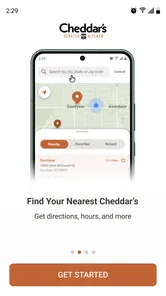
Yes. The app is designed to help you find Cheddar’s and get directions, which can make planning a visit easier. Check that the selected restaurant is the location you intend to visit before setting out, particularly if you are also placing a To Go order. You can browse the menu in the app as well, so you can review food options while deciding where to go.
What is the Cheddar’s Scratch Kitchen app used for?
The Cheddar’s Scratch Kitchen app is designed to help customers interact with the restaurant more conveniently. Depending on the supported location and current app version, you may be able to browse the menu, view food details, find nearby restaurants, check opening hours, place an order for pickup or delivery, and access available offers. Features can vary by region, so some options may not appear for every user.
Can I order Cheddar’s Scratch Kitchen food through the app?
In supported areas, the app may allow you to order meals for pickup or delivery, making it easier to arrange a visit without waiting at the restaurant. Before confirming an order, review the selected location, estimated preparation time, fees, taxes, and available menu items. Ordering availability can depend on restaurant hours, local delivery coverage, demand, and whether the location participates in mobile ordering.
Does the Cheddar’s Scratch Kitchen app provide coupons or special offers?
The app may feature promotional offers, restaurant deals, or rewards-related benefits when they are available. However, promotions can change frequently and may include restrictions such as expiration dates, minimum purchase requirements, participating locations, or limits on combining discounts. It is best to read the complete terms shown in the app before relying on an offer, especially when ordering through a third-party delivery service.
Pros
- Generous portions make it easy to share a meal.
- Comfort-food menu offers familiar choices for picky diners.
- Rewards program can provide savings for frequent visitors.
- Many locations offer curbside pickup for added convenience.
- Scratch-made sides add a more homemade feel to meals.
Cons
- Wait times may be long during peak dinner and weekend hours.
- Menu choices can feel limited for strict vegan diners.
- Portion sizes may be too large for light eaters.
- Prices can add up when ordering drinks and multiple sides.
- Food quality may vary slightly between restaurant locations.











