LongHorn Steakhouse®
- 2.86K
- 4.0
- Installs
- 500.00K
- Price
- Free

Screenshots
Analysis by Reviewed
I see LongHorn Steakhouse® as a practical companion for people who already know they want to eat at the chain, rather than a general restaurant-discovery tool. The app is free, comes from Darden Restaurants, Inc., and focuses on useful steps around a meal: looking over the menu, arranging a to-go order, joining a wait list, and paying by mobile. That focus makes it easiest to judge by how well it fits into the plans you already have.
A smoother start to a steakhouse visit
My most useful routine would be to browse the menu before leaving home, then use the app when I have a clear idea of what I want. That separates choosing a meal from the bustle of arriving with other people and deciding at the table. It is especially handy when someone in the group needs time to compare dishes or when you want to check the menu before suggesting LongHorn as the destination.
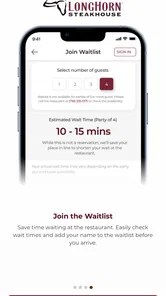
The wait-list option is a useful middle ground between turning up without a plan and calling the restaurant. I’d use it when I’m heading over but can’t be certain how busy the dining room will be. It is still wise to treat the app as a convenience, not a guarantee that the timing will suit every arrival: if plans change, keep the group informed and check the situation rather than assuming the wait-list step settles everything.
Small habits that make ordering easier
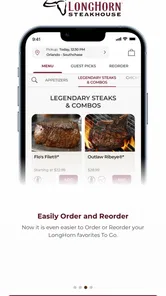
For takeout, I’d make the order in a deliberate pass: settle the main dishes first, review the sides and any choices shown for each item, then check the basket before submitting. That last pause matters more when ordering for several people, since it is easy to mix up similar meals or overlook a side. A saved routine like this is more reliable than rushing through the menu while everyone is waiting for you to decide.
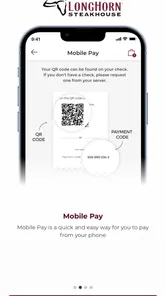
Mobile Pay can also make the end of an in-restaurant meal less fussy, particularly when a group wants to leave promptly. I would still keep the normal payment option in mind as a fallback, especially if a phone is low on battery or the app needs attention at the wrong moment. The app is most useful when it shortens a step, not when the whole outing depends on a phone behaving perfectly.
Exploring the Features
If you’re a steak lover, the LongHorn Steakhouse® app is your best companion. Upon launching the app, you’re greeted with a user-friendly interface that’s both visually appealing and easy to navigate. The first feature that caught my eye was the extensive menu option. Whether you’re craving a juicy ribeye or a tender filet mignon, the app gives you a detailed look at all the available dishes. Each menu item comes with a mouth-watering description and a list of ingredients, making it easier for you to choose your next meal.
Another impressive feature is the ability to make reservations directly through the app. No more waiting on the phone or worrying about getting a table at your favorite LongHorn Steakhouse® location. The app allows you to select your preferred dining time and even choose seating options, ensuring a hassle-free dining experience.
More From Our News Desk

Weather by Xiaomi Review: Clear at a Glance, Less Clear Up Close

X Under Pressure: Can It Recover When Posting Goes Wrong?

Clash of Clans Is Won Between the Battles

Android Auto Makes the Case for Quieter Car Software

MobiOffice: Transforming Mobile Productivity with Seamless Integration

EA SPORTS FC™ Mobile Soccer: Redefining Mobile Sports Gaming
Order and Enjoy
For those days when you just want to enjoy a delicious steak from the comfort of your home, the app has you covered. With the order online feature, you can browse the menu, select your favorite dishes, and have them delivered straight to your doorstep. The app also allows you to customize your order, ensuring that everything is cooked to your liking.
What’s more, the app integrates seamlessly with various payment options, making the checkout process swift and secure. Whether you’re paying with a credit card or using a mobile wallet, the app ensures your payment information is kept safe.
Loyalty Rewards
One of the standout features of the app is its loyalty program. Frequent diners can earn points with every purchase, which can be redeemed for discounts and exclusive offers. It’s a great way to enjoy more of what you love while saving a few bucks. The app keeps track of your points, so you always know how close you are to your next reward.
Choosing it for the right occasion
In a realistic weeknight scenario, I’d check the menu while commuting home, ask the household what they want, and place a to-go order once the choices are settled. That is a better fit than opening a broad delivery marketplace and scrolling through unrelated restaurants when LongHorn is already the plan. For a group meal, reviewing the basket together before checkout can help catch mismatched sides or duplicate items. I would not assume every location offers the same choices or timing, so I’d pay attention to the options presented for the restaurant I select.
The app is a strong fit for regular LongHorn diners, people who prefer to plan their order before they arrive, and anyone who wants a quick way to join a wait list or handle payment on a phone. It is less compelling if you are comparing restaurants across town, looking for independent reviews, or want one app to manage meals from many chains. A general restaurant or delivery service is more useful for that broader search; this one makes more sense once LongHorn is the specific destination.
What to check before relying on it
Before a busy evening, I’d confirm the selected location and review the current menu in the app rather than relying on an old mental note. That small check is useful when ordering for someone with a particular ingredient concern: descriptions and ingredient details can help guide a choice, but I would still contact the restaurant directly when an allergy or strict dietary need makes precision important. The same habit applies to pickup plans—read the order details carefully so the selected items and collection plan match what the group expects.
There are a few sensible limits to keep in mind. A restaurant’s app cannot make a crowded dining room predictable, and mobile payment is only convenient when your phone is ready to use. I also wouldn’t install it just to browse steakhouse options once; the menu can be useful, but its strongest value comes from repeating the same practical tasks. If you visit occasionally, using the app only when you have a specific order or wait-list need is a reasonable approach.
The app has an average rating of 4.2 from around 8,000 ratings, and it has been installed over 500,000 times. It is rated for everyone, with a current version of 6.5.1 and an operating-system requirement of 11. Those details make it straightforward to assess compatibility before installing, while the core decision is simpler: do you want a direct route to LongHorn’s menu and visit-related tools, or do you need a broader food app?
A few ways to make a visit smoother
I’d treat the app as a planning aid rather than a substitute for deciding what the occasion needs. If the group is still choosing between a sit-down dinner and eating at home, browse first, then make the plan: the menu can help narrow choices, while the wait-list and to-go functions suit different kinds of evenings. Keeping those steps in that order avoids starting a transaction before everyone has agreed on the destination.
For a family or group order, one person can collect everyone’s choices before opening the checkout flow. I find that more dependable than passing a phone around while each person decides, because a shared list of mains and sides makes it easier to spot omissions and confirm who wanted what. It also gives the person placing the order a chance to check the final basket without feeling hurried. This is a simple habit, not a special feature, but it makes a multi-person order less error-prone.
When using the wait list, I’d make sure the people coming along know that the app step is only part of the plan. Keep an eye on messages and stay coordinated about arrival, especially if someone is driving separately. For a straightforward visit with everyone together, that little bit of coordination can prevent the awkward situation where one person assumes the others have handled the wait while the group is still on the way.
What the app is—and is not—best at
Compared with a restaurant-search app, this one is deliberately narrow. Search tools are better when I want to compare cuisines, read a range of opinions, or find somewhere near an unfamiliar area. LongHorn’s app is more direct once I’ve already settled on the chain: it keeps the menu and the restaurant-related tasks in one place instead of making me search through unrelated options. That trade-off is useful for repeat visits but limits its value as a general food planner.
It is also different from relying on a phone call or handling everything at the restaurant. Calling can be the clearer choice when I have a complicated question, need to discuss an allergy, or want to confirm a detail that the on-screen choices do not resolve. Ordering in person is still sensible if I am already nearby and have not decided what I want. The app saves effort when the task is routine; it is not automatically the best channel for every exception.
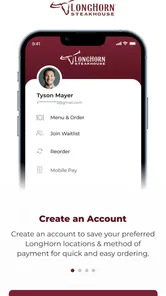
One practical question is whether I need an account or particular payment setup before I can use every feature. I would install it and check the relevant screen before making the app central to a time-sensitive plan, rather than assuming that browsing the menu and completing an order have identical requirements. For a quick menu check, I would not make account setup the first task; for a planned pickup or mobile payment, I’d leave enough time to work through the steps calmly.
Another question is how to handle changes after an order is placed. My cautious approach would be to review everything before submission and contact the restaurant promptly if a correction becomes necessary, rather than counting on an in-app edit option. That matters most when several meals are involved or when timing is tight. A final check is easier than trying to fix a mistake after the kitchen has begun preparing the order.
Where I would draw the line
I would skip installing it if I rarely eat at LongHorn and only want to compare restaurants once. A general dining app is more flexible for that job, and a browser search may be enough for a one-off menu look. I’d also avoid depending on mobile payment as the only way to settle a meal: keeping a regular payment method available is sensible whenever a phone could run out of power or need troubleshooting.
Dietary needs call for a similar distinction between useful information and certainty. Menu descriptions can help me shortlist dishes, but they are not a replacement for speaking with the restaurant about an allergy or strict restriction. If the answer affects someone’s safety, I would make that conversation before ordering. That is a limitation of relying on a menu screen for a high-stakes decision, not a reason to dismiss the app’s value for ordinary planning.
The app is published by Darden Restaurants, Inc. and sits in the food-and-drink category. Its 4.2 average across around 8,000 ratings gives a quick sense of how other users respond, while roughly 2,800 written reviews offer additional context for anyone who wants to look beyond the number. It is free to install, and its 500,000-plus installs suggest that plenty of diners use it as a direct companion to visits and orders rather than as a broad restaurant directory.
Final Thoughts
In conclusion, the LongHorn Steakhouse® app is a must-have for anyone who loves a good steak. With its user-friendly interface, convenient features, and rewarding loyalty program, it’s designed to enhance your dining experience both in-restaurant and at home. Whether you’re planning a night out or a cozy dinner at home, this app ensures that you have a delightful experience every time. So, next time you’re craving a steak, why not let the app guide you to a delicious meal?
My more measured recommendation is to use it when a LongHorn visit is already on your mind. The most dependable benefits come from a repeatable routine: look over the menu early, settle the group’s choices, verify the location and basket, and use the wait-list or payment option only when it fits the situation. That approach makes the app helpful without asking it to solve problems it cannot control, such as changing plans, a busy dining room, or a complicated dietary question.
For an occasional diner, it can remain an on-demand tool for checking a menu or arranging a specific meal rather than something that needs to become part of every outing. For someone who returns often, the time saved by having the chain’s ordering and visit tools close at hand is more persuasive. I’d recommend it to that second group most readily, while anyone seeking restaurant discovery or a single service for many chains will be better served by a broader alternative.
LongHorn Steakhouse® Frequently Asked Questions
Does the LongHorn Steakhouse® app cost anything to download?
The LongHorn Steakhouse® app is free to download, so you can install it and explore its Food & Drink features without paying for the app itself. It brings together tools for browsing the menu, ordering To Go, joining a wait list, and using Mobile Pay. Any costs related to food or restaurant purchases are separate from downloading the app.
What is the LongHorn Steakhouse® app used for?
The LongHorn Steakhouse® app is designed to enhance your dining experience by providing convenient features such as online ordering, locating the nearest restaurant, managing your waitlist status, and accessing exclusive offers. The app aims to make your visit to LongHorn Steakhouse® seamless and enjoyable, whether you're dining in or ordering takeout.
Is the LongHorn Steakhouse® app available on both Android and iOS?
Yes, the LongHorn Steakhouse® app is available for download on both Android and iOS devices. You can find it on the Google Play Store for Android users and the Apple App Store for iOS users. This ensures that a wide range of users can access the app's features regardless of their device type.
Can I place orders directly through the LongHorn Steakhouse® app?
Absolutely! The LongHorn Steakhouse® app allows users to place orders directly from their mobile devices. You can browse the menu, customize your order, and choose between dining in or takeout options. This feature is designed to provide a convenient and efficient ordering experience, saving you time and effort.
Are there any exclusive offers or rewards available through the app?
Yes, the LongHorn Steakhouse® app provides exclusive offers and rewards to its users. By downloading the app, you can access special promotions, discounts, and rewards that are not available elsewhere. This incentivizes app usage and enhances the overall dining experience, giving you more value for being part of the LongHorn community.
Pros
- User-friendly interface
- easy navigation.
- Wide range of menu options available.
- Convenient online reservation system.
- Exclusive offers for app users.
- Frequent updates with new features.
Cons
- Occasional glitches in the app.
- Limited customization options.
- Requires constant internet connection.
- Large app size consumes storage.
- Some features are region-specific.











