

OffPlay Music: MP3 Player
- 0.00
- 5.0
- Installs
- 50.00K
- Price
- Free

Screenshots
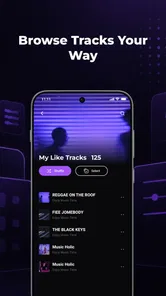
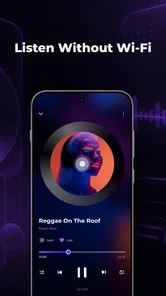
Analysis by Reviewed
I can see the appeal of OffPlay Music: MP3 Player most clearly in a shared household: one person has a folder of MP3s for a commute, another wants familiar songs during chores, and nobody wants to rely on a mobile signal or hand over a personal streaming account. This Android music and audio app focuses on playing music already in your library, with playlists and lock-screen playback. In my view, that simple purpose is its strongest point—and also the boundary to understand before installing it.
Who benefits from a local music library
I’d consider this app when the household already has a specific set of audio files and wants a straightforward way to play them. Think of a relative who prefers familiar albums, a person who has recorded their own music, or a shared phone set aside for background listening. In those cases, a local player can be easier to manage than asking everyone to use a streaming account or search through a large online catalog.
It is less suited to a household where each person expects a separate listening history or their own recommendations. A shared collection can be convenient, but it also makes the phone’s music experience communal by default. Before choosing it, I’d ask whether everyone is comfortable using the same library and whether one person can take responsibility for keeping the files and playlists in order.
A straightforward player for music you already have
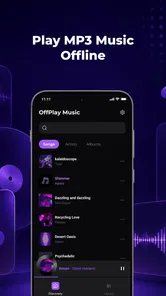
Rather than behaving like a streaming service, OffPlay Music: MP3 Player is aimed at people who keep audio files on their device. That makes it useful for downloaded albums, personal recordings, or a carefully assembled collection you want to play without depending on a connection. The developer is jadid-lyoum, and the app is free, so trying it does not require a subscription decision.
The offline focus suits routines where reception is unreliable or data use is unwelcome: a flight, a basement workout, a country drive, or a child’s familiar bedtime playlist. The practical benefit is not that every song is magically available; it is that the music you have stored can be played without treating a network connection as part of the listening experience. I would first make sure the desired MP3 files are actually on the device.
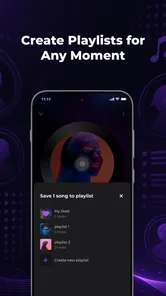
Playlists are useful here for more than tidying a large library. In a shared home, I’d make separate listening queues for different occasions—quiet background music while cooking, energetic tracks for exercise, or a short set for a car ride. This keeps a family member from having to search through someone else’s entire collection each time. It is a simple organizational habit, not a claim that the app creates household profiles.
Where it fits into a shared-device routine
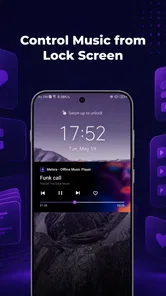
A realistic use is an older phone kept in a kitchen or living room, loaded with music that several people enjoy. One person can prepare a playlist in advance, then start playback and leave the device on a shelf. Lock-screen playback is particularly handy in that situation: once music is running, you can manage it from the locked screen instead of repeatedly unlocking the phone to reach the player.
More From Our News Desk

 Gmail
GmailGmail in a Busy Inbox: Who Benefits Most?
From first account to crowded workday, Gmail earns its place through dependable search and flexible sorting—but its best fit depends on how much inbox maintenance you can tolerate.

 Prime Video
Switching to Prime Video: What Changes in Your Viewing Routine
Prime Video can make a compelling second home for streaming, but switching means learning a different catalog, rental layer, and route from browsing to playback.

 Universal TV Remote Control
Universal TV Remote Control Works Best as a Reliable Backup
A phone remote earns its place through quick setup and reliable habits. Here is how to get more from Universal TV Remote Control—and where its limits show.

 Weather - By Xiaomi
Weather by Xiaomi Review: Clear at a Glance, Less Clear Up Close
Xiaomi’s weather app makes everyday forecasts quick to scan, but its calm surface can leave useful details and recovery paths harder to find than they should be.

 X
XX Under Pressure: Can It Recover When Posting Goes Wrong?
A resilience-focused review of X, examining setup, mistaken posts, interruptions, weak connections, and the gaps that matter when recovery needs to be dependable.

 Clash of Clans
Clash of Clans Is Won Between the Battles
Its raids are quick; its community is a long-term project of coordination, teaching, rivalry, and shared responsibility—with all the friction that entails.
Latest News



That convenience has a trade-off. A shared device means the active playlist and listening choices may be visible to whoever picks it up, and the playback controls are accessible from the lock screen. I would treat this as a practical household music player, not as a private listening space or a way to keep one person’s selections separate from another’s. If privacy and distinct accounts matter, a service or device setup designed around individual profiles is a better fit.
For a family car, I’d prepare the playlist before leaving rather than expect someone to browse and make choices while the vehicle is moving. Offline files avoid depending on mobile coverage, while a fixed queue reduces fiddling with the phone. The same approach works for a shared speaker: choose the music first, start playback, then leave the phone alone. These are small workflow choices, but they make a basic local player feel more dependable in everyday use.
Set expectations before handing over the phone
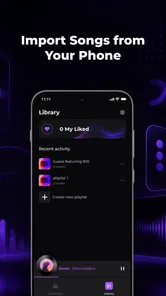
The useful setup boundary is the music library itself. Decide which audio files belong on the shared device and arrange them before inviting everyone to use the player. That keeps the experience focused and avoids the common frustration of opening a music app only to find that the songs someone expects are stored elsewhere. I’d also test the intended playlist once before a trip or gathering, when there is still time to correct a misplaced file.
Because this is a local-library player, it is not a replacement for a service that finds new artists, streams albums, or keeps a cloud collection synchronized. If one household member expects to type a song title and immediately discover a vast catalog, this is the wrong tool for that job. If the goal is to listen to a known collection without relying on streaming, the narrower scope is a genuine advantage: it keeps the app’s role easy to explain.
There is also a useful distinction between “offline playback” and “automatic music management.” The app’s focus is playing MP3s offline, with playlists and lock-screen controls; users should not assume that those basics imply automatic imports, shared queues, or account separation. My advice is to keep the first session simple: confirm the tracks appear in the library, build one short playlist, start it, and check that the lock-screen controls behave as you expect on your device.
Coordination without turning music into a chore
In a household, the main coordination challenge is often not playback but deciding what is on the phone and who updates it. One person can take responsibility for maintaining the shared library, while others can suggest tracks for the next playlist. A short, clearly named set is easier to use than a sprawling queue when several people take turns. This is especially helpful for routines with a predictable soundtrack, such as a morning drive or a weekly cleaning session.
A practical way to keep that arrangement low-effort is to agree on a small number of playlists by purpose rather than making a new one for every occasion. For example, a shared “quiet” set and a “drive” set can be easier for other household members to recognize than a collection of personal names or temporary moods. It also makes handoffs simpler: whoever prepares the phone can point to the relevant queue without explaining the whole library.
For a child using a shared phone, I’d choose the playlist and start playback myself before handing it over, rather than leaving the whole collection open for unsupervised browsing. That is a sensible device-use habit, not a parental-control feature. The app’s Everyone age rating indicates a broad audience classification, but it should not be mistaken for a promise that every MP3 on the device is suitable for every listener. The content comes from the library the household chooses to keep there.
Likewise, lock-screen playback is convenient when a phone is in a pocket, but it means basic playback controls remain reachable without opening the app. If accidental skipping would be a problem, place the phone somewhere stable or keep it with the adult managing the music. I see this as ordinary shared-device housekeeping rather than a special restriction the app provides.
How it compares with streaming and built-in players
Compared with streaming apps, this player makes more sense when you already own or have transferred the music you want. Streaming is better for discovery, frequently changing tastes, and collections that follow a person across devices. OffPlay Music is better suited to a fixed set of files that should play without a connection. Neither approach is universally superior; the right choice depends on whether the household values access to a broad online catalog or straightforward playback of music it already has.
There is a middle ground, too: some people use streaming for everyday discovery but keep a local player for a deliberately selected offline collection. That can work when the listening needs are genuinely different, such as a shared set for a road trip and individual services for personal listening. The trade-off is maintaining two music habits and remembering which files are available where, so I would only split the roles if offline access solves a recurring problem.
Compared with a phone’s built-in music app, the deciding question is whether the existing player already handles your local MP3s and playlists comfortably. If it does, there may be little reason to switch. If you want a dedicated app centered on offline music and lock-screen playback, this one is worth trying. I would judge it by a practical test rather than by appearance: can the people who will use it find their intended tracks, start a playlist, and control playback without confusion?
The app’s current version is 1.0.3, so I would keep expectations grounded and test it with the actual device and music collection before making it the household’s default player. Its average rating is 5.0 from 61 ratings, and it has over 50,000 installs. Those figures offer a little context, but they do not tell me whether a particular family’s file organization or phone habits will suit it. A quick trial with a small playlist is the more useful check.
Age, trust, and the right household fit
OffPlay Music is rated for Everyone, which makes its basic purpose approachable across age groups. In practice, the more important trust question is what audio is present on the device and who gets to choose it. If several people share one phone, agree on which files belong in the common library and whether playlists are intended for everyone. That avoids confusing a general-purpose player with a curated children’s music environment.
The app is free, which lowers the barrier to testing it on an Android device running version 8.0 or later. I’d still avoid installing it on a shared phone solely because it sounds convenient: first check whether a built-in player already meets the need, then try OffPlay with a handful of MP3s. If the household wants music discovery, cross-device synchronization, or clearly separated personal libraries, a more feature-rich alternative will be more appropriate.
For a useful first test, I’d choose files that represent the real shared use rather than a random sample: one short playlist for a routine, a few tracks that different listeners recognize, and a situation where the phone will be locked during playback. That helps reveal practical snags such as whether the chosen music is actually available on the device and whether the household finds the controls intuitive. If the trial feels awkward, there is little reason to make it the default.
My household verdict
I’d recommend OffPlay Music to someone who has a real collection of MP3s and wants a focused way to play it offline, especially when playlists and lock-screen controls make repeated listening easier. Its best household role is modest but useful: a shared source of familiar music, prepared in advance and used without depending on streaming. That can be just right for a spare phone, a family room, or a predictable playlist on the road.
I would skip it if the main expectation is a huge searchable catalog, private profiles for each family member, or automatic coordination across separate devices. Those needs call for a different kind of music app. For a household that simply wants its own files to play with minimal fuss, though, this is a sensible free option. My practical recommendation is to test one short playlist, try the locked-screen controls, and decide whether the shared-library approach feels natural for everyone who will use the phone.
OffPlay Music: MP3 Player Frequently Asked Questions
What is OffPlay Music: MP3 Player, and what can I use it for?
OffPlay Music: MP3 Player is designed for listening to music stored on your device, rather than serving as a streaming service with its own catalog. You can use it to browse and play compatible local audio files. The exact library tools and playback options may depend on the app version and device, so check its store listing before downloading if you need a particular feature.
Does OffPlay Music: MP3 Player work without an internet connection?
A local-file music player can generally play audio already saved on your device without an internet connection. However, internet access may still be needed for downloading the app, viewing advertisements, or using any online features it offers. If offline listening is your main reason for installing it, make sure your music files are downloaded to your device and test playback with connectivity turned off.
Can I use OffPlay Music to stream songs or download music?
OffPlay Music: MP3 Player should not be assumed to provide licensed music streaming or a built-in music download catalog. Its primary purpose is playback of audio files available on your device. To avoid copyright or security issues, obtain music from legitimate sources and review the app’s current description and permissions for any additional services before relying on them.
What audio files can OffPlay Music: MP3 Player play?
Supported formats can vary by app version, operating system, and the audio files present on your device. Common formats such as MP3 are typically associated with this kind of player, but that does not guarantee support for every codec or file variant. Check the store listing for a format list, then try a sample file before moving a large music collection into the app.
Is OffPlay Music: MP3 Player free, and what should I check before installing it?
The app’s price, advertisements, and any optional in-app purchases can change, so confirm the current details on the Google Play or Apple App Store page before installing. Also review its recent updates, developer information, privacy disclosures, and requested permissions. A music player may need access to audio files, but permissions should make sense for the features you plan to use.
Pros
- Plays locally stored MP3 files without requiring a streaming subscription.
- Keeps music playback available when you’re offline.
- A dedicated music player makes it easy to focus on your own audio library.
- Useful for listening to downloaded tracks while traveling or commuting.
- Can help reduce mobile data use compared with streaming music.
Cons
- You need to add or download music files before you can listen.
- Available features may vary between the Android and iOS versions.
- Music library organization depends on how your files are stored and tagged.
- Some audio formats or files may not play as expected.
- Background playback and lock-screen controls may depend on device settings.











