

Offline Player: Local Music
- 5.00
- 4.4
- Installs
- 100.00K
- Price
- Free

Screenshots

Analysis by Reviewed
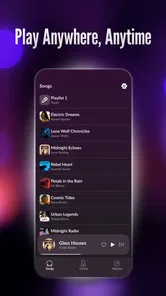
I like music apps that stay out of the way. When I already have audio files on my phone, I do not always want a streaming service, a subscription screen, or a constant internet connection. Offline Player: Local Music takes that simpler route: it is a free Music & Audio app from SUPER MM Ltd designed for playing music stored locally on an Android device. After spending time with it, my impression is that its appeal comes from being focused rather than overloaded. It is aimed at the moment when the tracks are already yours and you simply want to listen.
That focus makes the app easy to understand, but it also defines its limits. This is not the tool I would choose for discovering artists, following podcasts, or replacing a full streaming library. I see it as a practical local player for people who want dependable access to their own collection. Its current version is 1.0.1, so I also view it as an early product whose future usefulness will depend on how thoughtfully SUPER MM Ltd develops the basics.
How the current version fits everyday listening
The first thing I appreciate about a local player is the clear boundary between the app and the internet. Once music is saved on the device, listening does not depend on mobile data or Wi-Fi. That matters during travel, in places with unreliable reception, or whenever I want to avoid using a streaming service for files I already own. It also makes the app a sensible companion for a carefully prepared offline collection rather than another account-based music destination.
A realistic example is a long train journey. Before leaving, I would copy a selection of albums or playlists to my phone, open the player, and use those files throughout the trip. There is no need to plan around signal changes or worry about a streamed track becoming unavailable. The trade-off is that the preparation happens outside the listening session: the app can play what is present locally, but it does not magically build a collection for me.
The store presents it as an Offline Player, and that short description is unusually direct. I would not expect the experience to behave like Spotify, Apple Music, or another service built around online catalogs. Those alternatives are much stronger when I want recommendations, new releases, synchronized libraries, or access to music I have not downloaded. This app makes more sense when control over local files matters more than breadth.
Its free price lowers the barrier to trying it, especially for someone who wants a straightforward player without committing to a paid service. The Everyone content rating also makes it suitable for a broad audience. I would still judge it by a more practical question: does it match the way I keep music? If most of my listening comes from online playlists, radio stations, or cloud libraries, a local-only approach will feel restrictive no matter how simple it is.
The app has reached over one hundred thousand installs and holds a 4.5 average from around one thousand four hundred ratings. Those figures suggest that the basic idea is connecting with a meaningful group of listeners, while the relatively small number of written reviews means I would not treat the public reaction as a complete picture of every edge case. My own recommendation is therefore based on the app’s clear purpose and current positioning, not on assuming it already covers every advanced music-player need.
More From Our News Desk

 Gmail
GmailGmail in a Busy Inbox: Who Benefits Most?
From first account to crowded workday, Gmail earns its place through dependable search and flexible sorting—but its best fit depends on how much inbox maintenance you can tolerate.

 Prime Video
Switching to Prime Video: What Changes in Your Viewing Routine
Prime Video can make a compelling second home for streaming, but switching means learning a different catalog, rental layer, and route from browsing to playback.

 Universal TV Remote Control
Universal TV Remote Control Works Best as a Reliable Backup
A phone remote earns its place through quick setup and reliable habits. Here is how to get more from Universal TV Remote Control—and where its limits show.

 Weather - By Xiaomi
Weather by Xiaomi Review: Clear at a Glance, Less Clear Up Close
Xiaomi’s weather app makes everyday forecasts quick to scan, but its calm surface can leave useful details and recovery paths harder to find than they should be.

 X
XX Under Pressure: Can It Recover When Posting Goes Wrong?
A resilience-focused review of X, examining setup, mistaken posts, interruptions, weak connections, and the gaps that matter when recovery needs to be dependable.

 Clash of Clans
Clash of Clans Is Won Between the Battles
Its raids are quick; its community is a long-term project of coordination, teaching, rivalry, and shared responsibility—with all the friction that entails.
Latest News



What I would prepare before relying on it
The most important step is organizing the phone before opening the player. I would use consistent artist and album information in my files, remove duplicates, and create a small travel folder for the music I actually expect to hear. Local players are only as tidy as the library they receive. If the underlying files have messy names or incomplete tags, browsing can become frustrating even when playback itself is perfectly adequate.
A useful workflow is to separate music by situation rather than only by artist. For example, I might keep one folder for commuting, another for instrumental tracks, and another for albums I want to hear from beginning to end. This is a small habit, but it reduces the time spent searching on a phone. It also helps reveal the app’s real role: it is best treated as the playback layer for a collection I have already curated.
I would also test the exact files I plan to use before leaving home. That is not because the app promises a particular range of formats or audio behavior; it is simply sensible preparation for any local player. A short check confirms that the files appear as expected and that the chosen folder is available to the app. For a daily commute, this takes little effort. For a flight or a remote trip, it can prevent an avoidable disappointment.
What the early release tells me
Version 1.0.1 places the app at an interesting point. It is new enough that the core experience is still likely to be shaped by early user feedback, but it has already moved beyond the very first release. I read that as a sign to judge the product on its present usefulness while keeping expectations realistic. The current build should be considered a foundation, not proof that every feature found in mature players is already here.
The release date is April 29, 2026, which gives the product a recent starting point. That matters because a new local player has to earn trust through small details: predictable library scanning, sensible handling of interruptions, clear navigation, and reliable behavior after the phone has been idle. Those details are more important to me than a long feature list. A player can advertise many options and still be unpleasant if basic listening requires too much attention.
There are no verified claims here about a large redesign, a major audio engine change, or a long history of updates, so I would not invent an evolution story around the version number. What I can say is that the current build should be evaluated as an early, focused utility. If SUPER MM Ltd continues refining it, the most valuable progress will probably come from polishing everyday listening rather than adding unrelated distractions.
How existing users may feel about the current build
For someone moving from another simple local player, the transition should be easiest if the goal is merely to access music already stored on the phone. The offline-first idea is familiar and reassuring: prepare the files once, then listen without depending on a connection. Existing users who prefer a clean, narrow purpose may enjoy not having to navigate through recommendations or streaming sections.
However, switching players is never only about the headline function. People become attached to their queue habits, sorting methods, playlists, saved positions, and controls. I would not uninstall an established player immediately. I would run both for a few days with the same small selection of albums and see which one handles my normal routine more comfortably. That comparison is especially important because a new app can feel appealing in a quick test yet expose missing conveniences during repeated use.
My advice for current users is to treat the app as an additional option first. Import or copy a limited collection, check how quickly I can reach a favorite album, and see whether returning to music after a pause feels natural. If that routine works, expanding the library is reasonable. If I repeatedly need to return to another player for organization or control, the free installation still served a purpose: it showed me that the offline approach alone is not enough for my habits.
One benefit of starting with a small collection is that it makes problems easier to identify. A crowded phone can hide whether the issue is the app, the file organization, or an unclear naming scheme. I would begin with a few artists and albums, then add more only after the browsing experience feels manageable. This is a more reliable test than copying an entire library at once and assuming every awkward result comes from the player.
Where it may still feel limited
The main limitation is conceptual: local playback cannot replace the wider ecosystem of a streaming service. If I want to search millions of songs, discover unfamiliar artists, share a playlist with friends, or move seamlessly between devices, I would choose a different category of app. Offline Player: Local Music is valuable precisely because it does less, but that also means I need another solution for online discovery and cloud-based listening.
There is also a preparation cost. Music must already be on the device, and I have to manage that storage myself. Someone with a large collection may need to think about folders, tags, duplicates, and available space before the app feels comfortable. A streaming service hides much of that maintenance behind its catalog and account system. Here, the freedom from data usage comes with responsibility for the files.
I would be cautious about recommending it to listeners who expect a mature desktop-style library manager on a phone. Advanced organization can involve carefully edited metadata, smart playlists, extensive queue tools, equalizer controls, synchronized playback positions, or detailed audio options. I would not assume those capabilities from the app’s short positioning. Anyone who depends on a particular advanced function should test the current build directly before making it the only player on the device.
Another practical trade-off is that offline listening is only convenient when the library is kept current. If I regularly add music on a computer, I need a repeatable transfer routine. A small folder synchronized manually may be enough for occasional listening, while a large and constantly changing collection could make a cloud-connected alternative more efficient. The right choice depends less on the app’s price and more on whether I enjoy managing my own files.
Because the app is rated for Everyone, I see no reason to frame it as a specialist tool for a narrow age group. Still, suitability is about listening habits rather than age. A teenager building a personal collection, a commuter saving mobile data, and an adult carrying purchased albums may all find value in it. Conversely, a listener who never stores audio locally will gain little from installing it.
Questions I would answer before installing
The first question is whether it requires an internet connection while playing. Its purpose is offline playback, so the practical appeal is that locally stored music can be enjoyed without data or Wi-Fi. I would still use a connection beforehand if I need to transfer files or prepare the phone. The distinction is important: offline listening removes the connection requirement from playback, not from every part of managing a device.
The second question is whether it is free to try. Yes, it is available at no cost. That makes a side-by-side test with an existing player easy, and I would take advantage of that rather than making assumptions from the description. A free app can still be a poor fit for a particular workflow, but there is little reason not to test it with a small, nonessential selection of music.
Another question is whether it is suitable for an older Android phone. The minimum operating-system requirement is Android 7.0, so compatibility depends on the phone meeting that baseline. I would check the device before planning a transfer, especially if it is an older handset kept for travel or as a backup. The requirement is modest enough for many users, but it is still worth confirming before relying on the app away from home.
People may also wonder who develops it. The developer is SUPER MM Ltd. For me, that is useful context when watching how the early release develops: future updates will show whether the team prioritizes stable playback and library handling or moves toward a broader set of features. I would pay attention to practical improvements rather than expecting a completely different product.
What I would watch in future updates
The most meaningful improvements would be the ones that reduce friction around a local collection. I would look for clearer browsing, dependable scanning after new files are added, and a playback flow that remains comfortable when the phone is locked or the listener returns later. These are the areas that determine whether a player becomes part of a daily routine instead of remaining an app I open only once.
I would also watch how the app handles the tension between simplicity and depth. Adding every advanced option can make a focused player feel complicated, while refusing to add any organization tools can leave serious listeners behind. The best direction would be optional depth: keep the basic path quick, but give people with larger libraries enough control to sort and manage music without turning the app into a streaming platform.
Existing users should watch update notes and test important routines after an update, particularly if the app becomes central to travel or offline listening. I would keep a second player available until the newer product has proved itself over repeated journeys. That is not a criticism of this app; it is sensible practice with any early utility whose long-term behavior is still being established.
My final view is positive but specific. Offline Player: Local Music is worth trying if I have local audio files, want a free solution, and value listening without data or Wi-Fi. Its current version offers a clear starting point from SUPER MM Ltd, and the app’s appeal is strongest when I want music to remain simple and under my control. I would recommend it as a focused offline companion, not as a universal replacement for streaming or an advanced library manager.
If my daily listening begins with files already saved on the phone, I would install it and test a carefully chosen folder first. If my music life depends on discovery, cloud synchronization, social sharing, or a huge online catalog, I would stay with a more established streaming-oriented alternative. That distinction makes the recommendation honest: this app does not need to do everything to be useful, but it does need to fit the way I actually keep and hear music.
Offline Player: Local Music Frequently Asked Questions
Does Offline Player: Local Music stream songs or include a music catalog?
Offline Player: Local Music is a local music player, not a streaming service. Its purpose is to play audio files that are already stored on your device, so you should have your own music files ready rather than expect to browse and stream a built-in catalog. The app’s short description is “Offline Player,” and its focus is listening to your local music.
What is Offline Player: Local Music, and what does it do?
Offline Player: Local Music is designed for playing audio files already stored on your Android or iOS device. It focuses on local playback rather than music streaming, allowing you to listen to downloaded songs, albums, podcasts, or personal recordings without depending on an internet connection. Its usefulness depends on having compatible audio files available on your device and granting the necessary media-library permissions.
Can I use Offline Player: Local Music without an internet connection?
Yes, the main purpose of Offline Player: Local Music is to play music stored locally, so an active internet connection is generally not required once your audio files are available on the device. This makes it suitable for flights, commuting, travel, or areas with poor coverage. However, internet access may still be needed for downloading the app, updates, advertisements, optional features, or other services included in a particular version.
Which audio files can Offline Player: Local Music play?
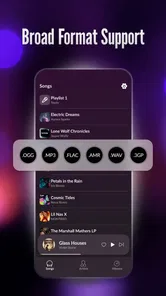
The app is intended to recognize common audio formats supported by your device’s operating system, but exact compatibility can vary between Android and iOS versions. Popular formats such as MP3 are usually the safest choice, while less common or protected files may not appear or may fail to play. Before downloading, check the app’s current store listing for supported formats and any device-specific limitations.
How do I add songs to Offline Player: Local Music?
Offline Player: Local Music normally accesses music through your device’s local storage or media library. After installation, you may need to approve permission to access audio files, then scan the library or import tracks through the app’s file-selection tools. Songs obtained through streaming subscriptions or protected services may not be transferable because they are often encrypted and restricted to their original application.
Pros
- Plays music without an internet connection or mobile data.
- Keeps your personal music library available while traveling.
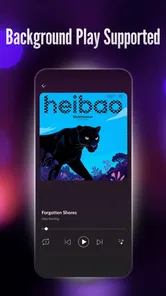
- Supports background playback while using other apps.
- Offers more privacy than streaming services tied to online accounts.
- Avoids ads
- subscriptions
- and streaming-related interruptions.
Cons
- You must transfer or download music files to the device first.
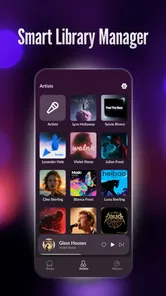
- Library organization depends heavily on your local file metadata.
- It may lack lyrics
- recommendations
- and other streaming features.
- Large music collections can consume considerable storage space.
- Compatibility may vary with uncommon audio formats or codecs.











