

Nomorobo Max
- 199.00
- 4.1
- Installs
- 50.00K
- Price
- Free

Screenshots





Analysis by Reviewed
Unwanted calls and texts are rarely dramatic enough to justify changing a phone number, but they are irritating enough to interrupt work, family time, and sleep. After spending time with Nomorobo Max, my view is that it is most useful as a layer of protection rather than a complete replacement for your phone’s built-in call controls. It focuses on the everyday problem of screening suspicious communication, and that narrow purpose makes it easier to understand than many broader security apps.
The app comes from Telephone Science Corp and sits in the communication category. It is free to start, available to an Everyone-rated audience, and the Android release I reviewed is version 2.3.0. The basic appeal is straightforward: instead of waiting for every unwanted caller or texter to become a nuisance, you use a dedicated tool designed to help identify and block that activity before it takes over your inbox or call history.
That sounds simple, but the practical value depends on how you use it. Nomorobo Max makes the most sense for someone who receives frequent suspicious calls, repeated promotional messages, or obvious robocall traffic. If your phone rarely receives anything unwanted, the extra app may feel unnecessary. My overall verdict is favorable, with one important qualification: the experience is strongest when you treat the app as a filter that needs sensible setup and occasional attention, not as an invisible shield that can make perfect decisions on your behalf.
What the experience is like in daily use
I find the day-to-day value of a spam filter depends less on how many numbers it catches than on whether it fits the calls I need to answer. I’d start by identifying the moments when interruptions are most costly—work calls, appointments, or family time—then use that to judge whether a dedicated filter earns a place on my phone. That practical test leads to the next question: where does this app offer a better fit than ordinary controls?
A focused answer to a familiar phone problem
The strongest part of Nomorobo Max is its focus. Many phone owners already have a contacts list, a dialer, a messaging app, and perhaps a general security tool. Those options can help, but they often make you handle unwanted communication one incident at a time. A dedicated spam-blocking app changes the workflow: suspicious activity becomes something you try to intercept instead of something you repeatedly clean up.
I find that distinction especially helpful for people who do not want to study every incoming number. When an unfamiliar caller appears during a busy moment, the useful question is not always “Who is this?” It is often “Do I need to deal with this right now?” A tool built around spam calls and texts can reduce that decision fatigue. That is a small benefit, but it becomes meaningful when interruptions arrive several times in a day.
The app also has a practical advantage over manually blocking numbers. Manual blocking is precise, but it is reactive. You block one caller after the interruption has already happened, then another number appears later. Nomorobo Max is better suited to patterns of unwanted contact, where the nuisance is not a single person but a stream of similar attempts. I would still keep manual blocking available for personal situations, yet I would not want to rely on it as my only defense.
More From Our News Desk

 Gmail
GmailGmail in a Busy Inbox: Who Benefits Most?
From first account to crowded workday, Gmail earns its place through dependable search and flexible sorting—but its best fit depends on how much inbox maintenance you can tolerate.

 Prime Video
Switching to Prime Video: What Changes in Your Viewing Routine
Prime Video can make a compelling second home for streaming, but switching means learning a different catalog, rental layer, and route from browsing to playback.

 Universal TV Remote Control
Universal TV Remote Control Works Best as a Reliable Backup
A phone remote earns its place through quick setup and reliable habits. Here is how to get more from Universal TV Remote Control—and where its limits show.

 Weather - By Xiaomi
Weather by Xiaomi Review: Clear at a Glance, Less Clear Up Close
Xiaomi’s weather app makes everyday forecasts quick to scan, but its calm surface can leave useful details and recovery paths harder to find than they should be.

 X
XX Under Pressure: Can It Recover When Posting Goes Wrong?
A resilience-focused review of X, examining setup, mistaken posts, interruptions, weak connections, and the gaps that matter when recovery needs to be dependable.

 Clash of Clans
Clash of Clans Is Won Between the Battles
Its raids are quick; its community is a long-term project of coordination, teaching, rivalry, and shared responsibility—with all the friction that entails.
Latest News



A realistic scenario: protecting a workday
Imagine working from home while waiting for an important delivery or a call from a medical office. You cannot simply ignore every unknown number, but answering every one defeats the purpose of having a phone that helps you stay reachable. In that situation, a spam-screening layer is more useful than a blanket “silence all unknown callers” setting. The built-in option may be too aggressive, while Nomorobo Max is aimed at separating likely nuisance traffic from calls you may genuinely need.
The same trade-off appears with text messages. A suspicious message can be more than an annoyance because it may tempt you to tap a link, reply, or share information. Blocking or filtering unwanted texts reduces the number of moments in which you have to make that judgment. I would still inspect anything that looks important through an independent route, but reducing the volume is a worthwhile first step.
For older relatives, the app can also be part of a broader phone-safety routine. It may help reduce the number of questionable calls they encounter, but I would not present it as a guarantee that every scam will disappear. A convincing scam can arrive through a number that looks legitimate, and no blocker removes the need for caution. The best setup combines filtering with a simple family rule: never provide codes, payment details, or personal information during an unexpected call.
Where it compares well with ordinary alternatives
The usual alternative is the phone’s built-in blocking and spam controls. Those tools have two clear advantages: they are already installed and they generally require less setup. If you only receive an occasional nuisance call, the built-in controls may be all you need. They are also a sensible fallback when you want the smallest possible number of apps involved in handling calls and messages.
Nomorobo Max earns its place when the problem is persistent. Its dedicated purpose makes it easier to think about spam as a category rather than as a collection of isolated numbers. That is more convenient than opening a call log after every interruption and deciding whether to block, report, or ignore the caller. The trade-off is that another app means another interface to understand and another service whose behavior you must trust.
It also differs from broad security suites. A general mobile-security product may cover several areas at once, while this app is more narrowly concerned with unwanted communication. I prefer that specialization when spam calls and texts are the main complaint. On the other hand, someone looking for device scanning, account monitoring, or wider digital-safety tools should not choose Nomorobo Max expecting it to cover those unrelated needs.
Small workflow choices that make a difference
One useful habit is to review your blocked or filtered activity periodically rather than assuming the system is always right. This is not because I found the concept ineffective; it is because any automated filter has to balance convenience against the risk of misclassification. A quick review helps you notice whether an expected caller was treated differently from what you wanted and gives you a chance to adjust your habits.
Another practical tip is to keep important contacts clearly saved and recognizable. A spam-blocking tool has a better chance of fitting into your routine when the people and organizations you expect to hear from are easy for you to identify. This is particularly important if you use your phone for appointments, school, deliveries, or freelance work, where legitimate calls may come from unfamiliar numbers.
I would also avoid treating a blocked message as proof that the sender is harmless or dangerous in every future situation. Phone numbers can change, and unwanted callers can imitate familiar patterns. The app can reduce exposure, but the final decision about sensitive requests should still come from the content and context of the communication, not only from the number shown on screen.
The meaningful weakness: filtering always involves judgment
The main limitation is the unavoidable possibility of friction around legitimate communication. A tool that blocks aggressively may be satisfying for someone overwhelmed by spam, but that same aggressiveness can become inconvenient if you regularly receive calls from new clients, temporary numbers, schools, clinics, couriers, or public services. I would be cautious about enabling the most restrictive behavior without first considering how often important contacts reach me from numbers I have not saved.
That is why I see Nomorobo Max as a tool that needs a personal balance. Someone with a stable contact list and heavy spam volume can reasonably favor stronger filtering. Someone whose work depends on unknown callers may prefer a lighter approach and more manual review. Neither person is using the app incorrectly; they simply have different costs when a call is missed.
There is also a psychological limitation. Once an app reduces nuisance traffic, it is tempting to relax completely. That would be a mistake. A spam blocker can make the phone quieter, but it cannot turn every remaining call into a trustworthy one. I would still avoid clicking unexpected links, calling back suspicious messages, or sharing private information simply because a communication was not blocked.
The free entry point is another reason to read the purchase screen carefully before committing to anything beyond the basic experience. The app includes in-app purchases ranging from $4.99 to $79.99 per item. Those amounts make it important to decide whether the extra value matches your own call volume and tolerance for interruptions. For a person who receives only a few unwanted calls, paying for additional capabilities may be difficult to justify; for someone dealing with constant spam, the calculation can look different.
Who will get the most from it
I would recommend Nomorobo Max first to people whose phones are regularly interrupted by suspicious calls and messages. It is a particularly sensible candidate for users who have tried manually blocking numbers and found that the nuisance keeps returning in a slightly different form. The app’s value comes from reducing repetitive decisions, not from adding entertainment or a large collection of unrelated tools.
It may also suit households that want a clearer routine for handling unwanted communication. One person can use it as part of a personal phone setup, while a family can agree on simple rules for reviewing unexpected messages and reporting anything that asks for money or sensitive information. The Everyone content rating makes it approachable for a broad audience, although younger or less experienced users still benefit from guidance rather than being left to interpret suspicious messages alone.
People who rely on unknown callers for their livelihood should approach it more carefully. Real-estate agents, contractors, recruiters, delivery workers, and independent professionals may receive legitimate calls from numbers that are not in their address books. For them, reducing spam is useful, but missing one genuine opportunity can cost more than answering several unwanted calls. I would favor a less aggressive setup and frequent checking of filtered activity.
I would skip it if your existing phone controls already handle your small amount of spam comfortably, or if you strongly prefer not to add a specialized communication app. I would also skip it as a supposed all-purpose privacy or security solution. Its purpose is narrower, and choosing a broader tool would make more sense if your main concern extends beyond unwanted calls and texts.
Support, maturity, and what the numbers suggest
The app has reached more than fifty thousand installs and holds a 4.1 average from roughly nine hundred ratings, with close to two hundred written reviews. I do not treat those figures as proof that it will behave perfectly on every phone, but they do suggest that it has attracted a meaningful group of users rather than existing only as an obscure experiment. The written feedback is more useful when you read it for recurring setup concerns and device-specific experiences instead of relying on the average alone.
Its release date was March 21, 2023, and the current version is 2.3.0. The stated minimum operating-system requirement is version 10, which matters if you are using an older device. Before installing, I would check that your phone meets that requirement and then consider how its call and messaging behavior fits with the controls already present on your device. Compatibility is not only about installation; it is also about whether the app’s filtering approach matches the way you normally handle unknown contacts.
Because the developer is Telephone Science Corp, I would judge the app primarily on how clearly it explains its behavior and charges, how easy it is to correct mistakes, and whether it earns a permanent place in my phone routine. Those are more important to me than a long feature list. A spam blocker succeeds when it reduces interruptions without creating a new source of confusion.
My final recommendation
Nomorobo Max is a focused communication app with a clear practical role: helping people deal with unwanted calls and texts before those interruptions become a daily chore. I like it best for users who experience enough spam to make manual blocking feel pointless, but who do not want a broad security suite taking over the entire phone. Its specialization is its strongest argument.
My reservation is equally clear. No filtering system should be trusted without context, especially when legitimate unknown callers matter to you. The app can make the phone calmer, but you still need to review important communication carefully and choose a level of blocking that fits your life. The in-app purchase range also means I would begin cautiously and decide whether the free experience solves the actual problem before spending more.
For a friend who complains about repeated robocalls and suspicious texts, I would recommend trying it. I would help them save essential contacts, choose a practical filtering level, and check the blocked activity during the first part of the setup. For someone who rarely sees spam or depends on every unfamiliar call, I would point them toward the phone’s built-in controls first. The right reason to install Nomorobo Max is not to stop thinking about phone safety; it is to spend less time dealing with obvious nuisance traffic while keeping control over the calls that matter.
Nomorobo Max Frequently Asked Questions
Can Nomorobo Max help protect me from spam text messages as well as calls?
Yes. Nomorobo Max is described as a tool for blocking spam calls and texts, and its protection is intended to cover unwanted communications rather than calls alone. Text filtering can depend on your device, operating system, and the permissions or settings you enable, so review the setup prompts carefully. As with call screening, treat suspicious messages cautiously and do not follow unexpected links or share sensitive information.
Who makes Nomorobo Max, and is it a well-established app?
Nomorobo Max is developed by Telephone Science Corp and is a communication app focused on blocking unwanted calls and texts. It has an average rating of 4.1 from 944 ratings, with 199 written reviews and more than 50,000 installs. Those figures offer a useful snapshot of its presence and user feedback, though individual experiences can differ depending on a person’s device, settings, and the calls or messages they receive.
What is Nomorobo Max and what does it do?
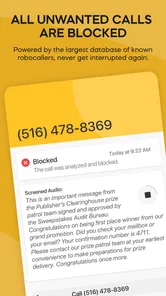
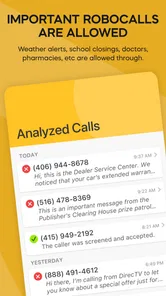
Nomorobo Max is a call and message protection service designed to help identify and block unwanted communications, including robocalls, telemarketing calls, scam attempts, and suspicious text messages. After setup, it works in the background and uses reputation data, detection tools, and user reports to flag potential threats. It is intended to reduce interruptions while still allowing legitimate contacts to reach you.
Does Nomorobo Max block every spam or scam call automatically?
No spam-blocking app can guarantee that every unwanted call will be stopped. Nomorobo Max can identify many known robocallers and suspicious numbers, but new scam numbers may appear before they are recognized. Depending on your settings and device, some calls may be blocked, silenced, labeled, or sent to voicemail. It is still important to review uncertain calls carefully and avoid sharing personal information.
Is Nomorobo Max available for both Android and iPhone?
Nomorobo Max availability and supported features can vary between Android and iOS. Some functions may depend on the operating system, mobile carrier, phone model, and the permissions granted during setup. Before downloading, check the official store listing and the developer’s current compatibility information. iPhone users may need to enable call-identification or filtering features in system settings, while Android users may have different default-call-app requirements.
Pros
- Blocks robocalls
- telemarketers
- and many scam calls automatically.
- Offers caller ID details to help identify unknown numbers.
- Can filter spam text messages in addition to unwanted calls.
- Provides protection across multiple devices with one subscription.
- Includes tools for reporting suspicious calls and improving detection.
Cons
- Some legitimate calls may occasionally be flagged as spam.
- Full protection requires a paid subscription after the trial period.
- Call filtering may vary by country
- carrier
- and local spam databases.
- Advanced features can require access to call and message permissions.
- The app may use additional battery while monitoring calls and texts.












