

Nomorobo Basic Robocall Block
- 1.64K
- 3.6
- Installs
- 100.00K
- Price
- Free

Screenshots

Analysis by Reviewed
Unwanted calls are one of those problems that seem small until they interrupt a work meeting, wake someone up, or make an ordinary phone call feel suspicious. I reviewed Nomorobo Basic Robocall Block as a communication app from Telephone Science Corp, and its purpose is refreshingly focused: reduce the number of robocalls, telemarketing calls, and phone scams that reach you. It is free to install, rated for Everyone, and has passed the point of being an obscure utility, with over 100 thousand installs.
My main impression is that Nomorobo is most useful when you want a layer of screening between your phone number and the constant stream of unwanted callers. It is not a replacement for common sense, and it cannot turn every unknown call into a harmless one. What it can do is make nuisance calls less disruptive, especially for people who receive repeated automated calls and do not want to spend their day manually identifying them.
The app has an average rating of 3.6 from around 2.6 thousand ratings, alongside roughly 1.6 thousand written reviews. That tells me the experience is useful but not universally smooth. In practice, call-blocking tools are judged in a very personal way: one person may care most about stopping volume, while another may be more concerned about a legitimate caller being treated as suspicious. That difference matters when deciding whether this is the right solution for you.
What Nomorobo’s call-blocking approach changes
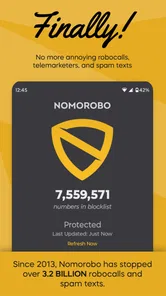
The central capability is simple to understand: Nomorobo works to stop robocalls, telemarketers, and phone scams from calling your phone. The important distinction is that it addresses the interruption before you have to deal with the caller yourself. Instead of answering every unfamiliar number and deciding whether it is genuine, you let the app take on part of that filtering job.
That can make a bigger difference than the description initially suggests. A nuisance call does not only cost the few seconds spent answering. It can break concentration, create anxiety when the number looks local, and encourage you to ignore unknown callers altogether. For someone waiting for a delivery, a medical office, a school, or a new client, that last consequence is especially inconvenient. A blocking service has to balance both problems: reducing unwanted calls without making every unfamiliar number feel unsafe.
I see the app as a practical middle layer between the phone’s normal caller controls and the more extreme option of silencing every unknown number. Basic phone settings are often enough for a few persistent contacts, but they usually require you to react after the problem appears. Nomorobo is aimed at the broader pattern of automated and commercial abuse rather than one irritating number at a time.
That focus also explains why it will not suit everyone. If you rarely receive unwanted calls, the benefit may be too minor to justify adding another communication tool to your routine. On the other hand, if your phone rings repeatedly with calls you never intended to receive, the app’s narrow purpose becomes its strength. You do not have to learn a large suite of unrelated features before getting value from it.
More From Our News Desk

 Gmail
GmailGmail in a Busy Inbox: Who Benefits Most?
From first account to crowded workday, Gmail earns its place through dependable search and flexible sorting—but its best fit depends on how much inbox maintenance you can tolerate.

 Prime Video
Switching to Prime Video: What Changes in Your Viewing Routine
Prime Video can make a compelling second home for streaming, but switching means learning a different catalog, rental layer, and route from browsing to playback.

 Universal TV Remote Control
Universal TV Remote Control Works Best as a Reliable Backup
A phone remote earns its place through quick setup and reliable habits. Here is how to get more from Universal TV Remote Control—and where its limits show.

 Weather - By Xiaomi
Weather by Xiaomi Review: Clear at a Glance, Less Clear Up Close
Xiaomi’s weather app makes everyday forecasts quick to scan, but its calm surface can leave useful details and recovery paths harder to find than they should be.

 X
XX Under Pressure: Can It Recover When Posting Goes Wrong?
A resilience-focused review of X, examining setup, mistaken posts, interruptions, weak connections, and the gaps that matter when recovery needs to be dependable.

 Clash of Clans
Clash of Clans Is Won Between the Battles
Its raids are quick; its community is a long-term project of coordination, teaching, rivalry, and shared responsibility—with all the friction that entails.
Latest News



How the app fits into an everyday call routine
After installing a call-screening app, the most important part is not simply opening it once. You need to think about how you normally handle unknown numbers. I would treat Nomorobo as a filter that supports my existing habits, not as permission to answer every call without checking. If a call is blocked or identified as unwanted, I still consider whether I am expecting something important before ignoring similar calls in the future.
A realistic example is a busy weekday when several automated calls arrive while I am working. Without a dedicated filter, I might stop what I am doing repeatedly, glance at each number, and wonder whether one is legitimate. With Nomorobo in the picture, the intended benefit is fewer interruptions reaching that point. The value is not excitement; it is the quiet return of attention to the task I was already doing.
There is also a useful habit hidden in this kind of setup: keep important callers informed through channels you already trust. If I am expecting a call from a company, clinic, or service provider, I do not rely on the caller’s number alone. I check the appointment details or contact the organization through its known channel if something seems unusual. This matters because call-blocking accuracy can never replace verification, especially when scammers imitate familiar numbers.
Nomorobo is therefore best understood as a reduction tool, not an absolute guarantee. It aims to lower exposure to unwanted calls, but I would still avoid sharing sensitive information with an unexpected caller. If someone asks for passwords, payment details, security codes, or urgent action, I end the call and make contact independently. The app can reduce the number of suspicious conversations; it cannot make a suspicious conversation safe.
Where the focused approach works best
The strongest use case is a phone that has become a regular target for automated calls. This may be a personal number that has circulated widely, a number used for online forms, or a line that receives frequent marketing attempts. In that situation, manually blocking callers becomes a repetitive chore because new numbers keep appearing. A service designed around robocalls and telemarketing is more sensible than maintaining a long list by hand.
I also think the app can be valuable for people who need to remain reachable but dislike answering unknown numbers. Parents, freelancers, older adults, and anyone managing work through a personal phone often face this conflict. Silencing all unfamiliar calls may protect peace and quiet, but it can also hide a genuine first-time caller. A more targeted screening approach offers a compromise: reduce known nuisance patterns while leaving room for necessary communication.
Another good scenario is a shared household where one person is particularly affected by interruptions. Repeated scam calls can be more than annoying for someone who is less comfortable judging whether a caller is legitimate. In that case, Nomorobo can serve as an initial safeguard, while family members still explain the basic rule that no unexpected caller should receive private information or immediate payment.
I would be more cautious about recommending it to someone whose work depends on answering many unfamiliar numbers. A contractor, recruiter, journalist, or sales professional may receive legitimate calls from numbers that are not already familiar. For that person, aggressive filtering can create a different kind of friction. The right question is not “Can this block unwanted calls?” but “How much inconvenience am I willing to accept to reduce them?”
The trade-off between fewer interruptions and missed context
Every call filter creates a judgment problem. Blocking too little leaves the original nuisance in place; blocking too much can make a useful caller harder to reach. That trade-off is the main limitation I would discuss with a friend before recommending Nomorobo. The app’s purpose is attractive precisely because it makes decisions about calls, and any automated decision deserves some oversight.
For me, the safest workflow is to combine Nomorobo with voicemail and a clear callback habit. If an unfamiliar caller leaves a meaningful message, I can evaluate it without the pressure of a live conversation. If there is no message and the call appears connected to a suspicious pattern, I have less reason to chase it. This approach preserves a route for legitimate callers without forcing me to answer every interruption.
There is another trade-off involving expectations. A person may install a blocking app hoping that all nuisance calls will disappear immediately. That is not how I would judge it. Unwanted callers change numbers and tactics, and no single tool should be treated as a complete defense. The realistic goal is a noticeable reduction in disruption, supported by sensible personal habits.
The app is free to download, but it includes in-app purchases ranging from $2.99 to $49.99 per item. That makes it important to consider the cost of any optional upgrade before committing to a longer-term setup. I would first decide whether the basic experience addresses my actual problem, then examine what a paid purchase changes and whether that difference is worth it for my call volume. The presence of purchases does not automatically make the app poor value, but it does mean “free” should not be read as “every capability has no cost.”
Its age rating of Everyone makes the app broadly approachable, but that does not remove the need for a short explanation when setting it up for a child or older relative. The important lesson is still behavioral: an app can help identify unwanted calls, but no caller should receive private information merely because the call was not blocked. I would make that rule part of the setup conversation.
How it compares with the usual alternatives
The most obvious alternative is the phone’s built-in blocking and spam controls. Those are convenient because they are already part of the device and do not require another app. They can be the better choice for someone who receives only occasional nuisance calls or wants the fewest moving parts. Their weakness, from my perspective, is that the user often has to recognize and block numbers individually, which becomes tiring when unwanted callers keep changing numbers.
Another alternative is to silence unknown callers altogether. That can be wonderfully peaceful, but it is blunt. It treats a first-time legitimate caller much like a robocall. Nomorobo’s appeal is the attempt to be more selective, preserving the possibility of receiving useful calls while focusing on the types of calls people generally do not want.
Manual screening is the cheapest option, but it demands the most attention. Answering, waiting through an automated message, and deciding whether to hang up is a poor use of time when it happens repeatedly. I prefer a tool like this when the volume is high enough that the interruptions themselves have become the problem.
Finally, some people choose to change their number or use a separate number for online registrations. That can work in extreme cases, but it is disruptive because a phone number is often tied to contacts, accounts, deliveries, and work. A call-blocking app is less drastic. It lets me try a focused intervention before changing something as fundamental as my number.
Small habits that make the protection more useful
One practical tip is to keep a record of expected calls during periods when you are waiting for an important response. If I know a clinic, employer, or service provider may call, I save the organization’s official contact details and use them to verify anything that feels questionable. This prevents me from treating a blocked or unfamiliar call as automatically fraudulent while still avoiding impulsive callbacks.
A second tip is to review my own call behavior after a few days rather than judging the app after the first hour. The real benefit is measured by whether interruptions become less disruptive over normal work, rest, and travel. If I still find myself answering many suspicious calls, the setup may not fit my needs. If I stop breaking concentration for calls that never mattered, the app is doing something worthwhile even if I rarely open it.
A third insight is that the best user is not necessarily the person who hates all unknown numbers. It is the person who wants to remain reachable but needs help separating likely nuisance traffic from calls worth considering. That distinction is why I would choose Nomorobo over a total silence setting for a personal phone that still needs to receive first-contact calls.
I would also avoid installing it as a substitute for checking account security. Scam calls often try to create urgency, and the safest response is to slow down. I never confirm sensitive details just because a caller knows my name or appears to know something about me. The app can reduce the number of opportunities scammers get; my decisions still determine what happens when one gets through.
Who should use it and who should skip it
I would recommend Nomorobo to someone whose phone has become a magnet for robocalls, telemarketing, or scam attempts and who wants a targeted way to reduce interruptions. It is particularly appealing when manual blocking has become repetitive, but silencing every unknown caller would risk missing legitimate communication. The focused design makes sense for people who want their phone to feel usable again without abandoning incoming calls altogether.
I would suggest caution for people who answer nearly every unfamiliar number as part of their job. Their legitimate call volume may make any filtering mistake more costly than the nuisance it prevents. They may prefer built-in controls, voicemail-based screening, or a separate professional number so that personal call protection does not interfere with work.
I would also skip it if unwanted calls are only a rare annoyance and the phone’s existing tools already handle them well. Adding a dedicated app is not automatically an improvement when the underlying problem is small. The value grows with the frequency and disruption of the calls, not with the number of features someone can list.
Telephone Science Corp has kept the product centered on a problem that is easy to recognize, and that clarity is its biggest advantage. The app is free to start, available to an Everyone audience, and has been established since its release on October 26, 2017. Its average rating of 3.6 suggests a mixed but meaningful experience rather than a universal solution, so I would approach it with realistic expectations.
My final view is that Nomorobo is worth trying when unwanted calls are stealing attention from your day. I like the idea of targeted filtering more than the all-or-nothing approach of silencing every unknown caller, and the everyday benefit can be substantial when the phone rings repeatedly for no good reason. I would pair it with voicemail, independent verification, and cautious handling of personal information. If your main problem is frequent nuisance calls, this is a focused tool with a clear purpose; if your work depends on every unfamiliar caller getting through, a less selective option may serve you better.
Nomorobo Basic Robocall Block Frequently Asked Questions
Is Nomorobo Basic Robocall Block available for Android and iPhone?
Nomorobo Basic Robocall Block is a communication app for filtering unwanted calls. Before downloading, check that the version in your device’s app store is compatible with your phone and operating system. Call-screening features can work differently on Android and iOS, so the setup steps and available controls may vary by platform.
Who makes Nomorobo Basic Robocall Block, and is it suitable for everyone?
Nomorobo Basic Robocall Block is developed by Telephone Science Corp and has an Everyone age rating. That makes it broadly suitable for general audiences, including people who want help identifying robocalls, telemarketing calls, and phone scams. As with any call-screening app, review its requested permissions and settings before enabling filtering on your device.
What is Nomorobo Basic Robocall Block and how does it work?
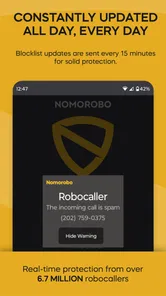
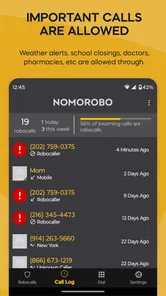
Nomorobo Basic Robocall Block is a call-screening app designed to help identify and stop unwanted robocalls, telemarketing calls, and known scam numbers. After installation, it checks incoming calls against a regularly updated database. Depending on your device and settings, suspicious calls may be blocked automatically or flagged so you can decide whether to answer.
Does Nomorobo Basic Robocall Block block every spam or scam call?
No call-blocking service can guarantee that every unwanted call will be stopped. Nomorobo relies on reported numbers, caller databases, and detection technology, so newly created, spoofed, or constantly changing numbers may occasionally get through. It is most useful as an additional layer of protection, but you should still avoid sharing personal information and remain cautious with unexpected callers.
Is Nomorobo Basic Robocall Block free to use?
Nomorobo offers a basic robocall-blocking experience, but the exact features, limitations, and availability may depend on your platform, region, and current subscription options. Some functions may require an account or paid upgrade. The app is free to download, while in-app purchases range from $2.99 to $49.99 per item. Before downloading, check the app-store listing and in-app pricing carefully, especially if a trial period or automatically renewing subscription is offered.
Pros
- Blocks many known robocalls before your phone rings.
- Simple setup with clear call-filtering controls.
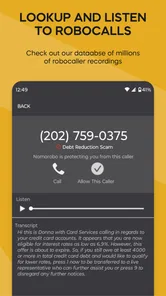
- Caller ID helps identify suspicious numbers quickly.
- Can reduce interruptions from telemarketing and scam calls.
- Useful protection for users who receive frequent unwanted calls.
Cons
- Effectiveness depends on Nomorobo’s database staying up to date.
- Some legitimate calls may be flagged or blocked incorrectly.
- Advanced protection features may require a paid subscription.
- May need ongoing permissions to identify and filter incoming calls.
- Results can vary depending on your carrier and phone model.












