NiceSurveys - Paid Surveys
- 3.17K
- 4.4
- Installs
- 100.00K
- Price
- Free

Screenshots
Analysis by Reviewed
I approached NiceSurveys as a practical lifestyle app rather than a promise of effortless income. Its basic idea is simple: answer surveys in your spare time and receive payment for sharing your opinions. That makes it appealing to people who want a low-commitment activity they can do from home, during a quiet break, or while waiting somewhere. My experience is that the real question is not whether surveys can be completed, but whether the process fits your attention, patience, device habits, and expectations.
Developed by Make Opinion GmbH, the app is free to use and carries a Mature 17+ content rating. It arrived on May 17, 2025, and the current version is 1.0.8, with support starting from Android 7.0. That combination makes it reachable for people using older Android phones, although the age classification is worth taking seriously for younger users and families. NiceSurveys has already passed 100K installs, with a 4.4 average from around 12K ratings and roughly 3.1K written reviews. Those figures suggest a reasonably positive early reception, but they do not remove the need to judge the day-to-day experience for yourself.
How clearly the app presents surveys and everyday tasks
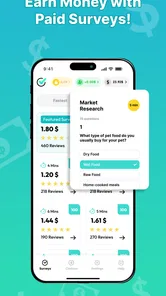
The strongest part of this kind of app is usually its directness. You open it with one purpose in mind, look for an available questionnaire, and decide whether the time involved feels worthwhile. NiceSurveys is best understood through that narrow workflow. It is not a budgeting tool, a job board, or a general rewards hub. If you want a small task built around giving opinions, its focus is easier to understand than that of an app crowded with shopping offers, games, videos, and unrelated promotions.
That focused purpose can help people who find multifunctional rewards apps tiring to navigate. Instead of learning several earning systems, you can concentrate on survey invitations and the information shown before committing your time. I would still recommend reading each screen carefully rather than tapping through automatically. Survey apps often depend on personal answers, eligibility questions, and attention checks, so rushing can lead to an incomplete session or an outcome that feels disappointing.
For readability, the most important practical habit is to use the app when you are alert enough to read every question. A survey may look short at first and then ask for detailed opinions about habits, preferences, or experiences. I would not treat the first screen as a guaranteed estimate of the whole effort. Before starting, I look for the available information about the task and consider whether I can finish without interruption. This is especially useful for anyone who has difficulty processing dense text or remembering a long sequence of answers.
The app’s free price lowers the barrier to trying it, but “free” should not be confused with “costless.” Your time, mobile data, battery, and concentration are still resources. My practical rule is to compare the task with what I could do during the same break. If I have only a few minutes, I prefer a clearly manageable survey rather than beginning something that may require sustained attention. That approach keeps the app from taking over more time than the reward feels worth.
A calmer workflow for people who tire easily
One useful way to use NiceSurveys is to create a small routine instead of checking it continuously. I would open it at a convenient point in the day, review what is available, and choose only a task that fits my energy. Repeatedly refreshing an earning app can become frustrating, particularly when invitations are not suitable or when a questionnaire ends after eligibility questions. A scheduled check makes the experience feel more controlled and reduces the temptation to treat every notification as urgent.
More From Our News Desk

Weather by Xiaomi Review: Clear at a Glance, Less Clear Up Close

X Under Pressure: Can It Recover When Posting Goes Wrong?

Clash of Clans Is Won Between the Battles

Android Auto Makes the Case for Quieter Car Software

MobiOffice: Transforming Mobile Productivity with Seamless Integration

EA SPORTS FC™ Mobile Soccer: Redefining Mobile Sports Gaming
People with dyslexia, attention difficulties, or limited concentration may benefit from taking the survey in short, interruption-free periods. I would keep the phone at a comfortable distance, increase system text size if needed, and avoid answering while walking or multitasking. Those adjustments are not special features I would attribute to NiceSurveys; they are simple ways to make a standard mobile interface easier to handle. The app works better when the user adapts the setting around it.
Another small but important tip is to answer consistently and honestly. Survey platforms need coherent responses, and changing answers simply to reach the end is likely to make the process less useful. I would also avoid guessing when a question is unclear. If the wording does not make sense, stopping is better than submitting an answer I do not understand. That may mean completing fewer surveys, but it protects the quality of the experience and keeps the activity aligned with its purpose.
Motor, visual, hearing, and sensory considerations
Survey answering is generally less physically demanding than many mobile activities because it relies mainly on reading and tapping. There is no fast gameplay, continuous swiping challenge, or need for precise timing. For users with limited fine-motor control, that can make the concept more approachable than reward apps built around rapid interactions. Large, deliberate taps and a stable phone position are usually enough for the basic activity.
That said, the experience can still be tiring for people with tremors, joint pain, or reduced reach. Long questionnaires may require repeated selection, scrolling, and moving between answer choices. I would use both hands or rest the phone on a surface rather than holding it in one hand throughout a lengthy session. If a question requires a small control or an option is difficult to select accurately, patience matters. A survey is not worth aggravating hand discomfort.
For users with low vision, the key issue is not just whether text can be enlarged but whether the entire question remains understandable after enlargement. System-level font and display settings may help, yet enlarged text can also make more scrolling necessary. I would test the app with the phone’s usual accessibility settings before investing much time. If labels become clipped, crowded, or difficult to distinguish, that is a meaningful barrier even when the words technically appear on screen.
People who are sensitive to bright displays or visual motion may prefer using NiceSurveys with reduced brightness, a warmer screen setting, or a dark environment avoided in favor of even room lighting. I would not assume that every screen will feel comfortable simply because the task is static. Survey sessions can involve repeated page changes and concentrated reading, which may cause eye strain. Shorter sessions with regular breaks are a better approach than pushing through discomfort.
Hearing differences are less central to a text-based opinion task than they would be in a video or audio app. However, I would still judge each survey by its actual presentation rather than assuming every question is equally accessible. If instructions depend on sound, spoken content, or media that cannot be understood in another way, that particular survey may not suit someone who cannot hear it clearly. The sensible choice is to leave that task and look for one whose questions can be completed through readable on-screen information.
Why the Mature rating matters for inclusive use
The Mature 17+ classification affects more than age. It means I would not recommend handing the app to a child simply because the surveys appear easy to answer. Adults should also remember that questionnaires can touch on personal opinions and life circumstances. Someone with anxiety, trauma-related sensitivities, or a strong preference for avoiding certain subjects may want to stop immediately when a survey moves into uncomfortable territory.
That is one reason I would use NiceSurveys in a private, calm setting rather than asking another person to answer on my behalf. Personal responses should reflect the participant, not a friend or family member who happens to be nearby. For users who need assistance because of a disability, a helper can make the interface easier to operate, but the answers should still belong to the person whose opinions are being collected. This distinction matters when the app is used as part of a supported routine.
Using it in real situations without losing control
A realistic example would be an adult commuting by train, waiting for an appointment, or taking a quiet break at home. I would first check whether the connection and surroundings are stable enough to finish. Public places introduce distractions, glare, noise, and privacy concerns. If a questionnaire asks about personal habits, answering beside strangers may not feel appropriate. In that situation, I would save the activity for home rather than forcing it into an unsuitable moment.
For someone working from home, NiceSurveys could fit into a short reset between tasks, but I would keep it separate from work notifications and deadlines. The danger is not technical; it is attention. A survey that begins as a break can become a distraction if I keep checking for the next opportunity. Setting a time limit helps preserve the app’s role as an optional side activity instead of letting it interrupt paid work, caregiving, study, or rest.
Travelers should be especially cautious about treating survey income as dependable. Availability may vary with location, profile, timing, and the kinds of participants a questionnaire seeks. I would never plan a bill around expected earnings from this app. It is more suitable for occasional extra money than for replacing employment. That is also where it differs from a conventional part-time job: the user has flexibility, but less control over how much suitable work appears.
Compared with broad cashback and rewards platforms, NiceSurveys has a clearer opinion-sharing identity. A cashback service may be better for someone who already shops online and wants rewards attached to purchases. A microtask platform may suit someone comfortable with repetitive classification or data tasks. A freelance marketplace is a better match for a person selling a defined skill. NiceSurveys makes more sense when the user specifically prefers questionnaires and wants a low-setup activity rather than a portfolio, client relationship, or shopping-based reward.
The trade-off is that a focused survey app can feel empty when there is nothing suitable to complete. That is not necessarily a flaw in the interface, but it changes how I evaluate it. I would rather see it as an occasional option in my routine than as an app that deserves constant attention. If you need predictable hours, guaranteed task volume, or transparent income planning, another category will serve you better.
Questions I would settle before relying on it
The first question is whether it costs anything to start. NiceSurveys is free, so there is no purchase price standing between a curious user and the initial trial. I would still avoid spending money to improve the experience, and I would treat any request for unnecessary payment with caution. The sensible test is whether the ordinary survey workflow is useful without financial commitment.
The next question is whether an older phone can run it. The listed minimum is Android 7.0, which covers devices that are no longer new. That is helpful for users who cannot upgrade immediately. Even so, an older phone may have a smaller screen, slower performance, weaker battery life, or limited storage. The operating-system requirement is only one part of practical accessibility, so I would test a short session before assuming the experience will be comfortable.
Users also want to know whether it is suitable for teenagers. Because the content rating is Mature 17+, I would treat it as an adult-oriented app and keep it away from younger children. For a household with several users, separate profiles and personal privacy habits are important. I would not let a child answer surveys through an adult’s account simply because the phone is shared.
Another common concern is how much attention each task deserves. My answer is to judge the whole interaction, not just the number of questions. Screening questions, reading effort, interruptions, and the possibility of not qualifying all affect the real value of a session. I would track my own time for the first few uses and then decide whether the activity feels worthwhile. This personal measurement is more useful than assuming every survey offers the same return.
Finally, I would ask whether the app fits my accessibility needs without extra effort. If I need high contrast, very large text, screen-reader support, or a completely keyboard-based workflow, I would test those needs directly before committing. The app may be comfortable for one user with limited mobility and unsuitable for another with severe visual or cognitive barriers. Inclusive use is not one universal experience; it depends on the interaction between the individual, the phone, and each survey.
Where the remaining friction shows up
The biggest limitation for me is the uncertainty built into survey work. Even a polished interface cannot guarantee that every available questionnaire will match my profile, mood, reading speed, or available time. Being screened out can feel especially discouraging when I have already answered several preliminary questions. I would approach the app with realistic expectations and avoid interpreting an unsuccessful survey as a personal failure.
There is also a privacy dimension to consider whenever an app asks for opinions about personal life. I would read each question before answering and decide whether I am comfortable sharing that information. People who want a completely anonymous, no-questions-asked earning method will probably dislike this category altogether. NiceSurveys is built around information from participants, so its central activity naturally requires a level of disclosure.
Accessibility barriers can appear in small details: cramped answer choices, long passages without easy breaks, unclear progress, or a session that does not suit someone who needs frequent pauses. I would not recommend completing surveys while driving, walking near traffic, caring for a child who needs immediate attention, or operating machinery. Situational access matters as much as the phone’s interface. A task that is manageable at a desk may be unsafe or stressful in motion.
People with limited data plans should also choose their moments carefully. I would prefer Wi-Fi for any session that includes rich content, and I would keep the app out of situations where a weak connection could interrupt progress. I am not treating that as a confirmed requirement of every survey; it is simply a sensible precaution for anyone managing connectivity or battery carefully.
These limitations do not make the app unusable, but they do define its audience. NiceSurveys suits an adult who can read comfortably, answer independently, tolerate occasional uncertainty, and view the activity as supplementary. It is a weaker choice for someone who needs guaranteed income, cannot share personal opinions comfortably, has severe difficulty with small mobile controls, or wants a completely passive way to earn.
My inclusive verdict after weighing the whole experience
I see NiceSurveys as a straightforward option for adults who want to exchange spare time and personal opinions for the possibility of extra money. Its free entry, lifestyle focus, support for Android 7.0 and higher, and relatively positive early reception make it reasonable to try. The developer, Make Opinion GmbH, has positioned it around a simple activity rather than a complicated collection of earning systems, which can help users who prefer a narrow, understandable workflow.
My recommendation comes with boundaries. I would use it in short, planned sessions, read every question carefully, stop when a topic feels uncomfortable, and never depend on it for essential income. I would also test it with my usual display settings and physical setup before deciding whether it is genuinely accessible for me. That approach is particularly important for users with visual, motor, cognitive, sensory, or situational needs, because the same survey can feel easy in one environment and exhausting in another.
The best way to approach NiceSurveys is as an optional, adult-friendly side activity—not as a guaranteed job. If that expectation matches what you want, the app can fit neatly into quiet moments and give your opinions a practical purpose. If you need predictable earnings, extensive accessibility controls, or tasks that avoid personal questions, I would choose a different type of app. For the right user, though, its focused survey format and low starting barrier make it worth a careful, realistic trial.
NiceSurveys - Paid Surveys Frequently Asked Questions
Is NiceSurveys - Paid Surveys free to download, and which devices support it?
NiceSurveys - Paid Surveys is a free Lifestyle app from Make Opinion GmbH. It supports devices running Android 7.0 or later, making it worth checking your device’s operating-system version before downloading. The app is rated Mature 17+, so its age classification is another point to consider when deciding whether it is suitable for you or someone else using your device.
What is NiceSurveys - Paid Surveys, and how does it work?
NiceSurveys - Paid Surveys is a rewards app that lets users answer market-research questionnaires in exchange for compensation. After creating an account, the app may show available surveys based on your profile, location, and current research needs. You complete qualifying questionnaires, earn rewards when accepted, and can generally monitor your balance from the account or rewards section.
How much money can I earn with NiceSurveys - Paid Surveys?
Your earnings depend on the number of surveys available, their estimated completion time, your demographic profile, and whether you qualify after the screening questions. Some days may offer several opportunities, while other days may have very few or none. It is best viewed as a way to earn occasional extra rewards rather than a dependable replacement for employment or regular income.
Why do I sometimes get screened out of a survey?
Being screened out is common in survey applications and does not necessarily indicate a problem with your account. Researchers usually need responses from specific groups, such as people of a certain age, profession, location, or buying behavior. You may answer initial questions and then be told that your profile does not match the study’s target audience. Availability can also change while you are attempting to qualify.
How and when can I redeem my NiceSurveys rewards?
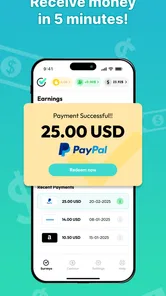
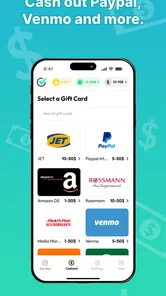
Redemption rules can depend on the reward option offered in the app, your country, and the minimum balance required. Before spending significant time on surveys, review the rewards or withdrawal section carefully for available payment methods, thresholds, processing times, and any verification requirements. Keep your account details accurate, because incorrect information may delay payment or prevent successful redemption.
Pros
- Simple survey interface that is easy to navigate for new users.
- Offers a straightforward way to earn small rewards during spare time.
- Survey invitations can match your profile and personal interests.
- Registration and account setup are generally quick and uncomplicated.
- Useful for users who prefer short tasks over complex earning platforms.
Cons
- Survey availability may vary significantly by location and demographic profile.
- Some surveys can screen you out after answering several questions.
- Rewards are modest and should not be viewed as a reliable income source.
- You may need patience while waiting for enough surveys to become available.
- Personal information is required for profile matching and survey eligibility.













