NBC Connecticut News & Weather
- 649.00
- 3.8
- Installs
- 100.00K
- Price
- Free

Screenshots


Analysis by Reviewed
If you're anything like me, staying updated with the latest news and weather is essential. That's where the NBC Connecticut News & Weather app comes into play. I've been using it for a while now, and here's my take on it.
Where the experience can get stuck
A local news app is most useful when I can get to the information I need quickly, but the first visit can still involve a little orientation. I would start by identifying the parts of the app I expect to use most: local reporting, weather information, alerts, and the live stream. That small check makes it easier to tell whether I am looking at a useful update or simply browsing headlines without a clear purpose.
It also helps to remember what makes a local outlet different from a general news aggregator. A broad news app may be better when I want to compare many publishers or follow a national story from several angles. NBC Connecticut is a more focused choice when the question is what is happening around Connecticut and whether local conditions may affect my day. That focus is valuable, but it also means I would not treat it as my only source for every subject.
The app is free, and its audience is reflected in a 3.5 average from around 2,000 ratings, alongside over 100,000 installs. I take those figures as context rather than a promise that every person will have the same experience. For me, the practical test is whether the local coverage, weather checks, and live viewing fit the routine I actually have.
Setup checks that make daily use easier
Before relying on any news and weather app for a time-sensitive decision, I would check that it opens normally and that I can reach the sections I care about. I would also confirm that the device is online and that the app is up to date. The current version is 8.5.1, and the minimum operating system requirement is 9, so compatibility is worth checking if I am using an older device.
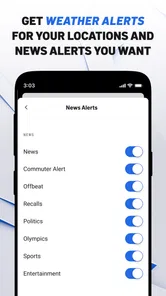
Alerts deserve a deliberate setup rather than an automatic yes to every prompt. I prefer to think about what I would genuinely act on: a significant local weather warning may deserve immediate attention, while frequent general headlines might not. If notifications become noisy, I would review the app’s available notification choices and the phone’s own notification settings instead of assuming that all alerts are equally useful.
There is a trade-off here. An alert can save me from repeatedly checking for an important change, but too many interruptions make it easier to ignore the one that matters. I would begin with only the kinds of updates I expect to need, then adjust after seeing how they fit into an ordinary week. That approach is more practical than turning everything on and deciding later that the phone is too distracting.
More From Our News Desk

Weather by Xiaomi Review: Clear at a Glance, Less Clear Up Close

X Under Pressure: Can It Recover When Posting Goes Wrong?

Clash of Clans Is Won Between the Battles

Android Auto Makes the Case for Quieter Car Software

MobiOffice: Transforming Mobile Productivity with Seamless Integration

EA SPORTS FC™ Mobile Soccer: Redefining Mobile Sports Gaming
A useful routine for local news and weather
For a normal morning, I would use the app as a short local briefing: scan the latest Connecticut coverage, check the weather before choosing clothes or planning a trip, and leave the live stream for moments when watching is more useful than reading. This is a simple workflow, but it separates quick checks from longer viewing and helps me avoid spending more time in the app than the task requires.
Imagine a day when I have to decide whether to leave earlier because conditions may change. I can check the local weather information before heading out, then return later if an alert or developing story makes another look worthwhile. I would still use judgment about travel and safety rather than treating a phone forecast as a guarantee. The value is having a convenient local reference, not removing the need to make a sensible decision.
One less obvious benefit of keeping news and weather together is that I can connect a local story with the practical question it raises for my day. If a developing event affects an area I care about, I can check the app for further local reporting and use its live viewing option when watching coverage seems more helpful than reading a short update. I would not leave a stream running automatically; I would open it when I have time and a clear reason to watch.
Comprehensive News Coverage
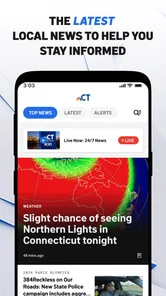
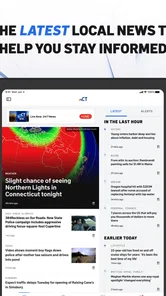
The NBC Connecticut News & Weather app offers a wide range of news articles that cover not just local happenings but also national and international events. I find that it does a splendid job of keeping me informed about the latest developments in various fields, from politics to entertainment. The articles are well-written, concise, and easy to read, which is great when you're on the go.
That mix can make the app a handy first stop, but I would keep its strongest purpose in view: local Connecticut coverage. When I need a quick sense of what is happening nearby, a local outlet can feel more immediately relevant than a national feed filled with stories that do not affect my plans. For a complicated national or international subject, however, I would compare coverage with other trusted sources rather than assuming one local app gives me every useful perspective.
NBCUniversal Media, LLC develops the app, which sits in the news and magazines category. Its content rating is Everyone 10+, a detail parents can consider when deciding whether it suits a younger user. It was released on April 2, 2012, and the current version is 8.5.1. I mention those details because a long-running app may appeal to people who want an established local source, while the version and operating-system requirement remain relevant when checking whether an older phone can run it.
Live Weather Updates
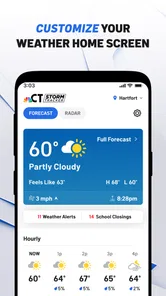
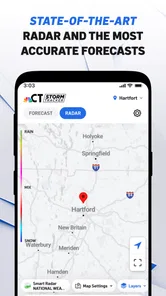
For those of us living in Connecticut, keeping track of the weather is crucial. This app provides real-time weather updates and forecasts, which I find incredibly accurate. The radar section is particularly useful during those unpredictable weather days. Whether it's rain, snow, or sunshine, you're always in the know.
Weather is the part I would check with a specific question in mind. A quick glance can help me decide whether to bring a coat or allow extra time, while a developing situation may call for checking again before I leave. I would not interpret any forecast as a guarantee about the exact conditions at my destination. Local conditions can vary, so for a consequential trip I would compare the latest information with what I can see around me and use ordinary caution.
Compared with a dedicated weather app, a local news app has a different advantage: it can put weather checks alongside area reporting and live news. A specialist weather service may be a better fit for someone who wants extensive forecasting tools or checks weather throughout the day. I would choose based on the task, not on the assumption that one kind of app must replace the other. For occasional planning tied to Connecticut news, having both subjects in one place is convenient.
User-Friendly Interface
One of the things I appreciate about this app is its straightforward interface. Navigating through different sections is a breeze. The layout is intuitive, making it easy even for those who aren't tech-savvy. It's clear that the developers put a lot of thought into making the app accessible to everyone.
For someone new to it, I would avoid trying to explore every section at once. First find the route to local stories and the weather information; then check where live viewing and alert controls are located. Once those paths are familiar, the app becomes easier to use as a practical tool rather than another feed to scroll through. This is especially helpful for a family member who wants a simple way to check local updates without learning a complicated interface.
If something does not appear to load, I would first check the basics: confirm the internet connection, close and reopen the app, and try again after a short pause. If other online services are also slow, the issue may be the connection rather than this app. If the problem is limited to one section, I would return to the main screen and try that section again before making larger changes. These are general troubleshooting steps, not a guarantee that every temporary problem can be fixed on the device.
Notifications and Alerts
I love the customizable notifications feature. You can choose to receive alerts for breaking news, weather warnings, or specific categories that interest you. It's like having a personal news assistant in your pocket, ensuring you never miss out on important updates.
In day-to-day use, I would treat notifications as prompts to check the full update, not as a substitute for reading it. A brief alert cannot always provide enough context to understand what has changed or whether it affects my plans. Tapping through when I have a moment lets me judge the details for myself. If an alert seems delayed or does not arrive, I would check both the app’s notification choices and the device settings, and make sure the phone is connected before concluding that the app itself is at fault.
There is also a useful distinction between wanting awareness and wanting interruption. Someone who follows local developments closely may prefer more notifications; someone who only checks news at set times may be happier with fewer. I would choose the lightest alert setup that still serves my needs, then open the app directly when I want a broader scan. That keeps the phone from turning every headline into an urgent task.
When another source is the better fit
I would recommend this app most readily to people who live in Connecticut, have family or work there, or need a convenient way to keep up with local conditions. It is also a reasonable choice for someone who prefers watching local coverage sometimes rather than relying only on written stories. The app is free, which makes it easy to try without making a purchase part of the decision.
I would steer someone toward a different option if they mainly want a broad, multi-publisher national news feed, specialized weather tools, or coverage centered on a different state. A general news aggregator is better for comparing outlets in one place; a dedicated weather service may suit someone who wants weather as the main activity. NBC Connecticut’s value is its local emphasis and the combination of news, weather, alerts, and live viewing—not being the best single tool for every information need.
If a video or page will not load, I would check whether the rest of the app and other online services work, then retry on a stable connection. If only one item is affected, it may be more useful to return later or read another available update than to keep repeating the same action. If the whole app is unresponsive, restarting it and checking for an available update are sensible first steps. For issues that continue, the app’s support route is more appropriate than guessing at a cause.
My practical verdict
In conclusion, the NBC Connecticut News & Weather app is a must-have for anyone looking to stay informed about their surroundings. Its comprehensive coverage, coupled with real-time updates and an easy-to-use interface, makes it a standout choice. So if you haven't already, give it a try. It might just become your go-to source for news and weather.
I would put that recommendation most strongly to a Connecticut reader who wants one familiar place to check local reporting and weather, with the option to watch live coverage when reading is not enough. I would be more cautious about calling it essential for someone who rarely needs Connecticut information or expects a single app to provide every national story and specialist forecast. The most sensible way to judge it is to use it for a week of ordinary checks: see whether the local stories matter to you, whether alerts help rather than distract, and whether the weather information fits your planning habits.
For me, the strongest reason to keep it installed is practical convenience, not a claim that it replaces every other news source. Keep notifications selective, use the live stream when you actually want to watch, and turn to another source when you need a broader comparison or a more specialized tool. With those expectations, it can be a useful local companion rather than another app demanding constant attention.
NBC Connecticut News & Weather Frequently Asked Questions
Can I use NBC Connecticut News & Weather to follow local stories as well as forecasts?
Yes. NBC Connecticut News & Weather is a news and weather app focused on Connecticut, bringing local coverage and weather information together. You can use it to keep up with news while also checking conditions that may affect your plans. The app’s local focus makes it a practical option for readers who want both subjects in one place rather than switching between separate apps.
What features does the NBC Connecticut News & Weather app offer?
The NBC Connecticut News & Weather app provides users with up-to-date news coverage, live newscasts, and on-demand video clips. It features real-time weather forecasts, interactive radar maps, and personalized alerts for severe weather conditions. Additionally, the app allows users to submit news tips, watch live events, and access investigative reports, ensuring comprehensive local news coverage.
Is the NBC Connecticut News & Weather app free to download and use?
Yes, the NBC Connecticut News & Weather app is free to download and use. Users can access a wide range of news articles, weather updates, and video content without any subscription fees. However, to enjoy an ad-free experience or access premium features, users might need to consider in-app purchases or subscriptions, if available.
Does the app provide real-time weather alerts?
Absolutely, the NBC Connecticut News & Weather app includes real-time weather alerts to keep users informed of severe weather conditions. These alerts are customizable, allowing users to set up notifications for specific areas of interest, ensuring they receive timely updates on weather changes that might impact their daily plans or safety.
Can I watch live broadcasts through the NBC Connecticut app?
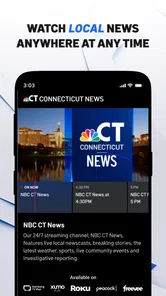
Yes, the NBC Connecticut News & Weather app offers live streaming of broadcasts, allowing users to watch live newscasts and breaking news events as they happen. This feature ensures that users stay informed with the latest updates and developments in their community, even when they are on the go.
Pros
- Real-time weather alerts.
- Live news streaming feature.
- User-friendly interface.
- Customizable news feeds.
- Detailed weather forecasts.
Cons
- Frequent ads interruptions.
- Limited offline content.
- Occasional app crashes.
- Heavy data consumption.
- Limited international news.













