NBC 5 Chicago: News & Weather
- 994.00
- 3.9
- Installs
- 100.00K
- Price
- Free

Screenshots


Analysis by Reviewed
I installed NBC 5 Chicago: News & Weather to see how well it works as a practical local-news tool rather than treating it as just another headline reader. My impression is that it makes the most sense in a Chicago household where people want a quick way to check local updates, weather alerts, and the NBC 5 Chicago live feed without opening a broad national news service first.
The app is free, aimed at Everyone, and comes from NBCUniversal Media, LLC. It sits in the News & Magazines category, but its value is more local and immediate than that label suggests. I found myself thinking less about long reading sessions and more about short checks: what is happening nearby, whether weather deserves attention, and whether live coverage is useful at that moment.
Its store rating sits at 3.9 from around three thousand ratings, with close to one thousand written reviews. That is a mixed but respectable signal. It suggests that many people find the local focus worthwhile, while others may run into the normal frustrations of a news app, such as changing content, notification preferences, or performance that depends on the device and connection.
How the app fits into a shared Chicago household
The most convincing use case is a shared-device situation. Imagine a phone or tablet in the kitchen, living room, or family car that several people check during the day. One person may want the morning forecast, another may be watching for traffic-affecting weather, and someone else may want live local coverage during a developing story. A focused Chicago app can be more convenient than asking everyone to search through a national news application.
I like the fact that the app’s purpose is easy to understand. It is not trying to be a complete replacement for every source of information. Instead, it gives a household a common local starting point. That can help when family members have different interests but live in the same area: one person can look at weather, another can follow news, and both are using the same local outlet rather than comparing unrelated national summaries.
There is also a useful distinction between a shared device and a shared account. I would be comfortable using the app on a household tablet for general local information, but I would not assume that every person’s preferences, alerts, or viewing habits should be treated as identical. If several people rely on the same device, the person who last changed the app’s settings may affect what the next person sees. That is not a reason to avoid it; it is simply a reason to agree on how the device should be used.
A practical routine is to check the app at the beginning of the day for local headlines and weather, then return only when an alert or live coverage is relevant. This keeps it from becoming background noise. In my experience, local-news apps are most useful when they answer a specific question quickly, not when they are left open all day in the hope that something important will appear.
More From Our News Desk

Weather by Xiaomi Review: Clear at a Glance, Less Clear Up Close

X Under Pressure: Can It Recover When Posting Goes Wrong?

Clash of Clans Is Won Between the Battles

Android Auto Makes the Case for Quieter Car Software

MobiOffice: Transforming Mobile Productivity with Seamless Integration

EA SPORTS FC™ Mobile Soccer: Redefining Mobile Sports Gaming
What I would do before handing it to someone else
Setup is straightforward in concept because the app has a narrow purpose, but I would still spend a few minutes deciding how it should behave on a shared phone. I would first confirm that the device runs at least iOS or Android equivalent to version 9, since that is the stated minimum operating-system requirement. On an older device, compatibility is the first practical boundary to check before expecting a smooth experience.
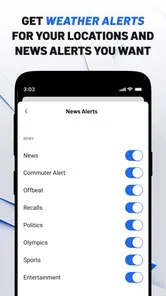
Next, I would review the notification choices rather than accepting every prompt automatically. Weather alerts can be valuable, especially when a household needs early warning, but frequent or poorly timed notifications can make people dismiss all alerts. My preference would be to keep only the notices that support a clear household decision, such as whether to change a commute, outdoor plan, or school-related routine.
I would also explain to other users that live news is not the same as an on-demand archive of everything that has happened. The app’s live NBC 5 Chicago coverage is useful when an event is unfolding or when I want a local broadcast perspective, but it should not be treated as a permanent substitute for reading a full report. A shared-device user should know whether they are opening a live stream, a current story, or a weather update before making an important decision.
One small but useful habit is to leave the app in a neutral place after using it. If one household member opens a weather alert, the next person may otherwise assume that the same screen is still the most important information. Returning to the main news view, when possible, makes the device less confusing for the next user. This is a simple coordination practice, but it matters more on a family tablet than on a personal phone.
I would not build household expectations around hidden personalization. The app is best treated as a local information window, not as a private profile system for every member of the family. If someone needs a separate, carefully tailored news routine, a personal device and individually chosen sources may be a better arrangement.
Coordinating alerts, live coverage, and daily routines
The app becomes more useful when a household agrees on what deserves attention. For example, one person can check the forecast before leaving for work, while another checks the live NBC 5 Chicago feed during a major local development. That division avoids everyone repeatedly refreshing the same screen and gives the app a clear role in the day.
Weather alerts are particularly suited to coordination because they can affect more than one person. If the app sends a notice about conditions that may change travel or outdoor plans, I would use it as a prompt to discuss the plan, not as the only source for a high-stakes decision. A forecast or alert can tell you that attention is needed; it still makes sense to consider the exact location, timing, and circumstances before acting.
For live coverage, the trade-off is different. Watching a local broadcast can provide a stronger sense of immediacy than scanning short headlines, but it also requires more attention and a reliable connection. If someone is trying to prepare breakfast or leave the house, a headline may be more practical than a live stream. If the household is already following an important Chicago story, the live option can be the better choice because it reduces the need to jump between unrelated sources.
My strongest tip is to separate “check now” information from “read later” information. Weather warnings and developing local events belong in the first group. Longer stories can wait until there is time to read them properly. This simple distinction prevents the app from competing with every other notification on a shared device and helps each person use it for the task that fits the moment.
There is another trade-off with local focus. A Chicago-centered app can be more relevant than a general news feed for neighborhood and regional awareness, but it will not necessarily satisfy someone who wants extensive national, international, business, or specialist coverage in one place. I would pair it with a broader source if the household needs a complete news diet, rather than expecting one local app to cover every subject equally.
Age, trust, and how I would explain it to younger users
The Everyone rating makes the app approachable for a broad household audience, including families who want local information available on a shared device. Still, an age label does not mean every news story will be emotionally neutral. Breaking events can involve accidents, severe weather, conflict, or other upsetting subjects. I would introduce the app to a younger user with that context instead of presenting it as a carefree entertainment app.
For children or early teenagers, I would encourage checking local news with an adult when a story is confusing or alarming. The app can help them understand what is happening around Chicago, but a headline or live segment may lack the background needed to interpret it calmly. The responsible approach is to discuss the difference between an initial report, a developing story, and confirmed details without turning every update into a source of worry.
For older teenagers, the app can be a useful way to build a local-news habit. I would suggest asking them to compare a quick headline with the fuller story and to notice whether an update is about weather, live coverage, or general reporting. That teaches a practical media skill: not every item should be consumed in the same way, and not every alert requires immediate action.
Trust is also important for adults sharing the app. NBCUniversal Media, LLC is the developer, and the NBC 5 identity gives the app a clear local-news context. Even so, I would avoid treating any single outlet as the only voice a household needs. For everyday awareness, the app is convenient; for an important decision, I prefer checking the details and considering other relevant information as well.
I also would not assume that a shared device creates separate boundaries between family members. Someone who wants a private reading history, personal notification routine, or completely separate media preferences should use a personal setup where possible. The app works well as a common local reference, but that is different from being a fully individualized household service.
Where it beats broader news alternatives
Compared with a general news aggregator, the app’s advantage is focus. A broad feed may offer more topics, but it can bury Chicago information beneath national headlines, opinion pieces, and stories that have little effect on daily life. When I want local weather or NBC 5 Chicago live coverage, going directly to a local app feels more efficient than searching through a crowded front page.
Compared with a weather-only app, it offers more context. A forecast can tell me what conditions may be like, while a local news service can connect weather with the wider situation in the area. That does not make it the best specialist weather tool for every user, but it makes the combination more useful for someone who wants weather and local reporting together.
Compared with watching television news, the app is more flexible for short checks. I can use it when the television is occupied, when the household schedule is busy, or when someone needs a quick update rather than a full broadcast routine. The disadvantage is that a phone or tablet screen can be less comfortable for extended viewing, and live content is more dependent on the quality of the connection and device.
Compared with social-media posts, the app offers a more deliberate starting point for local information. Social feeds can be fast, but they can also mix eyewitness comments, speculation, old posts, and unrelated reactions. I would rather begin with the app when I need a local headline or weather alert, then use other sources only when I need more viewpoints or detail.
That comparison also clarifies who should skip it. If you live outside the Chicago area and mainly want national or international reporting, the local emphasis may feel too narrow. If you want deep customization, a large collection of specialist sections, or a private multi-user profile system, a broader news platform may fit better. The app is strongest when local relevance matters more than breadth.
Everyday friction I noticed and how to work around it
The first limitation is inherent in live and local information: usefulness changes with the moment. During a developing event, the app may be especially valuable; during a quiet period, it may offer less reason to open it repeatedly. I would not judge it by how much time it keeps me inside the app. Its success is whether it gives me the local information I need without unnecessary effort.
The second limitation is notification discipline. Alerts can support a household, but too many interruptions can lead to alert fatigue. My recommendation is to begin conservatively, observe which notices genuinely help, and adjust from there. On a shared device, this matters even more because one person’s preferred alert level can become everyone else’s interruption.
The third limitation is that live viewing and quick reading serve different needs. A live feed is valuable for immediacy, but it is not always the most efficient way to find one specific fact. I would use live coverage when following an unfolding local story and use the news area when I need to scan or revisit information. Expecting both modes to feel identical would make the app seem less consistent than it really is.
Performance will also depend on the device and network. That is especially relevant for a household tablet that may be older or shared with many other apps. Keeping the operating system within the supported range and avoiding an overloaded device are sensible first steps. I would not choose this app as the only emergency communication method; a news app can inform, but it should complement rather than replace direct local instructions when those are needed.
The current version is 8.9, and the app has been available since April 2, 2012. That long presence gives it a familiar, established place in the local-news category, while the current version indicates that the app has continued to receive updates over time. For someone deciding whether it belongs on a household device, the more important question is still practical: does the Chicago focus match the household’s location and routine?
Who will get the most from it
I would recommend it to Chicago residents who want one recognizable place for local news, weather alerts, and live NBC 5 coverage. It is particularly suitable for commuters, households planning around weather, and people who prefer a local broadcast perspective instead of relying only on national feeds.
It is also a sensible choice for a shared tablet in a home, provided everyone understands that it is a common information source rather than a collection of separate personal spaces. A parent can check weather before the school run, another adult can follow local developments, and an older child can learn to keep up with nearby events under sensible guidance.
I would be more cautious about recommending it to someone who rarely wants local coverage or who expects a single app to provide a complete national and international news experience. That user may find a general aggregator more efficient. Likewise, a person who wants highly specialized forecasts may prefer a dedicated weather service alongside, or instead of, this app.
The free price makes trying it low-risk, and the Everyone content rating removes one obvious barrier for a mixed-age household. Still, the right choice depends on habits. If people in the home ignore alerts, do not live near Chicago, or prefer print-style long-form reading, the app may not become part of their routine no matter how accessible it is.
My household verdict
After using it as a local-news companion, I see NBC 5 Chicago: News & Weather as a focused tool rather than an all-purpose media hub. Its strongest qualities are the Chicago-specific perspective, the combination of news and weather, and access to NBC 5 Chicago live coverage when a broadcast-style update is more useful than a short headline.
I would install it on a shared household device if the people using that device live in or closely follow the Chicago area. I would set notification expectations first, explain that breaking news can be upsetting for younger users, and treat the app as a starting point for informed decisions rather than the only source anyone consults.
My final recommendation is simple: use it when local relevance is the priority, and pair it with broader or specialist sources when your needs extend beyond Chicago. The app does not need to do everything to be worthwhile. For a family or household that wants quick local awareness without sorting through a national feed, it earns a place on the device. For everyone else, its narrow focus is likely to be its main drawback rather than its main strength.
NBC 5 Chicago: News & Weather Frequently Asked Questions
Can I watch NBC 5 Chicago live in the app?
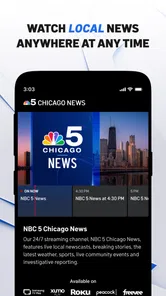
Yes. NBC 5 Chicago: News & Weather offers live viewing around the clock, making it useful if you want to follow local coverage as it happens rather than rely only on written updates. The app is free to download, and watching live video requires an internet connection. If you plan to stream while away from Wi-Fi, your mobile data plan may apply.
What devices and operating systems can run NBC 5 Chicago: News & Weather?
The app is available for Android and iOS devices, with the minimum supported operating system listed as version 9. Before downloading, check your device’s operating-system version and the app’s compatibility information in its store. Keeping your device and app updated can help you access the latest available version and features.
What is NBC 5 Chicago: News & Weather?
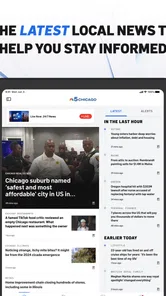
NBC 5 Chicago: News & Weather is a local news application focused on the Chicago area and surrounding communities. It typically provides breaking news, live updates, weather forecasts, radar imagery, video reports, traffic information, and coverage of local events. The app is designed for users who want Chicago-specific reporting in one convenient mobile experience.
What kind of news and local information does the app provide?
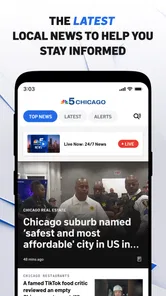
The app covers a broad range of Chicago-area topics, including local politics, crime, public safety, business, sports, entertainment, community stories, and major regional events. Users can usually browse developing stories, watch news clips, receive important alerts, and follow coverage relevant to their neighborhood. Available content and categories may change depending on current events.
Does NBC 5 Chicago: News & Weather offer live weather forecasts and alerts?
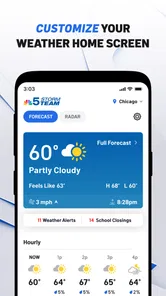
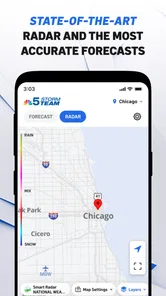
Yes, weather is one of the app’s main features. Users can generally view current conditions, hourly and extended forecasts, interactive radar, severe-weather coverage, and location-based updates. The application may also send notifications about storms, watches, warnings, or other significant conditions. Location permission may be requested to provide forecasts for your current area.
Pros
- Live local news
- weather alerts
- and traffic updates in one app.
- Personalized forecasts help you plan commutes and outdoor activities.
- Video reports make major Chicago stories easy to follow.
- Breaking-news notifications can keep you informed throughout the day.
- Covers neighborhoods and communities across the Chicago area.
Cons
- Frequent notifications may feel excessive unless you adjust alert settings.
- Some video content may require a stable
- fast internet connection.
- Advertising can interrupt browsing and reduce available screen space.
- Coverage is mainly Chicago-focused and less useful outside the region.
- Forecast accuracy may vary during rapidly changing Midwest weather.













