Nail Art Design Ideas
- 37.00
- 4.4
- Installs
- 1.00M
- Price
- Free

Screenshots
Analysis by Reviewed
I find a nail-art idea most useful when it helps me make a real decision: what to try, what colors to use, and whether the design fits the time and tools I have. Nail Art Design Ideas is aimed at that kind of inspiration, bringing manicure looks together in one place rather than asking me to hunt through scattered posts. I’d treat it as a reference for choosing a look, not as a substitute for practice or a professional appointment.
Passing the phone around without losing the plot
In a shared household, the app can work well as a casual idea book. One person can browse designs while another helps choose a color combination, and a parent and child can look together before deciding on a simple pattern. That is different from a shared account or a family organizer: I would not rely on it to keep each person’s preferences separate. If several people use the same device, it is worth agreeing on how to save or revisit a design so one person’s browsing does not become another person’s plan.
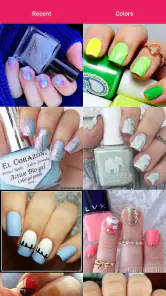
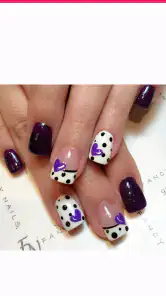
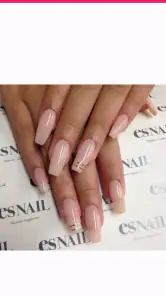
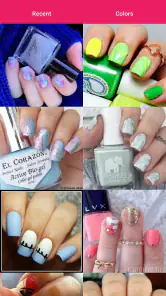
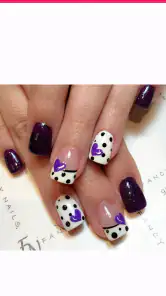
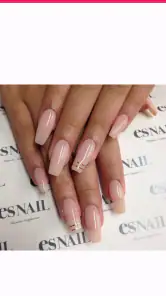
A practical way to use the collection is to narrow the choice before sitting down to paint. Pick a design for the occasion, then check whether its detail looks manageable on your own nails. A reference image can make the goal clear, but it cannot guarantee that the result will match the picture; nail length, polish, tools, and steady hands all matter. For a first attempt, I’d choose a design with a few clear elements instead of copying every decorative detail at once.
Keeping the plan realistic
For a busy evening, I’d use the app to choose one accent nail or a simple color pairing rather than committing to a full set of intricate art. That small change makes the inspiration more usable: it gives me a finished look without turning a quick manicure into a long project. If I’m preparing for an event, I’d browse earlier, settle on a design, and make sure I already have suitable colors. The app can help with the choice; the actual work still depends on what is on hand and how much time I can give it.
This is also where a design collection differs from the usual alternatives. Searching social feeds can produce plenty of fresh ideas, but results may be mixed with unrelated content and are not always easy to revisit. A dedicated nail-art app is more focused, which is helpful when I want to stay on the manicure task. On the other hand, a video tutorial can be better for seeing hand movements, while a salon consultation is the stronger choice for a polished result or advice tailored to my nails. I would use this app for inspiration and planning, then turn elsewhere when I need close instruction or personal expertise.
Age, trust, and expectations
The app is rated for Everyone, so it can suit a broad range of ages when a younger user is browsing with an adult. I’d still guide a child toward age-appropriate designs and keep expectations grounded: an image is inspiration, not a promise that a beginner will reproduce it perfectly. In a household, it is sensible to decide who is using the device and whether anyone is making purchases before handing it over. The app is free to get, with in-app purchases listed at $1.49 per item, so shared-device users should be clear about purchase boundaries rather than assuming every option is included.
For people deciding whether it is worth trying, its appeal is strongest if you enjoy looking at manicure ideas and want a focused starting point. It is less suited to someone who expects a complete virtual salon, personalized advice, or guaranteed step-by-step coaching for every look. I would also skip it if browsing inspiration tends to make me over-plan a manicure I do not have the patience or supplies to do. A saved idea is only useful when it fits the occasion and the effort I’m willing to put in.
More From Our News Desk

Weather by Xiaomi Review: Clear at a Glance, Less Clear Up Close

X Under Pressure: Can It Recover When Posting Goes Wrong?

Clash of Clans Is Won Between the Battles

Android Auto Makes the Case for Quieter Car Software

MobiOffice: Transforming Mobile Productivity with Seamless Integration

EA SPORTS FC™ Mobile Soccer: Redefining Mobile Sports Gaming
The app comes from KDMedia, and its 4.4 average rating across around 2.7 thousand ratings suggests it has found an audience, though that alone cannot tell me whether every design will suit my taste. It has over a million installs, is free to download, and is listed for Everyone. Those details make it easy to consider as a low-commitment source of ideas, while the per-item purchases are worth keeping in mind if the app is shared with younger users.
Choosing designs together
When several people are choosing at once, I find it helpful to agree on the occasion first rather than scrolling until someone spots a favorite. A birthday, a workday, or a weekend at home calls for different levels of decoration, and that shared starting point keeps the browsing from becoming a contest of unrelated preferences. Each person can then name one feature they like—a color, a shape, or a small accent—and the group can settle on a look that can actually be attempted.
There is a useful trade-off here: browsing as a group can make the decision more fun, but too many opinions can turn inspiration into indecision. I’d keep a short list of candidates in mind, then choose based on the person who will wear the manicure and the supplies available. If the app is being used on a family device, taking a quick screenshot or writing down the design description can also help avoid relying on someone else’s browsing history to find it later.
From an image to a workable manicure
A design image is most useful when I treat it as a blueprint rather than a strict template. Before starting, I’d break the look into its largest parts: the base color, the main accent, and any tiny details. That makes it easier to simplify a busy reference without losing its character. For example, a detailed pattern can become one decorated nail with plain color on the others, which is often a more realistic plan for a home manicure.
It also helps to check the design against the tools I already have. A thin line or tiny dot may look effortless in a finished picture but can be difficult to recreate with ordinary polish and an unpracticed hand. If a motif depends on precision, I’d either practice it on paper first or choose a broader, simpler version. That approach saves time and polish, and it lowers the chance that an ambitious reference will spoil an otherwise neat manicure.
For anyone wondering whether the app teaches technique, I would separate visual inspiration from instruction. A photo can show the finished appearance, but a moving demonstration is usually more useful for learning how to hold a brush, place a dot, or build a clean edge. I’d use the designs to decide what I want, then look for a suitable tutorial if I need to learn a specific hand movement. That two-step approach is more dependable than expecting every attractive image to explain how it was made.
What to expect from the app itself
Nail Art Design Ideas is a beauty app from KDMedia, and its stated purpose is reflected in its narrow focus: it is for looking at manicure designs, not for managing a salon visit or replacing a nail technician. The current version is 2.1.4, and it runs on Android 5.0 or later. It was released on April 24, 2016, which gives it a long presence as a design reference, though age alone does not tell me whether its selection matches today’s taste.
The app’s 4.4 average from around 2.7 thousand ratings and more than a million installs make it a familiar option for people browsing nail inspiration. I would treat those figures as context, not as a guarantee that the app will suit my style. There are also 37 reviews, but the more useful test for me is whether I can quickly find designs that fit my own nails, patience, and wardrobe. It is free to install, with in-app purchases at $1.49 per item, so I’d keep an eye on purchase prompts when sharing a device.
One practical question is whether it makes sense for someone who already uses social media for beauty ideas. It can, if the goal is to keep a browsing session centered on nails instead of mixing manicure photos with unrelated posts. If I want immediate interaction, creator explanations, or current discussion around a look, social platforms may be better. If I want to compare manicure ideas without that wider stream, a focused app is a more direct place to begin. Neither option guarantees that a design will be easy to recreate, so I still judge each look by its detail and my own skill.
A sensible fit for different users
I can see this app working especially well for a beginner who is still figuring out personal taste. Browsing can help someone notice whether they prefer clean color blocks, delicate accents, or more elaborate decoration before buying extra tools or booking an appointment. It is also handy for someone who does their nails at home and wants a visual prompt, or for friends choosing a coordinated look before an outing. In each case, the value is in helping make a choice, not in promising a salon-quality result.
It is a weaker fit for people who need customized advice about nail health, shape, or a particular product. A general design reference cannot assess an individual’s nails or explain whether a technique is appropriate for them. Anyone looking for hands-on coaching may be better served by a video lesson, and anyone who wants a look executed neatly for an important occasion may prefer a professional. I would also choose another option if I needed a tool that clearly organizes multiple household members’ choices or keeps their preferences separate.
For younger users, browsing together can be a low-pressure way to explore colors and patterns, but the adult should guide the final plan and handle any purchase decisions. The Everyone age rating makes the app broadly suitable, yet it does not replace ordinary supervision on a shared phone. Agreeing in advance about which designs are practical and whether paid items are off-limits is a simple boundary that avoids confusion. It also helps keep the activity focused on creativity rather than unexpected spending.
My household verdict
After weighing how I would actually use it, I see the strongest case for this app as a shared source of visual ideas that helps turn “What should I do with my nails?” into a manageable decision. It is most useful when the people browsing are happy to adapt a look to their own tools and skill, and when they understand that an image is a starting point. Its focus makes it less distracting than a general feed, but it does not replace technique lessons, personalized recommendations, or a nail professional.
My practical advice is to browse with a purpose, choose one design that matches the occasion, and simplify it before opening the polish. On a shared device, decide who is browsing and who is allowed to make purchases; for a child, look together and keep the plan age-appropriate. Those small boundaries make the app easier to use as a household inspiration book without expecting it to manage everyone’s preferences for them.
Let’s dive into the vibrant world of Nail Art Design Ideas, a mobile app that’s a real game-changer for all nail art enthusiasts out there. If you're someone like me who's always on the lookout for fresh and trendy nail designs, this app might just become your new best friend. It's not just an app; it’s like having a personal nail artist in your pocket, ready to inspire and elevate your nail game.
Discover a World of Creativity
When you first open Nail Art Design Ideas, you're welcomed by a sleek and user-friendly interface. The app boasts a vast collection of nail art designs that cater to every taste imaginable. Whether you’re into minimalist styles or extravagant patterns, there’s something for everyone. The developers have done a stellar job of categorizing the designs into various styles and occasions, making it super easy to find exactly what you’re looking for.
Features That Stand Out
One of the standout features of this app is its step-by-step tutorials. I mean, who doesn’t love a good tutorial? These guides are perfect for beginners and even seasoned nail artists who want to try something new. Each tutorial is detailed yet easy to follow, ensuring that you can recreate your favorite looks at home without too much fuss.
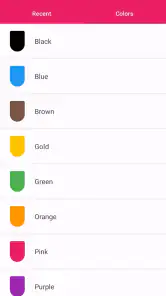
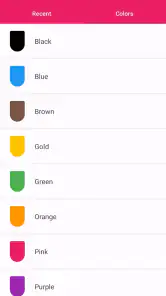
Another cool feature is the color palette suggestions. If you’re ever stuck on which colors to combine, the app offers suggestions that are on-trend and visually stunning. This feature alone has saved me from countless nail art disasters!
Stay Updated with Trends
What’s really fantastic is how the app keeps you updated with the latest nail art trends. The developers frequently update the app with new designs and ideas, so you’ll always have something fresh to try. Plus, there’s a community section where users can share their own designs and get feedback. It’s like having a supportive community of nail art lovers right at your fingertips.
My Personal Experience
I’ve been using this app for a few weeks now, and I must say, it’s been a delightful journey. The variety of designs keeps me excited about my next nail session. I particularly love trying out the seasonal designs that the app offers – they’re always spot-on and add a playful twist to my nails. And let me tell you, the compliments I get every time I try a new design are endless!
In conclusion, if you’re passionate about nail art or even just looking for some fun and creative ways to spice up your nails, it’s definitely worth a download. It’s engaging, easy to use, and packed with features that make nail art accessible to everyone. So why not give it a try and unleash your inner nail artist?
Nail Art Design Ideas Frequently Asked Questions
Is Nail Art Design Ideas free to download, and are there optional purchases?
Nail Art Design Ideas is free to download, so you can explore its nail-art inspiration without paying upfront. The app also offers in-app purchases at $1.49 per item for users who want to buy additional content. The basic experience remains available without a purchase, making it possible to browse ideas first and decide for yourself whether any optional extras are worthwhile.
Who makes Nail Art Design Ideas, and what devices can run it?
Nail Art Design Ideas is a beauty app developed by KDMedia. It is intended for devices running Android 5.0 or later, so checking your device’s operating system before downloading can help avoid compatibility surprises. The app is rated for Everyone, which makes its stated age classification suitable for a broad audience interested in manicure inspiration.
What features does the Nail Art Design Ideas app offer?
The Nail Art Design Ideas app offers a wide range of features to inspire nail enthusiasts. Users can explore thousands of nail art designs, ranging from simple and elegant to intricate and bold. The app includes step-by-step tutorials, DIY tips, and a diverse collection of styles suitable for different occasions. Additionally, it provides a color palette and design guides to help users recreate or customize designs according to their preferences.
Is the Nail Art Design Ideas app suitable for beginners?
Yes, the Nail Art Design Ideas app is designed to cater to all skill levels, including beginners. It offers easy-to-follow tutorials and tips that make it simple for newcomers to nail art to get started. The app's user-friendly interface ensures that even those with no prior experience can navigate the app effortlessly and create stunning nail art with ease.
Can I use the Nail Art Design Ideas app offline?
While some features of the Nail Art Design Ideas app require an internet connection, many resources can be accessed offline. Users can download their favorite designs and tutorials to view them without an internet connection. This feature is convenient for users who wish to access design ideas and guides anytime, anywhere, without relying on data or Wi-Fi.
Pros
- Vast collection of nail art designs.
- User-friendly interface and navigation.
- Regularly updated with new trends.
- Allows design customization and saving.
- Offline access to saved designs.
Cons
- Contains ads in the free version.
- Limited features without premium.
- Occasional app glitches.
- Large app size for storage.
- No social media integration.
- Category
- Beauty
- Version
- 2.1.4











