MyVeteransUnited
- 1.30K
- 4.8
- Installs
- 100.00K
- Price
- Free

Screenshots
Analysis by Reviewed
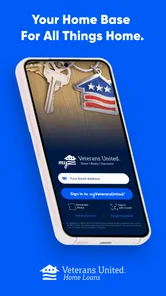
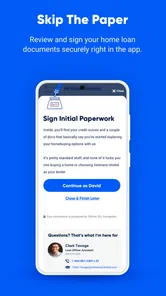
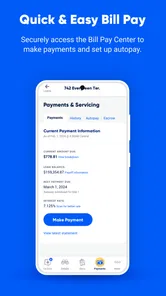
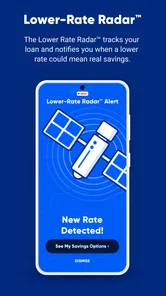
I’d treat MyVeteransUnited as a tool for a specific financial relationship, not as an all-purpose veteran services app. Its role is to help Veterans United borrowers manage a VA home loan, so the first question I’d ask is simple: do I already have a reason to access that loan through this lender? If yes, a dedicated mobile option may be useful. If I’m looking for broad benefits information, a community forum, or a view of every account I own, I’d start somewhere else.
Where people can get stuck
The first hurdle is having the right reason to use it. Someone looking for healthcare, education, career resources, or a forum may arrive expecting a general veterans’ hub and find that a home-loan account is the central use case instead. I’d check that the app fits the loan relationship you want to manage before spending time on setup. Its concise purpose is a strength for borrowers, but it is also a boundary.
Account access is another practical point. A finance app can only be useful once you can connect to the relevant loan information, so have your account details and any sign-in method you normally use for Veterans United available. If access does not work immediately, I would avoid repeated guesswork: check that the entered details are accurate, confirm the connection you are using, and use the lender’s usual support route if the issue persists. That is safer than assuming the app itself has lost or changed loan information.
I’d also separate “I can’t get in” from “I don’t know what this loan detail means.” Those are different problems and need different next steps. A sign-in obstacle calls for basic account-access checks; an unfamiliar term or a question about what a decision would mean calls for the lender or the relevant loan paperwork. Treating every uncertainty as a technical fault can waste time, especially when the real need is an explanation.
Setup checks that save time
MyVeteransUnited is a free finance app from Veterans United Home Loans, has an Everyone age rating, and first appeared on August 3, 2022. Its current version is 3.12.5, and Android users need version 10 or later. Before installing, I’d check that your device meets that requirement and that the publisher is Veterans United Home Loans. Those simple checks can prevent confusion when an older device or a similarly named service is involved.
Once installed, keep the first session simple: sign in, identify where the loan-management tools are, and make sure the information you need is accessible before relying on the app for a time-sensitive task. I would not treat a successful installation as proof that every account issue is resolved. A useful habit is to compare what you see with your existing lender records, especially when reviewing a detail that could affect a payment or a decision.
For a smoother first try, I’d do the setup when I have a few quiet minutes rather than just before I need to handle something urgent. Keep the sign-in details you normally use close at hand, check that the phone has a steady connection, and avoid changing several account details at once while troubleshooting. That makes it easier to tell whether the issue is a mistyped credential, a device problem, or a question that belongs with the lender.
More From Our News Desk

 Gmail
Gmail in a Busy Inbox: Who Benefits Most?
From first account to crowded workday, Gmail earns its place through dependable search and flexible sorting—but its best fit depends on how much inbox maintenance you can tolerate.

 Prime Video
Switching to Prime Video: What Changes in Your Viewing Routine
Prime Video can make a compelling second home for streaming, but switching means learning a different catalog, rental layer, and route from browsing to playback.

 Universal TV Remote Control
 Works Best as a Reliable Backup
A phone remote earns its place through quick setup and reliable habits. Here is how to get more from Universal TV Remote Control—and where its limits show.

 Weather - By Xiaomi
Weather by Xiaomi Review: Clear at a Glance, Less Clear Up Close
Xiaomi’s weather app makes everyday forecasts quick to scan, but its calm surface can leave useful details and recovery paths harder to find than they should be.

 X
X Under Pressure: Can It Recover When Posting Goes Wrong?
A resilience-focused review of X, examining setup, mistaken posts, interruptions, weak connections, and the gaps that matter when recovery needs to be dependable.

 Clash of Clans
 Is Won Between the Battles
Its raids are quick; its community is a long-term project of coordination, teaching, rivalry, and shared responsibility—with all the friction that entails.
Latest News



Recovering your workflow
For an everyday scenario, imagine you are away from home and want to check a loan detail before discussing household finances. The app’s value is practical access without having to start from a desktop session. I’d use that moment to review the account, note any question that needs follow-up, and handle important decisions through the appropriate lender channel rather than relying on a quick glance alone. That keeps the app useful without asking it to replace careful financial review.
If a screen seems out of date or an action does not complete, first check whether your connection is stable, then close and reopen the app and sign in again if needed. If the same problem remains, compare with the lender’s established account or support options. This is a sensible recovery path for a financial tool: distinguish a temporary device or connection hiccup from an account matter, and do not keep submitting an action when you are unsure whether it went through.
That last point is particularly useful when you are trying to complete a financial task: pause before tapping again. If you cannot tell whether an action finished, repeating it could create more uncertainty rather than resolve it. I’d check the account or the lender’s usual channel first, then continue only once I understand the current status. It is a cautious workflow, but with loan-related actions, clarity is more useful than speed.
When another option makes more sense
The app is best suited to Veterans United borrowers who want a mobile route to manage their VA home loan. It is less useful for someone comparing mortgage providers, tracking a household budget across several banks, or searching for broad veteran benefits. A bank’s own app may be better for day-to-day spending, while a dedicated budgeting service may give a wider view of accounts. For loan questions involving terms, eligibility, or a consequential change, direct contact with the lender is a better choice than expecting an app screen to explain the full context.
There is also a useful trade-off in keeping a loan-focused app separate from general finance tools. A focused service can make the relevant account easier to reach, but it will not automatically serve as a complete picture of your finances. I’d use it alongside—not instead of—the records and tools I rely on for budgeting, payment planning, or comparing offers. That separation helps avoid mistaking convenient access for independent financial advice.
For someone who already has several finance apps, the practical question is whether this one saves a step for the loan itself. If checking a loan through a general banking dashboard is not possible, a lender-specific route may be worth keeping. If you only need to review broad monthly spending, adding another app may create more places to check without adding much value. I’d choose based on the task I repeat, not on the assumption that one app should handle every part of my finances.
Getting Started with MyVeteransUnited
First things first, downloading and setting up MyVeteransUnited was a breeze. Available for both Android and iOS, the app ensures you spend less time fiddling with settings and more time exploring its features. The initial setup feels intuitive, guiding you through linking your veteran status seamlessly.
Features that Stand Out
One of the standout features is the comprehensive directory of benefits and services. Whether it’s healthcare, education, or career opportunities, everything is neatly categorized. I found this especially helpful in navigating the sometimes confusing world of veteran benefits. Plus, the app updates regularly, which means you’re always in the loop with the latest offerings.
Another cool feature is the community forum. Here, veterans can share experiences, advice, and just chat with fellow service members. It’s like having a supportive community at your fingertips, and trust me, the camaraderie is palpable. The forum is moderated to ensure a respectful and helpful environment, which is a huge plus.
User Experience and Design
The design of the app is sleek yet functional. I appreciated the clean interface, which makes navigation a cinch. No clutter, no unnecessary frills, just straight to the point. The app’s developers clearly prioritized user experience, making sure that even the least tech-savvy among us can make the most out of it.
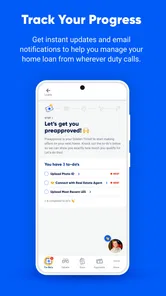
Notifications are another area where MyVeteransUnited excels. The app sends timely alerts about upcoming events, benefit deadlines, and new forum posts. This way, you’re not missing out on anything important. And if you’re like me, prone to forgetting dates, this is a lifesaver.
For a decision that involves more than a quick account check, I’d use the app as a starting point for organizing what I need to ask, not as the final authority. A useful habit is to write down the exact question while it is fresh, then take it to the appropriate lender contact or your documents. That turns a brief mobile session into a concrete next step instead of leaving you with a vague worry about a number or status.
The Final Verdict
In a world where apps often promise more than they deliver, MyVeteransUnited breaks the mold. It’s not just another app you download and forget about; it’s a tool you’ll find yourself using frequently. Whether you’re a tech enthusiast or someone just looking to simplify access to veteran services, this app is worth checking out.
Overall, MyVeteransUnited is more than just a convenience; it’s a community and a resource rolled into one. So, if you’re a veteran or know someone who is, I’d say this app is definitely worth a spot on your home screen.
A focused choice for managing a VA loan
The clearest reason to consider it is the specific job it is meant to do: help manage a VA home loan from the beginning of the process through its later stages. That makes it more relevant than a general finance app when the question is about your Veterans United loan, but less compelling if you simply want one dashboard for every financial account. I’d judge it by whether it makes the loan relationship easier to keep track of, not by how many unrelated tools it offers.
That distinction also helps set expectations about what the app can replace. It may offer a convenient mobile route for loan management, but it is not a substitute for comparing lenders, reviewing official loan documents, or getting a person to explain a complicated decision. If you are still shopping for a mortgage, a comparison process is the better starting point. If you already have a loan with Veterans United, the app is the more natural companion for routine account access.
It is also worth thinking about who should skip it. A borrower who prefers to handle every financial matter in person or through existing paperwork may not gain enough from another mobile tool to justify changing habits. Likewise, someone without a Veterans United loan relationship should not download it expecting it to become a general loan-shopping or veteran-resource service. The strongest fit is narrower: people who want a phone-based way to stay connected to this lender and already have a reason to do so.
What the audience response suggests
It has a 4.8 average from around 3,500 ratings, with more than 1,000 written reviews and over 100,000 installs. That reception is encouraging, though I would not treat a strong aggregate score as a guarantee that every login or device will behave the same way. For a finance app, my own test would be practical: can I get into the account when needed, find the relevant loan information, and recover sensibly if a session fails?
Those figures suggest that plenty of people have tried it, but my recommendation still depends on the match between the app and your needs. Before relying on it for a routine, I’d test the basic path from opening the app to locating the loan information I care about. If that path is clear on your device, it may become a convenient companion. If setup or access repeatedly gets in the way, the lender’s established account and support routes remain sensible alternatives.
My bottom line is measured but positive for the right borrower. I’d recommend giving it a try if you manage a VA home loan through Veterans United and want a mobile option for staying connected to that process. I’d skip it if you expect a general veterans’ resource center, a budgeting suite, or an independent mortgage adviser. Keeping that distinction clear makes it easier to decide whether it deserves space on your phone—and to use it for the work it is actually suited to.
MyVeteransUnited Frequently Asked Questions
Is MyVeteransUnited only for people applying for a VA home loan, or can existing borrowers use it too?
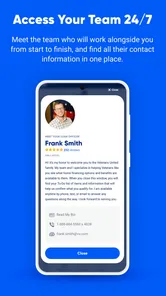
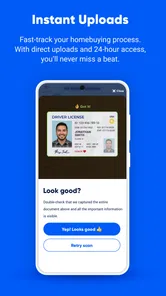
MyVeteransUnited is a finance app from Veterans United Home Loans, intended to help users manage a VA home loan from start to finish. Its focus is home-loan management rather than a general portal for every veterans’ benefit or service, so it is most relevant if you are working with or managing a VA home loan.
What devices can run MyVeteransUnited, and is it free to download?
The app is free and is available for Android and iOS devices that meet its minimum operating-system requirement. Before downloading, check that your device’s software is compatible and that you have enough space for the installation. MyVeteransUnited is rated for Everyone, making it suitable for a broad audience, though its loan-management purpose is specifically relevant to people dealing with a VA home loan.
What is MyVeteransUnited and how can it benefit me as a veteran?
MyVeteransUnited is a comprehensive app designed to assist veterans in managing their benefits, healthcare, and personal records. By using this app, veterans can easily access important resources, track their benefits claims, and connect with support services. It aims to simplify the often complex process of navigating veteran services and ensure users have the necessary tools to manage their post-service life effectively.
How do I register and set up my account in MyVeteransUnited?
To register for MyVeteransUnited, download the app from the Android or iOS store. Once installed, open the app and select the 'Sign Up' option. You will need to provide personal details including your name, email, and veteran ID for verification. Follow the prompts to set up your profile and customize the app settings according to your preferences.
Is MyVeteransUnited secure for storing personal and sensitive information?
Yes, MyVeteransUnited places a high priority on user security and data protection. The app uses advanced encryption methods to safeguard your personal and sensitive information. Regular updates are deployed to ensure security measures are up-to-date, providing peace of mind that your data is protected.
Pros
- User-friendly interface for easy navigation
- Comprehensive resource library for veterans
- Secure platform ensuring data privacy
- Personalized content options based on preferences
- Regular updates with new features
Cons
- Requires stable internet connection
- Limited offline functionality
- May have occasional login issues
- Notifications can be overwhelming
- Some features are behind a paywall