

MyMixtapez: Playlists 24/7
- 98.78K
- 4.2
- Installs
- 10.00M
- Price
- Free

Screenshots
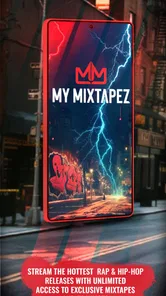
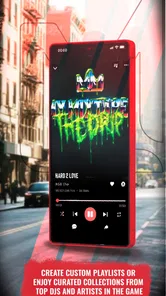




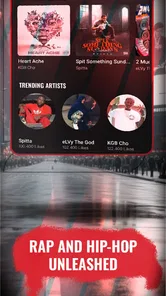

Analysis by Reviewed
I approached MyMixtapez: Playlists 24/7 less like a passive radio app and more like a working toolbox for discovering rap and hip-hop tracks, organizing listening sessions, and finding material that can influence a creative mood. It is a free Music & Audio app from My Mixtapez: Rap & Hip Hop, and its focus is clear from the first use: keep a steady flow of playlists available for people who want rap culture at the center of their listening.
That focus matters. This is not the app I would choose when I want a broad, neutral music service with every genre treated equally. I would open it when I want to move quickly from one rap-oriented selection to another without spending too much time building a library from scratch. After using it as a daily listening companion, I found that its biggest strength is momentum. Its biggest weakness is also connected to that strength: the experience is designed around browsing and consuming a stream of curated material, so it may feel less controlled than a traditional music library.
Starting with a focused rap and hip-hop discovery workflow
The first useful decision is simply knowing what kind of listener you are. If rap and hip-hop are occasional parts of your rotation, the narrow focus may feel limiting. If they are the reason you open a music app, the specialization makes the starting point much easier. I do not have to begin with a blank playlist or spend a long time filtering a general catalog. The app gives me a genre-centered environment where the next listening choice is usually close to the mood I already have.
I find that especially useful when I am starting a creative task. Before writing, editing a short video, sketching ideas, or organizing a personal project, I often need background music that establishes energy without requiring constant decisions. MyMixtapez works well in that moment because I can begin with a playlist rather than manually assembling a queue. The practical benefit is not only convenience; it reduces the interruption caused by repeatedly searching for the next track.
The app’s store summary presents it as a place for top playlists every day, and in practice that promise points toward a discovery-first experience. I would not treat it as a replacement for a carefully maintained personal collection. I would treat it as a launchpad. It is most valuable when I want to hear what is being surfaced in the rap and hip-hop space, then decide which sounds deserve more attention elsewhere or a place in my own listening routine.
Its audience is broad enough to include casual listeners, but the Teen content rating is worth keeping in mind for households. Rap and hip-hop can cover mature themes, strong language, and subjects that are not suitable for every younger listener. I would recommend that parents assess the app alongside the specific music being played rather than assuming that a genre-focused label tells the whole story.
Where it fits beside ordinary music services
Compared with a general streaming service, this app feels more like a specialist channel than a universal music shelf. A mainstream alternative is usually better when I want classical music, podcasts, international pop, albums from many genres, or detailed control over a large personal library. MyMixtapez makes more sense when the search itself is part of the experience and I want the app to keep presenting rap-focused options.
More From Our News Desk

 Gmail
GmailGmail in a Busy Inbox: Who Benefits Most?
From first account to crowded workday, Gmail earns its place through dependable search and flexible sorting—but its best fit depends on how much inbox maintenance you can tolerate.

 Prime Video
Switching to Prime Video: What Changes in Your Viewing Routine
Prime Video can make a compelling second home for streaming, but switching means learning a different catalog, rental layer, and route from browsing to playback.

 Universal TV Remote Control
Universal TV Remote Control Works Best as a Reliable Backup
A phone remote earns its place through quick setup and reliable habits. Here is how to get more from Universal TV Remote Control—and where its limits show.

 Weather - By Xiaomi
Weather by Xiaomi Review: Clear at a Glance, Less Clear Up Close
Xiaomi’s weather app makes everyday forecasts quick to scan, but its calm surface can leave useful details and recovery paths harder to find than they should be.

 X
XX Under Pressure: Can It Recover When Posting Goes Wrong?
A resilience-focused review of X, examining setup, mistaken posts, interruptions, weak connections, and the gaps that matter when recovery needs to be dependable.

 Clash of Clans
Clash of Clans Is Won Between the Battles
Its raids are quick; its community is a long-term project of coordination, teaching, rivalry, and shared responsibility—with all the friction that entails.
Latest News



That distinction also affects how I judge the app. I am not looking for it to replace every audio tool on my phone. I am looking for speed, focus, and a useful supply of playlists. On those terms, it has a clear identity. The 4.2 average from roughly 331 thousand ratings suggests that many listeners find the overall approach worthwhile, while the scale of more than 10 million installs shows that it has reached a substantial audience. I read those figures as evidence of a proven niche, not as a guarantee that every listener will enjoy the same browsing style.
One tip I found helpful is to use the app at the beginning of a session rather than waiting until I am already distracted. I choose a playlist that matches the task, start working, and resist switching selections too quickly. That turns the app from a source of endless browsing into a practical cue for getting started. If I keep searching every few minutes, its variety becomes a distraction instead of a benefit.
Turning discovery into a repeatable making process
For creative work, the useful question is not only “What can I listen to?” but “How can this listening support the work I am trying to finish?” I use the app in three stages. First, I browse for a general direction. Second, I let a playlist run while I make something. Third, I note which kinds of tracks helped or interrupted my concentration. That simple loop gives the app a role in my process without pretending that it is a full production suite.
Imagine I am preparing a short social video with a confident, energetic tone. I might open the app while outlining the edit, choose a suitable rap playlist, and use the first part of the session to establish pacing. I am not exporting audio from the app or treating it as a licensing solution. I am using it to shape my internal sense of rhythm while I decide how quickly the visuals should move. That is a realistic strength: it can help me begin with a mood before I make technical decisions.
The same approach works for writing. A slower playlist can create a consistent atmosphere for drafting, while a more forceful selection can help when I need to push through repetitive editing. I would still keep the volume and lyrical content appropriate for the setting. In a shared office, classroom, or family space, headphones and careful playlist selection matter more than the app’s simple interface.
A less obvious advantage is that specialized playlists can help me compare creative directions quickly. Instead of spending an hour searching individual tracks, I can listen to several playlist styles and ask which one supports the project best. That is useful during the brief stage of a project, when I am testing tone rather than committing to a final soundtrack. The trade-off is that a playlist may contain transitions or choices that do not fit my exact intention, so I need to separate inspiration from final selection.
I also would not use this app as the sole source for a professional music handoff. Listening to a track inside a playlist does not automatically answer questions about ownership, commercial use, attribution, or whether a particular recording can legally accompany a published project. For a video, podcast, advertisement, or client delivery, I would move from discovery to a properly cleared music source before finalizing the work. MyMixtapez can influence the brief; it should not be assumed to solve rights management.
How I handle the browsing friction
The main friction comes from the difference between discovery and precision. When I want a particular song, exact version, or carefully ordered sequence, a conventional library-focused service is usually more comfortable. MyMixtapez is better when I am open to being guided by playlists. That means I need to accept a little less control in exchange for a faster route into the genre.
I found it useful to separate “exploration sessions” from “focus sessions.” During exploration, I let myself browse, compare playlist moods, and notice new directions. During focus work, I pick one suitable starting point and stop touching the app. This small habit prevents the common problem of spending more time deciding what to play than doing the work that the music was supposed to support.
Another practical tip is to treat playlists as temporary creative references. If a selection gives me an idea for pacing, tone, or atmosphere, I write down that insight immediately instead of assuming I will remember it later. This turns casual listening into something actionable. It also avoids relying on the app as a permanent archive of every idea I encounter.
The app is free to download and use, which lowers the barrier to trying this workflow. It does include in-app purchases ranging from $0.99 to $29.99 per item, so I would review any purchase prompt carefully and decide whether the free experience already meets my needs. I would not pay simply because I enjoy the genre focus; I would first confirm that any optional purchase provides a practical improvement for the way I listen.
Iteration: refining mood, pace, and attention
Creative work rarely comes together in one pass, and music can either help iteration or make it harder. MyMixtapez is useful when I want to test whether a project feels too slow, too aggressive, too repetitive, or emotionally flat. I can change the listening direction and observe how my own editing or writing decisions respond. That makes the app a kind of informal mood-testing tool.
For example, I might review a rough video once with a high-energy playlist and again with something more restrained. The point is not to use the playback as the final soundtrack. The point is to notice whether the cuts still feel intentional when the surrounding energy changes. If the edit only works with one very specific musical mood, that may reveal a pacing problem. This is a more valuable use than simply playing music in the background.
I also use it to protect attention during repetitive revision. A familiar playlist can create a boundary around a work block, while a new playlist can signal a fresh stage of review. The distinction helps me avoid treating every revision as the same task. When I need deep concentration, I prefer a predictable selection. When I need new ideas, I accept more variation and let the app surprise me.
The limitation is that discovery can introduce unevenness. A playlist may move between tracks with different intensity, lyrical density, or emotional tone. That can be enjoyable for casual listening but disruptive when I am checking tiny details in an edit or polishing a paragraph. For precision work, I would choose a more controlled audio source or silence. This app supports the creative process best during ideation and broad revision, not necessarily during every minute of final quality control.
There is also a useful distinction between personal taste and project suitability. I may enjoy a track while recognizing that its energy is wrong for the audience or message I am working toward. The app can help me discover possibilities, but it cannot make that editorial judgment for me. I still need to ask whether the mood supports the content, whether the lyrics fit the context, and whether the final audience would interpret the choice as intended.
When another option is the smarter choice
I would choose a general streaming platform over this app when I need reliable access to a particular album, a broad genre mix, podcasts, or a highly organized personal collection. I would choose a dedicated music-production environment when I need to cut audio, arrange tracks, record vocals, adjust levels, or deliver a finished sound file. I would choose a rights-cleared catalog when the project is commercial or public and the music must be safe to publish.
I would also skip it if I dislike rap and hip-hop as a primary listening environment. The specialization is the reason to install it, so it is not a minor detail that can be ignored. Likewise, listeners who want complete control over every transition may become frustrated if they approach it expecting the same workflow as a detailed library manager.
For creators, the best compromise is to use it near the front of the pipeline. Let it help define a mood, stimulate ideas, or test pacing. Then move to tools designed for editing, asset management, and delivery. That division of labor keeps expectations realistic and makes the app more useful rather than less.
Handoff, device expectations, and daily practicality
MyMixtapez is not the final delivery stage of a creative project in my workflow. I use it to inform decisions, not to package a finished asset for a client or audience. Once I have found a direction, I transfer the creative conclusion rather than assuming the music itself can be transferred into another project. In practical terms, that means noting the mood, tempo impression, or playlist style and then sourcing an appropriate final audio asset through the correct channel.
This distinction answers an important question for anyone making content: can the app replace a music licensing service? I would say no. It can be a valuable discovery companion, but publishing requires a separate check of usage rights and project suitability. Keeping those stages separate prevents an enjoyable listening experience from becoming a legal or editorial problem later.
The app has been available since July 17, 2013, and its current version is 8.7.8. It supports devices running Android 7.0 or later. Those details make it accessible to people using older compatible Android hardware, although I would still keep the operating system updated when possible for general device security and stability. The long availability also helps explain why the app feels like an established genre destination rather than a temporary experiment.
In everyday use, I would install it for a commute, a workout, a writing block, or a creative planning session. I would not rely on it as my only audio app. That recommendation is not a criticism; it reflects its focused purpose. A specialist tool can be more useful when paired with a general service than when forced to cover every listening need.
One workflow that worked particularly well for me was to create a short personal note after each creative session: the playlist mood, the type of task it supported, and whether it became distracting. Over time, that turns broad discovery into a personal reference system. I can return to the kinds of selections that helped with brainstorming and avoid those that interfered with detailed work. The app supplies the listening environment, while my notes provide the organization it does not need to provide by itself.
My creator verdict after using it as a working companion
MyMixtapez: Playlists 24/7 earns its place on my phone when I want rap and hip-hop discovery to be immediate, focused, and useful for setting a creative atmosphere. I like it most at the beginning of a project, during broad revisions, and in ordinary moments when I want a genre-centered stream without building everything manually. Its free entry point makes experimentation easy, and the app’s established audience suggests that the approach works for many listeners.
My recommendation comes with clear boundaries. I would not choose it for audio production, final editing, rights clearance, or a carefully controlled delivery workflow. I would also avoid it if my listening needs are spread across many genres or if I want a precise personal-library experience. The app is strongest when I allow it to guide discovery and weakest when I demand exact control from every moment.
For a friend who enjoys rap and hip-hop, I would say: try it as a discovery and creative-mood tool, then judge it by how quickly it helps you find the right energy. Give yourself a simple routine, stop browsing once the work begins, and keep final publishing decisions separate from casual listening. Used that way, it becomes more than background noise. It becomes a practical first step from a vague idea toward a clearer creative direction.
Overall, I see it as a specialized starting point rather than a complete music ecosystem. That is a fair role, and it is one the app handles well. If your projects benefit from rap-focused inspiration and your daily listening already revolves around that world, My Mixtapez: Rap & Hip Hop is worth trying. If you need broad catalog coverage, production controls, or professional handoff tools, keep it as an optional source of ideas and let a different app handle the rest.
MyMixtapez: Playlists 24/7 Frequently Asked Questions
Is MyMixtapez: Playlists 24/7 available for both Android and iOS?
MyMixtapez: Playlists 24/7 is an app in the Music & Audio category, and device compatibility depends on the operating system version and the app’s availability in your region. Before downloading, check its page in the official store for your device and make sure your system meets the listed requirements. Using an official app store also helps ensure you receive the genuine app and its updates.
What does “Top Playlists All Every Day” mean for listeners?
The app’s focus is reflected in its store summary, “Top Playlists All Every Day,” pointing listeners toward playlists and regularly featured music. It is aimed at people who want hip-hop and mixtape content in one place rather than a general-purpose audio library. What you encounter can depend on the catalog and content available to you, so browse the app to see whether its selections suit your listening habits.
What kind of music is MyMixtapez: Playlists 24/7 focused on?
MyMixtapez: Playlists 24/7 is aimed at listeners interested in rap, hip-hop, mixtapes, and playlists. Its Music & Audio focus makes it a natural fit for people looking to explore this style of music in one app. The app is rated for teens, so users and families may want to consider that rating when deciding whether its music content is suitable.
Who develops MyMixtapez: Playlists 24/7, and is it an established app?
The app is developed by My Mixtapez: Rap & Hip Hop and has been available since July 17, 2013. It has more than 10 million installs, with an average rating of 4.2 from around 331,000 ratings and roughly 99,000 written reviews. Those figures suggest a sizeable user base, though individual experiences with music discovery and playback can still differ.
What is MyMixtapez: Playlists 24/7?
MyMixtapez: Playlists 24/7 is a music-focused app built around mixtapes, playlists, and hip-hop content. It is designed for listeners who want to discover tracks, follow popular releases, and stream music in a continuously updated environment. The available catalog, features, and content may vary by region and can change over time as new mixtapes or releases are added.
Pros
- Large library focused on hip-hop
- mixtapes
- and urban music.
- Streams continuously for background listening without manual song selection.
- Playlist discovery makes it easy to find new and trending tracks.
- Simple interface with quick access to stations and curated mixes.
- Useful option for listeners who prefer mixtapes over mainstream catalogs.
Cons
- Music selection may be less appealing outside hip-hop and urban genres.
- Some content availability can vary by region or licensing changes.
- Ad interruptions may affect uninterrupted listening sessions.
- Audio quality and playback stability depend heavily on your connection.
- Limited control over individual tracks in some continuous playlists.











