

My Selftape App
- 11.00
- 3.1
- Installs
- 10.00K
- Price
- Free
Screenshots
Analysis by Reviewed
When I test a self-tape app, I am not looking for a miniature film studio. I want to know whether it helps me record a clean audition quickly, make sensible edits, encode the result, and send it without forcing me to juggle several unrelated tools. That is the practical promise of My Selftape App, a free video app from Apps For Actors Inc. It is aimed at actors who need a focused way to prepare audition footage on a mobile device rather than a broad editor packed with features they may never touch.
My first impression is that its appeal comes from keeping the whole self-tape routine in one place. The app belongs to the video players and editors category, but I would judge it less like a general-purpose video editor and more like a specialized audition utility. That distinction matters. Someone making social clips, travel videos, or polished short films will probably want a different tool. Someone who regularly records monologues, scenes, or casting submissions may appreciate the narrower purpose.
The app is free to install and suitable for Everyone, although optional purchases are listed from $4.99 to $19.99 per item. It has a 3.1 average from around 64 ratings and has passed 10K+ installs, so it is a relatively small product rather than a dominant mobile-video platform. It first appeared on October 20, 2016, and the current version is 0.0.0.593, with Android 6.0 or newer required. Those details suggest a tool with a long presence but a modest audience, which matches my experience of it: useful when its focused workflow fits, less convincing when I expect modern editing polish.
How I would build a reliable self-tape routine
I would build the routine around a few decisions made before opening the app: where the phone will sit, how the reader will sound, and what the final file needs to communicate. Keeping a short checklist beside the recording space helps me repeat a setup that already works instead of troubleshooting from scratch each time. That preparation also makes it easier to spot whether a problem comes from the recording workflow or from the room itself.
Start with the performance, not the editing
The best way to use this app is to decide the audition plan before pressing record. I would read the sides, mark the emotional turns, choose the framing, and place the phone where my eyeline stays natural. The app can help with the recording and finishing stages, but it cannot rescue a performance recorded with poor preparation. Treating it as the final part of an acting routine produces better results than opening it casually and hoping the camera setup will sort itself out.
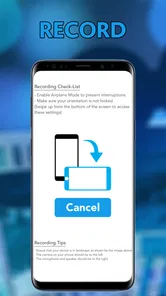
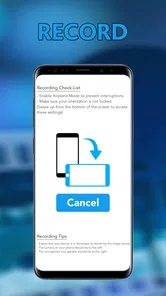
For a normal self-tape, I would first clear enough space for a stable shot, check that my face is visible, and make sure the background is not competing with the scene. A simple, quiet setup usually serves an audition better than an elaborate one. I would then record a short test before doing the full take. That test is valuable because it exposes practical problems early: an awkward crop, distracting room noise, an eyeline that drifts too far from the camera, or a performance area that leaves me half out of frame.
Once the test looks usable, I would record the scene with the same discipline I use in an in-person audition. I would avoid stopping after every minor mistake unless the mistake truly ruins the take. Several complete versions are easier to compare than a pile of fragments. This is where a dedicated self-tape workflow can feel more comfortable than a general camera app: my attention stays on the audition instead of immediately switching into a filmmaker’s mindset.
More From Our News Desk

 Gmail
GmailGmail in a Busy Inbox: Who Benefits Most?
From first account to crowded workday, Gmail earns its place through dependable search and flexible sorting—but its best fit depends on how much inbox maintenance you can tolerate.

 Prime Video
Switching to Prime Video: What Changes in Your Viewing Routine
Prime Video can make a compelling second home for streaming, but switching means learning a different catalog, rental layer, and route from browsing to playback.

 Universal TV Remote Control
Universal TV Remote Control Works Best as a Reliable Backup
A phone remote earns its place through quick setup and reliable habits. Here is how to get more from Universal TV Remote Control—and where its limits show.

 Weather - By Xiaomi
Weather by Xiaomi Review: Clear at a Glance, Less Clear Up Close
Xiaomi’s weather app makes everyday forecasts quick to scan, but its calm surface can leave useful details and recovery paths harder to find than they should be.

 X
XX Under Pressure: Can It Recover When Posting Goes Wrong?
A resilience-focused review of X, examining setup, mistaken posts, interruptions, weak connections, and the gaps that matter when recovery needs to be dependable.

 Clash of Clans
Clash of Clans Is Won Between the Battles
Its raids are quick; its community is a long-term project of coordination, teaching, rivalry, and shared responsibility—with all the friction that entails.
Latest News



Use editing as cleanup rather than decoration
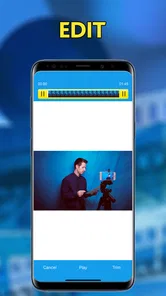
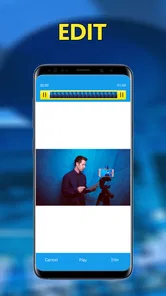
The editing stage should have a clear job. I would remove the few seconds before the scene begins, trim the end after the final moment, and keep the performance intact. For casting material, restraint is usually a strength. Dramatic transitions, filters, music, and aggressive color changes may make a clip look more “produced,” but they can also distract from the actor and create an impression that the footage is trying too hard.
A useful habit is to watch the trimmed version from beginning to end before sending it. I would check that the first spoken line is not cut too tightly, that the final reaction has enough room to land, and that the edit does not accidentally remove a breath or a meaningful pause. These small checks are more important than adding visual effects. They are also the kind of repeatable habits that make a basic app feel more capable in practice.
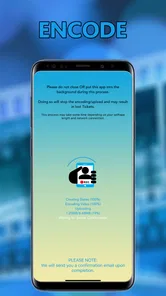
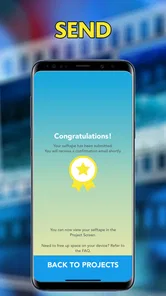
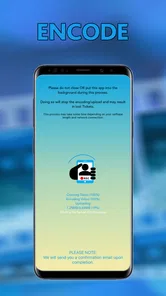
The app’s record, edit, encode, and send orientation is especially relevant here. I would treat encoding as part of delivery, not as an afterthought. A file that plays correctly on my phone may still deserve a test in another player or through the intended sharing route. If the audition is important, I would send a test copy to myself first and confirm that the picture, sound, and opening frame survive the process.
What a realistic everyday session looks like
Imagine I receive a short audition request during a busy day and have only a quiet corner available at home. I would prepare the sides, place the phone at eye level, and make a brief test take. After reviewing it, I might move the phone slightly farther away to improve framing rather than trying to repair the crop later. I would record two or three complete versions, compare them while the scene is still fresh, and choose the take that feels most truthful rather than the one with the most dramatic gestures.
Then I would trim the beginning and end, watch the finished clip without touching the controls, encode it, and use the app’s sending workflow. Before submission, I would confirm the recipient and file once more. This routine avoids a common mistake: spending all the available time recording and leaving no time to inspect the actual file. The app is most useful when it supports this calm sequence instead of becoming another source of last-minute decisions.
Settings worth checking before a serious take
I would not assume that the default setup is automatically right for every room or script. Before recording, I would inspect the available recording and output controls and make sure the result matches the purpose of the audition. The important question is not whether every option is enabled; it is whether the final video is clear, stable, and easy for another person to review.
Framing deserves particular attention. A close-up can reveal subtle reactions, while a wider shot may be necessary when movement or physicality is part of the scene. I would choose the shot size before recording and keep it consistent across takes. Reframing later can remove useful space around the actor, so a few seconds spent checking the composition is better than relying on an edit to fix it.
Sound is another area where experienced users should be methodical. I would record a spoken test at the same volume and distance I expect during the scene, then listen back with headphones if possible. A phone can produce an acceptable image while capturing room echo or uneven speech. If the environment is noisy, changing the room or moving closer may help more than any post-production adjustment. The app’s convenience does not remove the need for a sensible recording environment.
I would also check the output before committing to a long session. Encoding is a trade-off: a smaller file is easier to send, while a larger file may preserve more detail. I would select the most practical result for the recipient and the connection I expect to use, then test that file. Since optional purchases exist, I would review any paid choice carefully and ask whether it solves a real problem in my workflow or merely adds a convenience I can live without.
One useful discipline is to keep a repeatable setup note outside the app. I would record the phone position, approximate distance, preferred framing, and the room that gives the cleanest sound. This is not a hidden feature; it is a habit that makes the app more dependable. When a new audition arrives, I can reproduce a proven setup instead of experimenting while under deadline pressure.
Faster patterns for repeat users
Actors who submit frequently can make the workflow faster without rushing the performance. I would prepare a small routine: open the app, confirm the camera position, record a short test, capture complete takes, select one, trim only what is necessary, and inspect the encoded file. Repeating the same order reduces the chance of forgetting a delivery step.
I would also separate “performance review” from “technical review.” On the first playback, I would judge acting choices, pacing, and connection. On the second, I would check framing, sound, unwanted pauses, and the beginning and ending of the file. Mixing those questions together can lead me to reject a strong take for a minor technical issue or keep a weak take because it looks tidy.
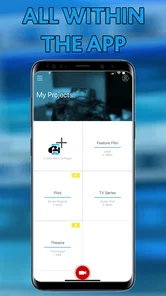
Another efficient pattern is to name or organize takes immediately if the app and the phone’s file workflow allow it. I would use a simple convention based on the role, scene, and take order rather than relying on memory. This becomes important when several auditions are recorded close together. A clean file-handling habit protects against sending the wrong version, which is a more serious problem than spending a few extra seconds on organization.
For a scene with a reader, I would decide in advance how the reader will be handled and keep the eyeline consistent. The app can record the image, but the quality of the interaction still depends on preparation. If the reader’s voice is needed, I would listen carefully to the balance during the test. If the reader is off camera, I would avoid turning so far that the performance loses its connection with the viewer. These choices are not flashy, but they make a self-tape feel intentional.
I would avoid repeatedly exporting the same clip through multiple apps. Every extra handoff creates another opportunity for an unwanted crop, altered sound, or confusing file version. My preferred pattern would be to make the cleanest edit inside My Selftape App, encode once, verify the result, and send that final copy. If I need extensive titles, layered audio, complex cuts, or detailed color work, I would move to a more capable editor rather than forcing this app to behave like one.
Where the focused design reaches its limits
The main limitation is also the reason to use it: specialization. A self-tape utility is not automatically the best choice for every video job. I would skip it for multi-camera projects, elaborate scene construction, advanced sound mixing, frequent social-media exports, or edits that depend on many layers and effects. A general editor gives more control when the video itself is the creative product rather than a straightforward presentation of a performance.
I would also be cautious if my phone is older or storage is tight. Recording and encoding video can be demanding, and a self-tape session may involve several takes before I choose one. I would clear unnecessary space first and avoid starting a long recording with the phone nearly full. The minimum operating system is Android 6.0, which makes the app accessible to many older devices, but compatibility alone does not guarantee a smooth experience on every handset.
The modest average rating and relatively small install base are worth considering without treating them as a final verdict. They tell me that this is not an app I would adopt blindly for a high-stakes submission without testing it first. I would run a complete practice session, including editing, encoding, and sending, before depending on it for a deadline. That trial is especially important because the best workflow varies with the phone, room, network, and casting instructions.
Optional purchases also deserve a practical approach. The app costs nothing to start, but items priced between $4.99 and $19.99 may affect the total cost if I decide I need them. I would first learn what the free workflow handles and identify the exact obstacle I am trying to remove. Paying can be reasonable when it saves repeated work, but it is not automatically worthwhile for someone who records only an occasional audition.
There is another trade-off in keeping everything within one app. Convenience reduces the number of tools I need, but it can also make me dependent on one workflow. I would keep a copy of the finished file in a clearly labeled location after sending it. That way, I can resend the approved take or adapt it for another request without repeating the performance. A single-app process is efficient only when the resulting files remain easy to manage.
Who will get the most from it
I think the strongest audience is an actor who wants a repeatable mobile routine and does not need a full production suite. It suits auditions recorded at home, quick practice submissions, and situations where the priority is to capture a clean performance, make modest trims, encode the result, and send it. Beginners may like the focused purpose, while experienced actors can benefit from the reduced number of decisions during a busy submission day.
It is less suitable for a creator who expects polished cinematic editing, extensive control over sound, or a large library of visual effects. I would also point a team working on more complicated productions toward a broader editor. In those cases, the usual alternative offers better control over timelines, layers, transitions, and audio, even if it requires more setup. The right comparison is not “which app has more features?” but “which workflow creates the required result with the least unnecessary friction?”
Compared with using the phone’s camera followed by a separate editor and sharing app, My Selftape App has a clear organizational advantage when its complete workflow works well for me. I can keep the audition process concentrated instead of moving files between tools. The separate-app approach remains stronger when I need specialized editing or when I want each stage to be handled by a mature, dedicated product. I would choose the focused app for speed and simplicity, and the broader combination for control.
My verdict after adopting the right habits
My Selftape App is not a universal answer for mobile video, and I would not recommend it as one. Its value is narrower and more practical: it gives actors a dedicated place to record, make essential edits, encode, and send self-tape material. When I pair it with a stable camera position, a sound check, complete takes, restrained trimming, and a final playback inspection, the workflow becomes much more dependable than the short store description alone suggests.
I would begin with the free version, run a complete rehearsal submission, and only consider an in-app purchase if a specific need appears. I would also test the finished file before using the app for an important deadline, particularly because the 3.1 average from around 64 ratings indicates a mixed reception rather than universal satisfaction. That cautious approach costs little and tells me more than assuming the same experience on every phone.
My recommendation is conditional but positive: choose it if your priority is a straightforward self-tape routine and you value having recording, light editing, encoding, and sending together. Skip it if your audition work demands elaborate post-production or if you already have a separate workflow that is faster and more reliable for you. For the right actor, its greatest strength is not a spectacular feature; it is the ability to turn a repeatable set of small habits into a less stressful submission process.
My Selftape App Frequently Asked Questions
What devices and operating systems can I use My Selftape on?
Before downloading, check that your phone or tablet meets the app’s operating-system requirements. My Selftape is an app in the Video Players & Editors category, developed by Apps For Actors Inc., and it supports devices running Android 6.0 or later. A compatible device is important for recording and handling video smoothly, especially when you plan to review or prepare audition footage.
Is My Selftape suitable for beginners who have never made a self-tape?
It can be a practical starting point if you are new to recording auditions on a mobile device. The app’s focus is on bringing recording, editing, encoding, and sending together, so you can approach those steps in one place. You will still need to follow the casting instructions and prepare your scene, framing, lighting, and sound; the app does not replace those parts of audition preparation.
What is the My Selftape app used for?
My Selftape is designed to help actors record, organize, and share self-tape auditions directly from a mobile device. It can be useful when a casting team requests a video audition without an in-person appointment. The app generally focuses on making recording more convenient, with tools for framing, reviewing takes, and preparing a submission in a professional-looking format.
Can I record a professional-looking audition with My Selftape?
The app can make the recording process easier, but the final quality still depends largely on your phone, lighting, sound, background, and performance. Before filming, place the device at eye level, use a quiet location, check that your face is evenly lit, and make sure the camera is stable. My Selftape may provide helpful recording controls, but it cannot replace good preparation or suitable equipment.
Does My Selftape support multiple takes and audition projects?
Self-tape auditions often require several attempts, so one of the app’s most useful purposes is allowing you to review your performance before choosing a final version. Depending on the current version and your device, you may be able to manage different recordings or projects separately. It is still wise to confirm how files are named, stored, and deleted before recording important auditions.
Pros
- Simple interface makes recording auditions quick and straightforward.
- Teleprompter support helps actors remember lines while maintaining eye contact.
- Video and audio quality are suitable for most casting submissions.
- Retakes let you refine performances before saving the final version.
- Useful tools help organize and prepare multiple self-tape auditions.
Cons
- Some advanced recording features may require a paid subscription.
- Large video files can use considerable storage and mobile data.
- Editing options may feel limited for users seeking professional controls.
- Performance can vary on older devices or with demanding video settings.
- A stable
- well-lit setup is still needed for polished-looking results.











