My Doctor Online (NCAL Only)
- 1.58K
- 4.6
- Installs
- 1.00M
- Price
- Free

Screenshots

Analysis by Reviewed
What I value most in a healthcare app is not the promise of doing everything from a phone; it is whether it helps me remember the next useful step without adding another complicated system to my day. My Doctor Online (NCAL Only) is aimed at Kaiser Permanente members in Northern California, so its usefulness comes from fitting into that specific care relationship. I would consider it a practical companion for routine tasks, rather than a universal medical tool or a replacement for talking with a clinician.
Making reminders useful instead of noisy
The app’s clearest purpose is helping Kaiser Permanente members in Northern California keep track of health reminders for themselves and their families. That focus matters: I would treat it as a companion to care within that system, not as a general-purpose medical app for comparing doctors or managing care across unrelated providers. Its medical category is broad, but its practical audience is specific.
Reminders can be useful when healthcare tasks are easy to put off, especially if several family members have different needs. A practical habit is to review alerts when planning the week, then add any relevant appointment or follow-up to the calendar you already use. That extra step avoids relying on a notification alone, which can be missed when a phone is muted or busy.
I would also think about who in a household actually needs to see each reminder. A shared phone can make family organization simpler, but it can blur whose task or health information is being handled. Before acting, I would check the person concerned and the details rather than assuming every alert applies to me. For a caregiver, that small pause helps keep support practical while respecting the member’s choices and privacy.
Using the app in everyday care
The first decision is whether the app matches your care setup. Kaiser Permanente’s Northern California members are the people most likely to get value from it; if your care is spread across unrelated providers, you may still need other channels to keep the whole picture organized. My Doctor Online is free, and its broad Everyone age rating makes it available to a wide audience, but neither point changes the regional membership focus.
What the phone can—and cannot—replace
The published app information describes health reminders for members and their families. That makes it sensible to think of the app first as a way to keep routine care on your radar, not as a standalone diagnostic tool. I would use a reminder to prompt a follow-up, then check the relevant details through the care options available to me rather than treating an alert as medical advice.
When deciding whether to install it, ask yourself a straightforward question: will I use a phone to stay on top of care that already runs through Kaiser Permanente in Northern California? If yes, the focused design may be an advantage. If you are looking for one place to coordinate appointments and records from many independent health systems, a broader record organizer—or direct contact with each provider—may suit you better.
More From Our News Desk

Weather by Xiaomi Review: Clear at a Glance, Less Clear Up Close

X Under Pressure: Can It Recover When Posting Goes Wrong?

Clash of Clans Is Won Between the Battles

Android Auto Makes the Case for Quieter Car Software

MobiOffice: Transforming Mobile Productivity with Seamless Integration

EA SPORTS FC™ Mobile Soccer: Redefining Mobile Sports Gaming
Readable reminders for everyday care
A clean, familiar route to a reminder can be more helpful than a long list of health tools. In my view, the best way to make reminders actionable is to check them at a regular moment, such as when planning the coming week, and decide what needs follow-up. If another calendar is already part of your routine, copying over a relevant date gives you a second cue without making the app responsible for every part of your schedule.
That routine also helps when family members have different needs. Instead of scanning an alert quickly and acting on it, I would confirm who it concerns and what the next step is. This is especially useful in a busy household, where a reminder may arrive while someone is cooking, commuting, or looking after a child. The app can bring a task to attention, but a deliberate check is still what turns it into the right action.
Getting Started with Ease
First off, downloading and setting up My Doctor Online (NCAL Only) is a breeze. As someone who's not exactly a tech wizard, I appreciated the clear instructions and intuitive interface. No need to jump through hoops to get started; just a few taps and you’re in. The app smoothly integrates with your existing health records, so you don’t have to worry about missing out on any vital information.
I would still take a little time after setup to learn where the routine items I expect to use are located. That preparation is more useful than waiting until a reminder feels pressing and then trying to navigate in a hurry. If a family member helps with phone tasks, agreeing in advance who will check alerts can also prevent two people from assuming the other has handled one.
Features that Stand Out
What really sets this app apart are its features. Need to schedule an appointment? Done. Want to check your lab results? Easy peasy. The app allows you to do all this and more without having to call your doctor’s office. It’s like having a personal healthcare assistant ready to cater to your needs 24/7.
One of my favorite features is the messaging function. You can directly send inquiries to your healthcare provider and get responses without the dreaded hold music. It feels like a genuine connection, and it helps build a better relationship with your doctor.
Messaging is most useful when I can explain a non-urgent concern clearly and keep the question focused. Before sending one, I would note what I want to know and include the details needed to make the question understandable. That is often easier than trying to remember every point during a call. It also helps me separate a routine clarification from a problem that needs a faster response.
Useful in a rush, but not for urgent care
For a non-urgent question, messaging is a sensible alternative to calling: I can explain the issue in my own time and keep the conversation tied to my care. It is not a substitute for urgent help, though. If a health problem needs immediate attention, I would use the appropriate urgent or emergency service rather than waiting for an in-app reply.
A realistic use case is a busy parent checking a family reminder while arranging the week, then sending a routine question when something needs clarification. The trade-off is that this workflow depends on being a Northern California Kaiser Permanente member and being comfortable handling routine tasks digitally. Someone who gets care from several unrelated systems may be better served by contacting those providers directly or using a broader health-record tool.
There is a useful distinction between “convenient” and “available at the right speed.” A message lets me write when I have a moment, but it is not the channel I would choose for a time-sensitive symptom or a situation where I need immediate back-and-forth. For those cases, I would use a phone or urgent-care route appropriate to the situation. Keeping that boundary clear is more important than trying to make every health task fit inside an app.
User Experience and Interface
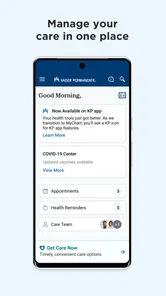
Let’s talk about the user interface for a minute. The developers definitely nailed it with the clean, user-friendly design. You can tell a lot of thought went into making the app not just functional but also enjoyable to use. Everything is where you expect it to be, which means less time fumbling around and more time getting things done.
That kind of straightforward presentation matters most when I am using the app for a particular task rather than browsing. If I open it to check a reminder, I want to leave knowing what I need to do next. I would avoid turning a quick check into a substitute for keeping personal notes about questions or dates that matter to me; a simple list in my usual organizer can make follow-up easier to remember.
Access across different needs and settings
For readability and navigation, a straightforward layout can reduce the effort of finding a reminder or starting a familiar task. Still, ease varies from person to person: someone who relies on larger text, screen readers, voice control, or a simplified phone setup should try the app on their own device before depending on it for time-sensitive routines. I would also keep another way to reach the care team available if navigating a screen is tiring or difficult.
Motor and sensory needs can shape when an app is practical. Typing a detailed message may be convenient for some people and burdensome for someone with limited dexterity, fatigue, or pain. Notifications can help when remembered, but they may be disruptive in a noisy environment or easy to overlook when alerts are silenced. A useful compromise is to check reminders at a chosen time rather than expecting every alert to catch attention.
For someone with limited dexterity, composing a message in one sitting may not be comfortable. I would draft the question in shorter, clear sentences and use the phone’s familiar input options if those are already part of my routine. The trade-off is that extra steps can make a task feel heavier, so a call or help from a trusted caregiver may be more workable on a difficult day. The right choice can change with pain, fatigue, or the setting; using the app does not have to be an all-or-nothing habit.
Notifications also depend on context. A quiet reminder may be useful at home but easy to miss during work, travel, or caregiving, while frequent phone alerts can be unwelcome for someone sensitive to sound or interruption. I would choose a predictable time to review care tasks and use notifications as prompts rather than guarantees. If another person helps manage reminders, it is worth agreeing on a routine that does not expose private information on a shared screen.
The app is free, is rated for Everyone, and is developed by Kaiser Permanente. Its 4.7 average across around 12,000 ratings suggests many users value it, while ratings alone cannot tell me whether its design suits a particular access need. It has passed 500,000 installs, and version 9.3.0 runs on Android 9 or later. Those details make compatibility worth checking before relying on it; a person using an older phone may need another route to the same care tasks.
Compared with a phone call, the app can make routine follow-up less dependent on office hours and hold time; compared with a general health tracker, its value is its connection to Kaiser Permanente care rather than broad tracking across providers. I would choose it for reminders and everyday account tasks, but not as my sole option for complex coordination, urgent symptoms, or care outside Northern California. It first appeared on May 31, 2013, and its 1.5K reviews offer more user context than a rating alone, though individual experiences will still differ.
One practical tip is to confirm that family reminders are relevant to the person they concern before acting on them, then use the app’s available care tools for the next step. That keeps a notification from becoming a substitute for checking details. If a family member cannot comfortably use a phone, a caregiver may need to help with the routine while respecting the member’s own preferences and privacy.
People often want to know whether this can stand in for a call, whether it is useful for relatives, and whether it works for care beyond the region. My answer is conditional: it can make routine communication and reminders more convenient for the intended Kaiser Permanente audience, and family support can be part of a household workflow. It should not be treated as an emergency channel or a single organizer for unrelated providers. If visual, motor, or sensory barriers make phone use difficult, I would test a low-stakes task first and keep another way to contact care available.
The Verdict
In conclusion, My Doctor Online (NCAL Only) is a game changer for managing personal health. It’s efficient, easy to use, and packed with features that truly cater to the needs of its users. Whether you’re tech-savvy or someone who prefers simplicity, this app is designed to accommodate everyone. So, if you’re in Northern California and haven’t tried it yet, what are you waiting for? Give it a go and see how it transforms your healthcare experience.
My recommendation is more measured: I’d suggest it to a Northern California Kaiser Permanente member who wants a convenient way to keep routine care visible, especially if reminders and digital communication fit their habits. I would not promise that it accommodates every disability or device setup, and I would keep phone or in-person routes in mind when the screen becomes a barrier. For the right member, it can make everyday care easier to organize without replacing judgment, direct support, or urgent medical help.
For someone deciding between this and a general health organizer, I would start with the care relationship, not the feature list. If the goal is to keep Northern California Kaiser Permanente tasks within reach, this focused app is the more relevant place to begin. If the goal is to combine records and appointments from multiple unrelated providers, the flexibility of a broader tool may matter more. Either way, I would keep a simple backup routine for important dates and use the app as support rather than the only place I remember them.
My Doctor Online (NCAL Only) Frequently Asked Questions
Is My Doctor Online (NCAL Only) free, and what devices can I use it on?
My Doctor Online (NCAL Only) is a free medical app from Kaiser Permanente. It is available for Android and iOS devices, with a minimum operating system requirement of version 9. Before downloading, check that your device meets this requirement and that you are choosing the Northern California version, as the app is intended for KP Northern California members.
What is My Doctor Online (NCAL Only) and who can use it?
My Doctor Online (NCAL Only) is a mobile application designed specifically for patients in the Northern California region who are part of the Kaiser Permanente healthcare system. It allows users to manage their healthcare needs conveniently from their smartphones. The app is exclusively available to Kaiser Permanente members in Northern California, facilitating easy access to medical records, appointment scheduling, and direct communication with healthcare providers.
How do I schedule an appointment using My Doctor Online (NCAL Only)?
To schedule an appointment with My Doctor Online (NCAL Only), users must first log into the app using their Kaiser Permanente member ID and password. Once logged in, they can navigate to the appointments section, select the type of appointment needed, choose a preferred date and time, and confirm their booking. The app also provides reminders and notifications to ensure users don’t miss their appointments.
Can I access my medical records through the app?
Yes, My Doctor Online (NCAL Only) provides users with secure access to their medical records. After logging in, users can view their health history, lab results, and other critical medical information. This feature ensures that patients have all necessary health information at their fingertips, which can be particularly useful during consultations or emergencies.
What features does My Doctor Online (NCAL Only) offer for managing prescriptions?
The app includes a comprehensive prescription management feature, allowing users to refill prescriptions, view their current medications, and set reminders for taking medications. This functionality helps ensure that users maintain their medication schedules and can easily manage their prescriptions without the need to visit a pharmacy in person.
Pros
- User-friendly interface and easy navigation.
- Offers virtual consultations with doctors.
- Provides appointment reminders and alerts.
- Access to medical records and lab results.
- Secure and confidential patient data handling.
Cons
- Limited to Northern California region only.
- Requires stable internet for virtual visits.
- Some features need premium membership.
- Occasional app crashes reported by users.
- Limited language support beyond English.











