My Budget Book
- 1.13K
- 4.8
- Installs
- 100.00K
- Price
- $4.99

Screenshots
Analysis by Reviewed
What I value in a budgeting app is not a promise to make money decisions for me, but a clear way to see where my own choices are taking me. My Budget Book is built around that hands-on idea: I record spending, sort it into categories and use the resulting picture to think about what I want to change. That can be satisfying if you prefer deliberate tracking, though it is less convenient than a service that imports transactions for you.
When the network is not doing the bookkeeping
One useful way to think about this finance app is as a personal record you maintain, rather than a live window into your bank account. That changes the routine: you enter purchases yourself, so a strong connection won’t automatically do the work of logging them. I find that trade-off appealing if I want to decide exactly what gets recorded, but it does mean the habit of entering transactions matters more than the strength of the network.
For everyday use, the practical question is whether I can capture spending while it is still fresh. After buying lunch, I’d add the amount and category before moving on; later, I could check the budget rather than trying to reconstruct the day from memory. This short, repeated workflow is more useful than a long weekly review for anyone who tends to forget small cash purchases.
It also suits a trip where I’m paying in more than one currency: recording expenses as they happen can make the eventual total easier to understand. I would still keep receipts for anything important and treat the app’s record as a budgeting aid, not as proof of a transaction. If I travel with limited connectivity, I’d avoid relying on last-minute syncing or exporting and make sure any records I need are available before I leave.
Getting Started with My Budget Book
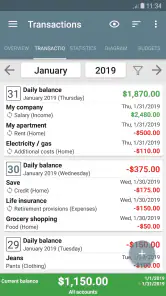
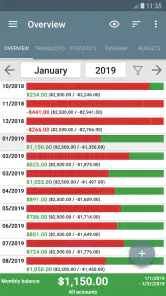
First things first, setting up My Budget Book is a breeze. You don't need to be a financial guru to get it up and running. The interface is super user-friendly, which is always a win in my book. As soon as you open the app, you're greeted with a neat and tidy dashboard that gives you a quick overview of your financial situation. It's like having a mini financial advisor right in your pocket.
Features that Stand Out
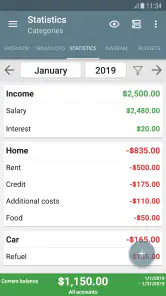
One of the standout features of this app is its ability to track expenses meticulously. You can categorize each expense, so you know exactly where your money is going each month. Plus, it supports multiple currencies, which is a huge plus if you're a globetrotter or dealing with international finances.
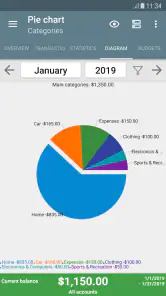
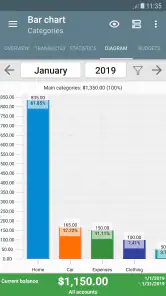
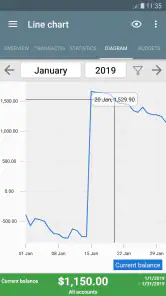
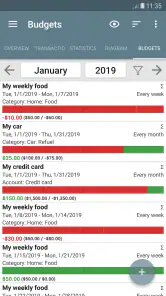
The app also offers a budget planner that lets you set limits for different categories. It's like having a budget buddy that nudges you whenever you're about to overspend on those tempting take-out meals. And if you're into charts and graphs, you'll love the detailed visual reports that show your spending habits over time.
More From Our News Desk

Clash of Clans Is Won Between the Battles

Android Auto Makes the Case for Quieter Car Software

MobiOffice: Transforming Mobile Productivity with Seamless Integration

EA SPORTS FC™ Mobile Soccer: Redefining Mobile Sports Gaming

How Microsoft OneDrive Became a Mobile Productivity Giant

How Google Translate Breaks Language Barriers Effortlessly
A routine that survives interruptions
Manual entry has a predictable weak point: when I’m rushed, I may postpone logging a purchase, and a delayed entry can make the current picture less useful. My workaround would be to record only the essentials at the point of purchase—the amount and the right category—then add any extra detail later if I need it. That keeps the habit light without turning every coffee into an accounting exercise.
If a report looks surprising, I’d check recent entries and category choices before changing my budget. A purchase assigned to the wrong category can distort a monthly comparison, while a forgotten expense can make a limit look roomier than it really is. Reviewing a handful of recent transactions is a simple recovery step before drawing a conclusion from a chart.
Because exporting is part of the experience, I’d treat it as a deliberate step for analysis or sharing rather than something to do automatically. If I’m preparing figures for an adviser, I’d check the date range and categories first, then review the exported material before sending it. That small pause helps prevent an incomplete snapshot from being mistaken for the whole financial picture.
Making the numbers useful in ordinary life
The best moment to use a category budget is often before a purchase, not after the month has ended. If I’m deciding whether to order dinner, I can check what I’ve already recorded in that category and make a choice with the month’s pattern in view. The app cannot make that decision for me, but the budget limit gives the question a useful frame: is this an occasional treat, or am I repeating a habit I meant to rein in?
For a household, I’d agree on a small set of shared categories and a consistent rule for who records each purchase. One person entering groceries while another logs only larger bills can leave gaps that look like savings. Even without turning budgeting into a group project, a quick weekly check of the entries can surface missing items while memories are still fresh.
For irregular income, I would avoid treating a strong week as permission to raise every category limit. A freelancer could use the records to distinguish recurring personal costs from flexible spending, then review the picture across a longer stretch instead of reacting to one unusually busy period. That is a practical use of reports, but it still depends on entering income and expenses consistently enough for the comparison to mean something.
The Daily Experience
Using My Budget Book daily feels like having a conversation with a friend who's genuinely interested in helping you save money. The app sends gentle reminders and alerts to keep you on track, and it's always rewarding to see the progress you make over time. You can even export your data to analyze it further or share it with a financial advisor.
Another aspect I appreciate is the app's commitment to privacy. No need to link your bank account or provide sensitive information. Everything stays local on your device, which is comforting for those of us who are wary of having our financial data floating around in the cloud.
What to expect when access is interrupted
A missed entry is not a disaster, but it does call for a small repair rather than guesswork. I’d use a receipt, payment notification or a short note from the day to add the amount and category, then check whether it belongs to the current budget period. If I cannot remember the exact details, I’d rather mark the record conservatively than invent precision; a budget is only helpful when I trust how it was assembled.
Changing phones deserves a little planning when a finance record matters to you. I would export records I expect to keep, store them somewhere I can find later and open the resulting files to make sure they are usable. That is more careful than assuming an app will carry everything across automatically, and it also gives me a chance to notice whether I have been recording transactions consistently.
Network availability still matters around tasks that involve moving or sharing information. I’d choose a reliable moment to export or send a report, confirm the right period is included, and avoid making a budget decision from a partial file. The day-to-day transaction habit is separate from those occasional information-handling steps, so a weak connection need not become an excuse to stop recording purchases.
Who this approach fits best
I’d recommend this style of budgeting to someone who wants hands-on control and is willing to log spending consistently. It can be a good fit for a household tracking shared categories, a student trying to understand where a limited monthly allowance goes, or a freelancer who wants a clearer view of personal spending. A useful starting tactic is to keep the category list focused: too few labels hide patterns, while too many make each entry slower.
Compared with bank-connected budgeting tools, this approach asks for more attention but gives you more say over what appears in your records. Compared with a basic notes app or spreadsheet, it offers a more dedicated budget-and-reporting workflow. I’d choose a spreadsheet instead if I needed custom calculations or a format built around a particular reporting process; I’d choose an automatically connected service if minimizing manual entry mattered more than keeping a hands-on record.
It is also not the right fit for someone who wants a complete financial dashboard assembled automatically, or who knows they will not make time to log purchases. In that case, the extra control may not compensate for the effort, and an automated alternative is more likely to keep the record current. Conversely, people who prefer not to connect a bank account may find manual entry a worthwhile exchange, as long as they are realistic about maintaining the habit.
The app costs $4.99, and optional in-app purchases range from $3.49 to $17.99 per item, so I’d check what I actually need before spending beyond the initial purchase. It is a finance app from OneTwoApps, rated for Everyone, with a 4.8 average from around 26,000 ratings and over 100,000 installs. Its current version is 9.10.1, and it runs on Android 5.0 or later. Since the record is kept on the device, I’d also think through how I’ll preserve access if I change phones; exporting useful records at sensible intervals is a prudent habit, not a substitute for checking that the files are readable.
The app has been around since February 7, 2012, and has around 1,100 reviews. That history may reassure people who prefer an established budgeting tool, but it doesn’t remove the need to test whether its manual workflow suits them. If I wanted every purchase imported automatically, a different kind of service would be a better match.
A sensible way to try it
I would start with one budget period and only the categories I already understand, rather than trying to design a perfect system on day one. Record the usual expenses, review the chart when there is enough activity to make a pattern visible, and adjust labels only when a real decision would benefit from more detail. This avoids spending more time organizing the budget than using it.
Before relying on a report, I’d ask two simple questions: have I logged the routine purchases, and are the categories consistent? Those checks matter more than a polished-looking chart. If the answers are yes, the report can help me spot where a limit needs to change; if not, the right next step is to fix the record rather than draw a firm conclusion.
Final Thoughts
All in all, My Budget Book is a solid choice for anyone looking to take control of their finances without feeling overwhelmed. It's practical, straightforward, and surprisingly engaging for a finance app. Whether you're a budgeting newbie or a seasoned pro, this app has something to offer. So, why not give it a shot and see if it can help you keep those finances in check?
In the end, managing money doesn't have to be a chore. With tools like My Budget Book, it's more like a personal challenge that you can actually enjoy tackling. Happy budgeting!
My recommendation comes down to the kind of relationship you want with your spending. If you like to enter purchases yourself, want category limits and visual reports, and are comfortable keeping an eye on your own records, this is a focused tool worth considering. If you need automatic transaction collection or highly customized analysis, I’d look elsewhere. For the right person, its main strength is not removing effort but making that effort easier to turn into a clearer monthly picture.
My Budget Book Frequently Asked Questions
Is My Budget Book suitable for someone who wants to start tracking everyday spending?
My Budget Book is a finance app for organizing income and spending and reviewing everyday money habits. Its focus on keeping expenses visible can make it a practical starting point for someone who wants to become more aware of where money goes. It is most useful when you are willing to record transactions regularly and use that information to guide your budget.
How much does My Budget Book cost, and are there additional purchases?
My Budget Book costs $4.99 to download, and the app also lists in-app purchases ranging from $3.49 to $17.99 per item. Check the purchase details in the store before installing so you understand which option applies to your use. It is worth considering the price alongside how often you expect to use the app’s budgeting and expense-tracking tools.
Who develops My Budget Book, and is it intended for everyday personal finance?
My Budget Book is a finance app from OneTwoApps, designed for people who want to keep everyday money management in one place. Its focus is on tracking income and spending, planning a budget, and reviewing financial activity. The app’s summary, “All expenses at a glance,” captures its practical aim: helping users see their money habits more clearly.
What is My Budget Book and how can it help me manage my finances?
My Budget Book is a comprehensive financial management app designed to help users track their income, expenses, and overall financial health. It provides detailed reports and charts, allowing users to visualize their spending habits and make informed financial decisions. With features like budget planning, transaction tracking, and financial forecasting, it offers a robust solution for personal finance management.
Is My Budget Book available on both Android and iOS platforms?
My Budget Book is primarily available for Android users. It can be downloaded from the Google Play Store. Unfortunately, there is no iOS version available at the moment, so iPhone users will need to look for alternative budgeting apps that offer similar features and functionality.
Pros
- Intuitive interface enhances user experience.
- Comprehensive budgeting tools included.
- Supports multiple accounts management.
- Customizable categories and labels.
- Strong community support for troubleshooting.
Cons
- Initial setup can be time-consuming.
- Limited free version features.
- Some users find navigation non-intuitive.
- Occasional bugs in the app.
- Lacks integration with some banks.
- Category
- Finance
- Version
- 9.10.1