

Musicolet Music Player
- 10.77K
- 4.6
- Installs
- 10.00M
- Price
- Free

Screenshots
Analysis by Reviewed
For everyday listening, a music player should make it easy to reach the songs already on my phone, not turn a simple choice into a project. That is where Musicolet Music Player makes a convincing case: it is an Android music app from Krosbits, built around local listening and hands-on library control. I’d consider it if I keep my own music collection and want more ways to organize a listening session than a basic play-next queue offers.
Quick access without extra ceremony
The app’s approach feels especially useful when I want to start playing something quickly and then leave my phone alone. Its average rating is 4.7, with over 10 million installs, and it has been available since June 2016. Those figures suggest that its straightforward focus has found an audience, though the more important question is whether that focus fits the way you listen.
Musicolet is free to download and rated for Everyone. In-app purchases are available, with listed prices ranging from $6.99 to $135.00 per item. I would treat the free version as the place to check whether its library and playback workflow suit me before deciding whether any paid option matters for my needs.
When several listening plans compete
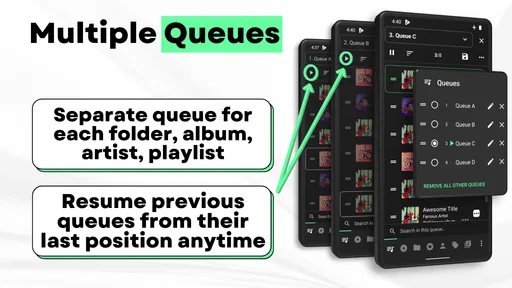
A useful advantage over a simple single-queue player is the ability to keep multiple queues ready. I can imagine using one for a commute, another for background music at home, and a third for a short run, switching between them rather than rebuilding the next listening session each time. That is more practical than it may sound if I regularly alternate between moods or activities.
There is a small trade-off: several queues are most helpful when I give them clear purposes. If I create them casually and forget what each contains, extra choice can become clutter. I’d start with just two or three distinct listening plans, then add more only if I find myself repeatedly wanting them.
Lyrics, equalizers, and useful setup choices
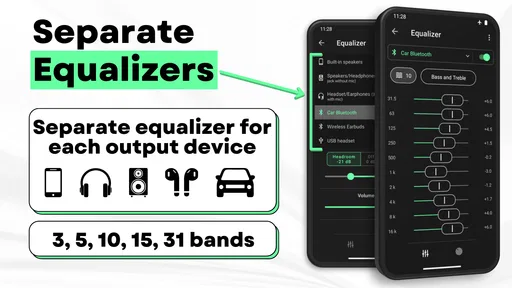
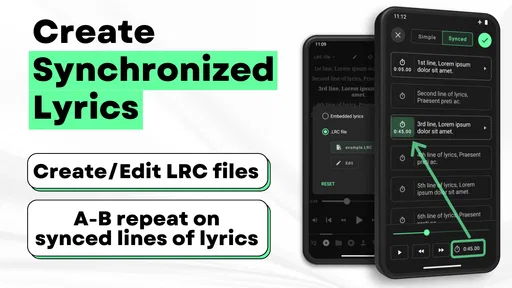
Offline lyrics are handy for travel, but the more interesting use is preparing them at home for tracks I want to follow or sing along with later. Musicolet also supports creating synchronized lyrics, which can take some setup, but gives me a reason to organize lyrics before I’m away from a connection. Separate equalizers are another potentially useful detail: I can keep different sound adjustments for different listening setups instead of continually changing one profile. That flexibility is valuable, although anyone who prefers a one-tap, no-adjustment experience may never need it.
The app’s local-music emphasis also makes it a different choice from streaming services. A streaming app is a better fit if I want discovery, a large on-demand catalog, or listening without managing files myself. Musicolet makes more sense when I already have music stored on my device and want to control how it is arranged and played.
More From Our News Desk

 Gmail
GmailGmail in a Busy Inbox: Who Benefits Most?
From first account to crowded workday, Gmail earns its place through dependable search and flexible sorting—but its best fit depends on how much inbox maintenance you can tolerate.

 Prime Video
Switching to Prime Video: What Changes in Your Viewing Routine
Prime Video can make a compelling second home for streaming, but switching means learning a different catalog, rental layer, and route from browsing to playback.

 Universal TV Remote Control
Universal TV Remote Control Works Best as a Reliable Backup
A phone remote earns its place through quick setup and reliable habits. Here is how to get more from Universal TV Remote Control—and where its limits show.

 Weather - By Xiaomi
Weather by Xiaomi Review: Clear at a Glance, Less Clear Up Close
Xiaomi’s weather app makes everyday forecasts quick to scan, but its calm surface can leave useful details and recovery paths harder to find than they should be.

 X
XX Under Pressure: Can It Recover When Posting Goes Wrong?
A resilience-focused review of X, examining setup, mistaken posts, interruptions, weak connections, and the gaps that matter when recovery needs to be dependable.

 Clash of Clans
Clash of Clans Is Won Between the Battles
Its raids are quick; its community is a long-term project of coordination, teaching, rivalry, and shared responsibility—with all the friction that entails.
Latest News



On an ordinary day, I might line up a focused playlist before leaving home, switch to a separate queue for the journey back, and use earphone controls to skip a track without taking out my phone. For a long trip, I’d prepare the music and lyrics in advance rather than assume the app will supply anything I haven’t stored locally. That distinction helps set expectations: it is a player for my collection, not a substitute for a streaming library.
Its tools reward a little organization, but they do not force an elaborate routine. I would keep queue names and playlists distinct, and make any lyric or equalizer adjustments when I have time rather than while heading out the door. Those small habits make the app’s extra controls feel useful instead of turning them into another layer to manage.
Unleashing the Tunes with Musicolet
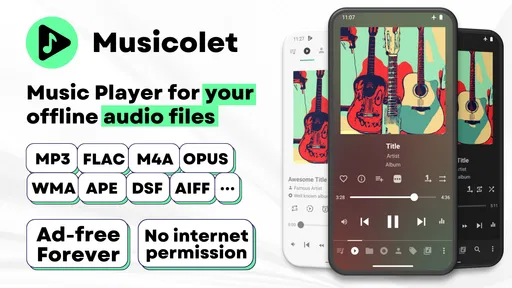
The first thing you'll notice about Musicolet Music Player is its no-nonsense approach. It’s all about getting you to your music as swiftly as possible. No ads, no internet permissions - just pure, unadulterated music. I mean, who wouldn't love a music player that respects your data privacy while delivering an impeccable audio experience?
Features That Hit the Right Note
One of the standout features of Musicolet is the multiple playlist support. You can create and manage up to 20 queues at a time. Yes, you read that right. It’s like having a personal DJ who never gets tired! And let's not forget the intuitive interface. With easy-to-use controls and a clean design, navigating through your music library feels like a breeze.
Now, let’s talk about its unique features. Ever wished you could control your music without even looking at your phone? Musicolet has got you covered with its earphone controls. Just a few taps on your earphones, and you’re changing tracks, pausing, or playing your favorite songs. This feature is a game changer, especially when you're on the move.
Why Musicolet Stands Out
Another feather in Musicolet’s cap is its support for offline lyrics. You can add and view lyrics while offline, making it perfect for those long flights or remote road trips where internet access is a luxury. Plus, the app supports a wide variety of formats, so you’re not stuck converting files just to enjoy your music.
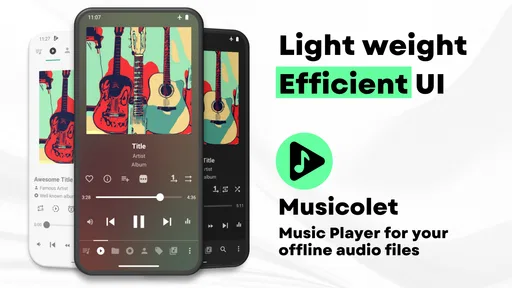
Moreover, the app's lightweight design ensures that it doesn’t hog your phone’s resources. This means smoother performance and longer battery life, which is always a win in my book. You can tell that Musicolet was crafted with care and attention to detail, focusing on what truly matters to music lovers.
Final Thoughts
In a world full of flashy apps with unnecessary frills, Musicolet Music Player is a refreshing change. It’s for those who believe music should be simple, enjoyable, and hassle-free. Whether you’re a casual listener or a hardcore music enthusiast, Musicolet offers a user-friendly experience without compromising on features.
So, if you’re in the market for a new music player that prioritizes functionality and privacy, then give Musicolet a whirl. Trust me, once you experience its seamless operation and thoughtful features, you’ll wonder how you ever lived without it.
Speed, stability, and the day-to-day reality
The quick-start idea is appealing, but I’d judge speed in practical terms: how quickly I can find a track in my own library, switch queues, and get back to listening. A local player avoids the extra step of choosing something from a streaming catalog, yet a very large or poorly organized collection can still make browsing feel like work. Keeping playlists purposeful is a better remedy than expecting any player to make a messy library effortless.
During heavier use, the app’s separate queues and equalizers can make it feel more like a listening workspace than a bare-bones player. That is useful when I move between headphones and other listening situations, but it also means there are more controls to understand. I’d configure the parts I actually use and leave the rest alone; piling on settings does not automatically improve the sound or the listening experience.
Reliability matters most when music is meant to accompany something else. For a commute or workout, I would test my preferred earphone controls and prepare the right queue before leaving, rather than assume every headset behaves the same way. If playback or library behavior feels unexpected, simplifying the active queue and checking the organization of the local collection are sensible first steps. The app’s offline focus makes preparation worthwhile, especially for journeys where I don’t want to depend on a connection.
Who will appreciate it—and who may not
I’d recommend Musicolet to people who already keep music on their Android device, value multiple listening queues, or want to work with lyrics and sound settings themselves. It is also a reasonable alternative to a streaming-first player when I want control over a personal collection rather than recommendations and a constantly changing catalog. Its popularity is reflected in around 226,000 ratings and roughly 10,000 written reviews, but those numbers don’t decide whether its hands-on style suits an individual listener.
I would look elsewhere if my main goal were finding new artists, accessing a huge online library, or avoiding any responsibility for storing and sorting music. A streaming service is simply better built for those jobs. Likewise, someone who wants the fewest possible buttons may prefer a simpler player and never benefit from separate queues or equalizers.
On devices where storage or background resources are tight, keeping a manageable music collection and avoiding unnecessary library clutter are sensible habits for any local player. I would not choose an app solely on a promise of lower battery use; actual performance depends on the device, the collection, and how I listen. What I value here is the focused design, not an assumed performance figure.
A practical performance verdict
Overall, Musicolet is strongest when I want a direct route to music I already own and appreciate having more control than a basic player provides. Its queues, offline lyrics, and earphone controls can make ordinary listening smoother once set up, while the extra options are not essential for everyone. I’d give it a try if local playback is my priority, but choose a streaming app for discovery and a simpler player if customization feels like unnecessary effort.
Making a personal library easier to use
One detail worth thinking through before switching is how I want to divide music between queues and playlists. I would use queues for temporary plans—what I want to hear during a particular stretch of the day—and keep playlists for collections I expect to reuse. That distinction prevents a queue from becoming a permanent dumping ground and makes it easier to change direction without losing a carefully assembled set of tracks.
For example, before a workday I could prepare one queue of instrumental music for concentration and another with familiar songs for the trip home. If a call interrupts the first session, I can return to the listening plan I had already assembled instead of searching again. This is a modest convenience, but it is exactly where multiple queues can feel more useful than a single play-next list.
There is also a practical way to approach synchronized lyrics: treat them as a small preparation project for a few favorite songs, not something that must be done for the whole library. I would start with tracks I genuinely want to follow, check the timing while I have attention to spare, and leave the rest alone. The trade-off is clear: lyrics can make listening more engaging, but creating them takes time that a listener who only wants background music may not want to spend.
Choosing between convenience and control
Compared with the music apps that put streaming recommendations at the center, Musicolet asks me to bring the collection and decide how it should be arranged. That is a better fit when I care about specific files, want playback without relying on an online catalog, or have already built a library over time. It is less convenient when I want an unfamiliar album immediately or expect an app to keep suggesting new listening.
Compared with a minimalist local player, the appeal is the added room to shape listening through separate queues, equalizer settings, and lyric handling. The downside is a longer path to learning which controls matter to me. I would not explore every option just because it is available; a basic playback routine can remain simple even when more advanced tools are there for later.
The app is aimed at Android, so it is not the choice I would make if I need the same local-library setup across an iPhone and Android device. I would also skip it if I rarely keep audio files on my phone, since its central strength depends on having a collection to play. For those users, a streaming service or a player built around a broader online catalog will likely feel more useful from the start.
What to check before relying on it
Before a long journey, I would confirm that the tracks I want are actually available in the phone’s local library, arrange the queue, and try the earphone controls I plan to use. That short check is more dependable than discovering on the train or trail that my intended music was never part of the collection. It also gives me a chance to see whether the queue is arranged in the order I expect.
If I change listening setups often, I would make the equalizer adjustments deliberately and listen to a familiar track before settling on them. Separate profiles can save repeated tweaking, but different headphones do not automatically need dramatically different settings. I’d use the feature to solve a real preference rather than adjust sound for its own sake.
For a library that feels slow to browse, I would first reduce the number of competing playlists and make the most-used listening plans easy to recognize. A local player can make playback direct, but it cannot decide which of hundreds of loosely sorted tracks I meant to choose. A little maintenance up front is the best way to keep the app feeling quick in everyday use.
The right fit for a certain kind of listener
Musicolet is most persuasive to me as a practical home for music I already have, with enough control to serve different parts of a routine without turning every session into a setup task. Krosbits has made an app that gives local listening more structure than a basic player, while leaving room for a casual user to stick to simple playback. Its free entry point makes it easy to judge that balance for myself, and the Everyone age rating makes its intended audience broad.
I would not call it the universal answer for music on a phone. Listeners who want a curated stream, automatic discovery, or a shared listening ecosystem should choose a service built around those priorities. But if I want my own tracks, offline preparation, and queues that can follow the shape of my day, this is a focused option worth trying. Its best performance is not a benchmark claim; it is the feeling of getting to the right music with less repeated sorting once I have set up my library.
Musicolet Music Player Frequently Asked Questions
Can I choose a particular queue for different moods or listening situations?
Yes. Musicolet Music Player’s multiple-queue feature lets you keep separate listening plans ready, such as a queue for a quiet evening and another for a workout. It is useful when you want to switch what plays next without rebuilding a single queue each time. This approach suits listeners who organize their own music and like having more control over playback.
Can I adjust the sound to suit my headphones or personal preferences?
Musicolet Music Player includes an equalizer, and its feature set highlights separate equalizers. That gives listeners a way to customize playback rather than relying only on a single default sound. If you enjoy fine-tuning how your music sounds, this is a useful feature to consider before downloading. The app is centered on music playback and management, with tools intended to give you more control over listening.
Is Musicolet Music Player available for free, and are there optional purchases?
Musicolet Music Player is free to download and use, with no subscription required for the basic listening experience. The app also offers in-app purchases, so some optional paid items may be available. Unlike many music apps built around streaming subscriptions, Musicolet is designed for playing music stored on your device. Additionally, the app is ad-free, ensuring an uninterrupted listening experience, which is highly appreciated by its users.
Can I use Musicolet Music Player without an internet connection?
Yes. Musicolet Music Player is focused on playing music stored on your device, so you can listen without relying on an internet connection. That makes it a practical choice for offline listening and for people who prefer to manage their own music collection. Its multiple queues also let you keep different listening plans ready without needing a streaming service.
Who develops Musicolet Music Player, and is it suitable for everyone?
Musicolet Music Player is developed by Krosbits and is a music and audio app intended for a general audience. Its straightforward focus on organizing and playing music stored on your device makes it approachable for everyday listening, while tools such as queues and an equalizer offer more control for users who like to customize playback. It has an Everyone content rating.
Pros
- No ads for uninterrupted listening
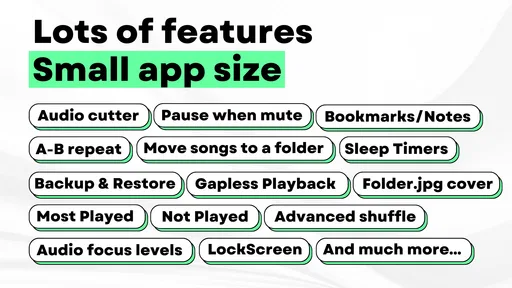
- Lightweight
- uses minimal storage
- Supports offline playback
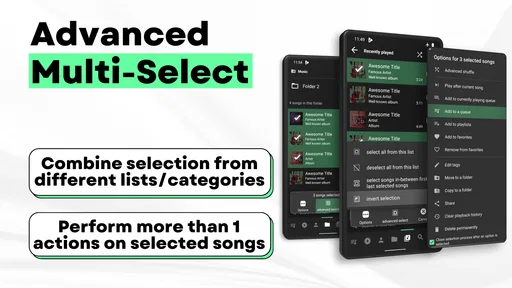
- Multiple queues for easy playlist management
- Intuitive
- user-friendly interface
Cons
- Limited streaming options
- No cloud syncing feature
- Basic equalizer settings
- Lacks social sharing features
- No lyrics integration











