

Musicnotes Sheet Music Player
- 896.00
- 4.1
- Installs
- 1.00M
- Price
- Free

Screenshots
Analysis by Reviewed
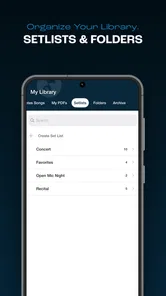
When I want to take a score from “I know the tune” to “I can actually play this passage,” I care about more than having a file on my phone. I want to find the piece, read it comfortably, and hear how the notes fit together without turning practice into a search through folders. Musicnotes Sheet Music Player is aimed at that kind of routine: it gives Musicnotes customers a mobile way to work with their sheet-music library. I see its appeal most clearly if you already use that catalog and want your scores close at hand, rather than if you are simply looking for a general-purpose music app.
Free to start, with purchases to consider
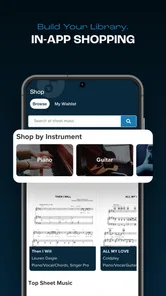
The app is free to download, which makes it easy to try before deciding whether it belongs in your routine. Sheet music purchases are a separate consideration: in-app items range from $0.99 to $204.99 each. That wide span means I would check the price of a specific piece or item before committing, rather than assuming the library is included with the free download. The app is rated for Teen users, a useful detail for families deciding whether it is appropriate to install.
Where the value comes from
For me, the strongest value is having a personal sheet-music collection available in one place instead of searching through loose pages or switching among files. Musicnotes is the developer, and the app is built around taking a Musicnotes library along for use away from a desk. That is most useful when I already rely on sheet music and want a more portable way to open and work with it; it is less compelling if I only need an occasional free score.
Discovering Melodies Anytime, Anywhere
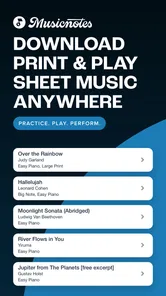
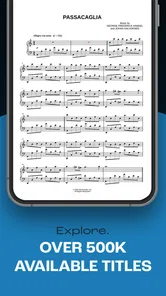
First off, let me tell you how liberating it feels to have an entire library of sheet music at your fingertips. With Musicnotes Sheet Music Player, you can access thousands of sheet music pieces from various genres—be it pop, rock, classical, or jazz. It's like carrying a whole orchestra in your pocket. And the best part? You don't need to be glued to your piano or guitar to practice. Whether you're on a train, in a park, or just lounging at home, this app makes it easy to dive into your favorite tunes.
User-Friendly Interface
One of the first things you'll notice is how intuitive the interface is. Even if you're not tech-savvy, navigating through the app is a breeze. The search function is super efficient, allowing you to quickly find your desired sheet music by title, artist, or even genre. Plus, the app's design is sleek and modern, making your sheet music look as good as it sounds.
Customizable Features
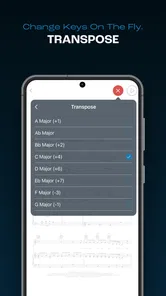
Now, let's talk about customization. I love how you can adjust the playback tempo to match your learning pace. Feeling a bit rusty? Slow it down. Ready to challenge yourself? Speed it up! You can also transpose the music to a different key with just a tap, which is a godsend for vocalists and instrumentalists alike.
Interactive Learning Tools
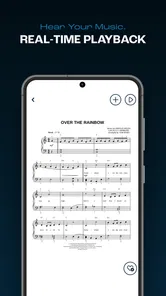
For those who are on a learning journey, the app offers interactive tools that make practice sessions more productive. The playback feature allows you to listen to the music as you follow along with the sheet music, helping you catch on to tricky rhythms or unfamiliar melodies. And if you're like me, sometimes you just need to hear how something is supposed to sound before you can nail it yourself.
More From Our News Desk

 Gmail
GmailGmail in a Busy Inbox: Who Benefits Most?
From first account to crowded workday, Gmail earns its place through dependable search and flexible sorting—but its best fit depends on how much inbox maintenance you can tolerate.

 Prime Video
Switching to Prime Video: What Changes in Your Viewing Routine
Prime Video can make a compelling second home for streaming, but switching means learning a different catalog, rental layer, and route from browsing to playback.

 Universal TV Remote Control
Universal TV Remote Control Works Best as a Reliable Backup
A phone remote earns its place through quick setup and reliable habits. Here is how to get more from Universal TV Remote Control—and where its limits show.

 Weather - By Xiaomi
Weather by Xiaomi Review: Clear at a Glance, Less Clear Up Close
Xiaomi’s weather app makes everyday forecasts quick to scan, but its calm surface can leave useful details and recovery paths harder to find than they should be.

 X
XX Under Pressure: Can It Recover When Posting Goes Wrong?
A resilience-focused review of X, examining setup, mistaken posts, interruptions, weak connections, and the gaps that matter when recovery needs to be dependable.

 Clash of Clans
Clash of Clans Is Won Between the Battles
Its raids are quick; its community is a long-term project of coordination, teaching, rivalry, and shared responsibility—with all the friction that entails.
Latest News



Offline Access
Another feature I can't live without is offline access. Once you've downloaded your music, you can access it even when you're off the grid. Perfect for those camping trips or long flights where Wi-Fi is a myth!
What I would check before relying on it
There is a practical question behind “Can I take my music anywhere?”: whether the exact score I need is in my Musicnotes library and ready on the device before I leave. I would use a quiet moment at home to open the piece, confirm that I can read it comfortably, and make sure it is available offline. That small preparation matters more than discovering a useful score while already sitting in a lesson room with a weak connection.
I would also treat transposition as a rehearsal aid, not a substitute for checking what a change means for my instrument or arrangement. A singer can use another key to explore a more comfortable range, while an instrumentalist may need to consider whether the new notes suit the instrument and the part. The convenience is real, but the best result comes from listening and checking the notation rather than assuming a changed key automatically solves every musical problem.
Practical trade-offs for a practice routine
I would treat the app as a companion to a score, not a replacement for playing an instrument or learning to read notation. Playback can clarify how a passage moves, but listening alone will not tell me whether my fingering, articulation, or tone is right. I get more from it by first listening to a difficult phrase, then playing it slowly myself, and finally returning to the score without playback to check whether I can keep the rhythm independently.
A useful routine is to prepare the pieces I expect to use before leaving home, especially if I know I will be somewhere with unreliable connectivity. I would also keep a printed copy or another reliable option for a performance where device access is impractical. Digital pages are convenient for browsing and carrying a collection, but a screen may be less comfortable than paper for someone who wants to mark up a score extensively or prefers not to look at a device while playing.
A realistic lesson-day workflow
Imagine I have a lesson after work and want to revisit a song on the commute. I can use the search tools to locate it, listen to a passage that has been giving me trouble, and make a note of the rhythm I want to ask about. Once I reach the lesson, the score is already in my collection rather than buried among paper sheets. The useful part is not that a phone replaces the lesson or the instrument; it is that a few minutes of focused listening can help me arrive with a specific question instead of spending that time trying to remember where the difficult bar begins.
For a short practice session, I would avoid letting playback run as background music. I would choose one phrase, listen for the beat and shape, then pause and attempt it myself. If I am working on a piece with a key that does not suit my voice, I would compare the original and transposed version before settling on one. This makes the app’s tools serve a clear practice goal, rather than turning a collection of options into distractions.
Who is likely to get the most out of it?
I can see it suiting a singer who wants to try a piece in a more comfortable key, a student who benefits from hearing a passage before rehearsing it, or a player who moves between home, lessons, and travel. For example, I might look up a piece at home, slow a tricky section for practice, then use the saved music during a lesson without needing to carry a folder of loose pages. That workflow makes the portability feel practical rather than just a convenient slogan.
It is a weaker fit for someone who mainly wants free notation, needs a broad tool for composing or editing scores, or does not already have a reason to build a sheet-music library. In those cases, a free-score source, notation editor, or ordinary PDF reader may be the more sensible choice. The app’s appeal is specifically its connection to a Musicnotes collection and its practice-oriented playback, not an all-purpose solution for every music task.
How it compares with other ways to use sheet music
Compared with printed books, a digital library is easier to carry and search, while paper can be simpler to spread out, annotate, and read without managing a device. Compared with a general PDF reader, this app is more tailored to working with Musicnotes sheet music and hearing the piece as I follow it; a PDF reader may be preferable for scores from many unrelated sources. I would choose based on where my music already lives and how I like to practice, rather than expecting one format to replace all the others.
That distinction also helps answer whether it can replace a folder or a separate notation tool. For scores you obtain through Musicnotes, the dedicated player is the more natural place to browse and practise; for a mixed collection gathered from different sources, a PDF reader may keep everything together more easily. And if the goal is writing, arranging, or editing notation, I would look for software built for those jobs instead of expecting a sheet-music player to become a composition workspace.
When the purchase makes sense—and when it does not
The free download lowers the barrier to trying the app, but it does not make every score free. I would decide on the value of a purchase one piece at a time: will I practise this score repeatedly, use it in lessons, or need it for a performance? If the answer is yes, paying for a specific item may be worthwhile for someone who prefers a ready-to-use digital score. If I only want to browse casually or I am unsure which arrangement I need, I would hold off until I have checked the exact item and its cost.
The broad range of in-app purchase prices is another reason not to judge the app by the download alone. A single score and a larger item can represent very different spending decisions, so I would never assume that the price of one purchase predicts the price of another. The practical test is whether the particular music I want is available at a cost I consider reasonable and whether I will use the app’s playback and portability enough to justify it.
Who should look elsewhere
I would skip it if my main need is a place to collect scores from many unrelated sources, or if I expect every song I want to play to be free. It is also not my first choice for someone who wants to compose on a phone, make extensive handwritten annotations, or work entirely from paper. Those needs point toward other tools or formats, and choosing them is not a failure to use this app properly; it is simply matching the tool to the job.
For a beginner who is still deciding what instrument or repertoire to pursue, I would be cautious about buying a pile of scores before knowing what will actually be practised. A better approach is to identify one piece, confirm that its arrangement suits the instrument and skill level, and try the player’s reading and listening workflow first. That way, the free install is a low-commitment test, while the paid choice remains tied to a real musical need.
My verdict after weighing the trade-offs
The app has a 4.1 average from around 4,800 ratings, and it has passed one million installs. It launched on May 27, 2014, and version 3.1.2 is the current release; it requires iOS 11 or later. Those details suggest an established product, but they do not change the practical question: will I use a Musicnotes library often enough to justify buying the pieces I want? If yes, the free app is a convenient way to keep that collection close. If not, I would skip it and choose a source or format that better matches how I find and use scores.
A sensible way to decide
I would begin by installing it, finding a piece I genuinely want to learn, and checking its individual cost before making a purchase. Then I would test whether the score display and playback suit the way I practice, rather than buying several pieces on the assumption that every feature will fit. The app has an average of 896 written reviews, and its current version is 3.1.2; neither figure can tell me whether its catalog matches my needs, so my own shortlist of songs is the best test. Musicnotes Sheet Music Player is worth trying for players who value a portable, playable collection, but it is not an automatic buy for anyone who simply wants sheet music at no cost.
Musicnotes Sheet Music Player Frequently Asked Questions
Does Musicnotes Sheet Music Player work offline?
Yes. Sheet music you have downloaded can be used offline, which is helpful when you want to practice somewhere without a reliable internet connection. You will need to access and download the music while online first. Your library can travel with you, though browsing for new pieces and other account-related activity may require an internet connection.
What is Musicnotes Sheet Music Player?
Musicnotes Sheet Music Player is a digital sheet music app designed for musicians of all skill levels. It allows users to access a vast library of sheet music for various instruments and genres. The app offers features such as transposition, playback, and annotation tools, making it a comprehensive resource for performers and music enthusiasts. It is a Music & Audio app from Musicnotes, and its main appeal is keeping your sheet music library accessible in one place.
How can I access sheet music on Musicnotes Sheet Music Player?
To access sheet music on Musicnotes Sheet Music Player, users need to create an account and may purchase individual pieces or subscribe to a membership plan. The app offers a vast selection of songs across different genres, which can be browsed directly within the app. Once purchased, the sheet music can be downloaded for offline use. The app is free to download, but purchases may be needed to build or expand your library.
What features does Musicnotes Sheet Music Player offer?
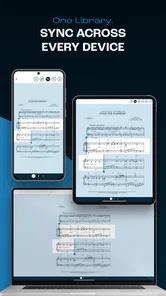
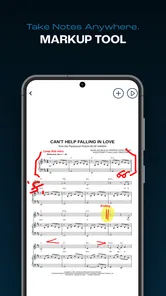
Musicnotes Sheet Music Player provides several features, including interactive sheet music playback, transposition of music to different keys, and the ability to annotate directly on the sheets. It also offers adjustable playback speeds and the option to loop specific sections, helping musicians practice more efficiently. Additionally, users can sync their music library across multiple devices. Together, these tools make it useful for studying a piece as well as following the score while playing.
Is Musicnotes Sheet Music Player compatible with all devices?
Musicnotes Sheet Music Player is compatible with both Android and iOS devices, including tablets and smartphones. The app is optimized to offer a seamless experience across different screen sizes and operating systems, ensuring that users can access their music library and features without any technical issues. It's advisable to check the app store for specific device compatibility. On Android, the current version requires Android 11 or later, so older devices may not be supported.
Pros
- Easy access to a vast sheet music library.
- Offline mode for on-the-go music practice.
- Interactive playback for better learning.
- High-quality audio for sheet music.
- Customizable playback settings.
Cons
- Some features require in-app purchases.
- Limited free sheet music selections.
- Occasional app lags or crashes.
- Requires internet for initial downloads.
- Interface can be overwhelming for beginners.











